
הקדמה
א דאנק פארן קויפןasing the Kisonli G103 Wooden Retro Portable Speaker. This speaker combines a classic aesthetic with modern audio technology, offering versatile playback options and powerful sound. Please read this manual carefully before using the product to ensure proper operation and to maximize your listening experience. Keep this manual for future reference.
זיכערקייַט אינפֿאָרמאַציע
- שטעלט נישט אויס דעם רעדנער צו וואַסער אָדער צו פיל פייכטקייט. דאָס פּראָדוקט איז נישט וואַסער-קעגנשטעליק.
- Avoid placing the speaker near heat sources, such as radiators, heat registers, stoves, or other apparatus (including ampליפיערס) וואָס פּראָדוצירן היץ.
- ניצן בלויז אַטאַטשמאַנץ / אַקסעסעריז ספּעסיפיעד דורך דער פאַבריקאַנט.
- ריין בלויז מיט אַ טרוקן שטאָף.
- בלאָקירט נישט קיין ווענטילאַציע עפענונגען. אינסטאַלירט לויט די אינסטרוקציעס פונעם פאַבריקאַנט.
- באַשיצן די מאַכט שנור פון גיין אויף אָדער פּינטשט, ספּעציעל אין די פּלאַגז, קאַנוויניאַנס רעסאַפּיז און די פונט ווו זיי אַרויסגיין פון די אַפּאַראַט.
- אָפּשטויסן דעם אַפּאַראַט בעשאַס בליץ סטאָרמז אָדער ווען אַניוזד פֿאַר לאַנג פּיריאַדז.
- אָפּשיקן אַלע סערוויסעס צו קוואַלאַפייד סערוויס פּערסאַנעל. סערוויס איז פארלאנגט ווען דער אַפּאַראַט איז דאַמידזשד אין קיין וועג, אַזאַ ווי מאַכט צושטעלן שנור אָדער צאַפּן איז דאַמידזשד, פליסיק איז ספּילד אָדער אַבדזשעקץ זענען געפאלן אין די אַפּאַראַט, דער אַפּאַראַט איז יקספּאָוזד צו רעגן אָדער נעץ, אַרבעט נישט נאָרמאַלי , אָדער האט שוין דראַפּט.
פּעקל אינהאַלט
ביטע קאָנטראָלירט אַז אַלע זאכן זענען פאַראַן:
- Kisonli G103 Wooden Retro Portable Speaker
- Power Cable (for charging)
- ינסטרוקטיאָן מאַנואַל (דעם דאָקומענט)
פּראָדוקט איבערview
The Kisonli G103 speaker features a classic wooden design with a 20W internal speaker for clear and powerful audio. It supports multiple input sources and is designed for portability.
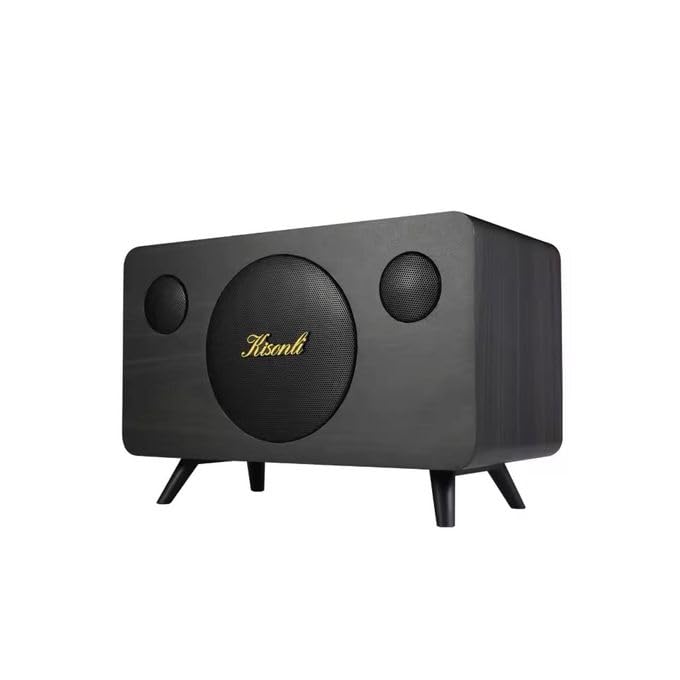
בילד 1: פראָנט view of the Kisonli G103 speaker, showcasing its wooden finish and central speaker grille with the Kisonli logo.

בילד 2: Top view of the Kisonli G103 speaker, highlighting the control panel with the rotary volume knob and input ports.
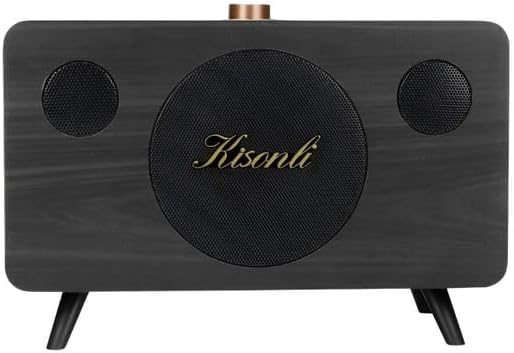
בילד 3: אַנגגאַלד view of the Kisonli G103 speaker, showing its compact size and retro design with small feet.

בילד 4: Diagram illustrating the internal 3.5-inch, 20W horn speaker, emphasizing its powerful sound capabilities including super volume, echo sound, and shock bass.
סעטאַפּ
1. ערשטע אויפלאָדונג
Before first use, it is recommended to fully charge the speaker. Connect the provided power cable to the charging port on the speaker and plug the other end into a suitable power source (e.g., USB wall adapter, computer USB port). The charging indicator light will illuminate. Once fully charged, the light may change color or turn off.
קסנומקס. פּלאַסעמענט
Place the speaker on a stable, flat surface. Its tabletop design ensures optimal sound projection in most environments. Avoid placing it in enclosed spaces that might obstruct sound or ventilation.
אַפּערייטינג ינסטראַקשאַנז

בילד 5: Close-up of the speaker's control panel, showing the rotary volume knob and various function buttons for easy operation.
1. מאַכט אויף / אויסגעלאשן
- To power on: Press and hold the Power button (usually integrated with the Mode button or a dedicated button) for a few seconds until an indicator light illuminates or an audible prompt is heard.
- To power off: Press and hold the Power button again for a few seconds.
2. באַנד קאָנטראָל
The speaker features a prominent rotary knob for volume adjustment. Turn the knob clockwise to increase the volume and counter-clockwise to decrease it.
3. מאָדע סעלעקציע
The Kisonli G103 supports multiple playback modes:
- וסב פלאַש דרייוו מאָדע: אַרײַנשטעלן אַ USB פֿלעש דרייוו מיט MP3 אַודיאָ files into the USB port. The speaker should automatically switch to USB mode and begin playback.
- TF קאַרד מאָדע: אַרײַנשטעלן אַ TF (MicroSD) קאַרטל מיט MP3 אַודיאָ files into the TF card slot. The speaker should automatically switch to TF card mode and begin playback.
- AUX מאָדע: Connect an external audio device (e.g., smartphone, tablet, laptop) to the 3.5mm AUX input port using a 3.5mm audio cable (not included). Use the Mode button to switch to AUX mode if it doesn't switch automatically.
Press the "M" (Mode) button on the control panel to cycle through available input modes (USB, TF, AUX).

בילד 6: Rear panel of the Kisonli G103 speaker, showing the USB port, TF card slot, and AUX input for various connectivity options.
4. פּלייבאַק קאָנטראָלס
Use the buttons on the control panel for playback management:
- שפּיל / פּויזע: Press the Play/Pause button (often indicated by a triangle/two vertical bars icon) to start or pause playback.
- ווייַטער שפּור: Press the "Next" button (often indicated by a double arrow or skip icon) to skip to the next track.
- פֿריִערדיקע שפּור: Press the "Previous" button (often indicated by a double arrow or skip icon) to go back to the beginning of the current track or to the previous track.
טשאַרדזשינג די באַטאַרייע
The Kisonli G103 speaker has a built-in 1800mAh rechargeable battery, providing approximately 2-8 hours of wireless playback depending on volume levels and usage. To charge the speaker:
- Connect the small end of the provided power cable to the charging port on the speaker.
- Connect the larger USB end of the cable to a USB power adapter (e.g., smartphone charger, computer USB port) or a power bank.
- The charging indicator light will show the charging status. Refer to the speaker's specific indicator behavior (e.g., red light for charging, off/blue for full).
- א פולע אָפּצאָל נעמט טיפּיש אַ פּאָר שעה.
The speaker can also be used while connected to a power source via the power cable.
ספּעסאַפאַקיישאַנז
| שטריך | באַשרייַבונג |
|---|---|
| סאָרט | קיסאָנלי |
| מאָדעל נאָמען | G103 |
| מאַקסימום רעדנער אַרויסגאַנג מאַכט | 20 וואטס |
| קאַנעקטיוויטי טעכנאָלאָגיע | וסב, AUX |
| אַודיאָ רעזולטאַט מאָדע | סטערעאָ (2.0 קאַנאַל) |
| מאַונטינג טיפּ | טאַבלעטאָפּ |
| מאַטעריאַל | האלץ |
| רעדנער טיפּ | פּאָרטאַטיוו |
| רעקאָממענדעד ניצט | Smartphones, Tablets, Computers, TVs, Music Players |
| קאַמפּאַטאַבאַל דעוויסעס | Tablet, Laptop, MP3 Player, Smartphone |
| וואַסער קעגנשטעליק | ניין |
| קאָנטראָל מעטאָד | Manual (Rotary Knob, Buttons) |
| ספּעציפֿישע פּראָדוקט ניצט | Portable Personal Audio, Home/Office Decor |
| באַטערי לעבן | 2-8 שעה (אפהענגיק פון באַניץ) |
| באַטאַרייע קאַפּאַציטעט | 1800 מאַה |
| אַרייַנגערעכנט קאַמפּאָונאַנץ | מאַכט קאַבלע |
| פּראָדוקט דימענשאַנז (ד רענטגענ וו רענטגענ ה) | 30 סענטימעטער X 19 סענטימעטער X 17 סענטימעטער |
| פּונקט וואָג | 1020 גראַמז |
| מאַכט מקור | קאָרדעד עלעקטריק, באַטאַרייע פּאַוערד |
טראָובלעשאָאָטינג
- קיין מאַכט:
- זיכער מאַכן אַז דער רעדנער איז אויפגעלאָדן. פֿאַרבינדט עס צו אַ שטראָם־מקור מיטן צוגעשטעלטן קאַבל.
- Press and hold the Power button for a few seconds to ensure it's properly turned on.
- קיין קול:
- Check the volume level on both the speaker and the connected device (if using AUX).
- Ensure the correct input mode (USB, TF, AUX) is selected. Press the "M" button to cycle through modes.
- If using USB or TF card, ensure the audio files are in a compatible format (e.g., MP3) and the storage device is properly inserted.
- If using AUX, ensure the 3.5mm audio cable is securely connected to both the speaker and the external device.
- פאַרקרימט סאָונד:
- רעדוצירן די באַנד אויף ביידע די רעדנער און די פארבונדן מיטל.
- זיכער מאַכן די אַודיאָ מקור file איז נישט פארדארבן אדער פון נידעריגער קוואַליטעט.
- רעדנער ענטפערט נישט:
- Try turning the speaker off and then on again.
- אויב די פראבלעם בלייבט, לאָזט די באַטאַרייע זיך גאָר אויסלאָדן און דערנאָך ריטשאַרדזשט זי.
וישאַלט
- רייניקונג: ניצט אַ ווייכע, טרוקענע שטאָף צו רייניקן די אויסערלעכע זייט פון דעם רעדנער. ניצט נישט קיין פליסיקע רייניגער אדער שברייענדע מאַטעריאַלן.
- סטאָרידזש: ווען נישט אין באַנוץ פֿאַר לענגערע פּעריאָדן, זאָל מען דעם רעדנער האַלטן אין אַ קיל, טרוקן אָרט, אַוועק פֿון דירעקטער זון און עקסטרעמע טעמפּעראַטורן.
- באַטערי זאָרגן: To prolong battery life, avoid fully discharging the battery frequently. Recharge it regularly, even if not in constant use.
- ויסמיידן פּראַל: Handle the speaker with care to prevent physical damage.
וואָראַנטי און שטיצן
According to the product specifications, this item is provided without a warranty. For any issues or inquiries, please contact your retailer or the point of purchase for assistance.