
1. הקדמה
א דאנק פארן קויפןasing the Divoom Portable Bluetooth Speaker & Fast Charging Bundle. This manual provides detailed instructions for the safe and efficient use of your new devices. Please read this manual thoroughly before use and retain it for future reference.
2. פּעקל אינהאַלט
- Divoom Portable Bluetooth Speaker
- Divoom Fast Charging Power Adapter
- USB-C Charging Cable (for speaker)
- USB-C to USB-C Cable (for charger, if included)
- באַניצער מאַנואַל
3. פּראָדוקט איבערview - Portable Bluetooth Speaker
3.1 שליסל פֿעיִקייטן
- העכער געזונט: Equipped with a unique dual-side bass design for deep, powerful audio.
- וועראַבאַל פּלאַן: Compact and lightweight, designed for easy attachment to bags or clothing.
- דרויסנדיק גרייט: IP67-rated for dust and water resistance, suitable for various environments.
- עקסטענדעד שפּיל צייט: ביז 10 שעה פון באַטאַרייע לעבן אויף איין אָפּצאָל.

בילד 3.1: אינערלעכער view of the Divoom Portable Bluetooth Speaker, highlighting its dual-side bass design for enhanced audio performance.

בילד 3.2: The Divoom Portable Bluetooth Speaker shown attached to a backpack strap, demonstrating its wearable and portable design.

בילד 3.3: The Divoom Portable Bluetooth Speaker in water, illustrating its IP67 dust and water resistance for outdoor use.

בילד 3.4: Multiple Divoom Portable Bluetooth Speakers displayed, emphasizing the 10-hour battery life for extended listening. Note: Playback time may vary based on volume, audio source, equalizer settings, and environmental conditions.
4. פּראָדוקט איבערview - Fast Charging Power Adapter
4.1 שליסל פֿעיִקייטן
- הויך-גיכקייַט טשאַרדזשינג: Delivers up to 65W fast charging for compatible devices.
- מולטי-פּאָרט פּלאַן: Features multiple ports (e.g., USB-C, USB-A) to charge various devices simultaneously.
- סאָליד און פּאָרטאַטיוו: Designed for travel with features like a 90° folding plug and a removable protective shoe cover.
- Pixel Interactive Screen: (If applicable to your model) Allows for custom pixel art display and interaction.

בילד 4.1: A user charging an iPhone with the Divoom 65W Fast Charging Power Adapter, illustrating its rapid charging capability.

בילד 4.2: The Divoom Fast Charging Power Adapter simultaneously charging a phone, laptop, and tablet, showcasing its 3-port capability.
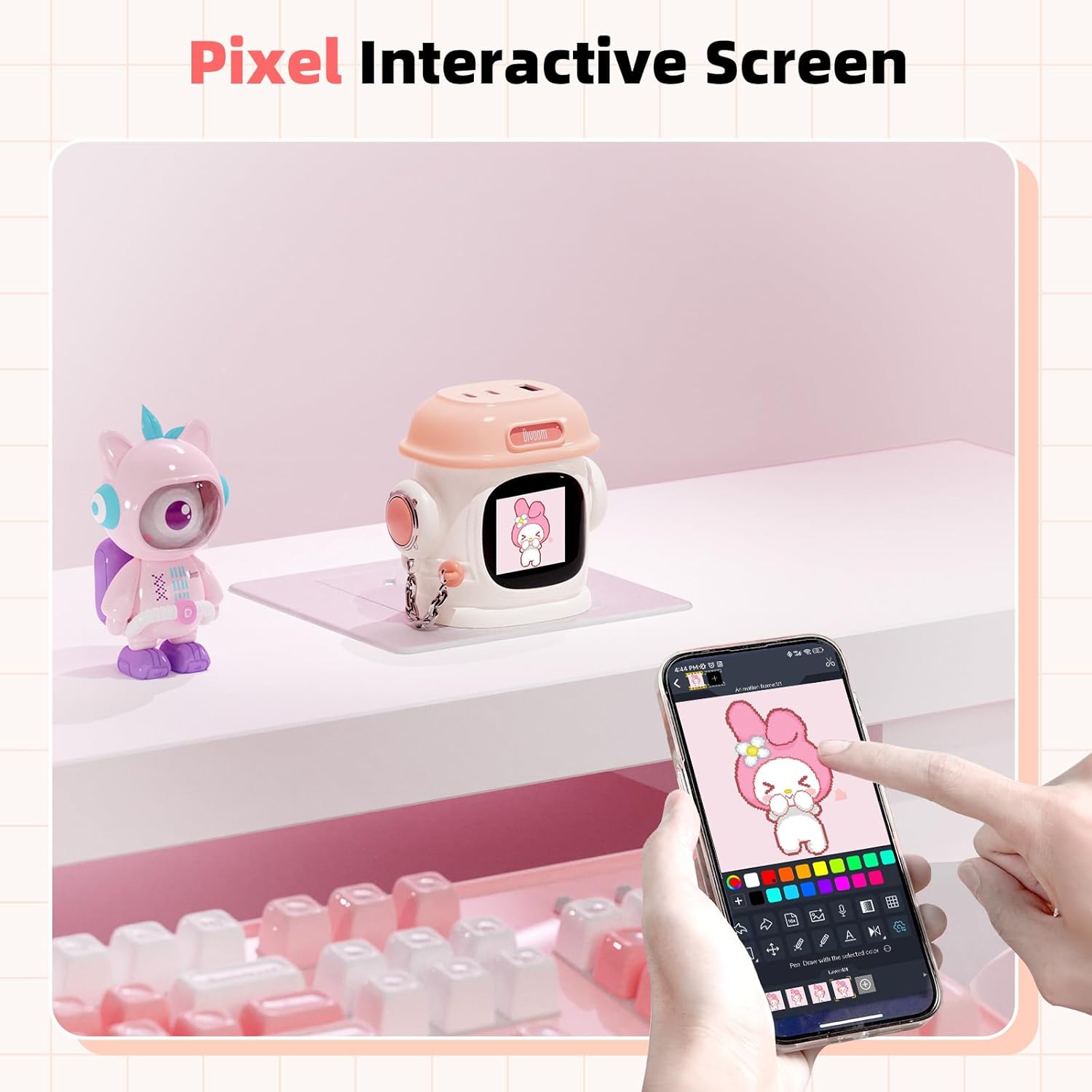
בילד 4.3: The Divoom Fast Charging Power Adapter featuring its pixel interactive screen, displaying custom pixel art.

בילד 4.4: A detailed breakdown of the Divoom Fast Charging Power Adapter's features, including its 90° folding plug, USB-C1 (65W), USB-C2 (65W), and USB-A (18W) ports, and a removable protective shoe cover.
5. סעטאַפּ
5.1 Portable Bluetooth Speaker Setup
- באַשולדיקן דעם רעדנער: Before first use, fully charge the speaker using the provided USB-C cable and a compatible power source. The charging indicator will show its status.
- מאַכט אויף: Press and hold the power button for a few seconds until you hear an audible cue or see an indicator light.
- פּערינג מאָדע: The speaker will automatically enter Bluetooth pairing mode. The Bluetooth indicator light will flash.
- קאָננעקט דיווייס: On your smartphone or other Bluetooth-enabled device, go to Bluetooth settings and select 'Divoom Speaker' from the list of available devices.
- באַשטעטיקונג: אַמאָל פארבונדן, וועט דער רעדנער געבן אַן אָזערלעכע באַשטעטיקונג, און די בלועטוט אינדיקאַטאָר ליכט וועט ווערן האַרט.
5.2 Fast Charging Power Adapter Setup
- צאַפּן אין: Extend the folding plug and insert the power adapter into a standard wall outlet.
- פאַרבינדן דיווייסאַז: Use appropriate charging cables (USB-C to USB-C, USB-C to Lightning, USB-A to various) to connect your devices to the available ports on the adapter.
- אָנהייבן טשאַרדזשינג: Charging will begin automatically. The adapter will intelligently distribute power to connected devices.
6. אַפּערייטינג ינסטרוקטיאָנס
6.1 Portable Bluetooth Speaker Operation
- מאַכט אויף / אַוועק: דריקן און האַלטן די מאַכט קנעפּל.
- באַנד קאָנטראָל: Use the '+' and '-' buttons on the speaker to adjust volume.
- שפּיל / פּויזע: דריקן די מאַכט קנעפּל אַמאָל צו שפּילן אָדער פּויזע מוזיק.
- האָפּקען טראַקס: Double-press the '+' button for next track, double-press '-' for previous track (functionality may vary by device).
- ענטפֿערן קאַללס: Press the power button once to answer an incoming call. Press again to end the call.
6.2 Fast Charging Power Adapter Operation
- טשאַרדזשינג: Connect your devices to the appropriate USB-C or USB-A ports. The adapter will automatically detect and deliver optimal charging power.
- Pixel Screen (if applicable): If your model features a pixel interactive screen, refer to the Divoom app for customization options, including displaying pixel art, animations, or notifications.
7. וישאַלט
- רייניקונג: Use a soft, dry cloth to clean the exterior of both devices. For the speaker, if it gets dirty during outdoor use, gently wipe it with a damp שטאָף. דו זאלסט נישט נוצן האַרב קעמיקאַלז אָדער אַברייסיוו קלינערז.
- סטאָרידזש: האַלט די דעוויסעס אין אַ קיל, טרוקן אָרט אַוועק פון דירעקט זונשייַן און עקסטרעמע טעמפּעראַטורן.
- Battery Care (Speaker): כדי צו פארלענגערן די לעבן פון די באַטעריע, זאָלט איר נישט אָפט אויסלאָדן דעם רעדנער. לאָדט עס אָפט אויף, אפילו אויב עס ווערט נישט גענוצט פאר לענגערע צייטן.
- Protective Cover (Charger): Ensure the removable protective shoe cover is in place when traveling to protect the prongs.
8. טראָובלעשאָאָטינג
8.1 פּאָרטאַטיוו בלועטאָאָטה ספּיקער
- קיין מאַכט: זיכער מאַכן אַז דער רעדנער איז אויפגעלאָדן. פֿאַרבינדט עס צו אַ שטראָם־מקור און פּרוּווט ווידער.
- קען נישט פארבינדן: Make sure the speaker is in pairing mode (flashing Bluetooth indicator). Turn off and on your device's Bluetooth. If issues persist, forget the device in your Bluetooth settings and try pairing again.
- קיין קול: קאָנטראָלירט די וואָלומען לעוועלס אויף ביידע דעם רעדנער און אייער פֿאַרבונדענעם מיטל. מאַכט זיכער אַז דער רעדנער איז ריכטיק פֿאַרבונדן.
- נעבעך געזונט קוואַליטעט: Move the speaker closer to your device to reduce interference. Ensure there are no obstructions between the devices.
8.2 Fast Charging Power Adapter
- ניט טשאַרדזשינג: Ensure the adapter is securely plugged into a working wall outlet. Check that the charging cable is properly connected to both the adapter and your device. Try a different cable or port.
- פּאַמעלעך טשאַרדזשינג: Ensure your device supports fast charging and that you are using a compatible cable. Some devices may limit charging speed if they are too hot or if multiple devices are connected.
- Pixel Screen Not Working (if applicable): Ensure the adapter is powered on. Check the Divoom app for connectivity and display settings.
9. ספּעסאַפאַקיישאַנז
9.1 פּאָרטאַטיוו בלועטאָאָטה ספּיקער
- קאַנעקטיוויטי: בלועטאָאָטה
- באַטאַרייע לעבן: Up to 10 hours (actual playtime varies by volume and content)
- וואַסער קעגנשטעל: IP67 (שטויב און וואַסער קעגנשטעליק)
- געזונט פֿעיִקייטן: Dual-side bass design
9.2 Fast Charging Power Adapter
- אַרייַנשרייַב: אַק 100-240 וו, 50/60 הז
- רעזולטאַט (USB-C1): אַרויף צו 65 וו
- רעזולטאַט (USB-C2): אַרויף צו 65 וו
- רעזולטאַט (וסב-א): אַרויף צו 18 וו
- גאַנץ רעזולטאַט: 65W Max (dynamic power distribution)
- צאַפּן טיפּ: 90° Folding Plug
10. זיכערקייַט אינפֿאָרמאַציע
- Do not expose devices to extreme temperatures, direct sunlight, or open flames.
- Do not disassemble or attempt to repair the devices yourself. This will void the warranty and may cause damage or injury.
- האַלטן אויס פון דערגרייכן פון קינדער.
- Use only original or certified compatible charging cables and accessories.
- פֿאַרמײַדט צו לאָזן פאַלן אָדער אויסשטעלן די דעווײַסעס צו שטאַרקע קלאַפּן.
- For the speaker, while it is water-resistant, avoid prolonged submersion or exposure to saltwater. Ensure charging port is dry before charging.
11. וואָראַנטי און שטיצן
Divoom products are covered by a limited warranty. For specific warranty terms and conditions, please refer to the warranty card included with your purchase or visit the official Divoom website. For technical support, troubleshooting assistance, or to inquire about warranty claims, please contact Divoom customer service through their official channels.
Webפּלאַץ: www.divoom.com