
1. הקדמה
The Swann DVR8-4685 2K Security System is designed to provide comprehensive surveillance for your home or business. This system features crystal-clear 2K video recording, advanced True Detect™ motion and heat detection, and color night vision for enhanced visibility in low-light conditions. With reliable wired connections and local storage options, your property remains protected without reliance on monthly fees.
ווידעא: אן איבערview of the Swann AdvancedX Security System, highlighting features like 4K resolution, reliable Ethernet connection, real-time alerts, and smart video analytics.
שליסל פֿעיִקייטן:
- Crystal-Clear 2K Video: Capture every detail with 2K Full HD resolution.
- קאָליר נאַכט זעאונג: See clearly in color, even in low-light conditions.
- Powerful Deterrents: Integrated spotlights deter intruders.
- TrueDetect Motion Detection: Advanced sensors provide accurate alerts, minimizing false alarms.
- אַודיאָ מאָניטאָרינג: Cameras include microphones to capture audio for identifying key details.
- Reliable Wired Connection: Ensures uninterrupted security with stable wired connections.
- Free Local Storage: Retain weeks of footage on the included 256GB MicroSD Card and back up to the cloud.
2. וואָס איז אין דער קעסטל
Your Swann DVR8-4685 2K Security System package includes the following components:
- 1 x 8 Channel DVR with 256GB MicroSD Card
- 4 x 2KMQB Bullet Cameras with Lights
- 4 x Extension Cables (60ft/18m)
- 1 רענטגענ מאַכט אַדאַפּטערז
- 1 רענטגענ עטהערנעט קאַבלע
- 1 רענטגענ ספּליטטער
- 1 x Mounting Screws & Plugs
- 1 x אפערירן אינסטרוקציעס (דיזער מאַנואַל)
- 1 x Theft Deterrent Sticker
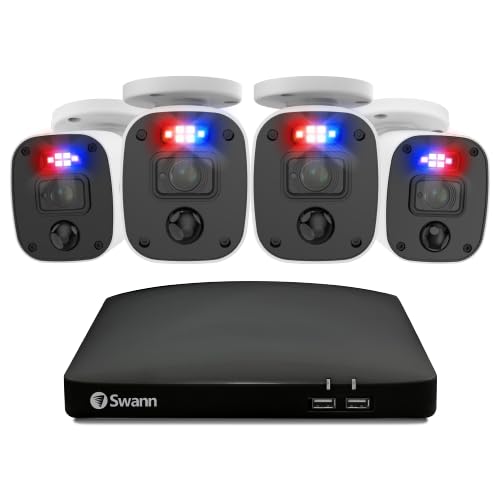
בילד: איבערview of the Swann DVR8-4685 2K Security System components, including the DVR, four bullet cameras, and various cables and accessories.
3. סעטאַפּ
Before permanent installation, it is recommended to set up and test the system to ensure all components are functioning correctly.
3.1 Initial System Connection
- פֿאַרבינדן קאַמעראַס צו DVR: Connect each 2KMQB Bullet Camera to an available PoE port on the DVR using the provided Ethernet cables.
- Connect DVR to Router: Connect the DVR's WAN port to a spare port on your internet router using the supplied Ethernet cable.
- Connect DVR to Display: Plug one end of an HDMI cable into the HDMI port on the back of the DVR and the other end into an HDMI input on your TV or monitor.
- פאַרבינדן מויז: Plug the USB mouse into an available USB port on the rear of the DVR.
- מאַכט אויף: Connect the power adapter to the DVR and then plug the power cable into a power outlet. The system should power on and display the setup wizard on your connected screen.
Video: A quick start guide demonstrating the hardware connections for a Swann NVR security system, including connecting cameras, display, mouse, and power.
3.2 מאָביל אַפּ סעטאַפּ
Download the Swann Security app from your device's app store (Android or iOS) to access live viewing, playback, and system controls remotely.
- Download and install the "Swann Security" app on your smartphone or tablet.
- Follow the in-app instructions to add your DVR system. This typically involves scanning a QR code on the DVR or manually entering device details.
- אַמאָל קאָננעקטעד, איר קענען view live feeds, access recordings, and configure settings from anywhere.
4. אפערירן אייער סיסטעם
4.1 לעבן View און פּלייַבאַקק
Access live camera feeds and review רעקאָרדעד פוtage through the connected monitor or the Swann Security mobile app. The system allows for customizable layouts to prioritize important areas.
Video: Demonstrates live viewing and playback features of a Swann security system, including customizable layouts and remote access via mobile app.
4.2 True Detect™ Motion Detection
The True Detect™ technology uses heat and motion sensors to accurately detect activity, reducing false alarms. You can adjust the motion sensitivity for each camera to suit specific areas, ensuring you receive alerts only when it truly matters.
4.3 קאָליר נאַכט זעאונג
The 2KMQB Bullet Cameras feature color night vision, allowing you to see detailed, full-color footage even in low-light conditions, providing clearer identification than traditional black and white night vision.
4.4 אַודיאָ רעקאָרדינג
Each camera is equipped with a microphone to record audio, adding another layer of detail to your surveillance footage. This can be crucial for capturing conversations or identifying sounds associated with events.
4.5 Storage and Backup
The DVR includes a 256GB MicroSD card for local storage, capable of retaining weeks of footage. You can also configure cloud backup options for added security and accessibility of your incident videos.
5. וישאַלט
- רעגולער רייניקונג: רייניקן קאַמעראַ לענסעס פּעריִאָדיש מיט אַ ווייכן, דamp שטאָף צו ענשור קלאָר בילד קוואַליטעט.
- Firmware דערהייַנטיקונגען: Check the Swann Security app or website for available firmware updates for your DVR and cameras to ensure optimal performance and security.
- קאַבלע דורכקוק: Regularly inspect all wired connections for any signs of wear or damage, especially for outdoor cameras.
- סטאָרידזש פאַרוואַלטונג: Monitor your storage usage and ensure regular backups to prevent loss of important footage.

Image: A Swann camera being sprayed with water, demonstrating its sturdy weatherproof design suitable for outdoor use.
6. טראָובלעשאָאָטינג
- קיין ווידעא דיספּלעי: Ensure all HDMI/VGA cables are securely connected and the display input is set correctly. Check power connections for both the DVR and cameras.
- קיין אינטערנעט פֿאַרבינדונג: Verify the Ethernet cable from the DVR to your router is connected. Check your router's internet status.
- פאַלש באַוועגונג אַלערץ: Adjust the motion sensitivity settings for individual cameras via the DVR interface or mobile app. Ensure detection zones are configured to avoid irrelevant areas.
- נעבעך בילד קוואַליטעט: Clean camera lenses. Check cable connections for any damage or loose fittings. Ensure cameras are positioned correctly for optimal lighting.
- רימאָוט אַקסעס ישוז: Confirm your mobile device has a stable internet connection. Verify the DVR is connected to the internet and the Swann Security app is updated to the latest version.
7. ספּעסאַפאַקיישאַנז
| שטריך | דעטאַל |
|---|---|
| סאָרט | סוואַן |
| מאָדעל נומער | DVK-8468542KMQB |
| ווידעא קאַפּטורע רעסאָלוטיאָן | 1440 פּ (2 ק) |
| קאַנעקטיוויטי טעכנאָלאָגיע | ווייערד |
| מאַכט מקור | קאָרדעד עלעקטריק |
| קאַמפּאַטאַבאַל דעוויסעס | פערזענלעכער קאמפיוטער, סמאַרטפאָון, טאַבלעט |
| פלינק טיפּ | Motion Only (True Detect™) |
| קאָנטראָל מעטאָד | קול |
| סטאָרידזש | 256 גיגאבייט מיקראָסד קאַרטל (אריינגערעכנט) |
| נומער דימענשאַנז (L X W X H) | 2.5 X 9.06 X 9.06 אינטשעס |
| ייַנמאָנטירונג אופֿן | שרויף-אין |
8. וואָראַנטי און שטיצן
For warranty information and technical support, please refer to the official Swann webזייטל אדער קאנטאקט זייער קאסטומער סערוויס. האלט אייער באווייז פון קויפן פאר יעדע גאראנטיע טענות.
אָנליין שטיצן: באַזוכן www.swann.com פֿאַר אָפֿט געשטעלטע פֿראַגעס, טראָובלעשווטינג גיידס, און ווייכווארג דאַונלאָודז.