
הקדמה
This manual provides essential information for the safe and efficient use of your SUPVAN T50M Pro Label Maker. Please read these instructions carefully before operating the device and retain them for future reference.
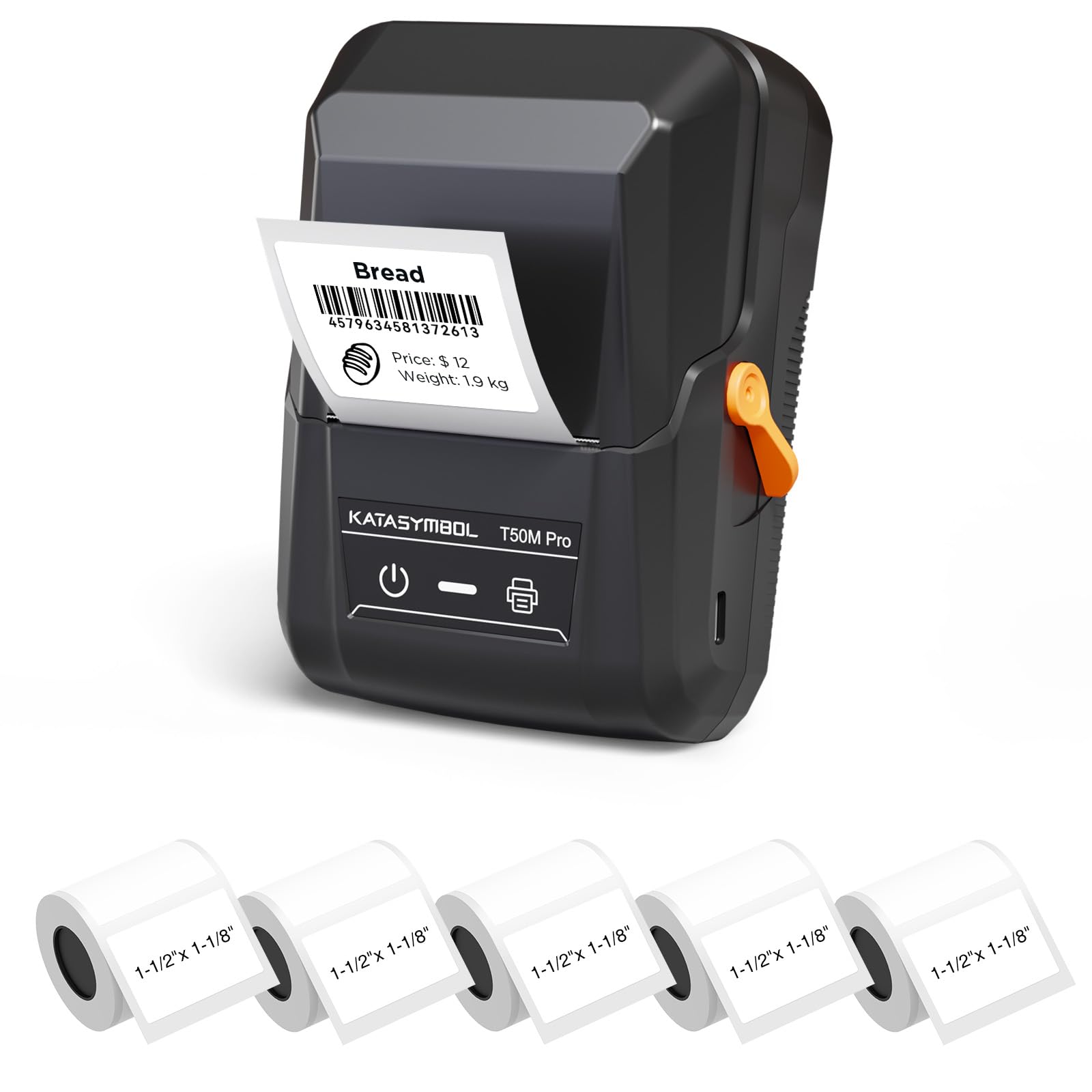
Image: The SUPVAN T50M Pro Label Maker, a compact thermal printer.
פּעקל אינהאַלט
באַשטעטיקן אַז אַלע זאכן זענען פאַראַן אין דיין פּעקל:
- SUPVAN T50M Pro Label Maker
- 5 rolls of 1.57'' × 1.18'' (40mm × 30mm) white labels (250 labels/roll)
- USB Cable (for charging and connectivity)
- באַניצער מאַנואַל (דעם דאָקומענט)
סעטאַפּ גייד
1. טשאַרדזשינג די מיטל
Before first use, fully charge the label maker using the provided USB cable. The device features a 1200 mAh built-in rechargeable battery, offering extended use on a single charge.
2. Installing the Label Roll
The T50M Pro uses thermal paper, eliminating the need for ink or toner. Follow these steps to install a label roll:
- עפֿנט דעם דעקל פֿון דעם עטיקעט־אָפּטייל.
- Insert the label roll with the printing surface facing upwards.
- Ensure the label edge is aligned with the printer's feed mechanism.
- Close the cover. The device's Smart RFID Auto-Detection will recognize the label size automatically.

Image: Illustration of loading thermal paper into the label maker. The device uses thermal printing technology, requiring no ink or toner.
3. אַפּ ינסטאַלירונג און קאַנעקשאַן
Download the official SUPVAN app from your device's app store. The app provides all editing functions and is free to use.
- Turn on the label maker.
- Open the SUPVAN app on your smartphone or tablet.
- Follow the in-app instructions to connect to your T50M Pro via Bluetooth or USB.
אַפּערייטינג ינסטראַקשאַנז
1. Creating Labels with the App
The SUPVAN app offers a comprehensive suite of editing tools:
- טעקסט עדיטינג: Choose from over 40 fonts.
- Image & Picture Integration: Add custom images and logos.
- מוסטערן: Access over 140 free, constantly updated templates for various uses.
- Auto Label Size Recognition: The app automatically detects the loaded label size, reducing errors.

Image: The SUPVAN app's editing interface, demonstrating font choices, image integration, and automatic label size detection.

Image: A selection of over 140 free templates available within the SUPVAN app, suitable for diverse labeling needs.
2. פּרינטינג לאַבעלס
After designing your label in the app, select the "Print" option. Ensure the label maker is connected and has sufficient battery. The T50M Pro supports various label styles and sizes, printing 3/4 to 2-inch wide labels.

בילד: עקסamples of labels created with the T50M Pro, including address labels, price tags, and decorative labels, demonstrating support for various styles.

Image: A visual comparison highlighting the high-quality image output from the SUPVAN T50M Pro's app compared to other label makers.
3. געוויינטלעכע אַפּליקאַציעס
The SUPVAN T50M Pro is suitable for a wide range of labeling tasks:
- קליין געשעפט: Shipping addresses, product information, QR codes, brand logos.
- Office & School: נאָמען tags, folder labels, documentation, asset tagגינג.
- היים אָרגאַניזאַציע: Pantry labels, storage bins, personal items.

Image: Demonstrates diverse uses for the label maker, such as labeling containers in a pantry, creating product labels, printing shipping labels, and organizing school supplies.
וישאַלט
1. רייניקן דעם דרוק קאָפּ
כדי צו זיכער מאַכן די בעסטע דרוק קוואַליטעט, רייניקט פּעריִאָדיש דעם טערמישן דרוק קאָפּ. ניצט אַ ווייכן, לינט-פֿרייע שטאָף לייכט ווישן.ampened with isopropyl alcohol. Do not use abrasive cleaners or sharp objects.
2. באַטערי קער
Recharge the device when the battery indicator is low. Avoid fully discharging the battery frequently to prolong its lifespan. Store the device in a cool, dry place when not in use for extended periods.
3. Label Storage
Store label rolls in a cool, dry place away from direct sunlight and heat to prevent degradation of the thermal material.
טראָובלעשאָאָטינג
1. מיטל ניט טורנינג אויף
- Ensure the device is fully charged. Connect it to a power source using the USB cable.
- דריקן און האַלטן די מאַכט קנעפּל פֿאַר אַ ביסל סעקונדעס.
2. Printing Issues (Blank or Faint Prints)
- Check if the label roll is installed correctly with the printing surface facing up.
- Ensure the label roll is not empty.
- רייניקט דעם דרוק קאָפּ ווי באַשריבן אין דער וישאַלט סעקציע.
- Verify that the label type is compatible with the T50M Pro.
3. פּראָבלעמען מיט אַפּ קאָנעקטיוויטי
- מאַכן זיכער אַז בלועטאָאָטה איז ענייבאַלד אויף דיין רירעוודיק מיטל.
- Make sure the label maker is turned on and within range.
- Restart both the label maker and the app.
- אויב פראבלעמען בלייבן, פרובירט צו ריאינסטאלירן די אפליקאציע.
4. Label Misalignment
- זיכער מאַכן אַז די לעיבעל ראָל איז ריכטיק אַרײַנגעזעצט און אויסגעשטעלט אין דעם אָפּטייל.
- The Smart RFID Auto-Detection should prevent most misalignment issues; if not, try re-seating the roll.
ספּעסאַפאַקיישאַנז
| שטריך | דעטאַל |
|---|---|
| מאָדעל נאָמען | T50M Pro |
| סאָרט | SUPVAN |
| דרוק טעכנאָלאָגיע | טערמאַל |
| קאַנעקטיוויטי טעכנאָלאָגיע | וסב, בלועטאָאָטה |
| ייַזנוואַרג צובינד | וסב |
| דרוקער רעזולטאַט | Monochrome (Black Ink Color) |
| מאַקסימום מעדיע גרייס | 1.57'' × 1.18'' (40mm × 30mm) - 3/4 to 2-inch wide labels supported |
| ספּעציעלע שטריך | Portable, Smart RFID Auto-Detection, BPA-free labels |
| באַטערי | 1200 מאַה געבויט-אין קריקאָנלאָדלעך באַטאַרייע |
| דימענשאַנז | אומגעפער 5" x 3.7" x 2.3" |
| וואָג | בעערעך 0.6 לב |
| אַרייַנגערעכנט קאַמפּאָונאַנץ | Label Maker, Labels, USB Cable |

Image: The compact design of the T50M Pro, highlighting its portability, lightweight nature, and 1200 mAh rechargeable battery.
וואָראַנטי און שטיצן
וואָראַנטי אינפֿאָרמאַציע
For detailed warranty information, please refer to the warranty card included with your product or visit the official SUPVAN webזייטל. גאַראַנטיע טערמינען און באדינגונגען קענען זיין אַנדערש לויט געגנט און הענדלער.
קונה שטיצן
If you encounter any issues or have questions regarding your SUPVAN T50M Pro Label Maker, please contact SUPVAN customer support through their official webפּלאַץ אָדער די זיצער ווו די פּראָדוקט איז פּערטשאַסט.
איר קענט אויך באַזוכן די יו SUPVAN Store on Amazon פֿאַר נאָך פּראָדוקט אינפֿאָרמאַציע און שטיצע רעסורסן.