
1. פּראָדוקט איבערview
The Camtro M6 is a battery-powered wireless outdoor security camera designed for reliable surveillance. It features 1080p video resolution, color night vision, two-way audio, and smart AI motion detection to enhance your home security. This manual provides detailed instructions for setup, operation, and maintenance.

Figure 1.1: Camtro M6 Outdoor Security Camera with key features highlighted.

פיגורע 1.2: איבערview of Camtro M6 camera features.
2. פּעקל אינהאַלט
ביטע טשעק די פּאַקעט פֿאַר די פאלגענדע זאכן:
- Camtro M6 Outdoor Security Camera
- מאָונטינג שרויף קיט
- ינסטרוקטיאָן מאַנואַל (דעם דאָקומענט)
3. סעטאַפּ
3.1 ערשט טשאַרדזשינג
Before first use, fully charge the camera using a standard 5V USB charger (not included). The charging indicator light will turn solid when charging and off when fully charged. A full charge typically takes several hours.
3.2 אַפּ אינסטאַלאַציע און אַקאַונט שאַפונג
- Download the official Camtro app from your smartphone's app store (iOS or Android).
- עפֿנט די אַפּ און פֿאָלגט די אינסטרוקציעס אויף דעם עקראַן צו שאַפֿן אַ נײַעם באַניצער אַקאַונט.
3.3 דעווייס פּערינג און Wi-Fi פֿאַרבינדונג
- Ensure your smartphone is connected to a 2.4GHz Wi-Fi network. The Camtro M6 camera only supports 2.4GHz Wi-Fi.
- In the Camtro app, tap 'Add Device' or the '+' icon.
- Select the Camtro M6 camera model from the list.
- Follow the app's instructions to put the camera into pairing mode (usually by pressing a reset button).
- Scan the QR code displayed on your phone with the camera lens, or follow alternative pairing methods provided by the app.
- אַמאָל פארבונדן, געבט א נאמען פאר אייער קאַמעראַ און פארענדיקט דעם סעטאַפּ פּראָצעס.
3.4 מאָונטינג די אַפּאַראַט
The Camtro M6 camera is designed for wall mounting. Choose a location that provides the desired viewing angle and is within range of your 2.4GHz Wi-Fi network.
- Mark the desired drill holes on the wall using the mounting bracket as a template.
- באָרט פּילאָט לעכער און אַרײַנשטעלן וואַנט אַנקערס אויב נייטיק.
- באַפֿעסטיקן די מאַונטינג קלאַמער צו דער וואַנט מיט די צוגעשטעלטע שרויפֿן.
- באַפעסטיקט די קאַמעראַ צו דער מאָונטינג קלאַמער און אַדזשאַסטירט דעם ווינקל ווי נייטיק.
4. אַפּערייטינג די קאַמעראַ
4.1 לעבן View
Open the Camtro app and select your camera to access the live video feed. You can monitor your property in real-time from anywhere with an internet connection.
4.2 צוויי-וועג אַודיאָ
The camera features a built-in microphone and speaker for two-way communication.
- בשעת אין לעבן view, צאַפּן דעם מיקראָפאָן ייקאַן אין דער אַפּ.
- Speak into your smartphone to transmit audio through the camera's speaker.
- Release the microphone icon to listen through the camera's microphone.

Figure 4.1: Using the two-way audio feature to communicate.

Figure 4.2: Two-way talk functionality for interactive communication.
4.3 קלוגע קינסטלעכע אינטעליגענץ באַוועגונג דעטעקציע
The Camtro M6 camera utilizes AI to distinguish between human movement and other objects, reducing false alerts.
- געבן באַוועגונג דיטעקשאַן אין די אַפּ סעטטינגס.
- Adjust sensitivity levels to optimize detection for your environment.
- באַקומט רעגע נאָוטאַפאַקיישאַנז אויף דיין סמאַרטפאָון ווען מענטשלעכע באַוועגונג ווערט דעטעקטירט.

Figure 4.3: AI Human Detection distinguishing between a person and an object.

Figure 4.4: AI Human Detection accurately identifying human activity.
4.4 קאָליר נאַכט זעאונג
The camera provides clear color video even in low-light conditions, offering enhanced detail compared to traditional black and white night vision.
- Color night vision activates automatically in low light.
- Ensure the camera's night vision settings are enabled in the app.
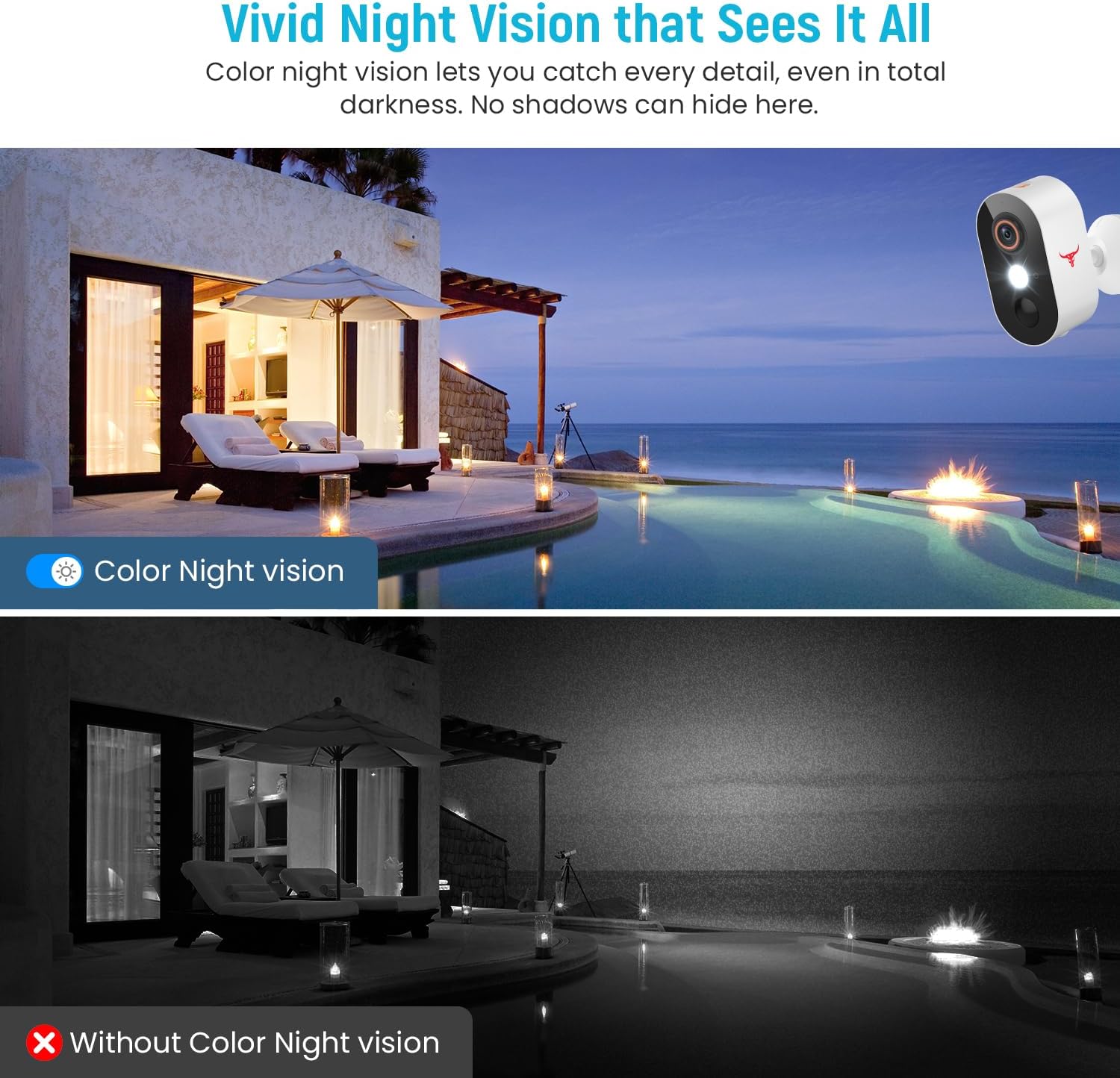
Figure 4.5: Comparison of Color Night Vision versus standard night vision.

Figure 4.6: Visual demonstration of Color Night Vision capability.
4.5 וואָלקן סטאָרידזש
The Camtro M6 supports cloud storage for recording and reviewאויף ווידעאtage. Cloud storage is sold separately and requires a subscription.
- Access recorded videos and playback history through the Camtro app.
- Manage your cloud storage subscription within the app or through the Camtro webפּלאַץ.

Figure 4.7: Cloud Storage functionality for video recording and access.

Figure 4.8: Cloud storage capturing and storing important events.
5. וישאַלט
5.1 באַטערי טשאַרדזשינג
The Camtro M6 is battery-powered. When the battery level is low, you will receive a notification via the app. Remove the camera from its mount and charge it using a standard 5V USB charger. Battery life varies based on usage and environmental factors.
5.2 רייניקן די קאַמעראַ
כדי צו זיכער מאַכן די בעסטע פאָרשטעלונג, זאָלט איר פּעריִאָדיש רייניקן די קאַמעראַ לינז און די קעסטל. ניצט אַ ווייכן, דamp cloth to wipe away dust and dirt. Avoid using harsh chemicals or abrasive materials that could damage the lens or finish.
5.3 וועטער קעגנשטעל
The Camtro M6 camera is designed for outdoor use and is resistant to various weather conditions, operating effectively in temperatures from 14°F to 140°F (-10°C to 60°C).

Figure 5.1: Camtro M6 camera demonstrating weather resistance.
6. טראָובלעשאָאָטינג
- קאַמעראַ פֿאַרבינדט זיך נישט צו Wi-Fi: Ensure your Wi-Fi network is 2.4GHz. Check Wi-Fi signal strength at the camera's location. Restart your router and the camera, then attempt pairing again.
- Frequent false motion alerts: Adjust the motion detection sensitivity settings in the app. Ensure AI Human Detection is enabled to filter out non-human movements.
- נעבעך ווידעא קוואַליטעט: קאָנטראָלירט די גיכקייט פון אייער Wi-Fi פֿאַרבינדונג. מאַכט זיכער אַז די קאַמעראַ לינז איז ריין און פֿרײַ פֿון שטערונגען.
- די באַטאַרייע פליסן געשווינד: געביטן מיט הויכע טעטיקייט אדער אָפטע וואוינונגען view access can reduce battery life. Ensure the camera is fully charged. Consider reducing motion detection sensitivity if alerts are excessive.
- צוויי-וועג אַודיאָ פּראָבלעמען: Ensure your phone's microphone and speaker are functioning correctly. Check the app's audio settings and your phone's volume.
7. ספּעסאַפאַקיישאַנז
| שטריך | באַשרייַבונג |
|---|---|
| מאָדעל נאָמען | M6 (1080p Wi-Fi Security Camera) |
| דרינענדיק / דרויסנדיק באַניץ | דרויסנדיק |
| ווידעא קאַפּטורע רעסאָלוטיאָן | 1080 פּ |
| קאַנעקטיוויטי טעכנאָלאָגיע | וויירלעס (נאָר 2.4GHz Wi-Fi) |
| מאַכט מקור | באַטעריע געטריבן (2 נישט-סטאַנדאַרט באַטעריע באַטעריעס אַרייַנגערעכנט) |
| ספּעציעלע שטריך | Motion Sensor, Color Night Vision, 2-Way Audio, AI Human Detection |
| קאַמפּאַטאַבאַל דעוויסעס | סמאַרטפאָון (אַנדרויד, יאָס) |
| מאַונטינג טיפּ | וואנט בארג |
| פּראָדוקט דימענשאַנז (L x W x H) | 2.8 X 1.7 X 3.4 אינטשעס |
| פּונקט וואָג | 6.6 אונסעס |
| אַפּערייטינג טעמפּעראַטור | 14°F צו 140°F (-10°C צו 60°C) |
| פאַבריקאַנט | Shenzhen Puge Electronics Co., Ltd |
8. וואָראַנטי און שטיצן
Camtro products are designed for reliability and performance. For warranty information, technical support, or service inquiries, please refer to the warranty card included with your product or visit the official Camtro website. You can also contact customer support through the Camtro app.