
1. הקדמה
Thank you for choosing the STRICH SDP-300W Digital Piano. This manual provides essential information for the proper setup, operation, and maintenance of your instrument. Please read it thoroughly to ensure optimal performance and longevity of your digital piano.

Figure 1: STRICH SDP-300W Digital Piano in Black with included headphones and music stand.
2. פּעקל אינהאַלט
באַשטעטיקט אַז אַלע זאכן וואָס זענען אויסגערעכנט אונטן זענען אַרייַנגערעכנט אין אייער פּעקל. אויב עפּעס פעלנדיק אָדער צעבראָכן, ביטע קאָנטאַקטירט קונה שטיצע.
- STRICH SDP-300W Digital Piano Unit
- Furniture Stand Components
- דריי-פּעדאַל אַפּאַראַט
- מוזיק רעסט
- Power Adapter (Input AC: 100V-240V, Output DC: 12V 3A)
- כעדפאָונז
- Assembly Hardware (screws, screwdriver)
- באַניצער מאַנואַל
3. אַסעמבלי אינסטרוקציעס
Follow these steps to assemble your digital piano. It is recommended to have two people for assembly due to the weight of the main unit.
- Unpack all components and lay them out on a soft, flat surface to prevent scratches.
- Assemble the furniture stand using the provided screws and screwdriver. Ensure all connections are secure.
- Attach the three-pedal unit to the designated area on the assembled stand.
- Carefully place the digital piano unit onto the assembled stand, aligning the mounting holes. Secure the piano unit to the stand using the remaining screws.
- Insert the music rest into the slot on top of the piano unit.
- Connect the pedal cable from the three-pedal unit to the 'PEDAL' port on the back of the piano.
- Connect the power adapter to the 'POWER' port on the back of the piano and then to a wall outlet.
פֿאַר אַ וויזועלע אנווייזונג וועגן פֿאַרזאַמלונג, ביטע זען די פאלגענדע ווידעא:
ווידעא 1: דעטאַלירטע רעview of the STRICH SDP-300W, including assembly and key feel demonstration.
4. קאָנטראָלן און פֿעיִקייטן איבערview
Your STRICH SDP-300W Digital Piano is equipped with a range of controls and features designed to enhance your playing experience.
4.1. קלאַוויאַטור
- 88 Hammer-Action Weighted Keys: Provides a realistic piano feel with simulated ivory texture.
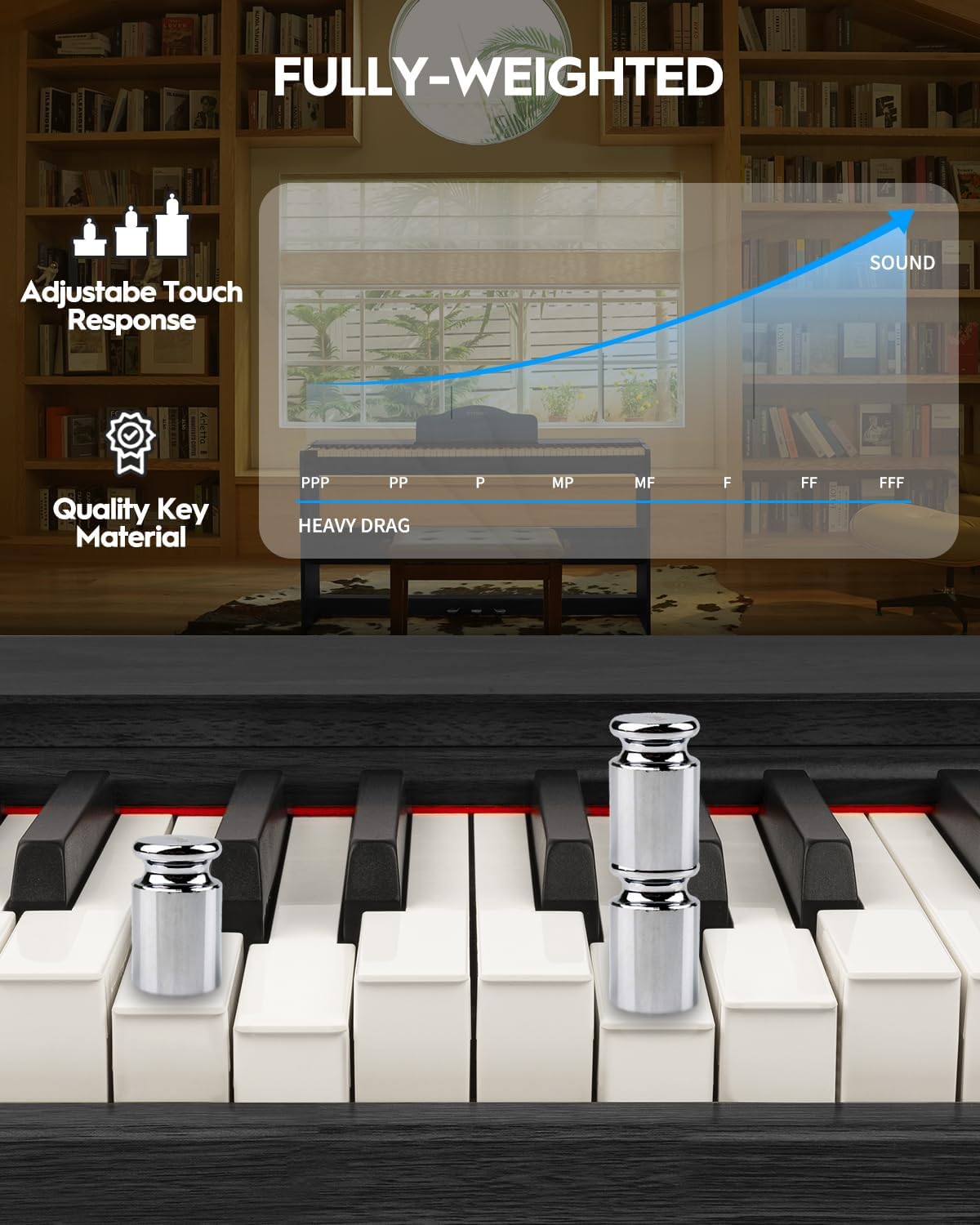
Figure 2: Detail of the fully-weighted, hammer-action keys with adjustable touch response.
4.2. קאָנטראָל פּאַנעל
The intuitive control panel allows easy access to various functions:
- מאַכט קנעפּל: Turns the piano on or off.
- באַנד קאָנטראָל: אַדזשאַסטירט די אַלגעמיינע אַרויסגאַנג באַנד.
- טאָנע סעלעקציע: Choose from 128 preset timbres.
- ריטם סעלעקציע: Select from 200 drum rhythms.
- דעמאָ לידער: Access 110 built-in demonstration songs.
- Record/Playback: Record and listen to your performances.
- איבערזעצן: Adjust the pitch of the keyboard in semitone steps.
- Layer/Split: Combine two voices or split the keyboard into two sections.
- אָקטאַוו שיפט: Shift the pitch of the keyboard up or down by octaves.
- Chorus Effects: Apply chorus effects to your sound.
- Smart Chord Function: Provides intelligent auto-chord accompaniment.

פיגורע 3: דעטאַילעד view of the control panel with various function buttons.
4.3. פּעדאַלז
- דריי פּעדאַל אַפּאַראַט: Includes Sustain, Sostenuto, and Soft pedals for expressive playing.
5. אָפּעראַציע גייד
5.1. אײַנשטעלן/אויסשטעלן און באַנד אַדזשאַסטמענט
To power on the piano, press the 'POWER' button. Adjust the volume using the dedicated volume control knob or buttons on the control panel.
5.2. Selecting Tones and Rhythms
Use the 'TONE' and 'RHYTHM' buttons on the control panel to browse and select from the available 128 timbres and 200 drum rhythms. The display will show the selected number.

Figure 4: The digital piano offers a wide range of sounds and rhythms for musical exploration.
5.3. רעקאָרדינג און פּלייַבאַקק
Utilize the 'RECORD' and 'PLAYBACK' functions to capture your performances. This feature is ideal for self-assessment and practice.
5.4. קאַנעקטיוויטי אָפּציעס
The SDP-300W offers versatile connectivity:
- יו-עס-בי-מידי: Connect to a computer or smart device for MIDI functionality, compatible with teaching apps.
- ווירעלעס (בלוטוט): Connect wirelessly to teaching apps on iPad or phone for interactive learning and composition.
- אַודיאָ-אין פּאָרט: Connect external audio sources to play through the piano's 25Wx2 speakers, allowing you to play along with your favorite tracks.
- כעדפאָון דזשאַק (6.35 מם): For private practice without disturbing others.

Figure 5: Rear panel connections for power, MIDI, USB, headphones, audio input, and sustain pedal.
See the piano's connectivity in action:
Video 2: Demonstration of MIDI, Bluetooth, weighted keys, and pedals on the STRICH digital piano.
5.5. Silent Practice
Connect headphones to the 6.35mm headphone jack for silent practice sessions. The internal speakers will automatically mute when headphones are connected.

Figure 6: Enjoy private practice sessions using headphones.
6. וישאַלט
Proper care will ensure your digital piano remains in excellent condition.
- רייניקונג: ניצט אַ ווייכע, טרוקענע שטאָף צו ווישן די ייבערפלאַך פון פּיאַנע. פֿאַר שווערע שמוץ, אַ ביסל ווייכער מאַכןampen the cloth with water and a mild soap, then wipe dry immediately. Avoid abrasive cleaners or solvents.
- שליסל זאָרג: Wipe the keys with a soft, slightly damp שטאָף. ניצט נישט צו פיל נעץ.
- אָרט: Avoid placing the piano in direct sunlight, near heat sources, or in areas with extreme temperature fluctuations or high humidity.
7. טראָובלעשאָאָטינג
אויב איר טרעפט זיך מיט פראבלעמען, זעט די פאלגנדע אלגעמיינע פראבלעמען און לייזונגען:
| פּראָבלעם | מעגלעך סיבה | לייזונג |
|---|---|---|
| קיין געזונט | די קול איז צו נידעריג; כעדפאָונז זענען פארבונדן; פראבלעם מיט שטראָם. | פֿאַרגרעסערן די קול; אָפּשטעקן די קאָפּהערער; קאָנטראָלירן די מאַכט פֿאַרבינדונג. |
| שליסלען ריספּאַנד נישט | Piano not powered on; internal malfunction. | Ensure piano is on; contact customer support if issue persists. |
| Connectivity issues (USB-MIDI/Bluetooth) | Incorrect connection; device not paired. | Ensure cables are correctly connected; follow device pairing instructions. |
8. ספּעסאַפאַקיישאַנז
- מאָדעל נאָמען: SDP-300W
- נומער פון שליסלען: 88
- שליסל טיפּ: Hammer-Action Weighted Keys with Simulated Ivory Texture
- דימענסיעס: 12.4"ד רענטגענ 51.2"וו רענטגענ 27.8"ה
- נומער וואָג: 59.4 פונט (27 קילאָגראַמס)
- רעדנער: 25W x 2
- טימבערס: 128 פּריסעט
- ריטמס: 200 drum rhythms
- פּאָליפאָני: 128 (מאַקס)
- קאַנעקטיוויטי: USB-MIDI, Wireless (Bluetooth), Audio-in, 6.35mm Headphone Jack
- מאַכט מקור: Corded Electric (Input AC: 100V-240V, Output DC: 12V 3A)
- מאַטעריאַל טיפּ: Wood (Casing), Plastic (Keys)
- קאָליר: שוואַרץ
9. וואָראַנטי און שטיצן
For warranty information, please refer to the documentation included with your purchase or contact STRICH customer support. For technical assistance or service inquiries, please visit the official STRICH webפּלאַץ אָדער קאָנטאַקט זייער קונה סערוויס אָפּטיילונג.