
1. פּראָדוקט איבערview
The TODAAIR Outdoor WiFi Extender AC1200 is a dual-band WiFi repeater designed to extend wireless network coverage in outdoor environments. It features IP65 weatherproofing, ensuring reliable performance in various weather conditions. This device supports both 2.4 GHz and 5 GHz frequency bands, providing stable and high-speed internet access for multiple devices across a wide area.

Image 1.1: The TODAAIR Outdoor WiFi Extender AC1200, a white rectangular device, is shown mounted on a pole in an outdoor setting, extending Wi-Fi coverage to a house and pool area.
ווידעא 1.1: אן איבערview of the TODAAIR Outdoor WiFi Extender, highlighting its features and potential applications in various outdoor settings.
2. פּעקל אינהאַלט
ביטע באַשטעטיקן אַז אַלע זאכן זענען פאַראַן אין פּעקל איידער איר גייט ווייטער מיט דער אינסטאַלאַציע.
- TODAAIR Outdoor WiFi Extender AC1200 Unit
- מאַכט אַדאַפּטער (DC 12V)
- Installation Accessories (e.g., cable ties, mounting screws)
- באַניצער מאַנואַל
Video 2.1: This video demonstrates the unboxing process of the TODAAIR Outdoor WiFi Extender, showing all included components and the initial power-on sequence.
3. פּראָדוקט פֿעיִקייטן
- צוויי-באַנד קאַנעקטיוויטי: Supports 2.4 GHz and 5 GHz for flexible network options.
- הויך ספּיד: Up to 1200Mbps wireless speed (AC standard).
- ברייט קאַווערידזש: Designed to cover large outdoor areas, up to 3440 sq. ft.
- IP65 וועטערפּרוף: Resistant to dust and water, suitable for outdoor use in various weather conditions.
- עטלעכע אַפּערייטינג מאָדעס: Functions as an Access Point (AP) or Repeater.
- עטהערנעט פּאָרט: Includes a LAN port for wired connections to devices like cameras or computers.
- מיטל קאַפּאַציטעט: Can support connections for up to 30 devices simultaneously.

Image 3.1: The TODAAIR Extender showcasing its 1200Mbps dual-band speed (2.4G+5G) and 300ft coverage, indicating enhanced Wi-Fi experience.

Image 3.2: The TODAAIR Extender demonstrating its IP65 weatherproof capabilities, showing resistance to various weather conditions like sun, rain, snow, thunder, wind, and frost.
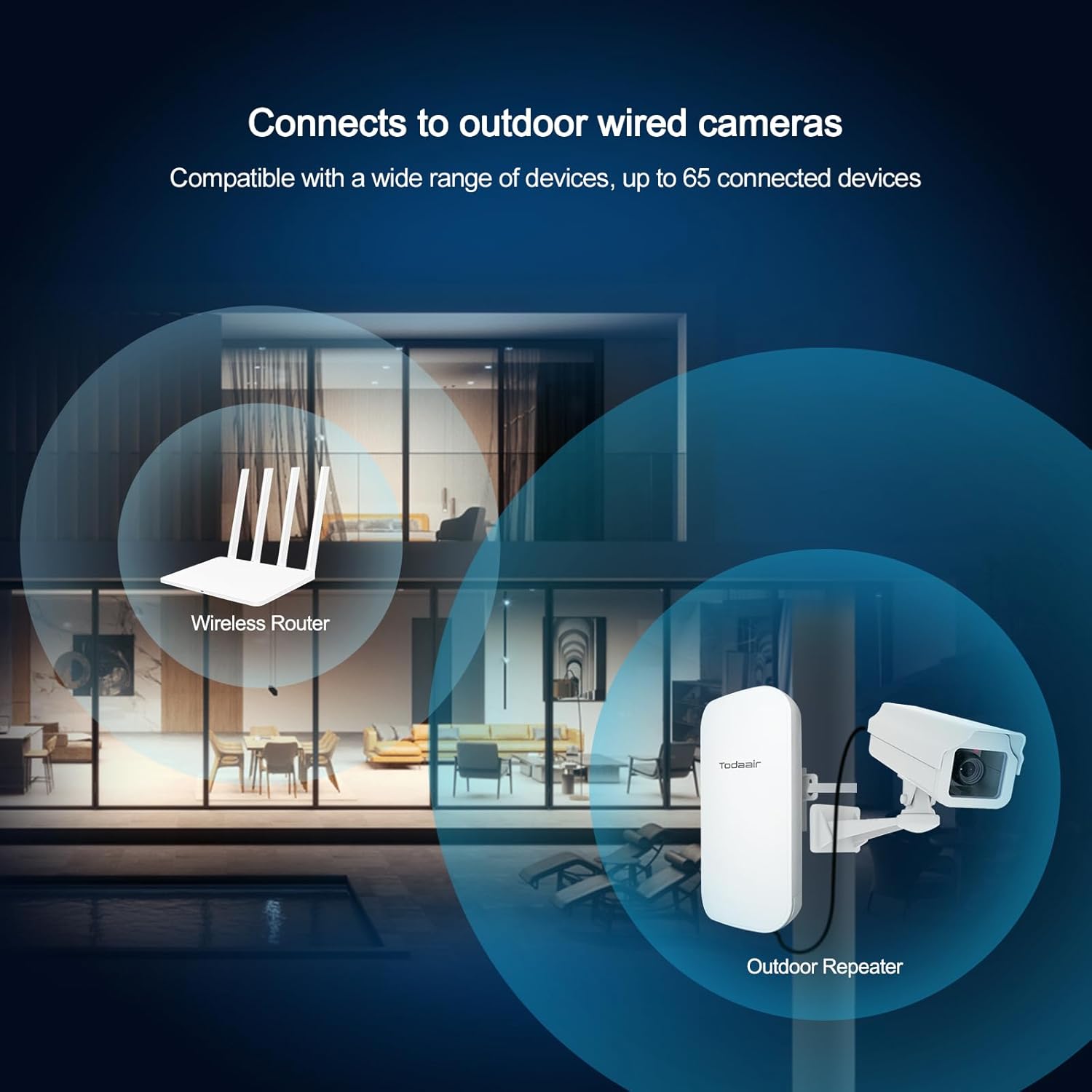
Image 3.3: The extender shown connecting to an outdoor wired camera, illustrating its compatibility with various devices.

Image 3.4: An illustration highlighting the extender's capacity to connect up to 30 devices, providing stable network connections even outdoors.

Image 3.5: This image displays various outdoor usage scenarios for the Wi-Fi extender, including yards, swimming pools, farms, and outdoor security camera setups.
4. סעטאַפּ אינסטרוקציעס
Follow these steps for initial setup and configuration of your TODAAIR Outdoor WiFi Extender.
4.1. פיזישע פֿאַרבינדונג
- Open the protective cover of the extender.
- Connect the provided DC 12V power adapter to the DC Power port.
- (Optional) For wired connections, connect an Ethernet cable to the LAN port.
- Close the protective cover, ensuring the power supply is protected.
- After powering on, wait approximately 20 seconds for the device to start detection. The indicator lights will flash, signaling it is ready for pairing.

בילד 4.1: א דעטאלירטע view of the extender's ports, including the Reset button, LAN port, and DC Power input, with examples of connecting a computer or camera.
4.2. Initial Pairing and Configuration (via Mobile Device)
For optimal pairing success, perform the initial setup near your main router. The connection process typically involves three main steps:
- פאַרבינדן זיך צו עקסטענדער'ס נעץ: Connect your mobile phone or computer to the extender's default Wi-Fi network, usually named "TDair".
- צוטריט קאָנפיגוראַציע בלאַט: עפענען א web browser. The system will automatically redirect you to the configuration page. If not, manually enter the default IP address (e.g., 192.168.34.1) in your browser. Enter the administrator password (default is "admin").
- Configure Repeater Settings: On the configuration page, select the "Survey" option to scan for available Wi-Fi networks. It is recommended to select the 5G band for scanning first. Choose your home Wi-Fi network (SSID) from the list and enter its password. Set the SSID and password for the extender's 2.4G and 5G frequency bands. For simplicity, these can be the same as your router's Wi-Fi password. Click "Confirm" to apply the settings. The extender will reboot.
- ריקאַנעקט: Reconnect your device to the newly configured extender's Wi-Fi network (e.g., "TDair5g" or "TDair2.4g") using the password you just set.

Image 4.2: Visual steps for configuring the extender via a mobile phone, showing connection to the extender's network, entering the administrator password, and setting up the new Wi-Fi network.
Video 4.3: A step-by-step tutorial demonstrating the repeater connection operation, including connecting to the extender's default Wi-Fi, accessing the configuration page, and setting up the network.
Video 4.4: This video illustrates the pairing process for the long-range waterproof outdoor repeater, showing how to connect it to an existing Wi-Fi network.
5. אַפּערייטינג מאָדעס
The TODAAIR Outdoor WiFi Extender supports two primary operating modes:
- רעפּעאַטער מאָדע: Extends the existing Wi-Fi signal range from your main router, eliminating dead zones.
- אַקסעס פונט (אַפּ) מאָדע: Converts a wired internet connection into a wireless network, ideal for areas without existing Wi-Fi coverage.
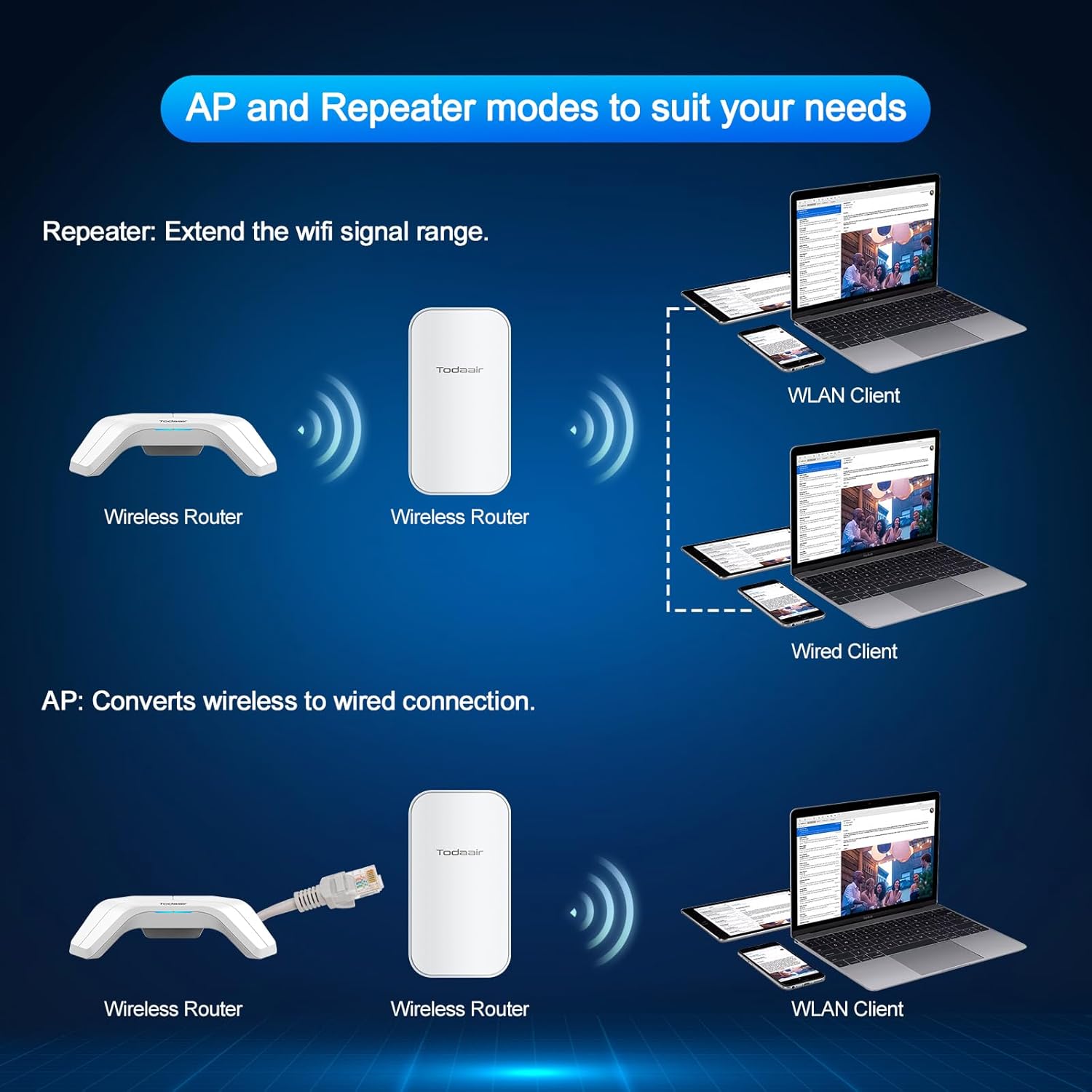
Image 5.1: A visual explanation of the Repeater mode, extending Wi-Fi from a wireless router, and AP mode, converting a wired connection to wireless.
6. ינסטאַלירונג גיידליינז
Proper placement is crucial for maximizing the performance of your WiFi extender.
- אָפּטימאַל דיסטאַנסע: Place the extender within the strong signal range of your main router. Avoid placing it too far, which results in a weak signal, or too close, which limits its effectiveness.
- שורה פון דערזען: For best results, ensure a clear line of sight between the extender and your main router, minimizing obstructions like thick walls or large metal objects.
- הייך: Mounting the extender at a higher elevation can improve signal propagation, especially in outdoor environments.
- Directional Coverage: The extender provides directional coverage. Orient it towards the area where you need extended Wi-Fi.

Image 6.1: A diagram showing different installation scenarios for a Wi-Fi extender, illustrating invalid placements (too far, too close) and a correct installation for successful signal extension.
Video 6.2: This video demonstrates how the TODAAIR WiFi Extender works with a TODAAIR router to expand Wi-Fi coverage and eliminate dead zones in a home environment.
Video 6.3: A demonstration of the repeater's distance test, showing its performance in extending Wi-Fi signal over a significant outdoor range.
7. ספּעסאַפאַקיישאַנז
| שטריך | באַשרייַבונג |
|---|---|
| מאָדעל נומער | Outdoor AC1200 |
| ווירעלעסס קאָמוניקאַציע סטאַנדאַרד | 802.11ac |
| אָפטקייט באַנדס געשטיצט | 2.4 גהז, 5 גהז |
| קייט | Up to 280 feet (approx. 3440 sq. ft. coverage) |
| וועטערפּראָאָף שאַץ | IP65 |
| פּראָדוקט דימענשאַנז | 9 X 3 X 4 אינטשעס |
| פאַבריקאַנט | TODAAIR |
8. טראָובלעשאָאָטינג
אויב איר טרעפן ישוז, פּרובירן די פאלגענדע סאַלושאַנז:
- קיין קשר:
- Ensure the extender is powered on and indicator lights are flashing.
- Verify that your device is connected to the extender's Wi-Fi network.
- Check if the password for your main router's Wi-Fi was entered correctly during setup. Incorrect passwords require a device reset and re-pairing.
- Ensure the extender is within range of your main router.
- שוואַך סיגנאַל:
- Relocate the extender to a more central position between your router and the desired coverage area.
- Minimize physical obstructions (walls, metal objects) between the extender and your devices.
- Adjust the orientation of the extender for optimal directional coverage.
- Configuration Page Not Accessible:
- Ensure your device is connected to the extender's default Wi-Fi network ("TDair") before attempting to access the configuration page.
- פרובירט אויסצורייניגן אייער בלעטערער'ס קעש אדער ניצן אן אנדערן בלעטערער.
- באַשטעטיק די מיטל: If issues persist, use the "RES" button (Reset) on the device to restore factory settings. This will require re-configuring the extender.
9. וישאַלט
To ensure the longevity and optimal performance of your TODAAIR Outdoor WiFi Extender:
- רעגולער רייניקונג: Periodically wipe the exterior of the device with a soft, dry cloth to remove dust and debris. Do not use liquid cleaners.
- Firmware דערהייַנטיקונגען: קוק די פאַבריקאַנט ס website for any available firmware updates to ensure the device has the latest features and security enhancements.
- קאַבלע אָרנטלעכקייַט: Inspect power and Ethernet cables regularly for any signs of wear or damage. Replace damaged cables immediately.
- פּראַטעקטיוו דעקן: Always ensure the protective cover over the ports is securely closed to maintain the IP65 weatherproofing.
10. וואָראַנטי און שטיצן
For warranty information, technical support, or further assistance, please refer to the contact details provided in the product packaging or visit the official TODAAIR webפּלאַץ.