
1. הקדמה
This manual provides essential information for the proper setup, operation, and maintenance of your FUNYET FUNPAD 10-inch Android Tablet. Please read this guide thoroughly before using your device to ensure optimal performance and longevity.
2. וואָס איז אין דער קעסטל
באַשטעטיקן אַז אַלע זאכן זענען פאַראַן אין פּעקל:
- FUNYET FUNPAD 10-inch Android Tablet
- מאַכט אַדאַפּטער
3. פּראָדוקט איבערview
The FUNYET FUNPAD is a 10-inch Android tablet featuring an Octa-Core processor, 8GB RAM, 128GB storage, and a metal shell design. It is equipped with dual cameras, Wi-Fi 5, and Bluetooth 5.0 for versatile use.
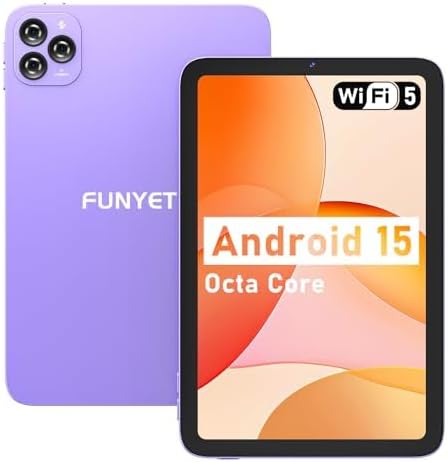
בילד: פאָרנט און הינטן view of the FUNYET FUNPAD 10-inch Android Tablet, showcasing its purple metal shell and camera module.
3.1 אַפּאַראַט אויסלייג און קאָמפּאָנענטן

Image: Diagram illustrating the various ports and buttons on the FUNYET FUNPAD tablet. This includes the Micro SD Slot, Power On/Off button, Volume buttons, Type-C (Full Function) port, Auto Focus 8MP Rear Camera, Fixed Focus 2MP Front Camera, Flashlight, and Dual Speakers.
- מאַכט קנעפּל: Located on the side, used to power the device on/off or put it to sleep.
- באַנד קנעפּלעך: אַדזשאַסטירן דעם אַודיאָ אַרויסגאַנג לעוועל.
- טיפּ-C פּאָרט: פֿאַר טשאַרדזשינג און דאַטן אַריבערפירן.
- מיקראָ סד שפּעלטל: Insert a Micro SD card for expandable storage.
- פראָנט אַפּאַראַט: 2MP camera for video calls and selfies.
- דערציען אַפּאַראַט: 8MP autofocus camera with flashlight for capturing photos and videos.
- צווייענדיק ספּיקערז: צושטעלן אַודיאָ רעזולטאַט.
4. סעטאַפּ
4.1 ערשט טשאַרדזשינג
Before first use, fully charge the tablet using the provided power adapter and Type-C cable. The battery indicator on the screen will show charging status.
4.2 פּאַוערינג אויף / אַוועק
- צו מאַכט אויף: Press and hold the Power button until the FUNYET logo appears.
- צו מאַכט אַוועק: דריק און האלט דעם פּאַוער קנעפּל, און דערנאָך סעלעקטיר "פּאַוער אויס" פֿון די אָפּציעס אויף דעם עקראַן.
- צו ריסטאַרט: דריק און האלט דעם פּאַוער קנעפּל, און דערנאָך סעלעקטיר "ריסטאַרט" פֿון די אָפּציעס.
4.3 ערשטע סעטאַפּ וויזאַרד
ביים ערשטן מאָל אנצינדן, וועט די טאַבלעט אייך פירן דורך אַן ערשטן סעטאַפּ פּראָצעס. פֿאָלגט די אינסטרוקציעס אויף דעם עקראַן צו:
- אויסקלייַבן דיין שפּראַך.
- פאַרבינדן צו אַ Wi-Fi נעץ.
- שטעלט אויף אייער גוגל אקאונט (אפציאנאל, אבער רעקאמענדירט פאר אפליקאציע דאונלאודס).
- Configure date and time.
5. אַפּערייטינג ינסטרוקטיאָנס
5.1 יקערדיק נאַוויגאַציע
The FUNYET FUNPAD features an In-cell multi-touch display. Use standard Android gestures:
- צאַפּן: אויסקלייבן אַן אייטעם אָדער עפֿענען אַן אַפּ.
- לאַקכענען: סקראָלן דורך סקרינז אדער רשימות.
- קניפּ: פארגרעסערן אדער פארקלענערן בילדער און web בלעטער.
- לאנג פּרעס: צוטריט קאנטעקסטועלע מעניוס אדער באוועג איקאנעס.
5.2 Wi-Fi קאָנעקטיוויטי
צו פאַרבינדן צו אַ Wi-Fi נעץ:
- גיין צו סעטטינגס > נעץ און אינטערנעט > ווי-פי.
- טוישן Wi-Fi On.
- אויסקלייבן אייער געוואונטשענע נעץ פון דער ליסטע.
- אַרייַן די פּאַראָל אויב געבעטן, און דאַן צאַפּן פאַרבינדן.
5.3 בלועטאָאָטה פּערינג
To pair with a Bluetooth device (e.g., headphones, speakers):
- גיין צו סעטטינגס > קאָננעקטעד דעוויסעס > בלועטאָאָטה.
- באַשטימען בלועטאָאָטה On.
- מאַכן זיכער אַז דיין בלועטאָאָטה מיטל איז אין פּערינג מאָדע.
- Select your device from the list of available devices and follow any on-screen prompts to complete pairing.
5.4 קאַמעראַ באַניץ
The tablet features an 8MP autofocus rear camera and a 2MP fixed-focus front camera.

Image: Visual representation of the FUNYET FUNPAD tablet's camera capabilities, highlighting the 8MP rear camera with autofocus and flashlight, and the 2MP front camera. Example photos are displayed.
- עפענען די אַפּאַראַט אַפּ.
- צאַפּן אויף די קאַמעראַ ייקאַן צו באַשטימען צווישן פראָנט און הינטערשטע קאַמעראַס.
- צאַפּן דעם שאַטער קנעפּל צו נעמען אַ פאָטאָ אָדער אָנהייבן/אָפּשטעלן ווידעאָ רעקאָרדינג.
5.5 סטאָרידזש פאַרוואַלטונג
The tablet comes with 128GB of internal storage. You can expand this by inserting a Micro SD card (up to 1TB capacity).

Image: The FUNYET FUNPAD tablet screen showing icons for 128GB ROM, 8GB RAM, and 1TB Micro SD expansion, indicating ample storage and expandability.
To manage storage:
- גיין צו סעטטינגס > סטאָרידזש.
- View internal storage usage and manage files.
- Insert a Micro SD card into the designated slot to expand storage.
5.6 באַטערי מאַנאַגעמענט
The tablet is equipped with a 6000mAh battery for extended usage.

Image: The FUNYET FUNPAD tablet being used for various activities like watching videos and video calls, illustrating its long-lasting 6000mAh battery.
- To check battery status, go to סעטטינגס > באַטערי.
- For optimal battery life, avoid extreme temperatures and use the provided charger.
5.7 גפּס נאַוויגאַציע
The tablet supports GPS, GLONASS, and BDS for accurate location services. Ensure location services are enabled in סעטטינגס > אָרט for navigation apps to function correctly.
6. וישאַלט
6.1 רייניקונג די מיטל
- ניצט אַ ווייכן, לינט-פֿרייע שטאָף צו רייניקן דעם עקראַן און קערפּער.
- ויסמיידן ניצן האַרב קעמיקאַלז אָדער אַברייסיוו מאַטעריאַלס.
- שפריצט נישט רייניגער גלייך אויפן עקראַן.
6.2 ווייכווארג דערהייַנטיקונגען
Regularly check for and install software updates to ensure your tablet has the latest features and security enhancements. Go to סעטטינגס > סיסטעם > סיסטעם דערהייַנטיקן.
6.3 באַטערי קער
- פֿאַרמײַדט אָפֿט פֿולשטענדיק אויסצולאָדן די באַטעריע.
- Do not expose the tablet to extreme heat or cold.
- אויב די טאַבלעט וועט נישט ווערן גענוצט פֿאַר אַ לענגערע צייט, לאָדן זי אויף צו בערך 50% איידער איר לייגט זי אַוועק.
7. טראָובלעשאָאָטינג
If you encounter issues with your FUNYET FUNPAD, refer to the following common solutions:
| פּראָבלעם | מעגלעך לייזונג |
|---|---|
| טאַבלעט טוט זיך נישט אָן | Ensure the battery is charged. Connect the tablet to the charger for at least 30 minutes, then try powering on again. |
| ווי-פי קשר ישוז | ריסטאַרט דעם טאַבלעט און דיין Wi-Fi ראַוטער. פֿאַרגעסט וועגן דעם נעץ אין די Wi-Fi סעטטינגס און פֿאַרבינדט זיך ווידער. מאַכט זיכער אַז איר זענט אין דער נאָענטקייט. |
| לאַנגזאַמע פאָרשטעלונג אָדער פרירן | Close unnecessary background apps. Clear cache for problematic apps. Restart the tablet. Check for available storage space. |
| פאַרשטעלן ניט ריספּאַנדאַבאַל | Perform a forced restart by holding the Power button for approximately 10-15 seconds. If the issue persists, consider a factory reset (data will be lost). |
| Device reboots unexpectedly | Ensure the device is updated to the latest software. Check for conflicting apps. If the issue persists, a factory reset may be necessary. |
7.1 פאַבריק באַשטעטיק
A factory reset will erase all data from your tablet and restore it to its original factory settings. This should be considered a last resort for persistent software issues.
- Back up any important data.
- גיין צו סעטטינגס > סיסטעם > באַשטעטיק אָפּציעס > מעקן אַלע דאַטן (פאַבריק באַשטעטיק).
- באַשטעטיקן אייער ברירה און נאָכפאָלגן די אינסטרוקציעס אויף דעם עקראַן.
8. ספּעסאַפאַקיישאַנז
Key technical specifications for the FUNYET FUNPAD 10-inch Android Tablet:
| שטריך | באַשרייַבונג |
|---|---|
| גרייס פון דעם עקראַן | 10 אינטשעס |
| פאַרשטעלן האַכלאָטע | 800x1280 פּיקסעלס |
| פּראַסעסער | 1.6 GHz Octa-Core (Spreadtrum T606) |
| גראַפיקס קאָופּראַסעסער | Mali-G57 |
| באַראַן | 8 גיגאבייט |
| אינערלעכער סטאָרידזש | 128 גיגאבייט |
| יקספּאַנדאַבאַל סטאָרידזש | מיקראָ סד (אַרויף צו 1 טב) |
| אָפּערייטינג סיסטעם | אַנדרויד |
| ווירעלעסס טיפּ | 802.11ac (Wi-Fi 5) |
| בלועטאָאָטה | בלועטאָאָטה 5.0 |
| דערציען אַפּאַראַט | 8MP אַוטאָ פאָקוס |
| פראָנט אַפּאַראַט | 2 מפּ פאַרפעסטיקט פאָקוס |
| באַטערי | 6000 מאַה |
| פּונקט וואָג | 1.74 פונט |
| פּראָדוקט דימענשאַנז | 9.48 X 6.28 X 0.3 אינטשעס |
9. וואָראַנטי און שטיצן
FUNYET is dedicated to providing quality electronic products. We offer a 30-day free exchange policy and a 1-year free repair service for all our products.
If you have any questions or require assistance with your FUNYET FUNPAD tablet, please contact FUNYET support. We aim to reply to all inquiries within 24 hours.
For further information or to explore other products, visit the official FUNYET store: FUNYET Store on Amazon