
1. הקדמה
This manual provides detailed instructions for the installation, operation, and maintenance of your youkey S320 Wire-Free MagCam Security Camera. The S320 is a versatile indoor/outdoor 2K battery-powered camera featuring dual-band WiFi 6, a magnetic mount for easy placement, color night vision, and intelligent person/pet detection. Please read this manual thoroughly before using the product to ensure proper function and safety.
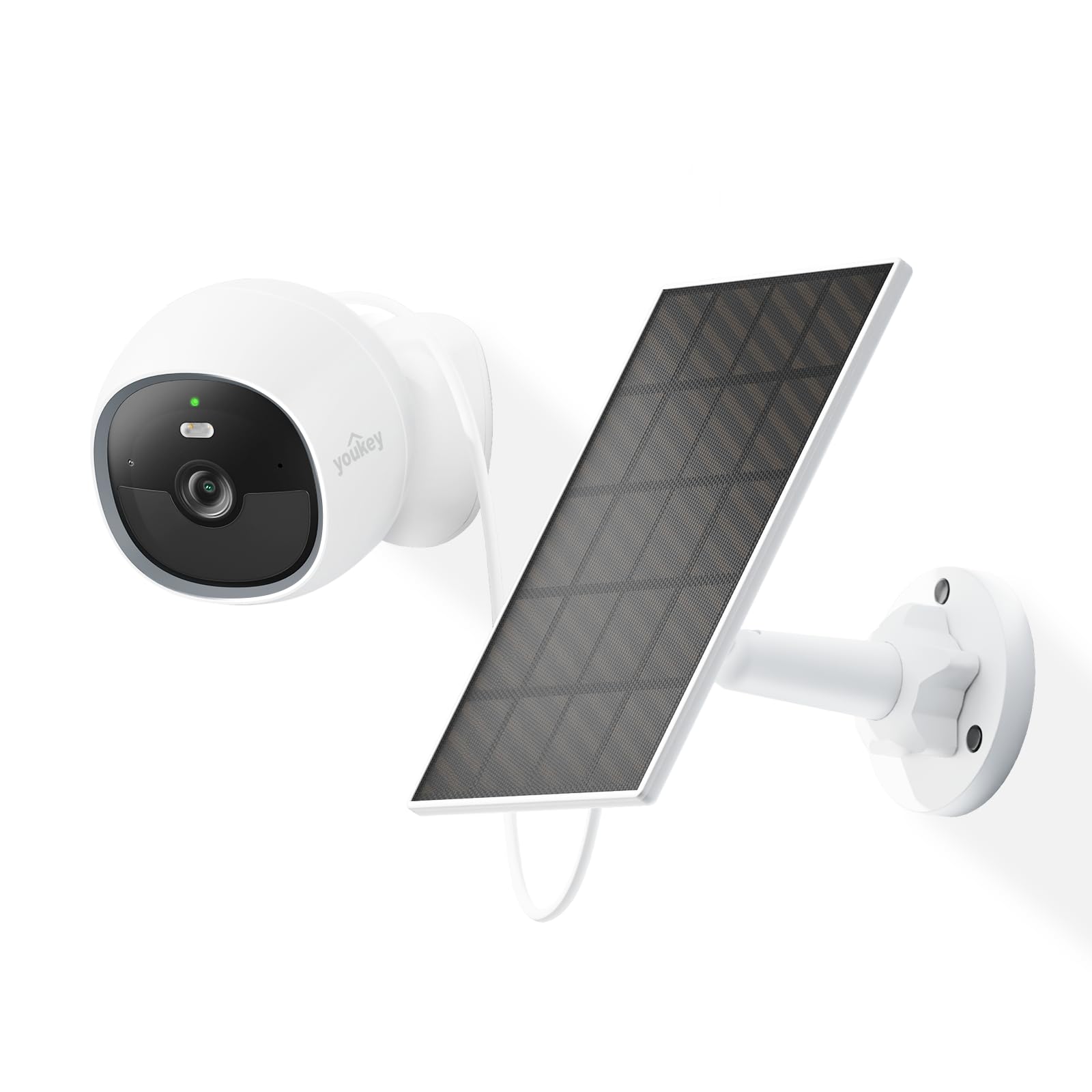
Image: The youkey S320 Wire-Free MagCam Security Camera, showcasing its compact design and magnetic base.
2. פּעקל אינהאַלט
Verify that all items are present in your package. If any items are missing or damaged, please contact customer support.
- youkey S320 Wire-Free MagCam Security Camera
- מאַגנעטיק מאַונטינג באַזע
- Screw Mounting Kit (screws and wall anchors)
- וסב טשאַרדזשינג קאַבלע
- שנעל אָנהייב גייד
3. פּראָדוקט איבערview
Familiarize yourself with the components of your S320 camera.

בילד: אן איבערview diagram highlighting key features of the youkey S320 camera, including its lens, LED indicator, and mounting points.
קאַמעראַ קאָמפּאָנענטן:
- אַפּאַראַט לענס: Captures 2K QHD video.
- LED ינדיקאַטאָר: Displays camera status (e.g., charging, connected, recording).
- מיקראָפאָן: פֿאַר אַודיאָ אַרייַנגאַנג און צוויי-וועג קאָמוניקאַציע.
- רעדנער: פֿאַר אַודיאָ אַרויסגאַנג און צוויי-וועג קאָמוניקאַציע.
- PIR באַוועגונג סענסאָר: דעטעקטירט באַוועגונג פֿאַר אַלערץ און רעקאָרדינג.
- טשאַרדזשינג פּאָרט: USB port for charging the internal battery.
- באַשטעטיק קנעפּל: געניצט צו צוריקשטעלן די קאַמעראַ צו די פֿאַבריק סעטטינגס.
4. סעטאַפּ
4.1. טשאַרדזשינג די קאַמעראַ
Before initial use, fully charge the camera's built-in 6400mAh battery. Connect the USB charging cable to the camera's charging port and a standard USB power adapter (not included). The LED indicator will show charging status.
4.2. דאַונלאָודינג די אַפּ
אָפּלאָדירן די youkey Life app from the Apple App Store or Google Play Store. Create an account or log in if you already have one.
4.3. צוזאמענשטעלן די קאַמעראַ
- Open the youkey Life app and tap the '+' icon to add a new device.
- Follow the on-screen instructions to power on the camera and enter pairing mode.
- The camera uses Bluetooth for initial setup and then connects to your home Wi-Fi network (2.4GHz or 5GHz Wi-Fi 6 supported).
- Ensure your Wi-Fi network credentials are correct.

Image: A smartphone screen showing a successful link confirmation, illustrating the easy setup process with Dual Band WiFi 6 and Bluetooth.
4.4. ינסטאַלירונג
The youkey S320 offers flexible installation options for both indoor and outdoor use.
מאַגנעטיק מאַונטינג:
For quick and easy placement on metal surfaces, attach the camera directly to the magnetic mounting base. This allows for simple angle adjustments.
שרויף מאַונטינג:
For non-magnetic surfaces or more secure installation, use the provided screw mounting kit. Mark the desired location, drill pilot holes, insert wall anchors (if necessary), and secure the mounting base with screws. Then, attach the camera to the base.

Image: The magnetic mount and screw pack components for the youkey S320 camera, demonstrating versatile installation options.
Solar Panel Integration (Optional):
To provide continuous power and eliminate the need for manual charging, connect the youkey SP3 Solar Panel (sold separately) to the camera. Ensure the solar panel is positioned to receive at least 1 hour of direct sunlight daily for optimal performance. The SP3 solar panel is IP65 weather-resistant, suitable for outdoor conditions.

Image: The youkey S320 camera mounted outdoors next to a youkey SP3 solar panel, illustrating continuous power capability.
5. אַפּערייטינג די קאַמעראַ
5.1. לייוו View
Access the live video feed from your camera through the youkey Life app. This allows real-time monitoring of your property.
5.2. אויפנעמען און ווידערשפּילן
The camera automatically records events triggered by motion detection. Recordings are stored on the built-in 8GB eMMC storage or in the cloud (subscription may apply for extended cloud features). You can review רעקאָרדעד פוtagע דורך די אַפּ.

Image: The youkey S320 camera with an overlay indicating its 8GB eMMC built-in storage for reliable performance and seamless playback.
5.3. באַוועגונג דעטעקציע און וואָרענונגען
The S320 features NueraMind AI Detection for accurate person and pet detection, reducing false alarms. You can customize detection zones within the app to focus on specific areas of interest.

Image: A child and a dog in a driveway, with icons indicating NueraMind Smart AI Detection for persons and pets.
Receive instant thumbnail notifications on your smartphone when motion is detected, allowing you to quickly assess the situation without opening the app.

Image: A smartphone displaying multiple instant thumbnail notifications from the youkey Life app, showing detected events.
5.4. צוויי-וועגיק אודיאָ
Utilize the built-in microphone and speaker for clear two-way communication through the app. This allows you to speak to visitors or deter intruders remotely.

Image: A child playing outdoors, with a speech bubble indicating two-way audio communication through the camera.
5.5. נאַכט זעאונג
The S320 provides color night vision for clear footage even in low-light conditions, enhanced by a F1.6 aperture. Built-in spotlights can activate upon motion detection to illuminate the area and deter unwanted activity.

Image: A family enjoying an evening outdoors, viewed through a smartphone screen, demonstrating the camera's color night vision capability.
6. וישאַלט
6.1. באַטערי מאַנאַגעמענט
The 6400mAh battery provides extended operation. For continuous power, especially in outdoor installations, consider pairing with the youkey SP3 Solar Panel. Monitor battery levels through the youkey Life app.
6.2. רייניקונג די קאַמעראַ
Periodically clean the camera lens and body with a soft, dry cloth to ensure optimal image quality and prevent dust buildup. Do not use harsh chemicals or abrasive materials.
6.3. פירמוואַרע דערהייַנטיקונגען
Ensure your camera's firmware is up to date for the best performance and security features. The youkey Life app will notify you of available updates and guide you through the process.
7. טראָובלעשאָאָטינג
If you encounter issues with your youkey S320 camera, refer to the following common solutions:
- קאַמעראַ פֿאַרבינדט זיך נישט צו Wi-Fi: Ensure your Wi-Fi network is 2.4GHz or 5GHz and within range. Check Wi-Fi password. Try resetting the camera.
- נעבעך ווידעא קוואַליטעט: קאָנטראָלירט די שטאַרקייט פון אייער Wi-Fi סיגנאַל. מאַכט זיכער אַז די קאַמעראַ לינז איז ריין און פריי פון שטערונגען.
- די באַטאַרייע פליסן געשווינד: Reduce the frequency of motion detection events or live view usage. Ensure the solar panel (if used) is receiving adequate sunlight.
- באַוועגונג דעטעקציע אַרבעט נישט: Verify that motion detection is enabled in the app settings. Check detection zones and sensitivity levels.
- קיין אַודיאָ: Ensure microphone and speaker permissions are enabled in the app and on your smartphone. Check camera volume settings.
For further assistance, contact youkey customer support.
8. ספּעסאַפאַקיישאַנז

Image: A detailed infographic outlining the key specifications and features of the youkey S320 camera.
| שטריך | באַשרייַבונג |
|---|---|
| מאָדעל | S320 |
| האַכלאָטע | 2.5K QHD |
| פעלד פון View (פאָוו) | 150° |
| נאַכט זעאונג | Color Night Vision (F1.6 aperture), Infrared Light (10m), White Light (5m) |
| באַטאַרייע קאַפּאַציטעט | 6400 מאַה |
| קאַנעקטיוויטי | Dual Band Wi-Fi 6 (2.4GHz & 5GHz), Bluetooth |
| סטאָרידזש | Built-in 8GB eMMC, Cloud Storage option |
| וועטער קעגנשטעל | IP65 |
| דעטעקשאַן | NueraMind AI (Human Body, Pet Detection), Customizable Zones |
| אַודיאָ | צוויי-וועג רעדן |
| קאַמפּאַטאַבילאַטי | אַרבעט מיט Alexa, אַרבעט מיט Google היים |
9. וואָראַנטי און שטיצן
9.1. וואָראַנטי אינפֿאָרמאַציע
Your youkey S320 Wire-Free MagCam Security Camera is covered by a limited warranty. Please refer to the official youkey webוועבזייטל אדער אייער קויפן דאקומענטאציע פאר ספעציפישע גאראנטיע טערמינען און באדינגונגען.
9.2. קונה שטיצן
For technical support, troubleshooting, or warranty claims, please contact youkey customer service through the following channels:
- Webפּלאַץ: Visit the official youkey webוועבזייטל פֿאַר אָפֿט געשטעלטע פֿראַגעס און שטיצע רעסורסן.
- בליצפּאָסט: Refer to your product packaging or the youkey webזייטל פֿאַר שטיצע אימעיל אַדרעסן.
- אין-אַפּ שטיצע: Access support options directly within the youkey Life application.