
הקדמה
Welcome to your Angrox Universal Replacement Remote Control. This manual provides detailed instructions for setting up and operating your new remote, designed for seamless compatibility with various Philips Smart 4K UHD Android TVs. Please read this manual thoroughly to ensure optimal performance and longevity of your remote control.
1. סעטאַפּ
1.1 באַטאַרייע ייַנמאָנטירונג
The remote control requires two AAA alkaline batteries (not included).
- געפֿינען די דעקן פון די באַטאַרייע אָפּטייל אויף די צוריק פון די ווייַט קאָנטראָל.
- Press down on the tab and slide the cover downwards to open.
- אַרײַנשטעלן צוויי AAA באַטעריעס, און זיכער מאַכן אַז די פּאָזיטיוו (+) און נעגאַטיוו (-) טערמינאַלן זענען ריכטיק אויסגעשטעלט מיט די מאַרקירונגען אינעווייניק אין דעם אָפּטייל.
- רוק די באַטאַרייע דעקן צוריק אין פּלאַץ ביז עס קליקס סיקיורלי.
1.2 ערשט קאַנעקשאַן
This Angrox replacement remote control is designed for immediate use with compatible Philips Smart TVs. No programming or pairing is required. Simply insert the batteries, and the remote is ready to operate your television.
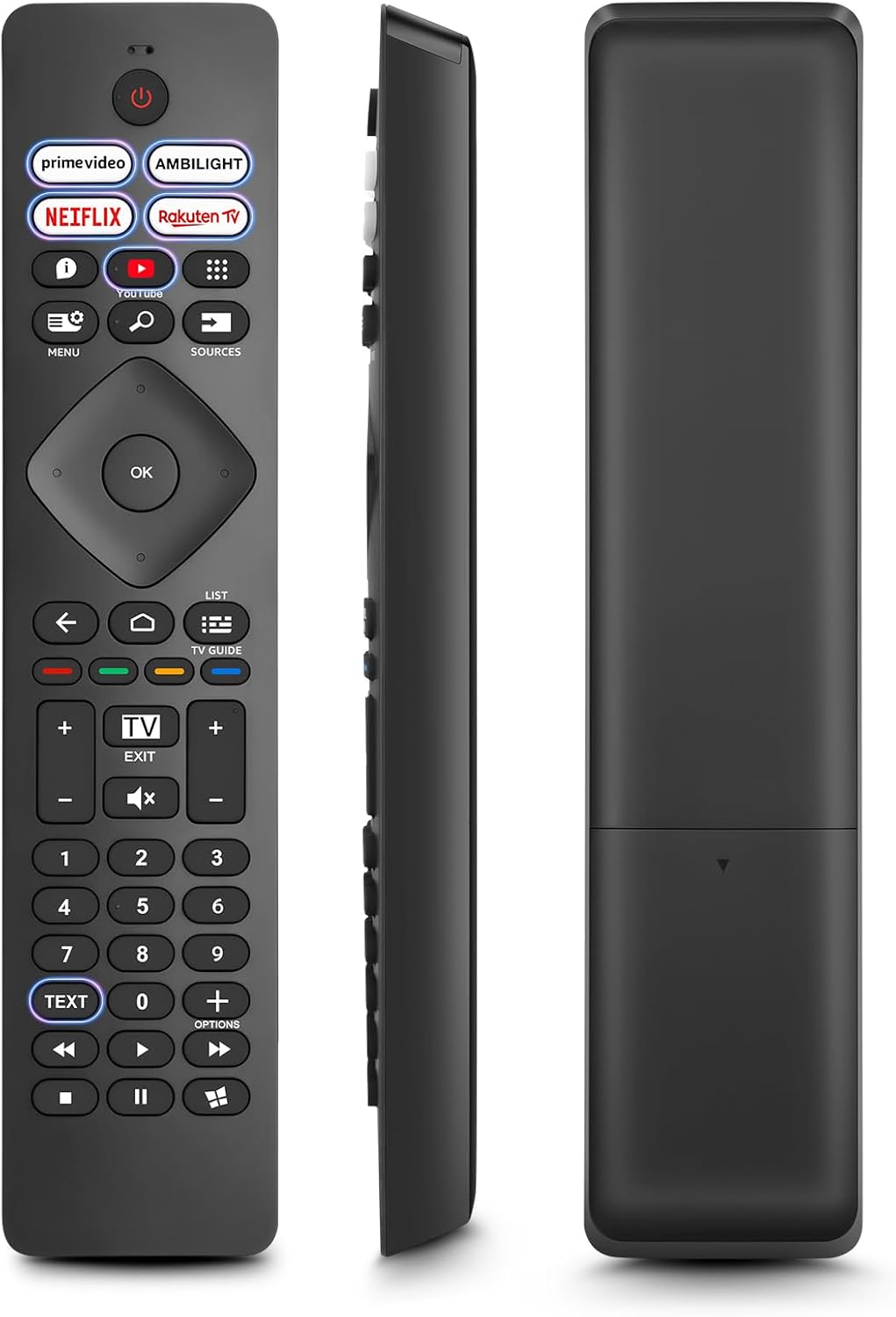
בילד: פראָנט, זײַט, און הינטן views of the Angrox Universal Replacement Remote Control. This image illustrates the physical design and battery compartment location.
2. אַפּערייטינג ינסטרוקטיאָנס
2.1 קנעפּל פונקציעס איבערview
Familiarize yourself with the remote control's buttons and their primary functions.
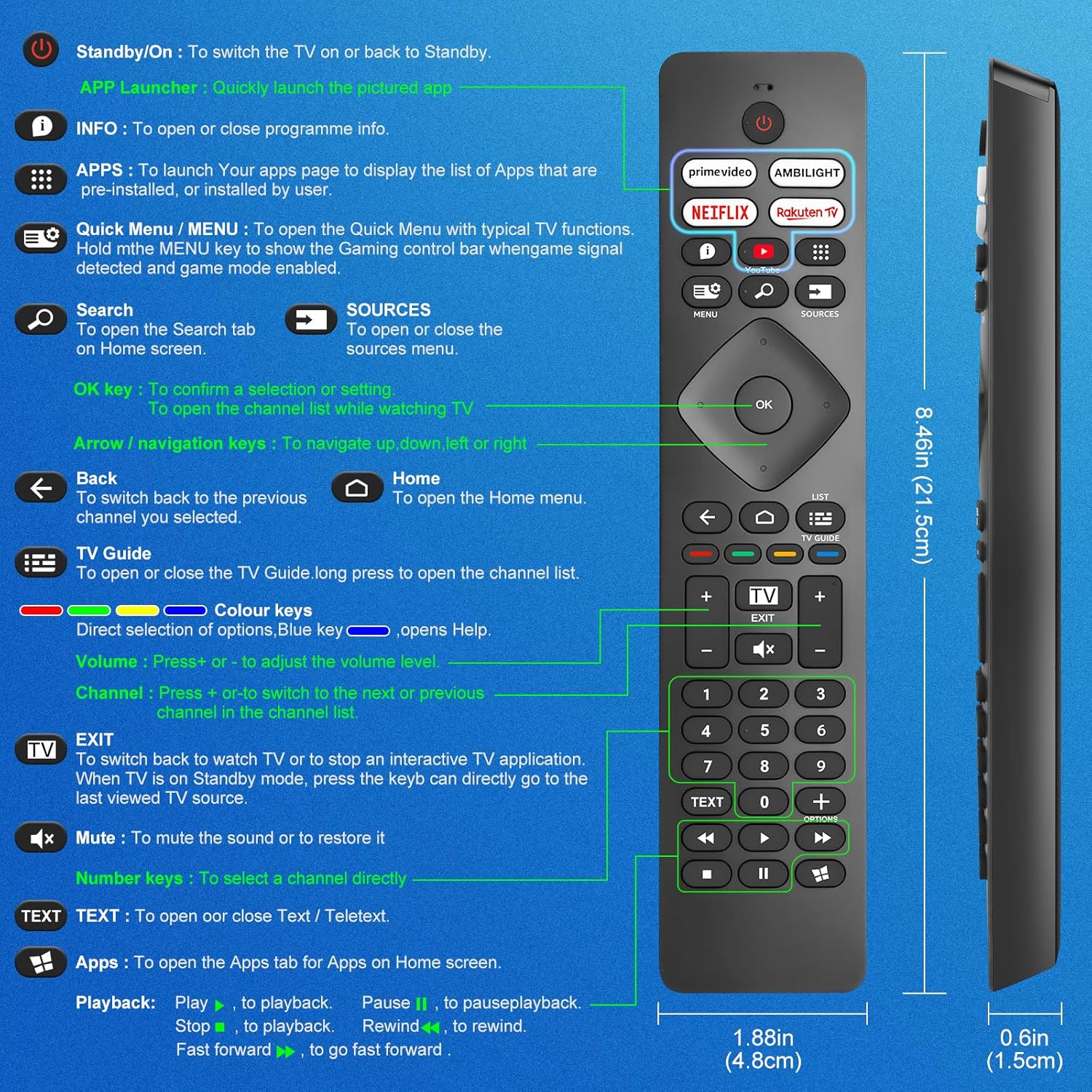
Image: A detailed diagram illustrating each button on the Angrox remote control and its corresponding function.
Detailed Button Descriptions:
- Standby/On (Power Button): צו באַשטימען די טעלעוויזיע אויף אָדער צוריק צו סטאַנדביי.
- APP Launcher: Quickly launch the pictured app.
- אינפֿאָרמאַציע: To open or close programme info.
- אַפּפּס: To launch your apps page to display the list of apps that are pre-installed or installed by the user.
- Quick Menu / MENU: To open the Quick Menu with typical TV functions. Hold the MENU key to show the Gaming control bar when game signal detected and game mode enabled.
- זוכן: To open the Search tab on Home screen.
- מקורים: To open or close the sources menu.
- OK שליסל: To confirm a selection or setting. To open the channel list while watching TV.
- Arrow/Navigation keys: צו נאַוויגירן אַרויף, אַראָפּ, לינקס אָדער רעכטס.
- צוריק: צו באַשטימען צוריק צו די פריערדיקע קאַנאַל איר אויסגעקליבן.
- היים: To open the Home menu.
- טעלעוויזיע גייד: To open or close the TV Guide. Long press to open the channel list.
- Colour keys (Red, Green, Yellow, Blue): Direct selection of options. Blue key opens Help.
- באנד +/-: צו סטרויערן די באַנד מדרגה.
- קאַנאַל +/-: צו באַשטימען צו דער ווייַטער אָדער פריערדיקן קאַנאַל אין דער קאַנאַל רשימה.
- אַרויסגאַנג: To switch back to watch TV or to stop an interactive TV application. When TV is on Standby mode, press the key to directly go to the last viewed TV source.
- שטום: צו שטום די געזונט אָדער צו ומקערן עס.
- נומער שליסלען (0-9): צו אויסקלייַבן אַ קאַנאַל גלייַך.
- טעקסט: To open or close Text / Teletext.
- Apps (Netflix, Prime Video, Rakuten TV, YouTube): Quick access to dedicated streaming applications.
- Playback Controls (Play, Pause, Stop, Rewind, Fast Forward): פֿאַר מעדיע ווידערשפּיל.
2.2 דורכוועג קנעפּלעך
The remote features dedicated shortcut buttons for popular streaming services and Ambilight control.

Image: The Angrox remote control with highlighted shortcut buttons for Prime Video, Ambilight, Netflix, Rakuten TV, and YouTube.
- הויפּט ווידעא: Direct access to Amazon Prime Video.
- אַמבילייט: Control Philips Ambilight features.
- נעטפליקס: Direct access to Netflix.
- ראַקוטן טעלעוויזיע: Direct access to Rakuten TV.
- יאָוטובע: Direct access to YouTube.
3. קאַמפּאַטאַבילאַטי
This Angrox replacement remote control is universally compatible with a wide range of Philips Smart TVs, including:

Image: Visual representation of the Angrox remote's compatibility with Philips 4K Ambilight TV, 4K Ultra HD TV, LED 4K TV, and OLED 4K TV.
- 4K Ambilight TV
- 4K Ultra HD טעלעוויזיע
- געפירט 4 ק טעלעוויזיע
- OLED 4K טעלעוויזיע
It is designed to function with all Philips Smart TV models that utilize an infrared remote control.
4. פאָרשטעלונג פֿעיִקייטן

Image: Graphics indicating a 0.2-second fast response and a 10-meter transmitting distance for the remote control.
- שנעל ענטפער: Enjoy a quick response time of approximately 0.2 seconds for button presses.
- טראַנסמיטינג ווייַטקייט: Effective operating range up to 10 meters (approximately 33 feet).
5. וישאַלט
- רייניקונג: ניצט אַ ווייכע, טרוקענע שטאָף צו רייניקן די ווײַטקאָנטראָל. פֿאַרמײַדט ניצן פֿליסיקע רייניגער אָדער שרײַבנדיקע מאַטעריאַלן.
- באַטערי זאָרגן: If the remote will not be used for an extended period, remove the batteries to prevent leakage and potential damage. Replace batteries when the remote's response becomes sluggish or inconsistent.
- סטאָרידזש: האַלט די ווײַטקאָנטראָלירטע אַפּאַראַטור אין אַ קיל, טרוקן אָרט, ווײַט פֿון דירעקטער זון און עקסטרעמע טעמפּעראַטורן.
6. טראָובלעשאָאָטינג
6.1 ווײַטקאָנטראָל רעאַגירט נישט
- טשעק באַטעריז: Ensure batteries are inserted correctly with the correct polarity (+/-). Replace old or depleted batteries with new AAA alkaline batteries.
- שורה פון דערזען: Make sure there is a clear line of sight between the remote control and the TV's infrared sensor. Obstructions can block the signal.
- ווייַט סענסאָר: Ensure the TV's infrared sensor is not blocked or dirty.
6.2 לימיטירטע פונקציאָנאַליטעט
- While this remote is broadly compatible, some specific advanced functions unique to certain original Philips remote models might not be replicated. Verify the button functions against the provided diagram.
6.3 Ambilight Functionality
עטלעכע באַניצער רעviews indicate that Ambilight functionality might vary. If your Ambilight button does not work as expected, ensure your TV's Ambilight feature is enabled and configured correctly in your TV settings.
7. ספּעסאַפאַקיישאַנז
| שטריך | דעטאַל |
|---|---|
| סאָרט | אַנגראָקס |
| מאָדעל | pour Philips TV |
| קאַמפּאַטאַבאַל דעוויסעס | Philips Smart TV (4K Ambilight, 4K UHD, LED 4K, OLED 4K) |
| ספּעציעלע שטריך | וניווערסאַל |
| קאַנעקטער טיפּ | ינפרערעד |
| באַטערי טיפּ | 2 x AAA אַלקאַליין (נישט אַרייַנגערעכנט) |
| נומער דימענשאַנז | 22.7 X 6.2 X 2.4 סענטימעטער |
| פּונקט וואָג | 60 ג |
| קאָליר | שוואַרץ |
באַמערקונג: ספּעסאַפאַקיישאַנז זענען אונטערטעניק צו טוישן אָן פריערדיק באַמערקן.
8. וואָראַנטי און שטיצן
For product support or warranty inquiries, please contact your retailer or the manufacturer, Angrox, directly. Please refer to your purchase documentation for specific warranty terms and contact information.
פאַבריקאַנט: אַנגראָקס
ASIN: B0F83X2FQG