
1. הקדמה
Thank you for choosing the Leapwell Portable Bluetooth Desktop CD Player, Model L-CD202B. This device offers versatile audio playback options, including CD, Bluetooth, FM Radio, USB, AUX, AB Repeat, and Optical modes. Designed for both home and portable use, it features integrated speakers and a rechargeable battery. This manual provides essential information for safe and effective operation of your new CD player.
2. זיכערקייַט אינפֿאָרמאַציע
- לייענען אַלע ינסטראַקשאַנז איידער נוצן און ריטיין פֿאַר צוקונפֿט רעפֿערענץ.
- שטעלט נישט אויס דעם אפאראט צו רעגן, פייכטקייט, אדער עקסטרעמע טעמפעראטורן.
- ויסמיידן פּלייסינג די מיטל לעבן היץ קוואלן אַזאַ ווי ראַדיאַטאָרס, היץ רעדזשיסטערז, סטאָוווז אָדער אנדערע היץ-פּראַדוסינג אַפּאַראַט.
- ניצן בלויז אַטאַטשמאַנץ / אַקסעסעריז ספּעסיפיעד דורך דער פאַבריקאַנט.
- ריין בלויז מיט אַ טרוקן שטאָף.
- דו זאלסט נישט פאַרשפּאַרן קיין ווענטאַליישאַן אָופּאַנינגז.
- באַשיצן די מאַכט שנור פון גיין אויף אָדער פּינטשעד.
- אָפּשטעקן די מיטל בעשאַס בליץ סטאָרמז אָדער ווען אַניוזד פֿאַר לאַנג פּיריאַדז.
- אָפּשיקן אַלע סערוויסעס צו קוואַלאַפייד סערוויס פּערסאַנעל.
3. וואָס איז אין דער קעסטל
ביים אויספּאַקן, ביטע זיכער מאַכן אַז אַלע זאכן זענען פאַראַן און אין גוטן צושטאַנד:
- Leapwell Portable CD Player
- ווייַט קאָנטראָל
- וסב-C טשאַרדזשינג קאַבלע
- 3.5 מם AUX קאַבלע
- ינסטראַקשאַנז מאַנואַל
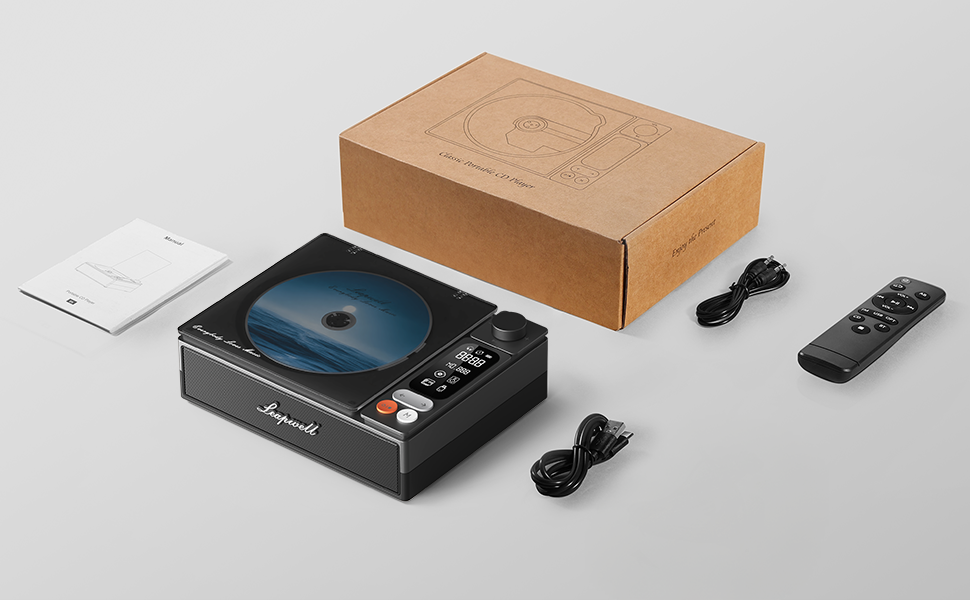
Image: All components included in the Leapwell CD Player package, including the player, remote, cables, and manual.
4. פּראָדוקט איבערview
The Leapwell L-CD202B is a compact and versatile audio device designed for various listening preferences.

בילד: פראָנט view of the Leapwell Portable Bluetooth Desktop CD Player with a CD inserted and the dust cover open.
שליסל פֿעיִקייטן:
- 7-in-1 Playback Modes: Supports CD Play, Bluetooth (Receive & Transmit), FM Radio, USB, AUX, AB Repeat, and Optical Mode.
- HiFi Speaker System: Features an independent sound cavity design and inner magnetic speaker unit for enhanced sound detail and bass.
- בלועטאָאָטה 5.1: Allows seamless connection to mobile phones, tablets, and external Bluetooth speakers or headphones.
- קריקאָנלאָדלעך באַטערי: Built-in USB-C fast-charging battery provides 4-5 hours of playback.
- קלאַסיש פּלאַן: Retro square design with a translucent CD dust cover, volume knob, and a 2.4-inch LCD display.
- אָפּטיש רעזולטאַט: For connecting to external decoders for lossless audio.
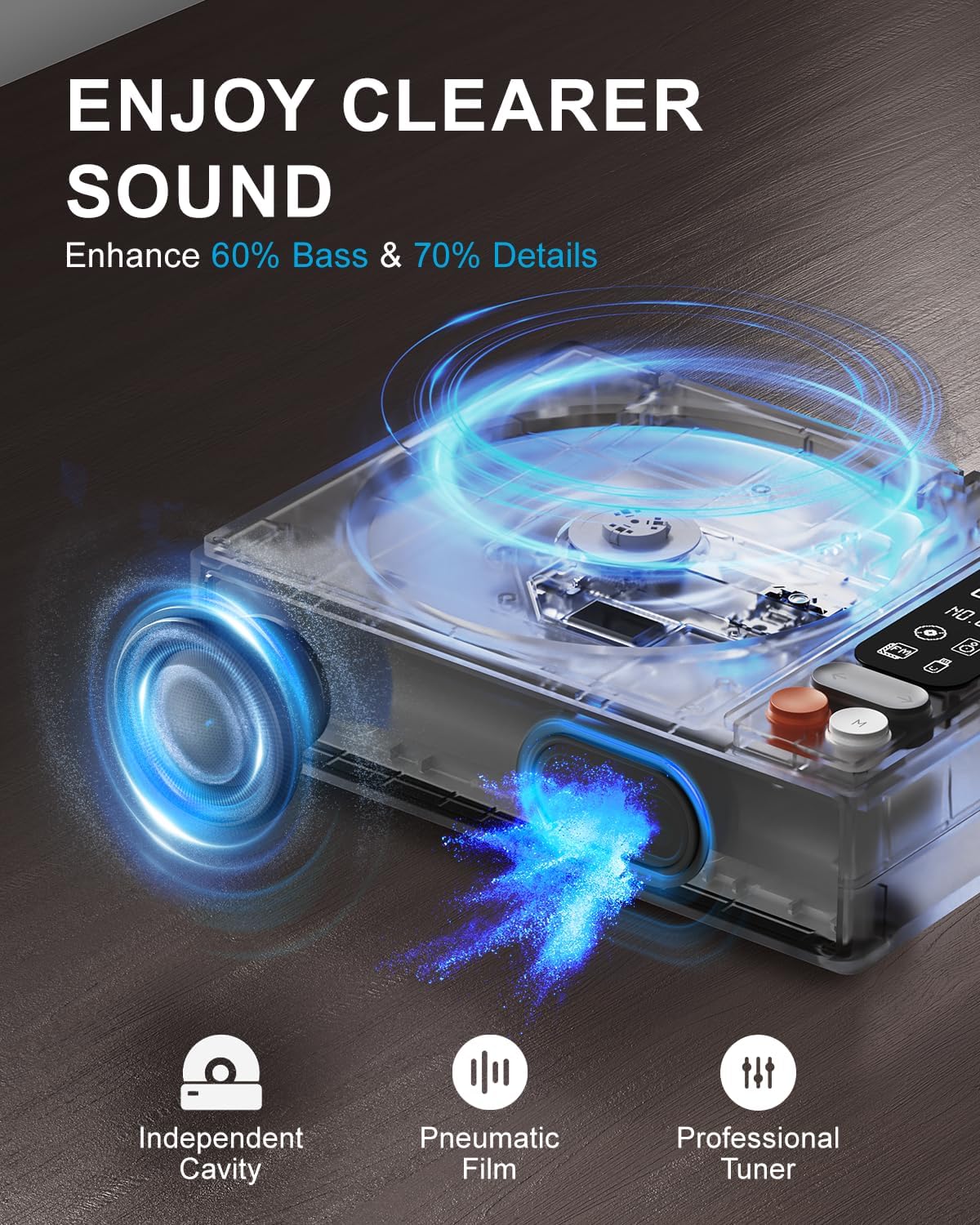
Image: Diagram illustrating the internal speaker design with independent cavity and pneumatic film for enhanced bass and sound detail.

בילד: נאָענט-אַרויף view of the Leapwell CD Player highlighting its classic design, volume knob, and digital display.
5. סעטאַפּ
5.1 טשאַרדזשינג די מיטל
Before first use, fully charge the CD player using the provided USB-C cable. Connect the USB-C end to the player's charging port and the other end to a 5V-2A USB power adapter (not included) or a computer's USB port. Charging via a computer's USB port will be slower.

Image: The Leapwell CD Player shown outdoors with battery indicators, emphasizing its portability and rechargeable battery.
5.2 מאַכט אויף / אַוועק
To power on the device, press and hold the power button. To power off, press and hold the power button again.
5.3 לאָדן אַ סי-די
- Gently lift the translucent dust cover.
- Place a CD onto the spindle, ensuring it is centered and flat.
- Close the dust cover. The player will begin reading the CD automatically or after selecting CD mode.
Video: Demonstration of loading a CD into the Leapwell CD Player and initiating playback. The video also shows the Bluetooth pairing process.
6. אַפּערייטינג מאָדעס
The Leapwell CD Player supports multiple audio playback modes. Use the 'M' (Mode) button on the device or remote control to switch between modes.
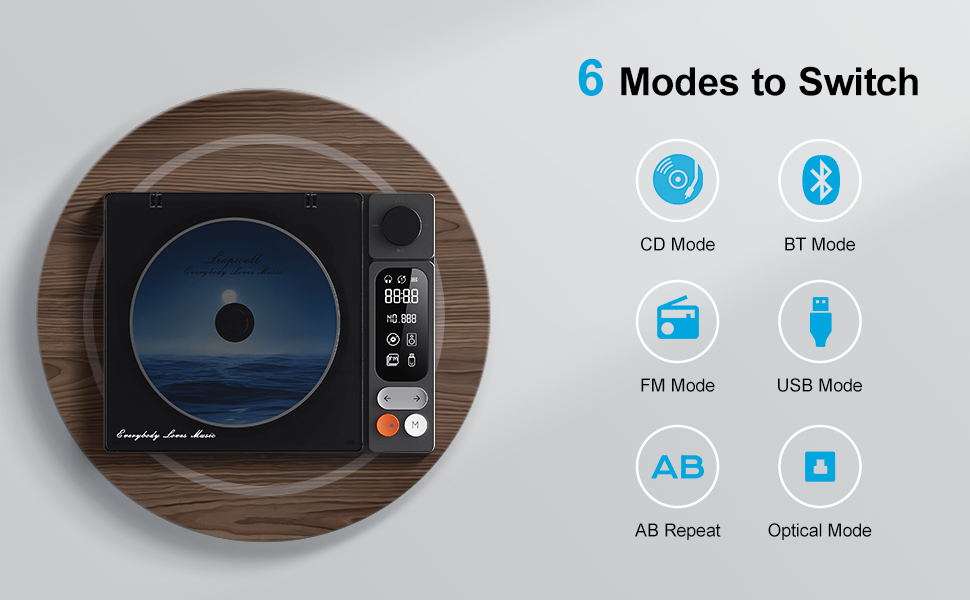
Image: Visual representation of the six main operating modes: CD, Bluetooth, FM, USB, AB Repeat, and Optical.
6.1 CD Play Mode
After loading a CD, the player will typically detect it and begin playback. Use the play/pause, next/previous track buttons, and the volume knob to control playback.
6.2 בלועטאָאָטה מאָדע
The device supports both Bluetooth Receive and Transmit modes.
- באַקומען מאָדע: Allows you to connect your mobile phone or tablet to the CD player and use its built-in speakers for audio output. Activate Bluetooth mode on the CD player, then search for 'CD player' on your external device's Bluetooth settings and pair.
- טראַנסמיסיע מאָדע: Enables the CD player to connect to external Bluetooth speakers or headphones. Activate Bluetooth mode on the CD player, then put your external Bluetooth device into pairing mode. The CD player will search and connect.

Image: A smartphone wirelessly connected to the Leapwell CD Player via Bluetooth, demonstrating the receive mode functionality.

Image: A woman enjoying music through Bluetooth headphones connected to the Leapwell CD Player, illustrating the transmit mode.
6.3 עפעם ראַדיאָ מאָדע
Switch to FM Radio mode. Use the next/previous track buttons to scan for radio stations. The display will show the current frequency.
6.4 וסב מאָדע
אַרייַנלייגן אַ וסב בליץ פאָר מיט אַודיאָ files into the USB port. The player will automatically switch to USB mode and begin playback. Use the track control buttons to navigate.
6.5 AUX מאָדע
Connect an external audio device (e.g., smartphone, MP3 player) to the CD player's AUX input using the provided 3.5mm AUX cable. Switch to AUX mode to play audio from the connected device through the CD player's speakers.
6.6 AB Repeat Mode
This mode allows you to repeat a specific section of audio. During playback, press the AB Repeat button once to set point A, and press it again to set point B. The player will continuously repeat the section between A and B. Press a third time to cancel.
6.7 Optical Mode
Connect the CD player to an external decoder or amplifier via an optical fiber cable (not included) using the optical output port. Switch to Optical mode to transmit digital audio for enhanced sound quality.

Image: The Leapwell CD Player connected to an external audio amplifier using an optical cable, demonstrating the optical output feature.
7. קאָנטראָלס
The CD player features intuitive controls for easy operation:
- באַנד קנעפּל: דרייען צו סטרויערן די באַנד.
- שפּיל / פּויזע קנעפּל: סטאַרץ אָדער פּאָזאַז פּלייבאַק.
- ווייַטער / פרייַערדיק שפּור קנעפּלעך: Skips to the next or previous track/station.
- מאָדע (M) קנעפּל: Switches between different playback modes.
- LCD פאַרשטעלן: Displays track information, mode, time, and battery status.
- ווייַט קאָנטראָל: Provides convenient access to all functions from a distance of up to 15 feet.
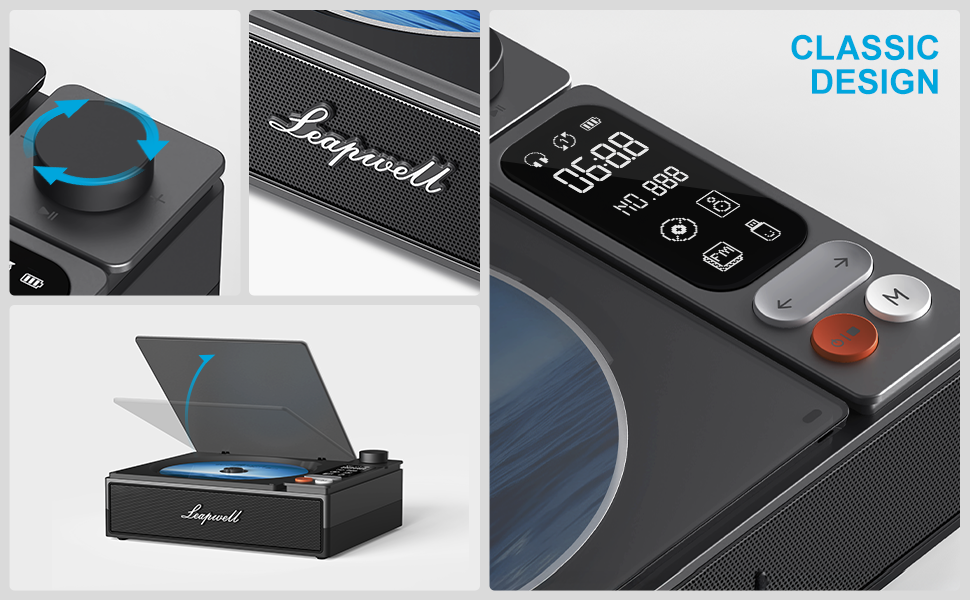
בילד: דעטאַלירט view of the control panel, including the volume knob, playback buttons, mode button, and LCD display.
8. וישאַלט
8.1 רייניקונג די מיטל
Wipe the exterior of the CD player with a soft, dry cloth. Do not use liquid cleaners or abrasive materials. Keep the CD compartment free of dust and debris. Avoid touching the optical lens.
8.2 סי-די קער
Handle CDs by their edges. Store them in their cases to prevent scratches and dust accumulation. Clean dirty CDs with a soft, lint-free cloth, wiping from the center outwards.
9. טראָובלעשאָאָטינג
If you encounter issues with your Leapwell CD Player, refer to the following common problems and solutions:
- קיין מאַכט: פאַרזיכערן אַז די מיטל איז באפוילן אָדער קאָננעקטעד צו אַ מאַכט מקור.
- CD ניט פּלייַינג: Check if the CD is inserted correctly and is clean. Ensure the device is in CD Play mode.
- קיין קול: Adjust the volume. Check if external speakers/headphones are properly connected or paired via Bluetooth. Ensure the correct mode is selected.
- בלועטאָאָטה קאַנעקשאַן ישוז: Ensure the CD player is in Bluetooth mode and your external device's Bluetooth is enabled and in pairing mode. Try restarting both devices.
- קענען עס זיין געוויינט בשעת טשאַרדזשינג? Yes, it can. Please unplug the power when not in use for a long time.
- Can it connect to Bluetooth headphones? Yes, it can. It can also connect to a mobile phone and play music.
- Can it be charged via a computer's USB port? Yes, it can. However, charging will be very slow. It is recommended to use a 5V-2A adapter for charging.
10. ספּעסאַפאַקיישאַנז
| פּראָדוקט דימענשאַנז | 7.3 X 5.7 X 2.5 אינטשעס |
| פּונקט וואָג | 1.4 פונט |
| מאָדעל נאָמען | L-CD202B |
| קאָליר | שוואַרץ |
| קאַנעקטיוויטי טעכנאָלאָגיע | Auxiliary, Bluetooth, Optical, USB |
| ספּעציעלע פֿעיִקייטן | Anti-Skip Protection, Auto Power-Off, Bluetooth, Portable, Rechargeable |
| באַטעריז | 1 ליטהיום יאָן באַטאַרייע (אַרייַנגערעכנט) |
11. וואָראַנטי און שטיצן
Leapwell CD Players come with lifelong technical support and 24/7 professional customer service. For any inquiries or assistance, please contact Leapwell customer support through the official channels provided at the time of purchase or on the Leapwell webפּלאַץ.