
1. פּראָדוקט איבערview
The ieGeek ZY-G2 is a versatile 4G solar-powered security camera designed for both outdoor and indoor surveillance. It operates without Wi-Fi, utilizing a 4G LTE connection via an integrated SIM card. Key features include 2K HD resolution, 300° horizontal pan capability, a 10000mAh rechargeable battery, and a 3W solar panel for continuous power. The camera also offers color night vision, two-way audio, and intelligent motion detection with real-time alerts.

Figure 1: ieGeek ZY-G2 4G Solar Security Camera with solar panel, highlighting 4G connectivity and no Wi-Fi requirement.
2. פּעקל אינהאַלט
באַשטעטיקן אַז אַלע זאכן זענען פאַראַן אין פּעקל:
- ieGeek ZY-G2 4G Camera
- זונ פּאַנעל (3 וו)
- Mounting Bracket (Magnetic)
- וסב-C טשאַרדזשינג קאַבלע
- סקרוז און וואנט פּלאַגז
- באַניצער מאַנואַל
- Integrated SIM Card (with initial free data)
3. סעטאַפּ גייד
3.1 ערשט טשאַרדזשינג
Before first use, fully charge the camera using the provided USB-C cable. This ensures optimal battery performance.
3.2 SIM Card Installation/Replacement
The camera comes with an integrated SIM card for immediate 4G connectivity, including 7 days of free unlimited data. To replace the SIM card, locate the black film covering the SIM slot. Gently remove this film using a pen or tweezers. Insert your compatible 4G SIM card into the slot. Ensure the camera is powered off before inserting or removing the SIM card.

Figure 2: Instructions for SIM card replacement, showing the protective film removal.
3.3 אַפּ אינסטאַלאַציע און פּערינג
Download the ieGeek Cam application from your smartphone's app store (compatible with Android and iOS). Follow the in-app instructions to pair your camera. No complex network configuration is required due to 4G connectivity.
3.4 מאָנטירן די קאַמעראַ און זונ פּאַנעל
The camera features a magnetic base for easy installation on metallic surfaces. For non-magnetic surfaces, the base includes screw holes for secure mounting. The solar panel should be installed in a location that receives maximum direct sunlight throughout the day to optimize charging efficiency. Refer to the solar panel installation guide for optimal orientation.

Figure 3: Magnetic mounting for easy installation.

Figure 4: Solar charging setup for continuous power.
4. אַפּערייטינג ינסטרוקטיאָנס
4.1 לעבן View און PTZ קאָנטראָל
Access the live video feed through the ieGeek Cam app. The camera supports 300° horizontal rotation, allowing you to remotely adjust the viewing angle to cover various areas. Note that automatic tracking is not supported.

Figure 5: 300-degree horizontal rotation for wide coverage.

Figure 6: Wide field of view covering a large area.
4.2 באַוועגונג דעטעקציע און וואָרענונגען
The camera detects human and object movements within a 10-meter range. Upon detection, it triggers an alarm and sends instant notifications to your app. You can define specific surveillance zones to reduce false alarms.
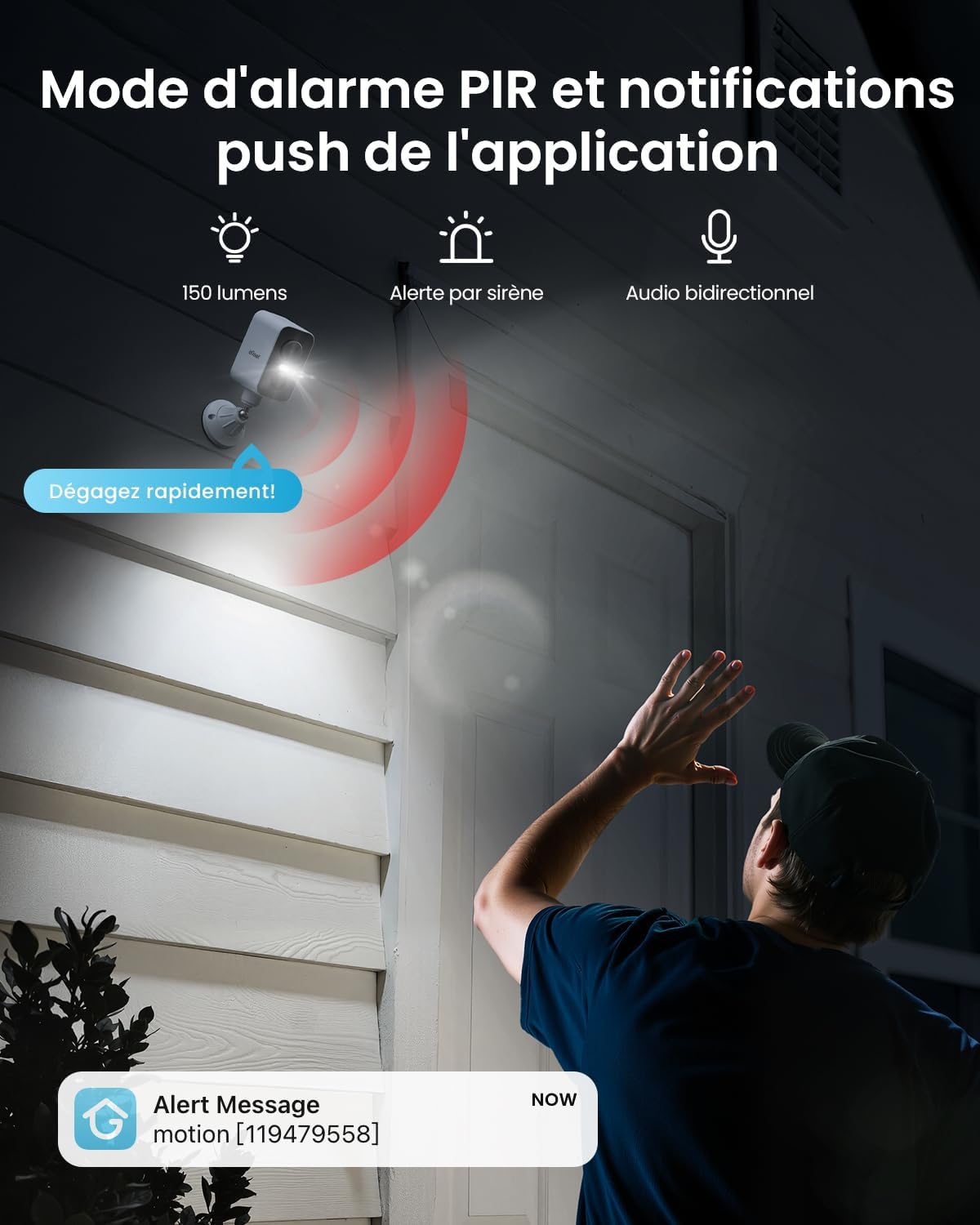
Figure 7: PIR alarm mode and push notifications.

Figure 8: Customized protection zones to minimize false alerts.
4.3 צוויי-וועג אַודיאָ
Equipped with a powerful microphone and speaker, the camera supports two-way audio communication. This allows you to speak to visitors or deter intruders remotely.

Figure 9: Two-way audio communication.
4.4 נאַכט זעאונג
The camera provides 2K HD color night vision, ensuring clear images even in low-light conditions. Infrared night vision is also available.

Figure 10: 2K HD color night vision.
4.5 רעקאָרדינג און סטאָרידזש
The camera supports local storage via a Micro SD card (up to 128GB). Cloud storage options are also available through the ieGeek Cam app. Continuous recording (AOV) is not supported; recording is triggered by motion detection.
4.6 מולטי-באַניצער ייַנטיילונג
Share camera access with family members through the app, allowing multiple users to view the live feed and receive alerts.

Figure 11: Multi-user sharing feature.
5. וישאַלט
5.1 Battery and Solar Panel
The camera is equipped with a 10000mAh battery and a 3W solar panel for sustained operation. Ensure the solar panel is clean and free from obstructions to maximize charging efficiency. The camera is designed to be woken up 4000-5000 times on a full charge.
5.2 וועטער קעגנשטעל
With an IP66 rating, the camera is resistant to rain, snow, and dust, making it suitable for various outdoor environments. It operates effectively in temperatures ranging from -10°C to 50°C.

Figure 12: IP65 weather resistance for outdoor use.
6. טראָובלעשאָאָטינג
- SIM Card Connectivity Issues: If you experience problems with SIM card connectivity, ensure the integrated SIM card is properly seated and activated, or that your replacement SIM is compatible with 4G LTE networks. Refer to the ieGeek Cam app for specific data plan details and activation status.
- לעבן View פאַרהאַלטן: A slight delay in the live view feed may occur due to network coverage variations. Ensure the camera has a strong 4G signal for optimal performance.
- No Continuous Recording: Please note that the camera does not support continuous recording (AOV). Recording is event-triggered by motion detection.
- באַטאַרייע ניט טשאַרדזשינג: Ensure the solar panel is clean and positioned to receive direct sunlight. If using the USB-C cable, verify the connection and power source.
7. ספּעסאַפאַקיישאַנז
| שטריך | באַשרייַבונג |
|---|---|
| מאָדעל נאָמען | ZY-G2 |
| קאַנעקטיוויטי טעכנאָלאָגיע | 4G LTE, Wireless |
| האַכלאָטע | 2K HD (1440p, 2560 effective video resolution) |
| אָפּטיש סענסאָר טעכנאָלאָגיע | קמאָס |
| נאַכט זעאונג | Color Night Vision, 15 Meters Range, 4 IR LEDs |
| פּאַן אַנגלע | 300 דיגריז (האָריזאָנטאַל) |
| View ווינקל | 130 דיגריז |
| דיגיטאַל פארגרעסער | 4x |
| מאַכט מקור | Solar Powered (3W Solar Panel), 10000mAh Battery |
| וואַסער קעגנשטעל מדרגה | IP66 (וואָטערפּרוף) |
| סטאָרידזש | מיקראָ סד (ביז 128 גיגאבייט), וואָלקן סטאָרידזש (אַפּשאַנאַל) |
| קאַמפּאַטאַבאַל דעוויסעס | Smartphone, Tablets |
| קאָנטראָל מעטאָד | Mobile Application, Remote Control |
| דימענשאַנז | 8.5 X 8.5 X 15 סענטימעטער |
| וואָג | 650 גראַמז |
| אַפּערייטינג טעמפּעראַטור | -10°C צו 50°C |
8. וואָראַנטי און שטיצן
ieGeek is committed to customer satisfaction and product security. This camera comes with a 2 יאָר וואָראַנטי for free replacement. Additionally, a 30-טאָג געלט-צוריק גאַראַנטירן is offered. For any questions or assistance, customer service is available 24 hours on working days. You can contact support via the ieGeek Cam app or through Amazon.

Figure 13: Warranty and support details.