
1. הקדמה
This manual provides essential information for setting up, operating, and maintaining your ASUS AiO V470 Series All-in-One PC. Please read this guide thoroughly before using your device to ensure proper function and longevity.

Image: ASUS V470 AiO PC showcasing its minimalist design and thoughtful functionality.
2. וואָס איז אין דער קעסטל
באַשטעטיקן אַז אַלע זאכן זענען פאַראַן אין דער פּאַקאַדזשינג:
- ASUS AiO V470 All-in-One PC
- ווירעלעסס קיבאָרד
- ווירעלעסס מאַוס
- מאַכט אַדאַפּטער
- דאָקומענטאַציע (שנעל אָנהייב גייד, וואָראַנטי קאַרטל)
3. סעטאַפּ
3.1 אַנפּאַקינג און פּלייסמאַנט
- Carefully remove the All-in-One PC and accessories from the packaging.
- Place the PC on a stable, flat surface with adequate ventilation around the unit.
- Ensure the area is free from direct sunlight, heat sources, and excessive dust.
3.2 קאַנעקטינג פּעריפעראַלס
- מאַכט קשר: Connect the power adapter to the DC-in port on the back of the PC, then plug the power cord into a wall outlet.
- ווייערלעס קלאַוויאַטור און מויז: Insert batteries into the wireless keyboard and mouse. The devices are pre-paired; if not, follow the instructions provided with the peripherals for pairing.
- פונדרויסנדיק דעוויסעס: Connect any external devices such as printers, external hard drives, or additional monitors to the appropriate ports.
4. קאָמפּאָנענטן און פּאָרטן
Familiarize yourself with the various ports and components of your ASUS AiO V470 PC.

בילד: דעטאַלירט view of the I/O ports for connectivity.
4.1 Side I/O Ports
- Kensington Lock Slot: For securing your device with a compatible lock.
- 3.5 מ״מ קאָמבאָ אַודיאָ דזשעק: פֿאַר פֿאַרבינדן כעדפֿאָונז אָדער אַ כעדסעט מיט אַ מיקראָפֿאָן.
- USB 2.0 טיפּ-א פּאָרט: פֿאַר פֿאַרבינדן USB 2.0 קאָמפּאַטיבלע דעוויסעס.
4.2 הינטערשטע I/O פּאָרטן
- DC-in Port: פֿאַר קאַנעקטינג די מאַכט אַדאַפּטער.
- RJ45 גיגאַביט עטהערנעט פּאָרט: פֿאַר אַ דראָטיקער נעץ פֿאַרבינדונג.
- HDMI In 1.4 Port: For connecting external video sources to use the AiO as a monitor.
- HDMI Out 1.4 Port: For connecting an external display.
- יו-עס-בי 3.2 דור 1 טיפ-סי פּאָרט: For high-speed data transfer and connecting compatible Type-C devices.
- 3x USB 3.2 Gen 1 Type-A Ports: For connecting high-speed USB 3.2 compatible devices.
5. אַפּערייטינג ינסטרוקטיאָנס
5.1 פּאַוערינג אויף / אַוועק
- מאַכט אויף: Press the power button located on the bottom right side of the display.
- מאַכט אַוועק: In Windows, click Start > Power > Shut down. Alternatively, press and hold the power button for 4 seconds to force a shutdown (use only when necessary).
5.2 ווייַז פֿעיִקייטן
Your ASUS AiO V470 features a high-quality display designed for clarity and comfort.
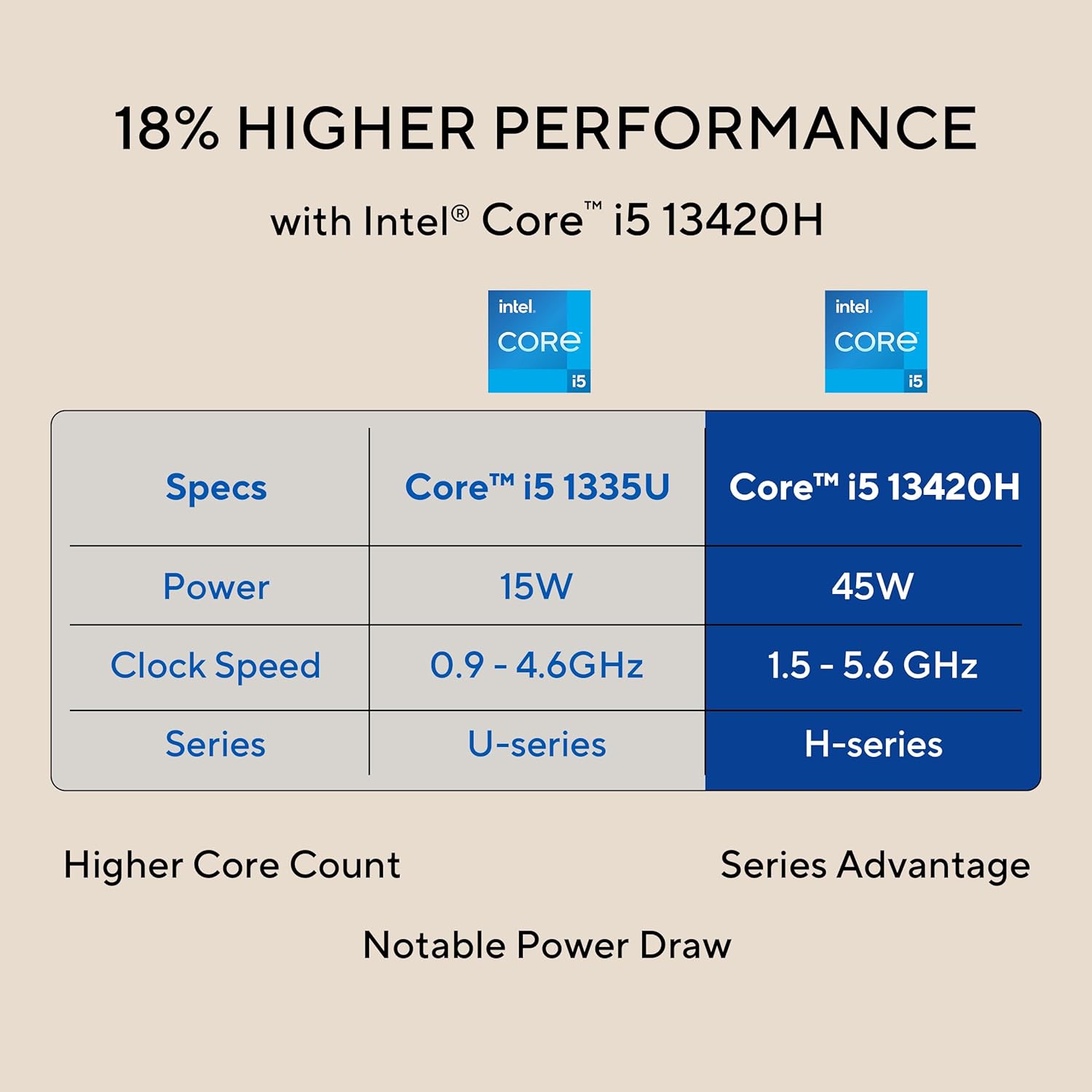
Image: The 27-inch FHD NanoEdge display with TÜV Rheinland-certified eye care.
- 27.0-inch FHD (1920 x 1080) Display: Provides clear and vibrant visuals.
- Anti-glare: רעדוצירט רעפלעקציעס פֿאַר באַקוועמע viewing.
- 100Hz דערפרישן קורס: Offers smoother motion for an enhanced visual experience.
- TÜV Rheinland-certified Eye Care: Designed to reduce blue light emissions and flicker for eye comfort during extended use.
5.3 Camera and Audio Features
The integrated camera and audio system enhance your communication and multimedia experience.

Image: Retractable camera for privacy and security features.
- Retractable 1080p HD Camera: Push to hide the camera for instant privacy.
- קינסטלעכע אינטעליגענץ ראַש קאַנסאַליישאַן: Reduces background noise during video calls and recordings for clearer audio.
- 5W x 2 Speakers with Dolby Atmos: Delivers immersive and high-quality sound.

Image: Advanced and immersive sound experience with integrated speakers.
5.4 קאַנעקטיוויטי
Your AiO PC offers robust connectivity options.
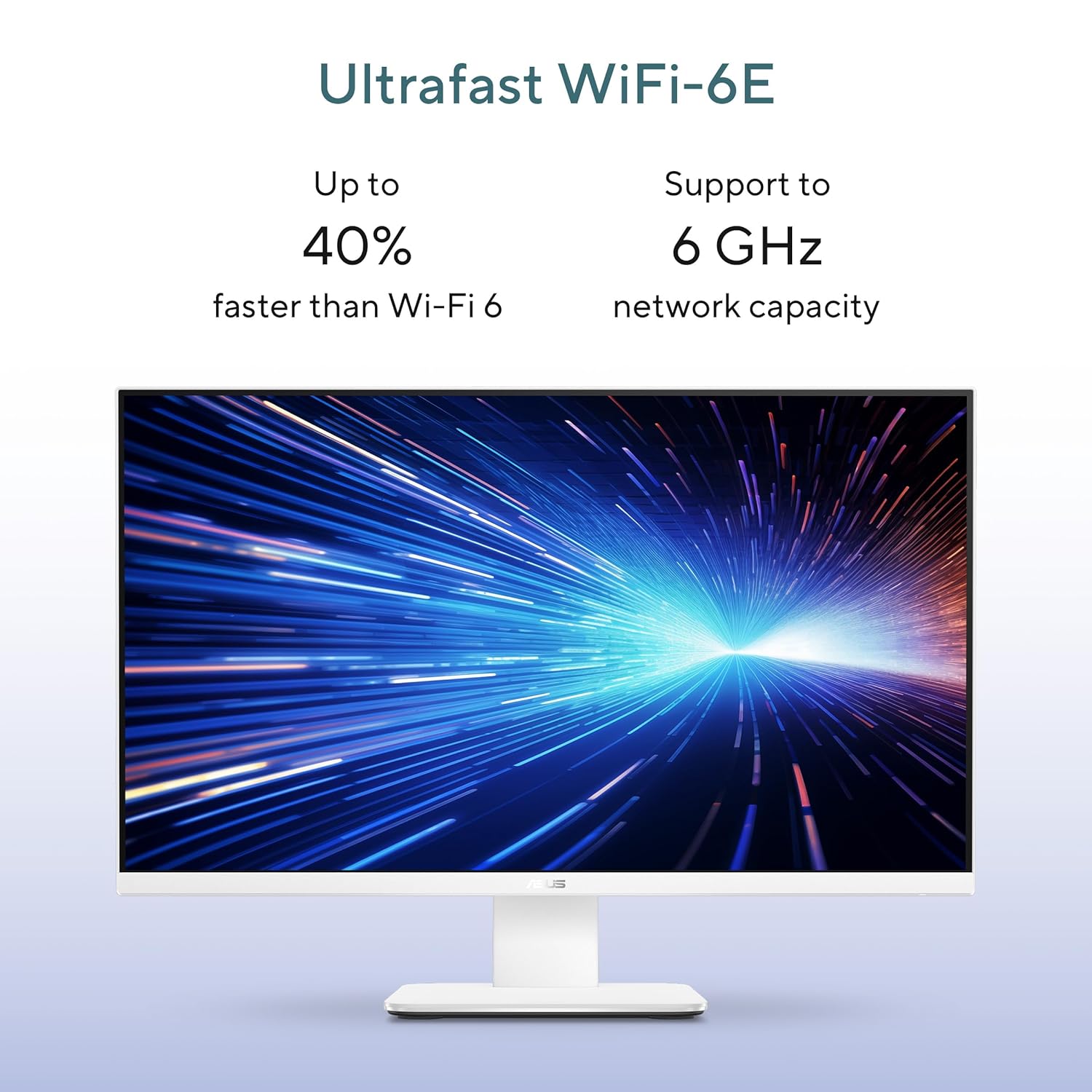
Image: Ultrafast Wi-Fi 6E for high-speed wireless connectivity.
- Wi-Fi 7: פֿאַר הויך-גיכקייט וויירלעס אינטערנעט אַקסעס.
- Gigabit עטהערנעט: For stable and fast wired network connections.
- בלועטאָאָטה: For connecting wireless peripherals like headphones and speakers.
6. וישאַלט
Proper maintenance ensures the longevity and optimal performance of your ASUS AiO V470 PC.
- רייניקונג די ווייַז: ניצט אַ ווייכע, לינט-פֿרייע שטאָף ספּעציעל דיזיינד פֿאַר עלעקטראָניק.ampen the cloth slightly with water or a screen cleaner, then gently wipe the screen. Avoid harsh chemicals.
- רייניקן דעם שאַסי: Use a soft, dry cloth to wipe down the exterior. For stubborn marks, a slightly damp מען קען ניצן אַ שטאָף, און דערנאָך אַ טרוקענעם.
- ווענטילאַטיאָן: Ensure that the ventilation openings are not blocked to prevent overheating. Regularly check for dust accumulation and gently clean with compressed air if necessary.
- ווייכווארג דערהייַנטיקונגען: האַלט אייער אָפּערייטינג סיסטעם און דרייווערס אַפּדייטיד צו ענשור זיכערהייט און פאָרשטעלונג.
- דאַטאַ באַקקופּ: מאַכט רעגולער באַקאַפּ פון וויכטיקע דאַטן צו אַן עקסטערנאַל דרייוו אָדער וואָלקן סטאָרידזש.
7. טראָובלעשאָאָטינג
די סעקציע באהאנדלט אלגעמיינע פראבלעמען וואס איר קענט באגעגענען.
7.1 קיין מאַכט
- Ensure the power adapter is securely connected to the PC and the wall outlet.
- באַשטעטיקן אַז די וואַנט אַוטלעט אַרבעט דורך אַרײַנשטעקן אַן אַנדער דעוויס.
- קאָנטראָלירט דעם מאַכט אַדאַפּטער פֿאַר קיין קענטיק שעדיקן.
7.2 ווייַז ישוז
- אויב דער עקראַן איז ליידיק, זאָרגט אַז דער קאָמפּיוטער איז אנגעצונדן און נישט אין שלאָף מאָדע.
- If using an external video source via HDMI In, ensure the correct input is selected (refer to your PC's on-screen display settings).
- Adjust brightness settings in Windows.
7.3 פּעריפערישע אַפּאַראַטן רעאַגירן נישט
- For wireless keyboard/mouse, check battery levels and ensure they are within range.
- For wired devices, ensure they are properly connected to the correct USB ports.
- פרובירט צו קאנעקטן דעם פּעריפערישן אַפּאַראַט צו אַן אַנדער USB פּאָרט.
8. ספּעסאַפאַקיישאַנז
Detailed technical specifications for your ASUS AiO V470 PC.

Image: Key performance specifications including processor, memory, and storage.
| שטריך | באַשרייַבונג |
|---|---|
| פּראַסעסער | Intel Core i5-13420H (2.1 GHz, up to 4.6 GHz, 8 cores, 12 threads, 12MB Cache) |
| אָפּערייטינג סיסטעם | Windows 11 היים |
| ווייַז | 27.0-inch FHD (1920 x 1080), 16:9, 300nits, 100Hz, Anti-glare, TÜV Rheinland-certified Eye Care |
| גראַפיקס | ינטעגראַטעד ינטעל UHD גראַפיקס |
| זכּרון | 16GB DDR5 באַראַן |
| סטאָרידזש | 1TB M.2 NVMe PCIe 4.0 SSD |
| אַפּאַראַט | Retractable 1080p HD Camera |
| אַודיאָ | 5W x 2 Speakers, AI Noise Cancellation, Dolby Atmos |
| ווירעלעסס קאַנעקטיוויטי | Wi-Fi 7, בלועטאָאָטה |
| ווייערד קאַנעקטיוויטי | RJ45 גיגאַביט עטהערנעט |
| איך / אָ פּאָרץ | 1x USB 2.0 Type-A, 3x USB 3.2 Gen 1 Type-A, 1x USB 3.2 Gen 1 Type-C, 1x HDMI In 1.4, 1x HDMI Out 1.4, 1x 3.5mm Combo Audio Jack, 1x DC-in, 1x Kensington Lock Slot |
| דימענשאַנז (ב x ד x ה) | 61.3 X 1.7 X 44.7 סענטימעטער |
| וואָג | 9 קילאָגראַמס |
| אַרייַנגערעכנטע פּעריפעראַלס | Wireless Keyboard, Wireless Mouse |
9. וואָראַנטי און שטיצן
Your ASUS AiO V470 PC comes with comprehensive warranty and support services.

Image: ASUS 4A Guarantee and support contact details.
9.1 וואָראַנטי אינפֿאָרמאַציע
This genuine ASUS AiO PC includes a 1-year Global Warranty און אַן Onsite Domestic Warranty from ASUS. The warranty covers manufacturing defects and does not cover physical damage. To activate your warranty, please register your product on the official ASUS webפּלאַץ.
9.2 קונה שטיצן
For product-related queries or immediate assistance, please contact ASUS support:
- אָפּצאָל-פריי נומער: 1800-2090365 (Monday - Saturday, 09:00 AM - 06:00 PM)
- בליצפּאָסט: rc_india@asus.com
- Service Center Information: באַזוכט די ASUS שטיצע website for an extensive network of over 180 service centers across India: https://www.asus.com/in/support/Service-Center/India


