
1. הקדמה
The TMEHM S660pro is a versatile 3-in-1 device designed to enhance sleep and relaxation. It combines 8 mixable nature sounds, a portable Bluetooth speaker, and a 12-color night light with adjustable brightness. This manual provides detailed instructions for setup, operation, and maintenance to ensure optimal performance.
2. וויכטיק סאַפעטי אינפֿאָרמאַציע
- גאָר אָפּצאָל די מיטל איידער ערשטער נוצן.
- האַלטן אַוועק פון וואַסער און היץ קוועלער.
- Do not cover the product to avoid damage.
- קינדער מוזן נוצן אונטער דער השגחה פון דערוואַקסענע.
3. פּעקל אינהאַלט
זיכער מאַכן אַז אַלע זאכן זענען פאַראַן אין פּעקל:
- TMEHM S660pro Sleep Sound Machine
- וסב טיפּע- C טשאַרדזשינג קאַבלע
- מאַכט אַדאַפּטער
- באַניצער מאַנואַל (דעם דאָקומענט)

Image: TMEHM S660pro device, USB-C charging cable, and power adapter included in the package.
4. פּראָדוקט איבערview
מאַכט זיך באַקאַנט מיט די קאָמפּאָנענטן און קאָנטראָלס פֿון דעם אַפּאַראַט.
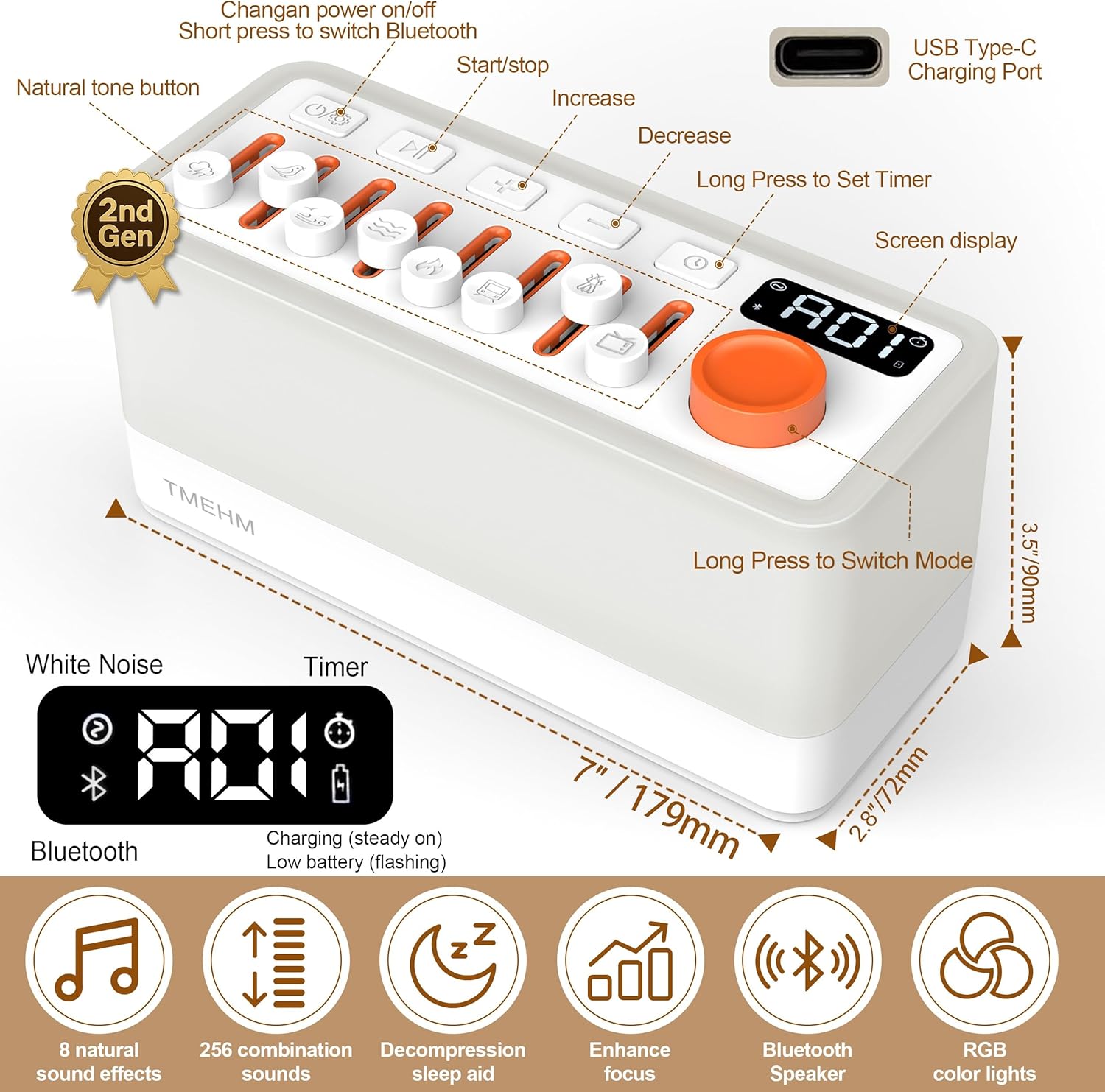
בילד: אויבן view of the TMEHM S660pro showing the control panel with individual sound sliders, power button, play/pause, volume controls, timer button, and the main knob for light/timer adjustments. Dimensions are also indicated.
קאָנטראָל פּאַנעל פֿעיִקייטן:
- מאַכט קנעפּל: Press and hold to turn on/off. Short press to switch Bluetooth.
- Sound Sliders: Individual sliders for 8 natural sound effects (rain, birdsong, ocean waves, stream, campfire, train, crickets, TV static). Adjust volume for each sound.
- שפּיל / פּויזע קנעפּל: Controls playback for Bluetooth audio.
- באַנד קנעפּלעך (+/-): סטרויערן די קוילעלדיק באַנד.
- טיימער קנעפּל: Short press to set sleep timer (5-180 minutes).
- Light Button (Knob Switch): Rotate to adjust warm night light brightness (30 levels). Press and hold to switch to color ambient light mode (11 colors).
- סקרין ווייַז: Shows timer settings, light brightness, and mode indicators.
- USB Type-C טשאַרדזשינג פּאָרט: Located on the back for charging.
5. סעטאַפּ
5.1 ערשט אָפּצאָל
Before first use, fully charge the device using the provided USB Type-C cable and power adapter. The battery indicator on the screen will show charging status.

Image: The TMEHM S660pro connected to its USB-C charging cable and power adapter.
5.2 מאַכט אויף / אַוועק
Press and hold the Power button (leftmost button on the top panel) for 2 seconds to turn the device on or off.
6. אַפּערייטינג ינסטרוקטיאָנס
6.1 Natural Sound Playback
The device features 8 unique non-looping natural sounds: rain, birdsong, ocean waves, stream, campfire, train, crickets, and TV static. Each sound has an independent volume control.
- To activate a sound, push up the corresponding slider button.
- Adjust the volume of each individual sound by moving its slider up (increase) or down (decrease).
- Combine multiple sounds by activating their respective sliders to create up to 256 unique soundscapes.

Image: The TMEHM S660pro displaying the 8 individual sound sliders and their corresponding nature sound icons.
Video: This video demonstrates the various features of the TMEHM S660pro, including sound selection and light adjustments.
6.2 נאַכט ליכט פונקציע
The device offers both warm white light and multiple color ambient light modes.
- וואַרעם ווייַס ליכט: Rotate the main knob switch (rightmost knob) to adjust the brightness of the warm white light across 30 levels. The display will show the current brightness level (e.g., F01-F30).
- Color Ambient Light: Press and hold the main knob switch to cycle through 11 different color modes. The light will transition between colors.
- Breathing Therapy Mode: This mode is integrated with the color ambient lights. Follow the light's gentle breathing pattern to aid relaxation.
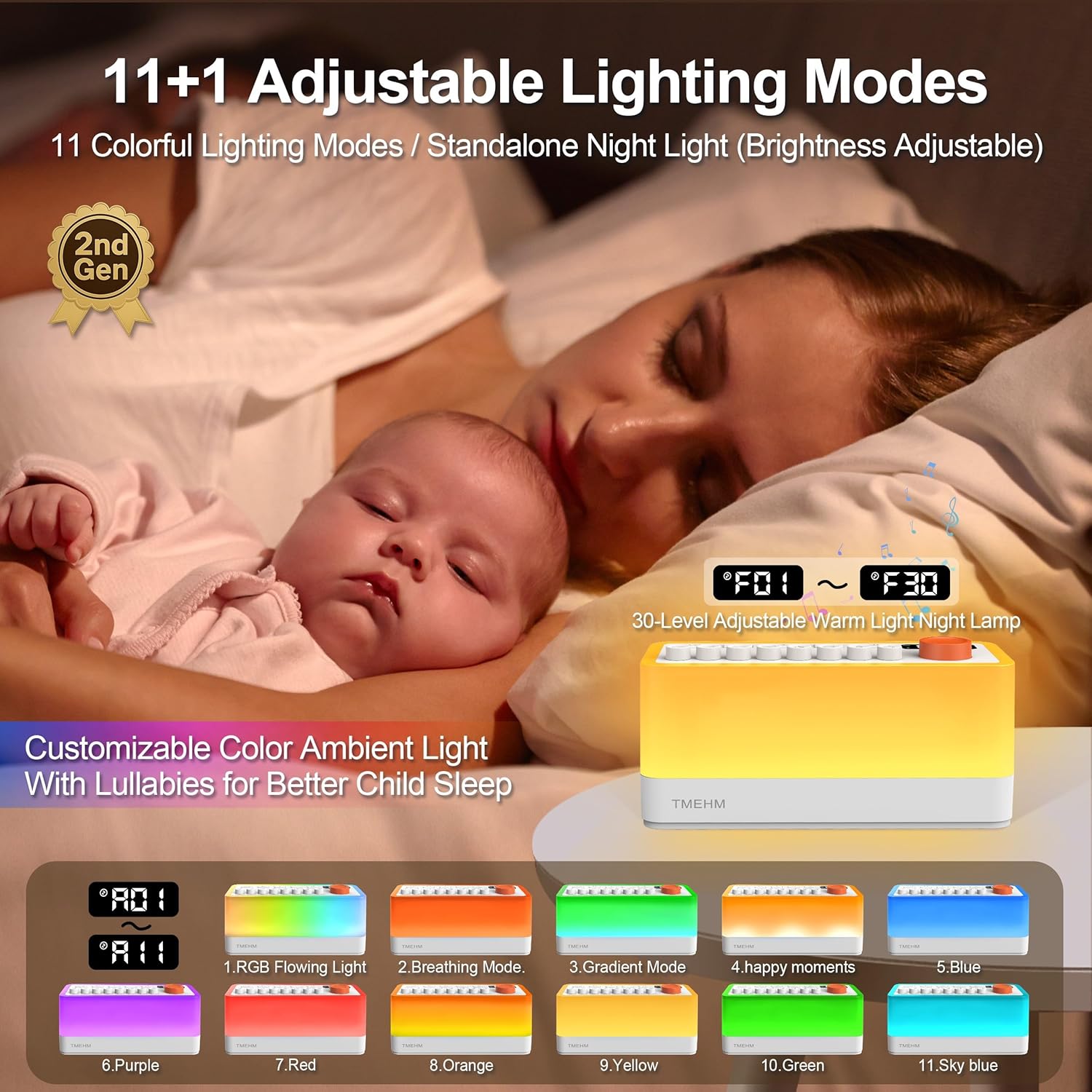
Image: The TMEHM S660pro functioning as a night light in a bedroom setting, illustrating its use for sleep assistance.

Image: A visual representation of the 11 adjustable light color modes available on the TMEHM S660pro.
6.3 בלועטאָאָטה רעדנער פֿונקציע
Connect your smartphone or other Bluetooth-enabled device to the S660pro to play your own audio.
- Short press the Power button to switch to Bluetooth mode. The display will indicate Bluetooth pairing mode.
- On your device, enable Bluetooth and search for "S660pro".
- Select "S660pro" to pair. Once connected, you will hear a confirmation sound.
- Play your desired audio from your connected device. Use the Play/Pause button and Volume buttons on the S660pro or your connected device to control playback.

Image: The TMEHM S660pro highlighting its dual speakers and a smartphone screen showing a successful Bluetooth connection to "S660pro".
Video: This video provides a detailed analysis of each function of the TMEHM S660pro, including Bluetooth connectivity and sound mixing.
6.4 Sleep Timer Settings
The auto-off timer can be set from 5 to 180 minutes, with gradual sound fading.
- Short press the Timer button (clock icon) to activate the timer.
- Rotate the main knob switch to select the desired duration in 5-minute increments (e.g., 005, 010, ..., 180).
- The device will automatically turn off after the set time, with the sound gradually fading out.

Image: The TMEHM S660pro displaying the timer function, set to assist sleep.
7. וישאַלט
- רייניקט דעם אַפּאַראַט מיט אַ ווייכן, טרוקענעם שטאָף. ניצט נישט קיין פליסיקע רייניגער אָדער אַעראָזאָלן.
- ויסמיידן יקספּאָוזינג די מיטל צו עקסטרעם טעמפּעראַטורעס אָדער דירעקט זונשייַן.
- סטאָר אין אַ קיל, טרוקן אָרט ווען ניט אין נוצן פֿאַר עקסטענדעד פּיריאַדז.
8. טראָובלעשאָאָטינג
| פּראָבלעם | מעגלעך סיבה | לייזונג |
|---|---|---|
| די מיטל טוט נישט מאַכט אויף. | נידעריגע באַטעריע אָדער נישט אויפגעלאָדן. | Charge the device fully using the provided adapter and cable. |
| No sound from natural sounds. | Individual sound slider is down or overall volume is low. | Push up the desired sound slider(s) and increase the overall volume using the '+' button. |
| בלועטוט קאנעקט נישט. | Device not in Bluetooth mode or out of range. | Short press the Power button to enter Bluetooth mode. Ensure your device is within range (approx. 10 meters) and "S660pro" is selected. |
| נאכט ליכט ארבעט נישט. | Light brightness set to minimum. | Rotate the main knob switch to increase brightness. |
9. ספּעסאַפאַקיישאַנז
| שטריך | דעטאַל |
|---|---|
| פּראָדוקט דימענשאַנז | 7 X 2.8 X 3.5 אינטשעס |
| פּונקט וואָג | 16 אונסעס (1 פונט) |
| מאָדעל נאָמען | S660pro |
| סאָרט נאָמען | TMEHM |
| מאַכט מקור | באַטעריע געטריבן (2600mAh) |
| קאַנעקטער טיפּ | וסב טיפּ-C |
| קאָליר | ווייַס |
| מאַטעריאַל טיפּ | אַקרילאָניטרילע בוטאַדיענע סטירענע (אַבס) |
| שלאָפן סאָונדס | 8 mixable nature sounds (non-looping) |
| נאַכט ליכט | 30-level warm light, 11 color modes, breathing therapy |
| טיימער סעטטינגס | 5-180 מינוט (5-מינוט ינקראַמאַנץ) |
| בלועטאָאָטה ווערסיע | 5.0 |
| באַטערי לעבן | פּלייַטימע אַרויף צו 10 שעה |

Image: A visual representation of the TMEHM S660pro's main parameters and specifications.
10. וואָראַנטי אינפֿאָרמאַציע
The TMEHM S660pro comes with a manufacturer's warranty. Replacement with a new unit is provided within one year for non-human damage.
פֿאַר וואָראַנטי קליימז, ביטע האַלטן דיין קויפן באַווייַז און קאָנטאַקט קונה שטיצע.
11. קונה שטיצן
For any questions, technical assistance, or support regarding your TMEHM S660pro, please visit the official TMEHM store or contact their customer service through the platform of purchase.
Official TMEHM Store: TMEHM Amazon Store