
הקדמה
Thank you for choosing the PowerLocus MoonFly Hybrid Noise Cancelling Wireless Headphones. This manual provides detailed instructions for setting up, operating, and maintaining your headphones to ensure optimal performance and longevity. Please read this manual carefully before use.
פּעקל אינהאַלט
זיכער מאַכן אַז אַלע די זאכן וואָס זענען אויסגערעכנט אונטן זענען פאַראַן אין דיין פּעקל:
- 1x PowerLocus MoonFly Hybrid Noise Cancelling Wireless Headphones
- 1 קס 3.5 מם AUX קאַבלע
- 1x USB-C טשאַרדזשינג קאַבלע
- 1x EVA Hard Carrying Case
- 1x באַניצער מאַנואַל (דאָס דאָקומענט)
- 1x International PowerLocus Warranty Card

Image: Contents of the PowerLocus MoonFly headphone package, including the headphones, hard case, USB-C charging cable, and 3.5mm AUX audio cable.
פּראָדוקט איבערview
The PowerLocus MoonFly headphones feature an ergonomic design with intuitive controls for a seamless audio experience. Familiarize yourself with the various components:
- מאַכט קנעפּל: Used for powering on/off and pairing.
- באַנד קנעפּלעך (+/-): Adjusts volume, also used for track control.
- ANC קנעפּל: Toggles Active Noise Cancelling and Transparency Mode.
- וסב- C פּאָרט: פֿאַר טשאַרדזשינג די כעדפאָונז.
- 3.5 מם אַודיאָ דזשאַק: פֿאַר דראָטיקער פֿאַרבינדונג.
- מיקראָפאָן: פֿאַר רופֿן און שטימע באַפֿעלן.

בילד: א נאָענטע בילד view of the headphone earcup, highlighting its Hi-Fi stereo sound capabilities and ventilation system designed for optimal audio performance and balanced air pressure.
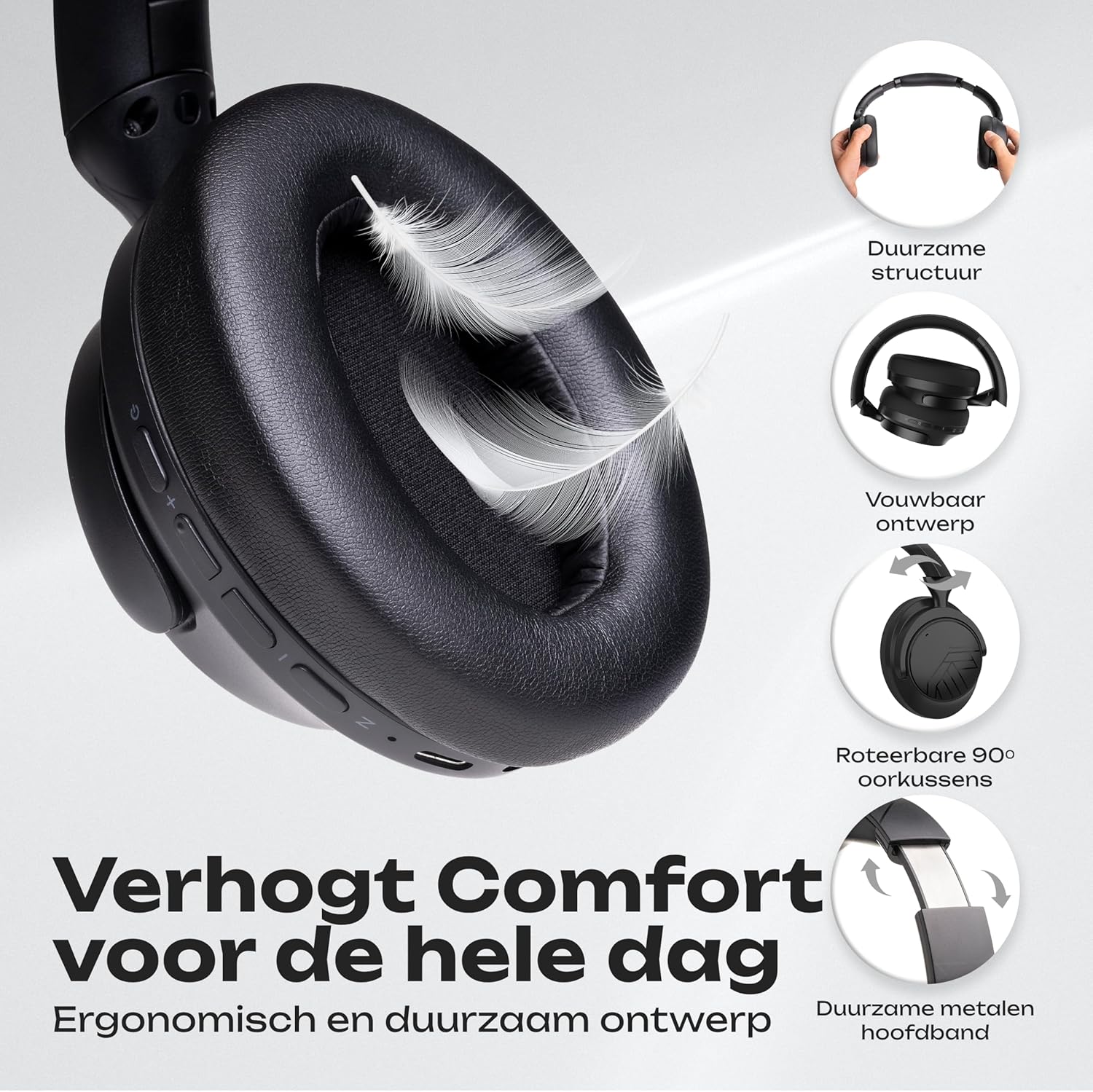
Image: An illustration detailing the comfort features of the headphones, including their durable structure, foldable design, 90-degree rotatable earcups, and a robust metal headband for extended wear.
טשאַרדזשינג די כעדפאָונז
Before first use, fully charge your MoonFly headphones. A full charge takes approximately 2 hours.
- Connect the small end of the USB-C charging cable to the USB-C port on the headphone earcup.
- Connect the larger end of the USB-C cable to a USB power source (e.g., computer USB port, wall adapter, power bank).
- The LED indicator on the headphones will show the charging status. It typically turns off or changes color when fully charged.
With USB-C fast charging, a 5-minute charge can provide up to 6 hours of playtime. A full charge offers over 70 hours of playtime in non-ANC mode.

Image: The headphones showcasing key features such as over 70 hours of wireless usage, the availability of a 3.5mm Aux Mode, rapid USB-C charging, and Bluetooth 5.4 connectivity.
מאַכט אויף / אַוועק
- צו מאַכט אויף: דריק און האלט דעם פּאַוער קנעפּל פֿאַר אַרום 3 סעקונדעס ביז דער LED אינדיקאַטאָר צינדט זיך אָן.
- צו מאַכט אַוועק: דריק און האלט דעם פּאַוער קנעפּל פֿאַר אַרום 3 סעקונדעס ביז דער LED אינדיקאַטאָר גייט אויס.
בלועטאָאָטה פּערינג
The MoonFly headphones offer easy one-click pairing and universal compatibility with various Bluetooth-enabled devices.
- אַרייַן די פּערינג מאָדע: With the headphones powered off, press and hold the Power button for about 5-7 seconds until the LED indicator flashes red and blue alternately. This indicates the headphones are in pairing mode.
- אַקטיווירן בלועטוט אויף דיין מיטל: Go to the Bluetooth settings on your smartphone, tablet, laptop, or other Bluetooth-enabled device.
- Select 'PowerLocus MoonFly': In the list of available devices, select 'PowerLocus MoonFly'.
- באַשטעטיקן קשר: Once connected, the LED indicator on the headphones will typically show a solid blue light or flash blue slowly.
The headphones can connect to 2 devices simultaneously, allowing for seamless switching between audio sources.

Image: The headphones demonstrating simultaneous Bluetooth connection to both a laptop and a smartphone, highlighting their multi-device connectivity and universal compatibility with iOS, Android, Windows, Mac, and other Bluetooth devices.
Active Noise Cancelling (ANC) & Transparency Mode
The MoonFly headphones feature three levels of noise reduction to enhance your listening experience:
- Active Noise Cancelling (ANC) ON: Blocks out external noise, ideal for travel or noisy environments.
- Passive Noise Cancelling: Achieved through the physical design of the earcups, providing a basic level of sound isolation.
- דורכזעיקייַט מאָדע: Allows ambient sounds to pass through, keeping you aware of your surroundings while still enjoying your audio.
דרוק די דעדאַקייטאַד ANC קנעפּל on the earcup to cycle through these modes.

Image: A man wearing the headphones on an airplane, illustrating the effectiveness of the noise-cancelling feature, which blocks 95% of external noise. The image also highlights the three available noise reduction modes: Active Noise Cancelling ON, Passive Noise Cancelling, and Transparency Mode.
דראָט מאָדע (AUX)
If the headphone battery is depleted or you prefer a wired connection, use the included 3.5mm AUX cable.
- Plug one end of the 3.5mm AUX cable into the audio jack on the headphones.
- שטעקט אריין דעם אנדערן עק אין דעם 3.5 מ״מ אודיאָ אַרויסגאַנג פֿון אייער דעווייס.
The headphones will function as passive wired headphones. Note that ANC functionality may be limited or unavailable in wired mode if the battery is completely drained.
מאכן קאַללס
The built-in ENC (Environmental Noise Cancellation) microphone allows for clear calls.
- ענטפֿערן / סוף רופן: דריקן די מאַכט קנעפּל אַמאָל.
- אָפּוואַרפן רופן: דריקן און האַלטן די מאַכט קנעפּל פֿאַר 2 סעקונדעס.
- ריאַל די לעצטע נומער: דריקט צוויי מאָל דעם מאַכט קנעפּל.

Image: A collage illustrating various usage scenarios for the headphones, including comfortable use for travel, perfect for daily listening, equipped with an excellent microphone for online meetings, and suitable for gaming.
זאָרגן און וישאַלט
To ensure the longevity and optimal performance of your PowerLocus MoonFly headphones, follow these care guidelines:
- רייניקונג: ניצט אַ ווייכע, טרוקענע שטאָף צו רייניקן די אויערקעפּלעך און קאָפּבאַנד. פֿאַרמייַדט ניצן שטרענגע כעמיקאַלן אָדער שרײַבנדיקע מאַטעריאַלן.
- סטאָרידזש: When not in use, store the headphones in the provided EVA hard carrying case to protect them from dust, scratches, and impacts. The foldable design makes them compact for storage.
- ויסמיידן עקסטרעמע טנאָים: שטעלט נישט אויס די כעדפאָונז צו עקסטרעמע טעמפּעראַטורן, הומידיטי, אדער דירעקטע זונשייַן.
- וואַסער קעגנשטעל: The headphones are rated as waterproof. However, avoid submerging them in water or exposing them to heavy rain for extended periods.
- קאַבלע זאָרגן: Handle the charging and AUX cables gently to prevent damage.

Image: The foldable headphones and their premium hard carrying case neatly packed inside a suitcase, illustrating their portable design and ease of storage for travel.
טראָובלעשאָאָטינג
אויב איר טרעפט פראבלעמען מיט אייערע כעדפאָונז, באַציעט זיך צו די פאלגענדע געוויינטלעכע לייזונגען:
| פּראָבלעם | מעגלעך לייזונג |
|---|---|
| קאָפּהערער וועלן זיך נישט אָנצינדן | זיכער מאַכן אַז די קאָפּהערער זענען גאָר אָנגעלאָדן. פֿאַרבינדט זיי צו אַ מאַכט מקור מיטן USB-C קאַבל. |
| קען נישט צוזאמענשטעלן דורך בלוטוט | Make sure the headphones are in pairing mode (LED flashing red/blue). Disable and re-enable Bluetooth on your device. Move closer to the headphones. |
| ניט געזונט אָדער נידעריק באַנד | Check the volume levels on both the headphones and your connected device. Ensure the headphones are properly paired or the AUX cable is fully inserted. |
| ANC אַרבעט נישט עפֿעקטיוו | Ensure ANC mode is activated using the ANC button. Check that the earcups form a good seal around your ears. |
| מיקראָפאָן טוט נישט אַרבעטן | Ensure the headphones are connected via Bluetooth. Check your device's audio input settings to confirm the MoonFly microphone is selected. |
If the issue persists, please contact PowerLocus customer support for further assistance.
ספּעסאַפאַקיישאַנז
| שטריך | דעטאַל |
|---|---|
| מאָדעל נאָמען | MoonFly |
| בלועטאָאָטה ווערסיע | 5.4 |
| ווירעלעסס ראַנגע | אַרויף צו 20 מעטער (65 פֿיס) |
| Battery Life (Non-ANC) | אַרויף צו 70 שעה |
| טשאַרדזשינג צייט | Approximately 2 hours (USB-C) |
| אַודיאָ דרייווער גרייס | 40 מם דינאַמיק דרייווער |
| אָפטקייַט ענטפער | 20 הז - 20,000 הז |
| ימפּידאַנס | 32 Ohm |
| סענסיטיוויטי | 100 דב |
| ראַש קאָנטראָל | היבריד ראַש קאַנסאַליישאַן |
| מיקראָפאָן | איינגעבויטע ENC מיקראָפאָן |
| קאַנעקטיוויטי | ווירעלעס (בלוטוט), ווייערד (3.5 מ״מ AUX) |
| אויער פּלייסמאַנט | איבער-אויער |
| מאַטעריאַל | Plastic and Leather |
| וואָג | 246 גראַמז |
| וואַסער קעגנשטעל מדרגה | וואָטערפּרוף |
וואָראַנטי און שטיצן
PowerLocus provides a 2 יאָר וואָראַנטי for the MoonFly headphones, covering manufacturing defects and ensuring peace of mind. Additionally, a 30-day money-back period is offered.
For any questions, technical support, or warranty claims, please contact PowerLocus customer service. Refer to the included International PowerLocus Warranty Card for contact details and specific terms and conditions.
Our customer service team is dedicated to providing excellent and friendly support whenever you need assistance.