
1. הקדמה
Thank you for choosing the Roadstar RDM-710DSP Bluetooth 3xUSB Car Stereo. This manual provides essential information for the proper installation, operation, and maintenance of your new car stereo. Please read this manual thoroughly before using the product to ensure optimal performance and safety.
The RDM-710DSP is a mechless car stereo designed to provide high-quality audio and versatile connectivity options for your vehicle. It features Bluetooth 5.0 for wireless audio streaming and hands-free calling, three USB inputs for media playback, and a sophisticated Digital Sound Processor (DSP) with a 32-band equalizer for precise audio customization.
2. פּראָדוקט פֿעיִקייטן
- Mechless Car Stereo design (no CD/DVD mechanism)
- Multi-color display with seven selectable color options
- Digital Sound Processor (DSP) with 32-band equalizer
- TDA7388 amplifier for robust audio output
- Bluetooth 5.0 for wireless audio streaming and hands-free communication
- Three USB inputs for diverse media playback and charging
- FM radio tuner (5807)
- Six RCA outputs for external ampליבער קאַנעקשאַנז
- דעדאַקייטאַד סובוואָאָפער רעזולטאַט
- High Pass Filter (HPF) and Low Pass Filter (LPF) functions for audio crossover management
- Time and day display function
- ISO standards compliant for easy installation
- Folder selection feature for organized media browsing
- Controllable via included remote control
- Mobile application control support
3. פּעקל אינהאַלט
ביטע טשעק די פּאַקעט פֿאַר די פאלגענדע זאכן:
- Roadstar RDM-710DSP Car Stereo Unit
- וויירינג כאַרניס
- מאָנטירונג האַרדווער (שרויף, קלאַמערן)
- ווייַט קאָנטראָל
- באַניצער מאַנואַל (דעם דאָקומענט)
אויב קיין זאכן זענען פעלנדיק אָדער דאַמידזשד, ביטע קאָנטאַקט דיין הענדלער מיד.
4. זיכערקייַט אינפֿאָרמאַציע
- ייַנמאָנטירונג: Always have the unit installed by a qualified technician to prevent damage to the unit or your vehicle. Incorrect wiring can cause fire or electrical shock.
- מאַכט צושטעלן: פֿאַרבינדט דעם אַפּאַראַט נאָר צו אַ 12V DC מאַכט צושטעל מיט אַ נעגאַטיוון גראַונד.
- דרייווינג זיכערקייַט: Do not operate the unit in a way that distracts you from driving. Always keep your attention on the road.
- באַנד מדרגה: Keep the volume at a level where you can still hear outside traffic sounds. Excessive volume can impair your hearing.
- נעץ: Do not expose the unit to moisture or water to prevent electrical shock.
- רייניקונג: ניצן אַ ווייך, טרוקן שטאָף פֿאַר רייניקונג. דו זאלסט נישט נוצן אַברייסיוו קלינערז אָדער סאָלוואַנץ.
5. סעטאַפּ און ייַנמאָנטירונג
5.1 וויירינג קאַנעקשאַנז
The RDM-710DSP is designed to be ISO standards compliant, simplifying wiring. Refer to the wiring diagram provided with the unit for specific connections. Ensure all connections are secure and properly insulated to prevent short circuits.
- מאַכט: Connect the yellow wire to the constant 12V supply, the red wire to the accessory 12V supply (switched by ignition), and the black wire to a good chassis ground.
- רעדנער: Connect speaker wires to the corresponding vehicle speaker wires. Pay attention to polarity (+/-).
- אַנטענע: Connect the vehicle's FM antenna to the antenna input.
- RCA אַוטפּוץ: פֿאַר פונדרויסנדיק amplifiers, connect the six RCA outputs (Front L/R, Rear L/R, Subwoofer) to your ampליפיער ס ינפּוץ.
5.2 מאָונטינג די אַפּאַראַט
Insert the metal mounting sleeve into the dashboard opening. Bend the tabs outward to secure the sleeve. Slide the RDM-710DSP unit into the mounting sleeve until it clicks into place. Ensure the unit is firmly secured.
5.3 ערשט מאַכט-אַרויף
נאך דער אינסטאַלאַציע, צינדט אָן די איגנישאַן פון אייער פאָרמיטל. די אַפּאַראַט זאָל זיך אָנצינדן. פֿאָלגט אַלע אינסטרוקציעס אויף דעם עקראַן פֿאַר דער ערשטער סעטאַפּ, ווי למשל שטעלן די זייגער.
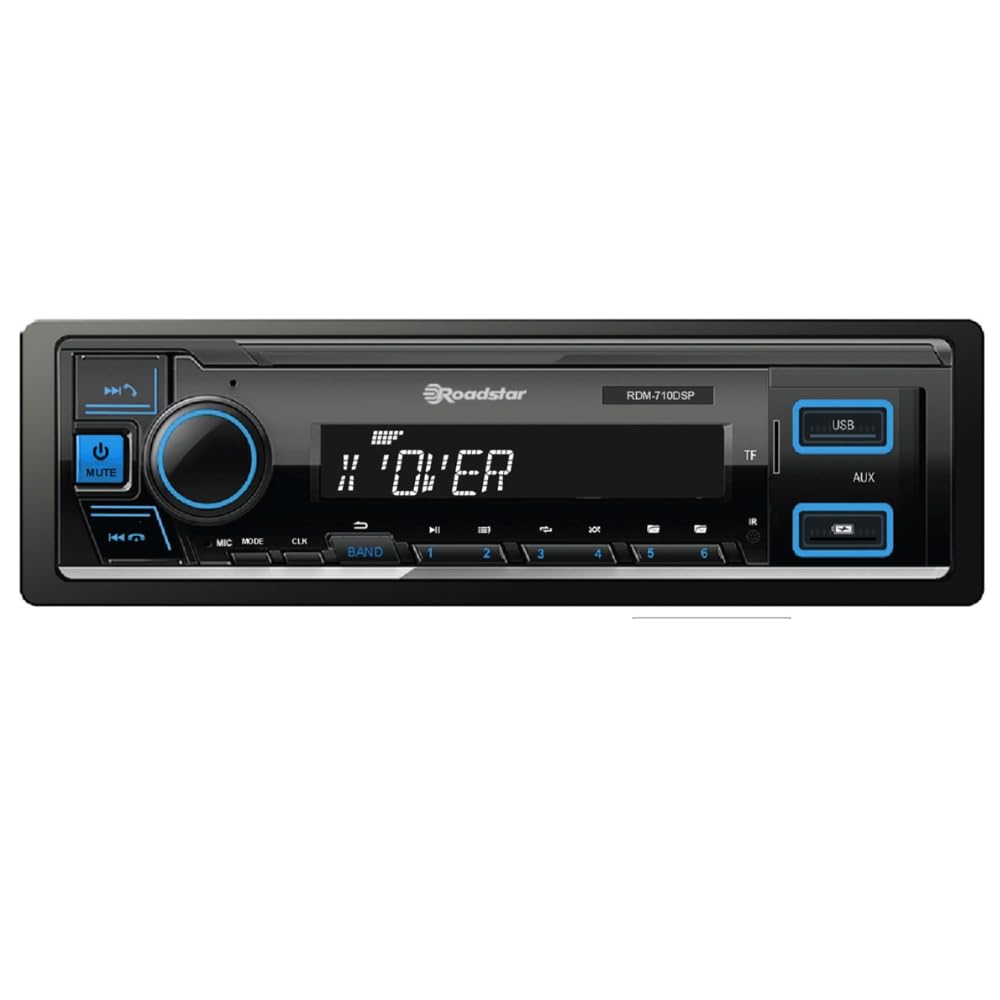
פיגורע 1: פראָנט view of the Roadstar RDM-710DSP Car Stereo. This image displays the main unit with its multi-color display, control buttons, and USB ports.
6. אַפּערייטינג ינסטרוקטיאָנס
6.1 יקערדיק קאָנטראָלס
- מאַכט קנעפּל: דרוק צו קער די אַפּאַראַט אויף / אַוועק.
- באַנד קנעפּל: דריי צו סטרויערן דעם באַנד. דריק צו צוקומען צו די אַודיאָ סעטטינגס.
- מאָדע קנעפּל: Press to cycle through available sources (FM, Bluetooth, USB1, USB2, USB3, AUX).
- ווייַז: The multi-color display shows current source, track information, radio frequency, time, and day. You can customize the display color through the settings menu.
6.2 Remote Control and Mobile App
The unit can be controlled using the included remote control. Point the remote control towards the unit's IR sensor. For advanced control, download the dedicated mobile application from your smartphone's app store. Pair your phone via Bluetooth to use the app.
7. בלועטאָאָטה קאַנעקטיוויטי
7.1 צוזאמענשטעלן א בלוטוט דעווייס
- Turn on the RDM-710DSP and select the Bluetooth source using the Mode button.
- געבן בלועטאָאָטה אויף דיין רירעוודיק מיטל און זוכן פֿאַר בנימצא דעוויסעס.
- Select "RDM-710DSP" from the list of found devices.
- If prompted, enter the PIN code (usually "0000").
- Once paired, the unit will confirm the connection, and you can stream audio or make calls.
7.2 Bluetooth Audio Streaming (A2DP)
After pairing, you can play music from your Bluetooth-enabled device. Use the unit's controls or your phone to play, pause, skip tracks, and adjust volume.
7.3 Hands-Free Calling (HFP)
When a call comes in, the unit will display the caller ID (if supported). Press the Answer button on the unit or remote to accept the call. Use the unit's microphone for communication and the car speakers for audio output.
8. וסב פּלייַבאַקק
The RDM-710DSP features three USB inputs. Connect a USB flash drive containing audio files (e.g., MP3, WMA) to any of the USB ports. The unit will automatically switch to USB mode and begin playback.
- נאַוויגאַציע: Use the forward/backward buttons to skip tracks. Use the folder selection feature to browse through directories on your USB device.
- שטיצט פֿאָרמאַטירונגען: The unit supports common audio formats. Refer to the technical specifications for a complete list.
- טשאַרדזשינג: USB ports may also provide charging capabilities for compatible devices.
9. ראַדיאָ אָפּעראַציע
Press the Mode button to select FM radio. The unit will display the current frequency.
- אַוטאָ סקאַן: Press and hold the seek buttons to automatically scan for and store strong stations.
- מאַנואַל טונינג: Briefly press the seek buttons to manually tune to the next frequency.
- פּריסעט סטיישאַנז: Use the numeric buttons (if available on the unit or remote) to select preset stations.
10. סאָונד סעטטינגס
The RDM-710DSP features a powerful Digital Sound Processor (DSP) to customize your audio experience.
- עקוואַליזער: Access the 32-band equalizer through the audio settings menu. Adjust individual frequency bands to tailor the sound to your preference.
- HPF/LPF: High Pass Filter (HPF) and Low Pass Filter (LPF) settings allow you to define the frequency range sent to your speakers and subwoofer, optimizing sound quality and preventing distortion.
- סובוואָאָפער רעזולטאַט: Adjust the subwoofer level and phase through the audio settings.
- RCA אַוטפּוץ: The six RCA outputs provide clean, pre-amplified signals for connecting external amplifiers, allowing for a more powerful and customized sound system.
11. וישאַלט
- רייניקונג די אַפּאַראַט: Use a soft, dry cloth to wipe the front panel. Do not use harsh chemicals, solvents, or abrasive cleaners, as they may damage the finish or display.
- וסב פּאָרץ: Keep USB ports free from dust and debris.
- אַלגעמיינע זאָרגן: פֿאַרמײַדט אויסשטעלן דעם אַפּאַראַט צו עקסטרעמע טעמפּעראַטורן, דירעקטע זונשײַן פֿאַר פֿאַרלענגערטע פּעריאָדן, אָדער איבערגעטריבענע פֿײַכטקייט.
12. טראָובלעשאָאָטינג
If you encounter problems with your RDM-710DSP, refer to the following table for common issues and solutions.
| פּראָבלעם | מעגלעך סיבה | לייזונג |
|---|---|---|
| קיין מאַכט | Incorrect wiring; Blown fuse; Vehicle ignition off | Check power and ground connections; Replace fuse if necessary; Turn vehicle ignition ON. |
| קיין געזונט | קול צו נידעריג; שטום פונקציע אקטיוו; נישט ריכטיגע רעדנער וויירינג; Amplifier not powered (if external) | Increase volume; Deactivate mute; Check speaker connections and polarity; Ensure external ampליפיער איז פּאַוערד. |
| בלועטאָאָטה איז נישט קאַנעקטינג | Bluetooth not enabled on phone; Unit not in pairing mode; Device already paired to another unit | Enable Bluetooth on your phone; Ensure unit is in Bluetooth mode; Forget device on phone and re-pair. |
| USB מיטל נישט דערקענט | ניט געשטיצט file system; Damaged USB device; Incompatible file פֿאָרמאַט | Ensure USB is FAT32 formatted; Try a different USB device; Check supported file פֿאָרמאַטירונגען. |
| ווייַט קאָנטראָל נישט ארבעטן | Dead battery; Obstruction between remote and unit; Remote not pointed correctly | Replace remote battery; Remove obstructions; Point remote directly at the unit's IR sensor. |
אויב די פראבלעם בלייבט נאך פרובירן די לייזונגען, ביטע קאנטאקטירט קאסטומער סופארט.
13. ספּעסאַפאַקיישאַנז
| שטריך | באַשרייַבונג |
|---|---|
| מאָדעל | RDM-710DSP |
| סאָרט | ראָאַדסטאַר |
| בלועטאָאָטה ווערסיע | 5.0 |
| וסב פּאָרץ | 3 |
| עקוואַליזער | 32-באַנד דספּ |
| רקאַ אַוטפּוץ | 6 (Front L/R, Rear L/R, Subwoofer) |
| Ampליפיער IC | TDA7388 |
| טונער | FM (5807) |
| וואָג | 0.65 קילאָגראַמס |
| אַרייַנגערעכנט קאַמפּאָונאַנץ | קאַר סטערעאָ אַפּאַראַט |
14. וואָראַנטי און שטיצן
14.1 וואָראַנטי אינפֿאָרמאַציע
Warranty information for the Roadstar RDM-710DSP is not specified in the product details. Please refer to your purchase receipt or contact your retailer for details regarding warranty coverage and terms.
14.2 קונה שטיצן
For technical assistance, troubleshooting beyond this manual, or service inquiries, please contact your authorized Roadstar dealer or visit the official Roadstar webפּלאַץ פֿאַר שטיצן רעסורסן.