
1. הקדמה
The HTVRONT Phone Case Heat Press Machine is an advanced auto 3D vacuum heat press designed for sublimation printing on various items, including phone cases, badges, and coasters. It features precise temperature control and a universal mold compatible with popular iPhone models, ensuring high-quality, full-surface transfers with vibrant colors.
This manual provides detailed instructions for the safe and effective use of your HTVRONT heat press machine. Please read it thoroughly before operation.

Image: The HTVRONT Phone Case Heat Press Machine in lavender purple, shown with included accessories such as a phone case fixture, heat-resistant gloves, and sublimation film.
2. זיכערקייַט אינפֿאָרמאַציע
שטענדיק אָבסערווירן די פאלגענדע זיכערהייט מיטלען צו פאַרמייַדן שאָדן אָדער שעדיקן צו דער מאַשין:
- Keep hands and fingers away from the heating plates during operation. The plates reach high temperatures.
- Use heat-resistant gloves when handling hot items or components.
- זיכער מאַכן אַז די מאַשין איז געשטעלט אויף אַ סטאַבילער, היץ-קעגנשטעליקער ייבערפלאַך.
- דו זאלסט נישט אַרבעטן די מאַשין לעבן ברענעוודיק מאַטעריאַלס.
- נעמט ארויס די מאַשין פון דער עלעקטרישער אַוטלעט ווען זי ווערט נישט גענוצט אדער איידער איר רייניגט זי.
- דו זאלסט נישט ייַנטונקען די מאַשין אין וואַסער אָדער קיין אנדערע פליסיק.
- האַלטן אויס פון דערגרייכן פון קינדער.
- Only use the machine for its intended purpose as described in this manual.
3. פּראָדוקט קאַמפּאָונאַנץ
The HTVRONT Phone Case Heat Press Kit includes the following items:
- HTVRONT H17 Phone Case Heat Press (x1)
- Phone Case Fixture Set (x1)
- Badge Fixture Set (x1)
- Sublimation Film (A4) (x5)
- Heat-resistant Gloves (x1 pair)
- Sublimation Badge (58 mm) (x3)
- Tweezers (x1)
- Heat-resistant Tape (x1)

Image: A visual representation of all components included in the HTVRONT Phone Case Heat Press Kit, neatly arranged with quantities.
4. סעטאַפּ
Follow these steps to set up your heat press machine:
- אַנפּאַק: נעמט פֿאָרזיכטיק אַרויס אַלע קאָמפּאָנענטן פֿון דער פּאַקאַדזשינג. האַלט די פּאַקאַדזשינג פֿאַר צוקונפֿטיקע סטאָרידזש אָדער טראַנספּאָרט.
- אָרט: Place the heat press machine on a flat, stable, and heat-resistant surface. Ensure there is adequate ventilation around the machine.
- מאַכט קשר: שטעקט אריין דעם עלעקטרישן שנור אין א געערדטן עלעקטרישן ווענטיל. זיכערט זיך אז דער וואָלומען איז גוטtage פּאַסט צו די מאַשין'ס באדערפענישן.
- ערשט דורכקוק: Before first use, inspect the machine for any visible damage. Do not operate if damage is present.
5. אַפּערייטינג ינסטרוקטיאָנס
5.1 Basic Operation (Quick Start Guide)
The HTVRONT heat press is designed for ease of use, even for beginners. Follow these general steps for heat transfer:
- Power On and Set Parameters: Turn on the machine and use the control panel to set the desired temperature and time according to your material's requirements.
- Preheat and Mount: Place the appropriate fixture (e.g., phone case fixture) into the device. Allow the machine to preheat. Once preheated, mount the item (e.g., phone case) onto the fixture.
- Apply Sublimation Film: Carefully place the printed sublimation film with your design onto the item. Ensure proper alignment.
- Begin Transfer: Close the lid to initiate the heat transfer process. The machine will automatically apply 3D vacuum pressure.
- Completion and Peel: Once the transfer is complete, the machine will signal. Open the lid and carefully peel off the sublimation film while the item is still hot, using heat-resistant gloves.

Image: A visual guide illustrating the four key steps of the 6-minute heat press process, from setting parameters to peeling the film.
5.2 Material-Specific Settings (Quick Reference Chart)
Refer to the table below for recommended temperature and time settings for common sublimation materials:
| סאַבסטרייט | מאַטעריאַל | מכשיר | Upper Heat Plate Temp | Lower Heat Plate Temp | פּרעהעאַט צייט | אַריבערפירן צייט | שאָלעכץ מעטאָד |
|---|---|---|---|---|---|---|---|
| טעלעפאָנירן קאַסע | טפּו/פּיסי | Universal phone case fixture set | 135°C/275°F | 135°C/275°F | 2-10 ס | 300-350 ס | הייס שאָלעכץ |
| באַדגע | מעטאַל | בעדזש פיקסטשער סעט | 140°C/285°F | 140°C/285°F | 2-10 ס | 330 ס | הייס שאָלעכץ |
| סעראַמיק פּלאַטע | סעראַמיק | באַזע טעלער | 140°C/285°F | 140°C/285°F | 2-10 ס | 300 ס | הייס שאָלעכץ |
| קאָוסטער | לעדער | באַזע טעלער | 135°C/275°F | 125°C/255°F | 2-10 ס | 300 ס | הייס שאָלעכץ |
| קייטשאַין | MDF | באַזע טעלער | 135°C/275°F | 135°C/275°F | 2-10 ס | 300 ס | הייס שאָלעכץ |
Table: Quick Reference Chart for recommended heat press settings based on substrate material.
5.3 Universal Mold and Compatibility
The HTVRONT H17 features an adjustable phone case mold designed for compatibility with a wide range of iPhone models (iPhone 12 and above). This single fixture reduces the need for multiple molds.

Image: Illustration showing the heat press's universal adaptation for different iPhone models, highlighting its versatility.
The phone case fixture set includes a main fixture, lens pads, and filler blocks to ensure a snug fit for various phone sizes. Refer to the Model Compatibility Chart for specific recommendations:
| מאָדעל | Lens Pad | פיללער בלאַק | מאָדעל | Lens Pad | פיללער בלאַק |
|---|---|---|---|---|---|
| יפאָנע 16 | I-9 | ② + ③ | יפאָנע 14 פּראָ | I-4 | ② + ③ |
| יפאָנע 16 פּלוס | I-9 | ① + ② + ③ + ④ + ⑤ | יפאָנע 14 פּראָ מאַקס | I-4 | ① + ② + ③ + ④ + ⑤ |
| יפאָנע 16 פּראָ | I-8 | ② + ③ | יפאָנע 13 | I-2 | ② + ③ |
| יפאָנע 16 פּראָ מאַקס | I-8 | ① + ② + ③ + ④ + ⑤ | יפאָנע 13 פּראָ | I-3 | ② + ③ |
| יפאָנע 15 | I-6 | ② + ③ | יפאָנע 13 פּראָ מאַקס | I-3 | ① + ② + ③ + ④ + ⑤ |
| יפאָנע 15 פּלוס | I-6 | ① + ② + ③ + ④ + ⑤ | יפאָנע 12 | \ | ② + ③ |
| יפאָנע 15 פּראָ | I-7 | ② + ③ | יפאָנע 12 פּראָ | I-1 | ② + ③ |
| יפאָנע 15 פּראָ מאַקס | I-7 | ① + ② + ③ + ④ + ⑤ | יפאָנע 12 פּראָ מאַקס | I-1 | ① + ② + ③ + ④ + ⑤ |
| יפאָנע 14 | I-5 | ② + ③ | |||
| יפאָנע 14 פּלוס | I-5 | ① + ② + ③ + ④ + ⑤ |
Table: Model Compatibility Chart for iPhone models, indicating recommended Lens Pad and Filler Block combinations.
5.4 Smart Alignment Feature
The machine is equipped with phone-specific templates and pattern adjustment tools within its software. This feature ensures perfect alignment and complete coverage of your design, significantly improving the accuracy and efficiency of your creative process.
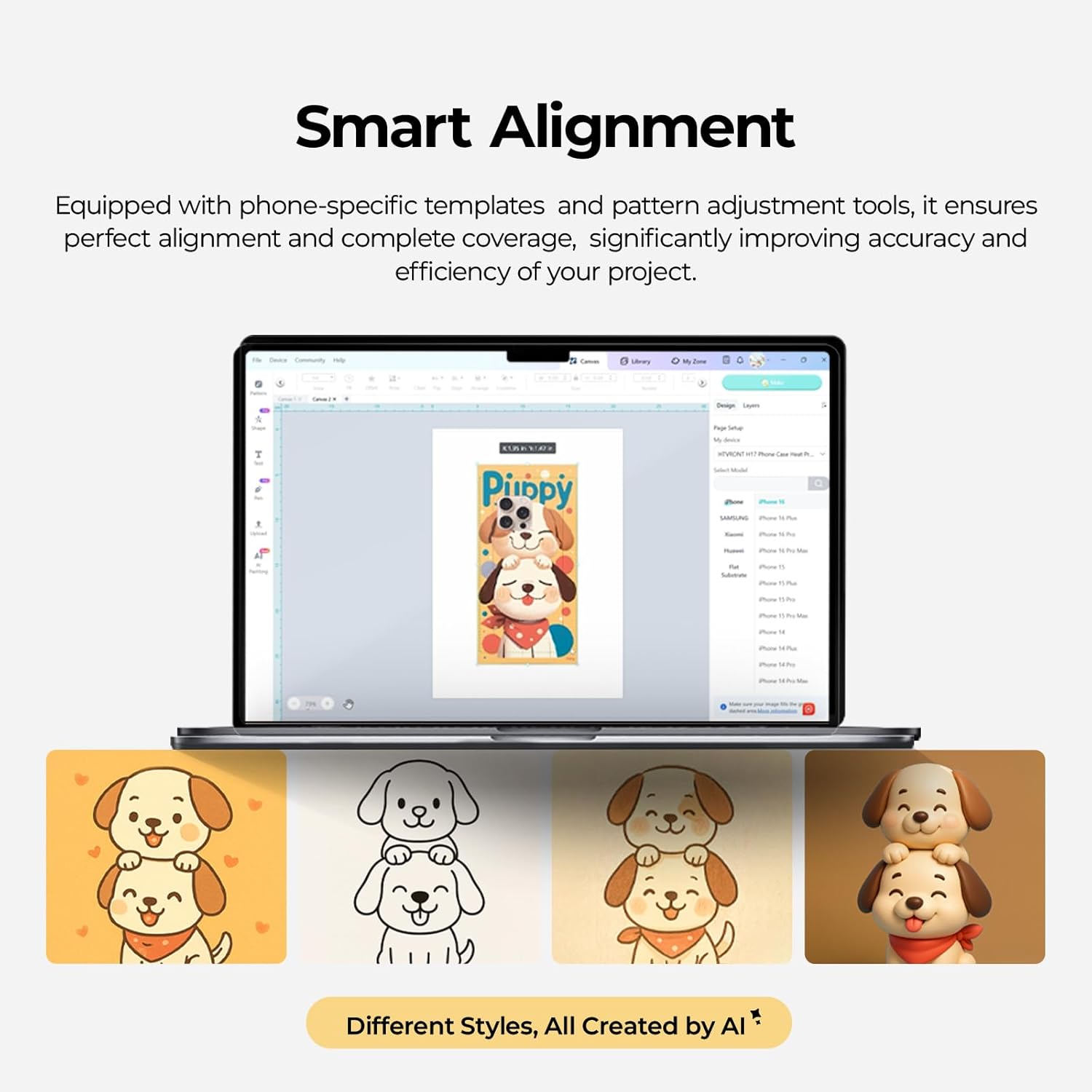
Image: A screenshot of the Smart Alignment software interface, demonstrating how users can adjust pattern size and position for perfect alignment on phone cases.
6. וישאַלט
Proper maintenance ensures the longevity and optimal performance of your HTVRONT heat press machine:
- רייניקונג: After each use, allow the machine to cool completely. Wipe down the heating plates and exterior with a soft, damp שטאָף. דו זאלסט נישט נוצן אַברייסיוו קלינערז אָדער סאָלוואַנץ.
- פיקסטשער קער: Clean the phone case and badge fixtures regularly to prevent residue buildup.
- סטאָרידזש: Store the machine in a dry, dust-free environment when not in use. Keep it in its original packaging if possible to protect it from damage.
- דורכקוק: Periodically check the power cord for any signs of damage. If damaged, contact customer support for assistance.
7. טראָובלעשאָאָטינג
די סעקציע באהאנדלט אלגעמיינע פראבלעמען וואס איר קענט באגעגענען. פאר פראבלעמען וואס זענען נישט דא אויסגערעכנט, ביטע קאנטאקטירט קאסטומער סופארט.
- מאַשין איז נישט פּאַוערינג:
- זייט זיכער אז דער עלעקטרישער שנור איז זיכער אריינגעשטעקט אין ביידע די מאַשין און א ארבעטנדיקן עלעקטרישן ווענטיל.
- קאָנטראָלירט אויב דער מאַכט קנעפּל איז אין דער 'אויף' פּאָזיציע.
- באַשטעטיקן אַז די עלעקטרישע אַוטלעט אַרבעט דורך אַרײַנשטעקן אַן אַנדער אַפּאַראַט.
- Uneven Heat Transfer/Faded Design:
- Confirm that the temperature and time settings are correct for your specific material (refer to the Quick Reference Chart).
- Ensure the sublimation film is properly aligned and securely taped to the item.
- Check that the item is placed correctly and snugly within the fixture.
- Ensure the item has a sublimation coating, as this machine is only suitable for such items.
- מאַשין ניט באַהיצונג:
- Verify the temperature setting is not at 0 or minimum.
- Allow sufficient time for the machine to preheat to the set temperature.
- אויב די אַרויסגעבן בלייַבט, קאָנטאַקט קונה שטיצן.
- יבעריק ראַש:
- The machine operates quietly, typically below 65 dB. If unusual loud noises occur, discontinue use and contact support.
8. ספּעסאַפאַקיישאַנז
- מאָדעל נומער: RY-SJKJ-0651-US
- סאָרט: HTVRONT
- מאַטעריאַל: מעטאַל
- קאָליר: לאַוואַנדע לילאַ
- נומער וואָג: 15.22 פונט (אומגעפער 6.9 ק"ג)
- פּראָדוקט דימענשאַנז: 1.2"ל x 1"בר x 0.8"ה
- ראַש מדרגה: <65 dB (Quiet Operation)
- רעקאַמענדיד ניצט: Sublimation Phone Cases, Badges, Coasters, Keychains, Slates
- טעכנאָלאָגיע: Auto 3D Vacuum Heat Press
- טעמפּעראַטור קאָנטראָל: Precise digital control
- קאַמפּאַטאַבילאַטי: Universal mold for iPhone 12 and above models
9. וואָראַנטי און שטיצן
HTVRONT is committed to providing excellent customer service. If you have any questions or require assistance with your Phone Case Heat Press Machine, please do not hesitate to contact us.
- קונה שטיצן: We provide 24/7 customer support to assist with any issues or inquiries.
- וואָראַנטי אינפֿאָרמאַציע: For detailed warranty terms and conditions, please refer to the warranty card included with your product or contact HTVRONT customer service directly.
Thank you for choosing HTVRONT. We hope you enjoy creating with your new heat press machine!