
הקדמה
Thank you for choosing the Ledwood ACCESS130 Portable HiFi Speaker. This manual provides essential information for the safe and efficient operation of your device. The ACCESS130 is a versatile portable speaker featuring dynamic RGB LED effects, Bluetooth 5.3 connectivity, USB input, and a karaoke function with an included wireless microphone. It is designed to deliver a powerful audio experience for various occasions.
זיכערקייַט אינפֿאָרמאַציע
- לייענען אַלע ינסטראַקשאַנז קערפאַלי איידער איר נוצן דעם פּראָדוקט.
- שטעלט נישט אויס דעם רעדנער צו וואַסער אָדער צו פיל נעץ. דאָס פּראָדוקט איז נישט וואַסערפּרוף.
- Keep the speaker away from heat sources, direct sunlight, and flammable materials.
- פּרוּווט נישט צו צענעמען, פאַרריכטן אָדער מאָדיפֿיצירן דאָס אַפּאַראַט. לאָזט איבער אַלע סערוויסינג אַרבעטן צו קוואַליפֿיצירטע פּערסאָנעל.
- ניצט נאָר דעם צוגעשטעלטן USB-C טשאַרדזשינג קאַבל.
- ויסמיידן צוגעהערט אין הויך באַנד לעוועלס פֿאַר עקסטענדעד פּיריאַדז צו פאַרמייַדן געהער שעדיקן.
- האַלטן אויס פון דערגרייכן פון קינדער.
פּעקל אינהאַלט
ביטע טשעק די פּאַקעט פֿאַר די פאלגענדע זאכן:
- Ledwood ACCESS130 Portable HiFi Speaker
- וסב-C טשאַרדזשינג קאַבלע
- ווירעלעסס מיקראָפאָן
- קעריינג רימען
פּראָדוקט איבערview
Familiarize yourself with the components and controls of your Ledwood ACCESS130 speaker.
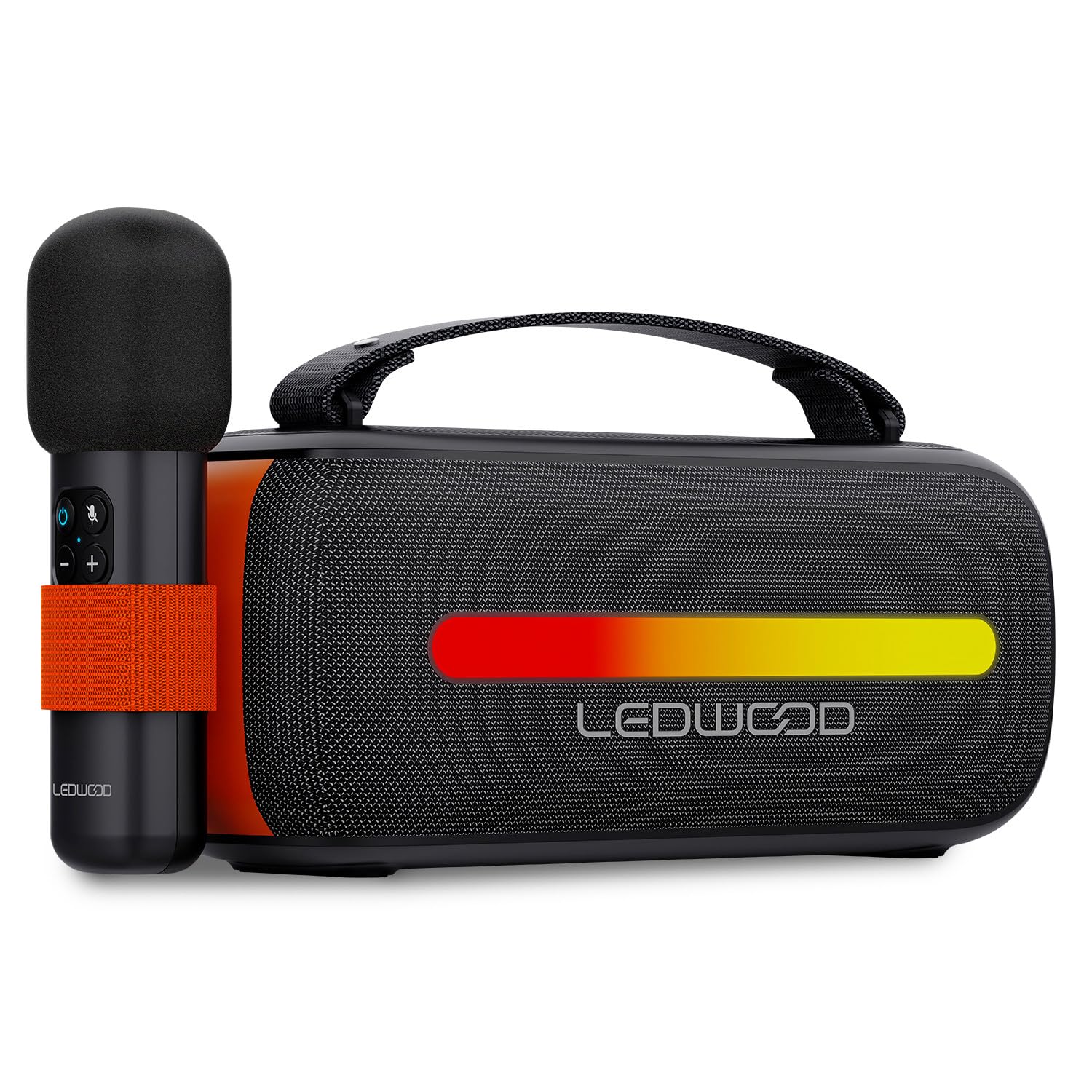
Image: The Ledwood ACCESS130 portable speaker shown with its wireless microphone attached to the side. The speaker features a black mesh grille and an illuminated LED strip on the front.
קאָנטראָלס און פּאָרץ

בילד: א פון אויבן אראפ view of the Ledwood ACCESS130 speaker, highlighting the control panel with buttons for power, volume, mode, and LED effects. Icons for LED colors, microphone, karaoke function, USB-C, and wireless connection are also visible.
- מאַכט קנעפּל: דריקן און האַלטן צו ווענדן די רעדנער אויף / אַוועק.
- מאָדע קנעפּל (M): Press to switch between Bluetooth, USB, and other input modes.
- באַנד אַרויף (+): פאַרגרעסערן באַנד.
- באַנד אַראָפּ (-): פאַרמינערן באַנד.
- שפּיל / פּויזע קנעפּל: שפּילן אָדער פּויזירן אַודיאָ ווידערשפּיל.
- LED Effect Button: Cycle through different LED lighting modes or turn them off.
- וסב- C פּאָרט: פֿאַר טשאַרדזשינג די רעדנער.
- USB-A פּאָרט: For USB audio playback.
סעטאַפּ
1. טשאַרדזשינג די ספּיקער
- פֿאַרבינדט דעם צוגעשטעלטן USB-C טשאַרדזשינג קאַבל צום רעדנער'ס USB-C פּאָרט.
- פֿאַרבינדט דעם אַנדערן עק פֿונעם קאַבל צו אַ קאָמפּאַטיבלע USB מאַכט אַדאַפּטער (נישט אַרייַנגערעכנט) אָדער אַ קאָמפּיוטער'ס USB פּאָרט.
- The LED indicator will show charging status. A full charge takes approximately [Charging Time - not specified in input, omit if not available].
2. פּאָווערינג אויף / אויסגעלאשן
- צו אנצינדן, דריק און האלט דעם פּאַוער קנעפּל ביז דער רעדנער אַקטיוויזירט זיך.
- צו אויסלעשן, דריק און האלט דעם פּאַוער קנעפּל ווידער ביז דער רעדנער שליסט זיך אויס.
3. בלועטאָאָטה פּערינג
- Ensure the speaker is powered on and in Bluetooth mode (indicated by a flashing Bluetooth LED). If not, press the 'M' (Mode) button to switch to Bluetooth mode.
- אויף אייער סמאַרטפאָון, טאַבלעט, אָדער קאָמפּיוטער, אַקטיווירט בלועטוט און זוכט פֿאַר פֿאַראַן דעוויסעס.
- Select "Ledwood ACCESS130" from the list of devices.
- Once paired, the Bluetooth LED will stop flashing and remain solid, indicating a successful connection.
4. Connecting the Wireless Microphone
- Ensure the wireless microphone is charged and powered on.
- The microphone should automatically connect to the speaker when both are powered on and within range.
- Test the microphone by speaking into it to confirm audio output from the speaker.
אַפּערייטינג
1. בלועטוט פּלייבּעק
- After successful Bluetooth pairing, open your music application on your connected device.
- Start playing audio. The sound will be transmitted wirelessly to the ACCESS130 speaker.
- Use the volume buttons on the speaker or your connected device to adjust the audio level.
- Press the Play/Pause button on the speaker to control playback.
2. וסב פּלייַבאַקק
- אַרייַנלייגן אַ וסב בליץ פאָר מיט אַודיאָ files (e.g., MP3) into the speaker's USB-A port.
- Press the 'M' (Mode) button to switch to USB mode.
- The speaker will automatically begin playing audio from the USB drive.
- Use the speaker's controls to adjust volume and navigate tracks.
3. קאַראַאָקע פונקציע
- Ensure the wireless microphone is connected to the speaker as described in the Setup section.
- Play your desired instrumental track via Bluetooth or USB.
- Speak or sing into the microphone. Your voice will be amplified through the speaker, mixing with the music.
4. LED ליכט עפֿעקטן
- Press the LED Effect button to cycle through various dynamic RGB lighting modes.
- Continue pressing the button to select your preferred lighting effect or to turn the LEDs off.
וישאַלט
- רייניקונג: ניצט אַ ווייכע, טרוקענע שטאָף צו רייניקן די רעדנער'ס ייבערפלאַך. ניצט נישט קיין שרײַבנדיקע רייניגער אָדער סאָלווענטן.
- סטאָרידזש: האַלט דעם רעדנער אין אַ קיל, טרוקן אָרט אַוועק פון דירעקט זונשייַן און עקסטרעמע טעמפּעראַטורן ווען עס איז נישט אין באַנוץ פֿאַר לענגערע פּעריאָדן.
- באַטערי זאָרגן: To prolong battery life, fully charge the speaker before first use and recharge it at least once every three months if not used regularly. Avoid completely draining the battery.
טראָובלעשאָאָטינג
| פּראָבלעם | מעגלעך סיבה | לייזונג |
|---|---|---|
| דער רעדנער לאָזט זיך נישט אָנ. | נידעריק באַטאַרייע. | באַשולדיקן די רעדנער מיט די צוגעשטעלט וסב-C קאַבלע. |
| קיין בלועטאָאָטה פֿאַרבינדונג. | Speaker not in pairing mode; device out of range; previously connected device. | Ensure speaker is in Bluetooth pairing mode. Move device closer. Disconnect from other devices. |
| קיין געזונט פון מיקראָפאָן. | Microphone not powered on; microphone not paired. | Ensure microphone is charged and powered on. Check if it automatically connects. |
| USB ווידערשפּיל אַרבעט נישט. | אומרעכטער מאָדע; נישט געשטיצט file format; corrupted USB drive. | Press 'M' button to select USB mode. Ensure files are MP3. Try a different USB drive. |
| די על-אי-די לייץ ארבעטן נישט. | LED effects turned off. | Press the LED Effect button to cycle through modes. |
ספּעסאַפאַקיישאַנז
| מאָדעל נאָמען: | אַקסעס 130 |
| סאָרט: | Ledwood |
| רעדנער טיפּ: | פּאָרטאַטיוו ספּיקער |
| מאַקסימום רעדנער רעזולטאַט מאַכט: | 130 Watts (12W RMS) |
| אַודיאָ רעזולטאַט מאָדע: | סטערעאָ |
| ווירעלעסס קאָמוניקאַציע טעכנאָלאָגיע: | בלועטאָאָטה 5.3 |
| בלועטאָאָטה מאַקס מאַכט: | -6 צו 4 דבם |
| סיגנאַל-צו-ראַש פאַרהעלטעניש: | ≥80דב |
| מאַכט מקור: | באַטאַרייע פּאַוערד |
| באַטערי: | 3.7V - 3600mAh |
| Total Playtime (50% volume): | 6 שעה 30 מינוט |
| קאָנטראָל אופֿן: | Application, Touch |
| פֿאַרבינדונגען: | Bluetooth 5.3, USB-A |
| דימענסיעס (ה x ט x ל): | 12.04 סענטימעטער X 9.9 סענטימעטער X 26.1 סענטימעטער |
| וואָג: | 1 קג |
| וואָטערפּרוף: | ניין |
| אַרייַנגערעכנט קאַמפּאָונאַנץ: | USB-C charging cable, Wireless microphone, Carrying strap |
וואָראַנטי און שטיצן
For warranty information or technical support, please refer to the documentation provided at the time of purchase or contact your retailer. You may also visit the official Ledwood webפּלאַץ פֿאַר ווייַטער הילף.