
1. וויכטיק סאַפעטי אינסטרוקציעס
Please read these instructions carefully before using the Audizio Canzo DAB+ Internet Radio. Keep this manual for future reference.
- שטעלט נישט אויס דעם אפאראט צו רעגן אדער פייכטקייט כדי צו פארמיידן פייער אדער עלעקטרישע שאק.
- נישט עפענען דעם סיasinז. עס זענען נישטאָ קיין טיילן וואָס דער באַניצער קען סערוויסן אינעווייניק. לאָזט איבער אַלע סערוויסינג צו קוואַליפֿיצירטע פּערסאָנעל.
- נאָר נוצן די מאַכט אַדאַפּטער סאַפּלייד מיט די מיטל.
- זיכער מאַכן אַז די ווענטילאַציע איז געהעריק אַרום דעם אַפּאַראַט. נישט פאַרשפּאַרן די ווענטילאַציע עפענונגען.
- ויסמיידן פּלייסינג די אַפּאַראַט לעבן היץ קוואלן אָדער אין דירעקט זונשייַן.
- Clean the unit only with a dry, soft cloth. Do not use liquid cleaners.
2. פּראָדוקט איבערview
The Audizio Canzo is a versatile DAB+ Internet Radio designed for high-quality audio reception and playback. It features multiple connectivity options including Wi-Fi, Bluetooth 5.3, AUX, and USB, along with a remote control for convenient operation. The elegant wooden finish and clear display make it suitable for various home environments.
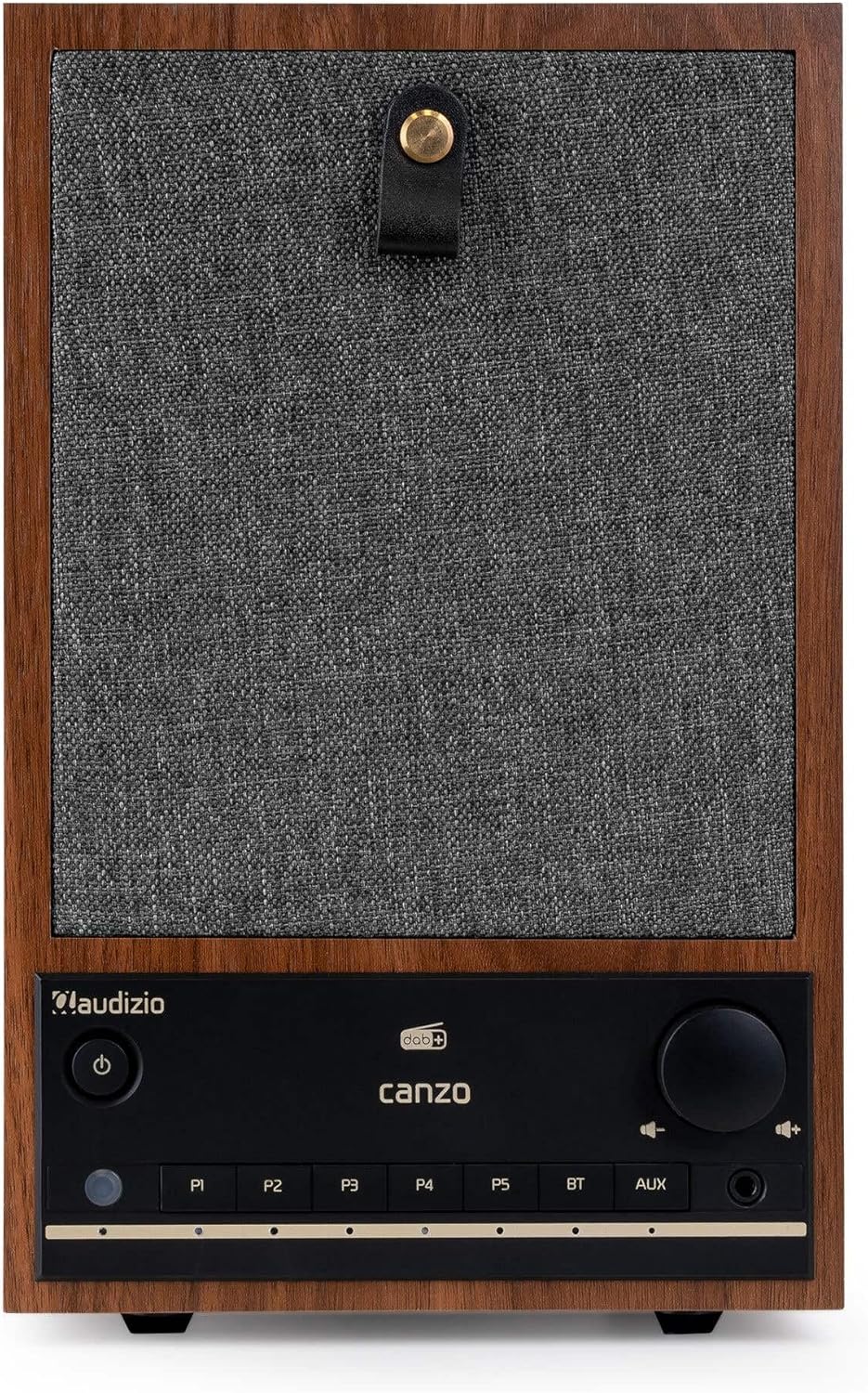
פיגורע 2.1: פראָנט view of the Audizio Canzo DAB+ Internet Radio in walnut finish.

פיגורע 2.2: פראָנט view with speaker grille removed, highlighting the speaker, display, and control panel.
3. וואָס איז אין דער קעסטל
פֿאָרזיכטיק אויספּאַקן די קעסטל און זיכער מאַכן אַז אַלע זאַכן זענען דאָרט:
- Audizio Canzo DAB+ Internet Radio
- מאַכט אַדאַפּטער
- ווייַט קאָנטראָל
- שנעל אָנהייב גייד
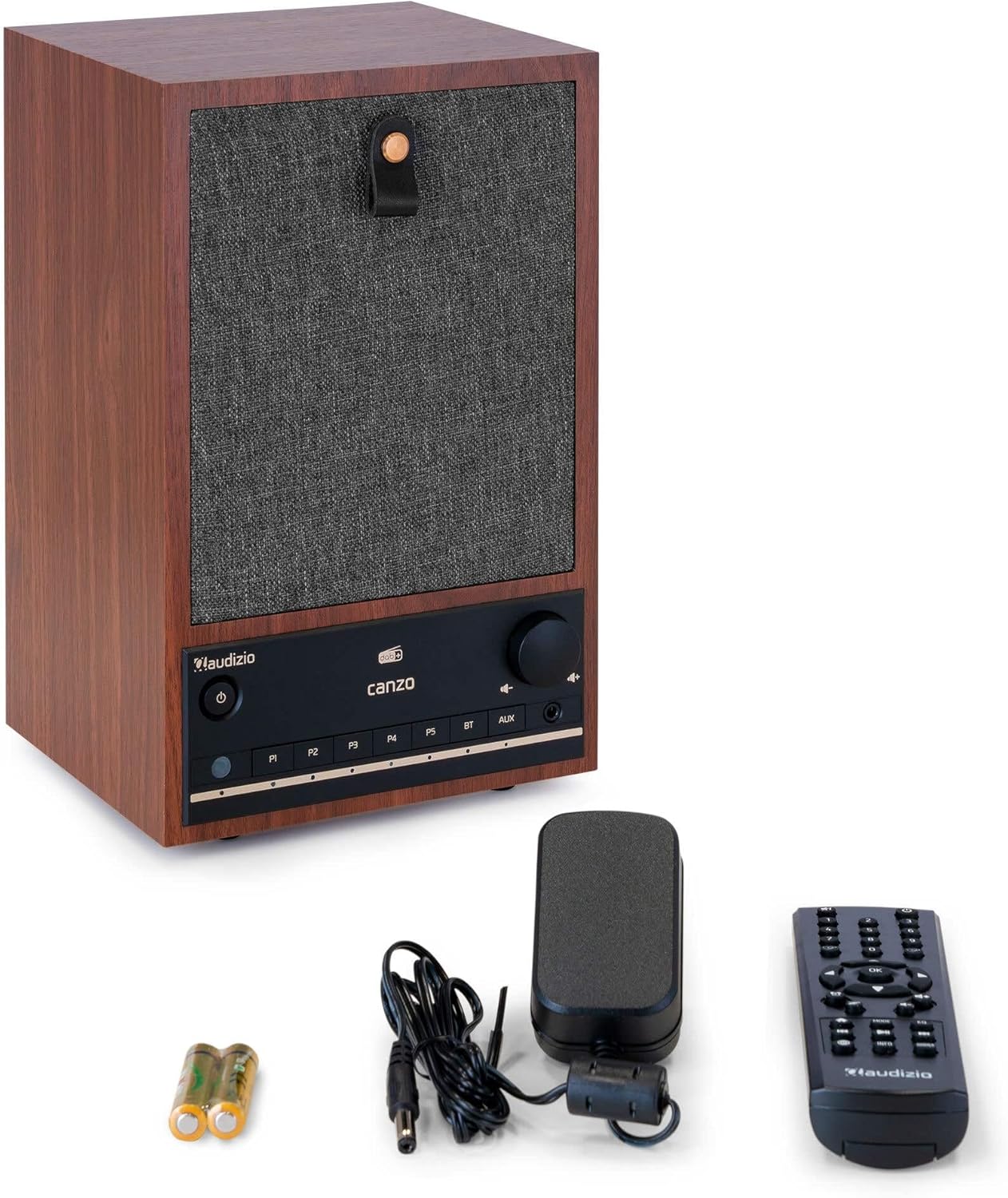
Figure 3.1: Audizio Canzo radio with its accessories.
4. סעטאַפּ
4.1 קאַנעקטינג מאַכט
- Insert the DC plug of the power adapter into the DC IN port on the back of the radio.
- Plug the power adapter into a standard wall outlet (220V).
- פליפּ די ON/OFF switch on the back of the unit to the ON שטעלע.
4.2 אַנטענע קאַנעקשאַן
For optimal DAB+ and FM reception, extend the telescopic antenna located on the back of the unit. Adjust its position for the best signal.

Figure 4.1: Rear panel with power input, audio ports, USB, LAN, and antenna.
4.3 ערשטע איינשטראָם און נעץ סעטאַפּ
- דרוק די מאַכט button on the front panel or remote control to turn on the radio.
- The display will show the Audizio logo and then guide you through the initial setup wizard.
- אויסקלייַבן דיין בילכער שפּראַך.
- The radio will prompt you to connect to a network. Choose ווי-פי or לאַן.
- פֿאַר Wi-Fi: Select your Wi-Fi network from the list and enter the password using the navigation buttons and OK קנעפּל.
- For LAN: פֿאַרבינדט אַן עטערנעט קאַבל פֿון אײַער ראַוטער צום לאַן port on the back of the radio. The connection should be established automatically.
- Once connected, the radio will update the time and date automatically.
5. אַפּערייטינג ינסטרוקטיאָנס
5.1 יקערדיק קאָנטראָלס
The front panel features a power button, preset buttons (P1-P5), Bluetooth (BT) and AUX input buttons, a volume knob, and navigation controls. The remote control provides full access to all functions.
5.2 מאָדע סעלעקציע
דרוק די מאָדע button on the radio or remote control to cycle through available modes: Internet Radio, DAB+, FM, Bluetooth, AUX, and USB Playback.
5.3 אינטערנעט ראַדיאָ
- אויסקלייַבן אינטערנעט ראַדיאָ מאָדע.
- Use the navigation buttons to browse stations by location, genre, or search.
- דרוק OK צו סעלעקטירן אַ סטאַנציע.
- צו ראַטעווען אַ סטאַנציע ווי אַ פּרעסעט, דריק און האַלט איינע פון די קנעפּלעך P1-P5 buttons until the display confirms.
5.4 DAB+ ראַדיאָ
- אויסקלייַבן DAB+ מאָדע.
- די ראַדיאָ וועט אויטאָמאַטיש סקענען פֿאַר פֿאַראַן DAB+ סטאַציעס.
- Use the navigation buttons to scroll through the list of found stations.
- דרוק OK צו סעלעקטירן אַ סטאַנציע.
- צו ראַטעווען אַ סטאַנציע ווי אַ פּרעסעט, דריק און האַלט איינע פון די קנעפּלעך P1-P5 קנעפּלעך.
5.5 עפעם ראַדיאָ
- אויסקלייַבן FM מאָדע.
- דריקן און האַלטן די סקאַן button (usually on the remote or via menu) to auto-scan for FM stations.
- Use the navigation buttons to tune manually or select from scanned stations.
- צו ראַטעווען אַ סטאַנציע ווי אַ פּרעסעט, דריק און האַלט איינע פון די קנעפּלעך P1-P5 קנעפּלעך.
5.6 בלועטוט פּלייבּעק
- אויסקלייַבן בלועטאָאָטה mode. The radio will enter pairing mode, indicated on the display.
- אויף דיין סמאַרטפאָנע אָדער טאַבלעט, געבן בלועטאָאָטה און זוכן פֿאַר בנימצא דעוויסעס.
- Select "Audizio Canzo" from the list to pair.
- אַמאָל פּערד, קענט איר שפּילן אַודיאָ פֿון אייער מיטל דורך די ראַדיאָ.
5.7 AUX אַרייַנשרייַב
- פֿאַרבינדט אַן עקסטערנעם אַודיאָ מיטל (למשל, MP3 שפּילער) צום AUX IN port on the back of the radio using a 3.5mm audio cable.
- אויסקלייַבן AUX מאָדע.
- Audio from the connected device will now play through the radio.
5.8 יו-עס-בי פּלייבּעק
- אַרייַנלייגן אַ וסב בליץ פאָר מיט אַודיאָ fileס אין די וסב פּלייבאַק port on the back of the radio.
- אויסקלייַבן וסב מאָדע.
- ניצט די נאַוויגאַציע קנעפּלעך צו בלעטערן און אויסקלייבן אַודיאָ files פֿאַר פּלייבאַק.
5.9 וועקער זייגער און שלאָף טייַמער
- שרעק: Access the Alarm settings via the menu. Set up to two alarms with desired time, source (buzzer, radio), and volume.
- שלאָפן טימער: Access the Sleep Timer settings via the menu. Set a duration (e.g., 15, 30, 60 minutes) after which the radio will automatically turn off.
- סנוז: ווען אַן אַלאַרם קלינגט, דריק די סנוז button on the remote or radio to temporarily silence it.
6. וישאַלט
6.1 רייניקונג
To clean the radio, use a soft, dry, lint-free cloth. Do not use abrasive cleaners, waxes, or solvents as they may damage the finish or internal components.
6.2 סטאָרידזש
אויב איר לייגט דאָס אַפּאַראַט אַוועק פֿאַר אַ לענגערע צייט, זאָלט איר עס אָפּשטעקן פֿון דער עלעקטרישער אַוטלעט און עס אַוועקלייגן אין אַ קיל, טרוקן אָרט, אַוועק פֿון דירעקטער זון און עקסטרעמע טעמפּעראַטורן.
7. טראָובלעשאָאָטינג
| פּראָבלעם | מעגלעך סיבה | לייזונג |
|---|---|---|
| קיין מאַכט | Power adapter not connected; ON/OFF switch is OFF. | Ensure power adapter is securely connected and ON/OFF switch is ON. |
| קיין געזונט | Volume too low; incorrect source selected; headphones connected. | פֿאַרגרעסערן די קול; אויסקלײַבן די ריכטיקע אינפֿוט מאָדע; אָפּשטעקן די כעדפאָונז. |
| קענען ניט פאַרבינדן צו ווי-פי | אומרעכט פּאַראָל; ראַוטער צו ווייט; נעץ פּראָבלעם. | Verify Wi-Fi password; move radio closer to router; restart router. |
| שלעכטע DAB+/FM אויפנאמע | אַנטענע נישט אויסגעשטרעקט; שוואַכע סיגנאַל געגנט. | Fully extend and adjust the telescopic antenna; try repositioning the radio. |
| ווייַט קאָנטראָל נישט ארבעטן | Batteries depleted; obstruction between remote and radio. | Replace remote control batteries; ensure clear line of sight to the radio's sensor. |
8. ספּעסאַפאַקיישאַנז
| שטריך | באַשרייַבונג |
|---|---|
| מאָדעל נומער | Canzo |
| פּראָדוקט דימענשאַנז | 22.5 X 20.5 X 34 סענטימעטער |
| פּונקט וואָג | 2.9 קילאָגראַמס |
| קאָליר | וועלשענער נוס |
| פאַרשטעלן גרייס | 2.4 אינטשעס |
| קאַנעקטיוויטי טעכנאָלאָגיע | Aux, Bluetooth, Wi-Fi, LAN |
| בלועטאָאָטה ווערסיע | 5.3 |
| געשטיצטע ראַדיאָ באַנדס | DAB+, FM, Internet Radio |
| מאַכט מקור | Corded Electric (220 Volt) |
| ספּעציעלע פֿעיִקייטן | Integrated Clock, Sleep Timer, Alarm, Remote Control, Preset Stations |
| קאַמפּאַטאַבאַל דעוויסעס | Smartphone, Tablet, Headphones, MP3 Player, USB Storage Device |
9. וואָראַנטי און שטיצן
For warranty information and technical support, please refer to the warranty card included with your product or contact your retailer. Keep your proof of purchase for any warranty claims.