
הקדמה
א דאנק פארן קויפןasing the WISCENT WTB-733 Retro Cassette Player Recorder. This device combines classic audio playback with modern features, including AM/FM/SW radio, Bluetooth connectivity, USB/Micro SD playback, and voice recording. Please read this manual thoroughly before use to ensure proper operation and to maximize your listening experience.
זיכערקייַט אינפֿאָרמאַציע
- שטעלט נישט אויס דעם אַפּאַראַט צו רעגן אָדער פייכטקייט כּדי צו פאַרמייַדן פייער אָדער עלעקטרישע קלאַפּן.
- פֿאַרמײַדט צו שטעלן דעם אַפּאַראַט לעבן היץ־קוואַלן ווי ראַדיאַטאָרן, היץ־רעגיסטערס, אויוון אָדער אַנדערע אַפּאַראַטן וואָס פּראָדוצירן היץ.
- ניצן בלויז אַטאַטשמאַנץ / אַקסעסעריז ספּעסיפיעד דורך דער פאַבריקאַנט.
- אָפּשטעקן די אַפּאַראַט בעשאַס בליץ סטאָרמז אָדער ווען אַניוזד פֿאַר לאַנג פּיריאַדז.
- נישט עפענען דעם סיasinז. איבערגעבן אלע סערוויסינג צו קוואַליפֿיצירטע סערוויס פּערסאָנעל.
- האַלטן אויס פון דערגרייכן פון קינדער.
פּראָדוקט איבערview
The WISCENT WTB-733 is a versatile audio system designed for both retro and modern listening. Key features include:
- קאַסעטע שפּילער/רעקאָרדער: Play and record audio cassettes.
- AM/FM/SW Radio: Multi-band radio tuner for various broadcasts.
- בלועטאָאָטה קאַנעקטיוויטי: וויירלעס אַודיאָ סטרימינג פֿון קאָמפּאַטיבלע דעוויסעס.
- USB/Micro SD (TF) Playback: שפּיל MP3/WMA fileס פון עקסטערנעם סטאָרידזש.
- געבויט-אין מיקראָפאָן: פֿאַר קול רעקאָרדינג.
- RGB Colorful Lights: Dynamic lighting effects on speakers.
- כעדפאָון דזשאַק: פֿאַר פּריוואַט צוגעהערט.
- צווייענדיק מאַכט אָפּציעס: AC or battery powered.

פיגורע 1: פראָנט view of the WISCENT WTB-733 with key features highlighted.
סעטאַפּ
מאַכט די מיטל
The WTB-733 can be powered by AC electricity or batteries.
- AC מאַכט: Connect the included AC power cord to the AC IN port on the back of the unit and then to a standard 120V AC, 60Hz wall outlet. The AC cord is typically stored in the battery compartment.
- באַטאַרייע מאַכט: For portable use, insert 6 UM-1 type batteries (not included) into the battery compartment located on the back of the unit. Ensure correct polarity. Alternatively, 2 rechargeable batteries (not included) can be used.
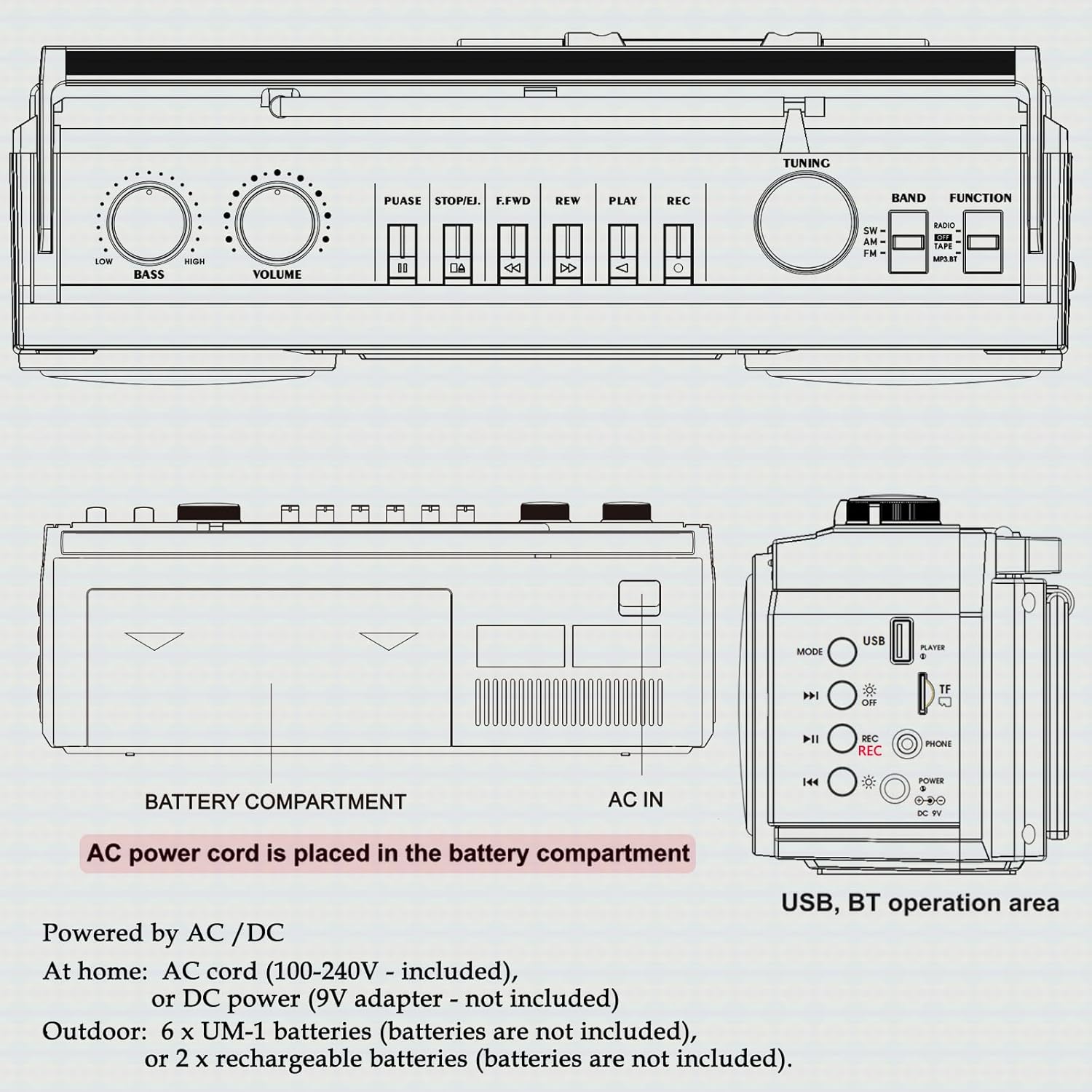
פיגורע 2: דערציען view showing battery compartment and AC IN port.
אַנטענאַ סעטאַפּ
For optimal radio reception, extend the telescopic antenna fully. Adjust its position and angle to improve signal clarity.
אַפּערייטינג ינסטראַקשאַנז
אַלגעמיינע קאָנטראָלס

Figure 3: Top panel controls.
- מאַכט באַשטימען: טורנס די אַפּאַראַט אויף / אַוועק.
- VOLUME קנופּ: אַדזשאַסטירט דעם אַלגעמיינעם געזונט־ניוואָ.
- באַס קנופּ: אַדזשאַסטיד די באַס מדרגה.
- FUNCTION Selector: Switches between RADIO, TAPE, USB/TF, and BT (Bluetooth) modes.
- BAND Selector: In Radio mode, selects between FM, AM, and SW bands.
- טונינג קנעפּל: Tunes to desired radio stations.
Radio Operation (AM/FM/SW)
- שטעלן די פונקציע סעלעקטאָר צו RADIO.
- Select the desired band (FM, AM, or SW) using the BAND סעלעקטאָר.
- פֿאַרלענגערט די טעלעסקאָפּישע אַנטענע פֿאַר אַ בעסערן אָפּנאַם.
- דרייען די טונינג knob to find your desired station.
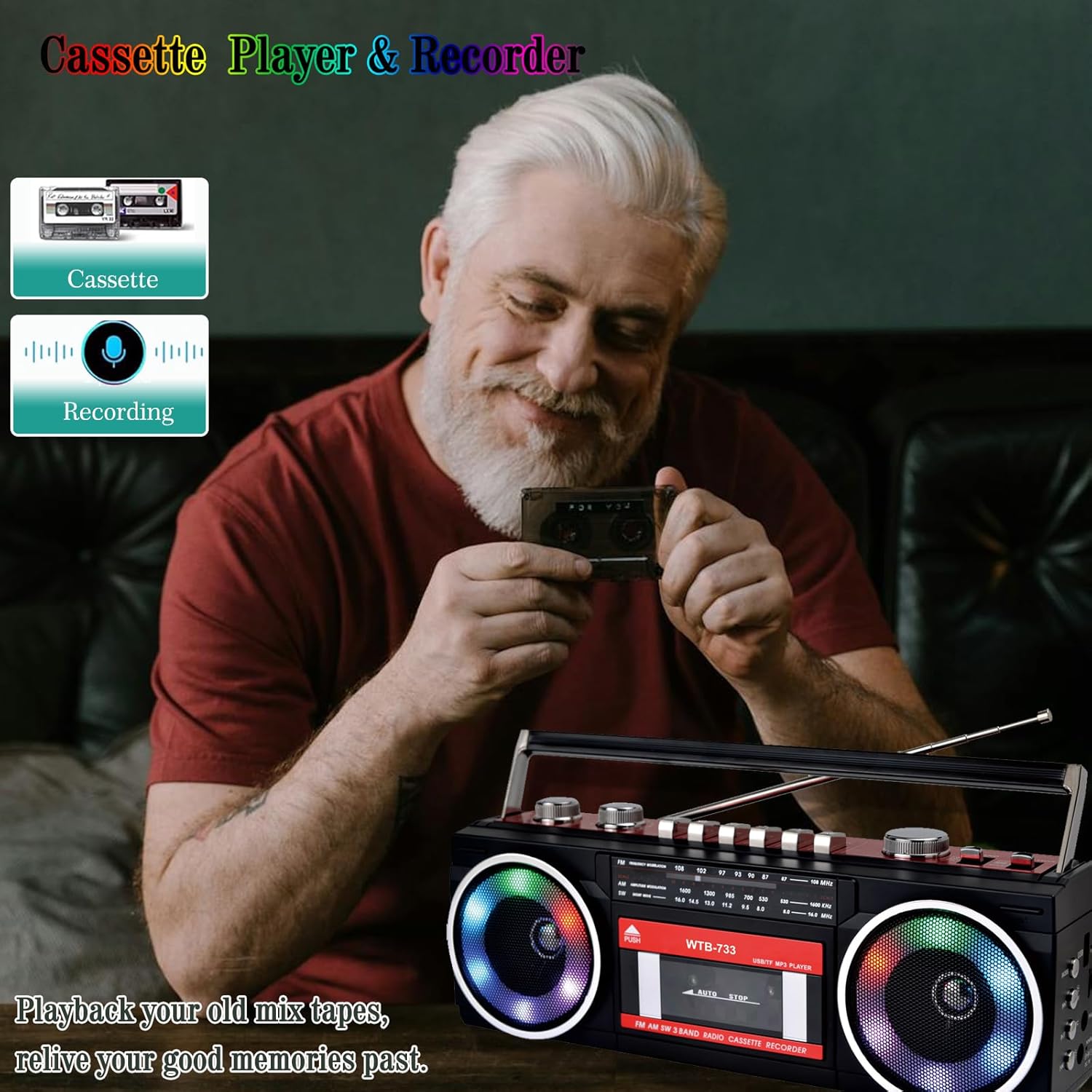
Figure 4: Radio tuning dial.
קאַסעט שפּילער און רעקאָרדער

Figure 5: Cassette player controls.
- שטעלן די פונקציע סעלעקטאָר צו טופּען.
- דרוק די PUSH/EJECT קנעפּל צו עפענען די קאַסעט טיר.
- Insert a cassette tape with the open edge facing upwards. Close the cassette door.
- פּלייבאַק: דרוק די שפּיל קנעפּל צו אָנהייבן פּלייבאַק.
- רעקאָרדינג: דרוק די REC button to begin recording. Ensure a blank tape is inserted. The built-in microphone will record ambient sound.
- שנעל פאָרויס / צוריק: ניצן די F.FWD און REW קנעפּלעך.
- פּויזע: דרוק די פּויזע button to temporarily stop playback/recording. Press again to resume.
- האַלטן / אַרויסוואַרפן: דרוק די האַלטן / אַרויסוואַרפן button to stop playback/recording and eject the tape.
בלועטאָאָטה קאַנעקטיוויטי
- שטעלן די פונקציע סעלעקטאָר צו BT. The unit will enter pairing mode, indicated by a flashing light or audio prompt.
- אויף אייער בלוטוט-פארשטארקטע דעווייס (למשל, סמאַרטפאָון, טאַבלעט), אַקטיווירט בלוטוט און זוכט פֿאַר פאַראַן דעווייסעס.
- Select "WTB-733" from the list of devices to pair.
- Once paired, you can stream audio from your device to the boombox.
- באַמערקונג: This unit supports Bluetooth reception only and does not transmit Bluetooth signals to headphones or other speakers.

פיגור 6: בלועטוט סטרימינג פון א מאבילן אפאראט.
USB/Micro SD (TF) Playback
- שטעלן די פונקציע סעלעקטאָר צו וסב / טף.
- Insert a USB drive or Micro SD (TF) card into the corresponding slot on the side of the unit.
- The unit will automatically detect and begin playing MP3/WMA fileס פון די סטאָרידזש מיטל.
- Use the playback control buttons (Play/Pause, Next, Previous) to navigate tracks.
RGB פאַרביק ליגהץ
The speakers are equipped with RGB LED lighting that creates a dynamic visual effect.
- The lights are automatically turned off in Radio mode.
- In other modes (BT, Tape, USB/TF), the lights are on by default.
- To manually control the lights, press the 'OFF' button (often labeled with a lightbulb icon) twice continuously to toggle them on or off.

Figure 7: RGB colorful lights in operation.
כעדפאָון דזשאַק
Connect standard 3.5mm headphones (not included) to the headphone jack on the side of the unit for private listening. Audio will be muted from the main speakers when headphones are connected.
וישאַלט
- רייניקונג: ניצט אַ ווייכע, טרוקענע שטאָף צו רייניקן די אויסערלעכע זייט פון דעם אַפּאַראַט. ניצט נישט קיין שרײַבנדיקע רייניגער אָדער סאָלווענטן.
- קאַסעטע דעק זאָרג: רייניקן די טייפּ קעפּ און די ראָולערס פון צייט צו צייט מיט אַ וואַטע שטעכל.ampבאדעקט מיט איזאָפּראָפּיל אַלקאָהאָל צו ענשור אָפּטימאַלע געזונט קוואַליטעט און פאַרמייַדן טייפּ שעדיקן.
- סטאָרידזש: ווען נישט אין באַנוץ פֿאַר לענגערע פּעריאָדן, אַרויסנעמען די באַטעריעס און האַלטן די אַפּאַראַט אין אַ קיל, טרוקן אָרט אַוועק פון דירעקט זונשייַן.
טראָובלעשאָאָטינג
| פּראָבלעם | מעגלעך סיבה | לייזונג |
|---|---|---|
| קיין מאַכט | AC שנור נישט פארבונדן; באַטעריעס אויסגעשעפט אדער נישט ריכטיג אריינגעשטעלט. | Check AC connection; Replace or correctly insert batteries. |
| קיין געזונט | קול צו נידעריג; כעדפאָונז פארבונדן; אומרעכטע פונקציע מאָדע. | פֿאַרגרעסערן די קול; אָפּשטעקן די כעדפאָונז; אויסקלײַבן די ריכטיקע פֿונקציע מאָדע. |
| נעבעך ראַדיאָ אָפּטראָג | אַנטענע נישט אויסגעשטרעקט; שוואַך סיגנאַל. | Extend and adjust antenna; Try moving the unit to a different location. |
| קאַסעטע שפּילט נישט/רעקאָרדירט נישט | Tape damaged; Incorrect buttons pressed; Tape heads dirty. | Check tape condition; Ensure correct play/record buttons are pressed; Clean tape heads. |
| בלועטאָאָטה איז נישט קאַנעקטינג | Unit not in BT mode; Device not in pairing mode; "WTB-733" not selected. | Switch to BT mode; Ensure device Bluetooth is on and searching; Select "WTB-733" to pair. |
| RGB לייץ נישט ארבעטן | In Radio mode; Lights turned off manually. | Lights are off in Radio mode by design; Press the 'OFF' button twice to toggle them on in other modes. |
ספּעסאַפאַקיישאַנז
- מאָדעל נומער: ווטב-733
- פּראָדוקט דימענשאַנז: 13 X 4.92 X 3.93 אינטשעס
- נומער וואָג: 3.63 פונט
- ראַדיאָ באַנדס: AM/FM/SW
- קאַנעקטיוויטי: Bluetooth, USB, Micro SD (TF)
- רעדנער טיפּ: סטערעאָ
- מאַכט צושטעלן: AC 120V, 60Hz or 6 x UM-1 batteries (not included)
- USB/TF Support: ביז 64 גיגאבייט (FAT32 פֿאָרמאַט)
וואָראַנטי און שטיצן
WISCENT products are designed for reliability and performance. For warranty information or technical support, please refer to the documentation included with your purchase or contact WISCENT customer service through their official channels. Keep your purchase receipt as proof of purchase for warranty claims.