
הקדמה
Thank you for choosing the VATOS Rechargeable Infrared Laser Tag Set with Projector. This set provides an immersive and interactive laser tag experience for kids, teens, and adults. It features advanced projection technology, multiple weapon modes, and real-time data synchronization for dynamic battles. Please read this manual carefully to ensure proper setup, operation, and maintenance of your laser tag שטעלן.

Image: Children engaging in both projector game and traditional laser tag שלאַכט.
זיכערקייַט אינפֿאָרמאַציע
ווארענונג: Toy inside, not suitable for children under 3 years old due to small parts which may present a choking hazard.
- This product uses Class 1 infrared technology (<0.9mW emission), which is eye-safe. Do not aim directly into eyes at close range.
- Ensure all components are handled carefully to prevent damage.
- דערוואַקסענע השגחה איז רעקאָמענדירט בעת שפּיל, ספּעציעל פֿאַר ייִנגערע קינדער.
- Do not modify or disassemble the product components.
וואָס איז אין די קעסטל
Your VATOS Rechargeable Infrared Laser Tag Set includes the following components:
- 2 x Laser Tag גאַנז
- 2 x Vests (with digital LED score display)
- 1 רענטגענ פּראַדזשעקטער
- 3 x Charging Cords (4-in-1 USB charging cable included)
- 1 x באַניצער מאַנואַל

בילד: דעטאַלירט view פון אַלע קאָמפּאָנענטן אַרייַנגערעכנט אין דעם פּעקל.
סעטאַפּ אינסטרוקציעס
1. Projector Battery Installation
The projector requires 4 x AA batteries (not included).
- Locate the battery compartment on the bottom of the projector.
- עפענען די באַטאַרייע דעקן.
- אַרייַנלייגן 4 אַאַ באַטעריז, ינשורינג די ריכטיק פּאָולעראַטי (+/-).
- פאַרמאַכן די באַטאַרייע דעקן סיקיורלי.
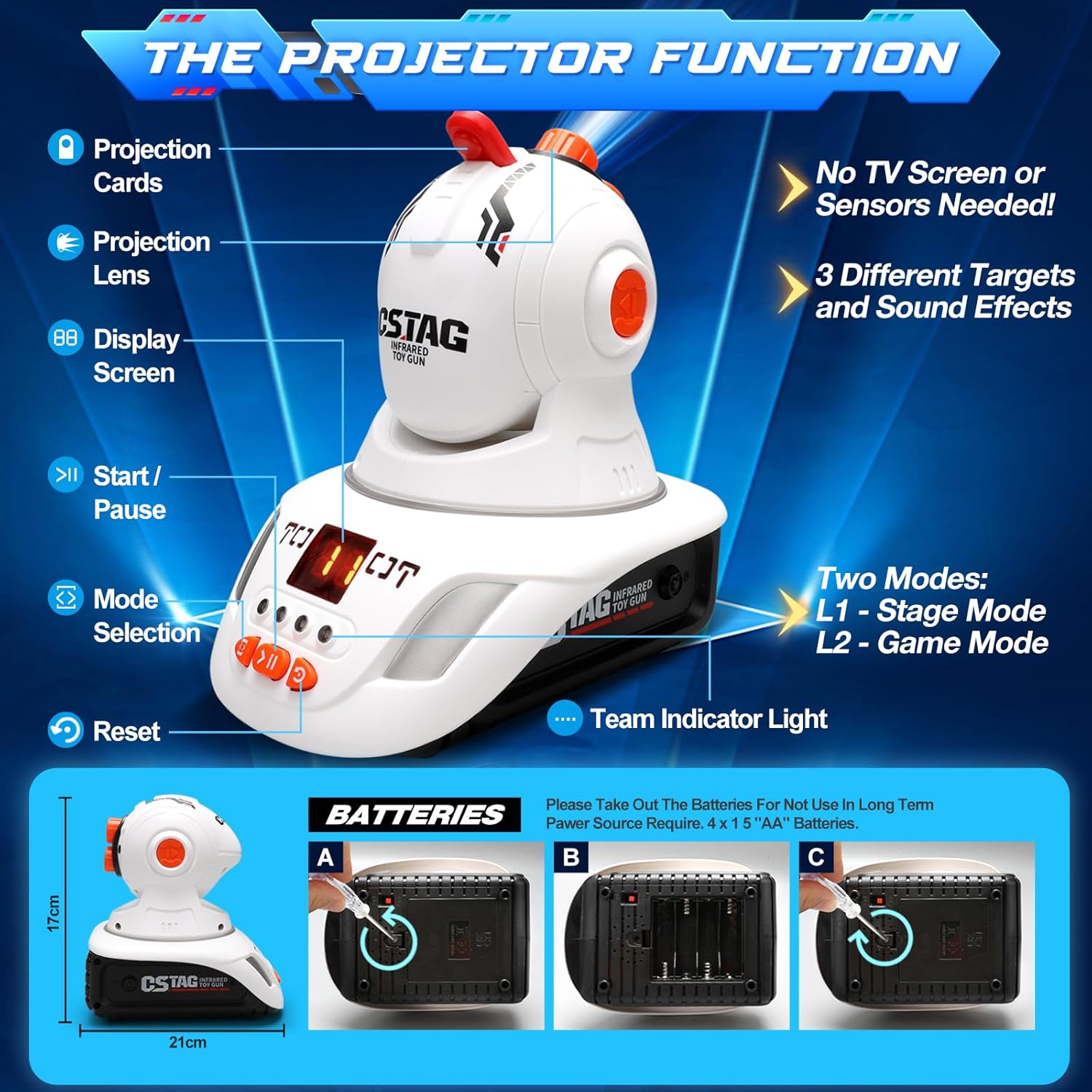
Image: Steps for installing AA batteries into the projector.
2. Charging Laser Tag Guns and Vests
די לאַזער tag guns and vests are rechargeable. Use the provided 4-in-1 USB charging cable.
- Connect the charging cable to the charging ports on the laser tag guns and vests.
- Plug the USB end of the cable into a compatible USB power source (e.g., computer, USB wall adapter).
- The charging indicator light on the guns/vests will show charging status (refer to specific product lights for details).
- Charge until fully charged before first use.

Image: Laser guns and vests connected to the 4-in-1 USB charging cable.
אַפּערייטינג ינסטראַקשאַנז
1. מאַכט אויף / אויסגעלאשן
Locate the power switch on each laser tag gun and vest to turn them on or off.
2. Team Selection
Each gun and vest can be assigned to one of four team colors: blue, red, green, or white. Use the team selection button on the vest to choose your team. The team indicator light will display the selected color.
3. Weapon Modes
די לאַזער tag guns feature four distinct weapon modes, each with unique bullet counts and sound effects:
- איין שאָס: High damage, limited shots.
- Shotgun: Wide spread, moderate damage.
- Submachine Gun: Rapid fire, lower damage per shot.
- Machine Gun: Continuous fire, sustained damage.
Use the gun type switch button on the laser gun to cycle through these modes.

Image: Laser gun features and available weapon modes.
4. Health Points and Hits
Each player starts with 15 health points, displayed on the gun and vest. When hit, the vest will vibrate and make sounds, and health points will decrease. The game ends when a player's health reaches zero.

Image: Vest vibrating and making sounds when hit.
5. Projector Function
The projector offers an interactive target practice or game mode by projecting targets onto surfaces.
- Place the projector in a suitable location, aiming it at a wall or screen.
- Insert a projection card into the designated slot on the projector.
- Adjust the focal length using the lens to make the projected pattern clear.
- Select the desired projector game mode (L1 - Stage Mode, L2 - Game Mode) using the mode selection button.
- After the gun and vest are paired, press the two buttons on the gun simultaneously to enter projection mode.

Image: Step-by-step guide for setting up and using the projector.
The projector features 3 different targets with realistic sound simulations:
- Mallard (Quack sound)
- UFO (Intrusion alarm sound)
- Dinosaur (Roar sound)

Image: The three distinct game targets available with the projector.
6. Real-time Data Sync
The 2.4GHz real-time data synchronization ensures that hits and scores are accurately updated between guns and vests, providing a seamless gaming experience.

Image: Real-time data synchronization between gun and vest.
7. אפיציעלע פּראָדוקט ווידעאָס
ווידעא: אן איבערview of the VATOS 2.4GHz laser tag game with projector, demonstrating its features and gameplay.
Video: A detailed demonstration of the VATOS Rechargeable Laser Tag with Projector, specifically for kids, showcasing its interactive elements.
וישאַלט
- רייניקונג: Wipe down the guns, vests, and projector with a soft, dry cloth. Do not use harsh chemicals or abrasive cleaners.
- סטאָרידזש: Store the set in a cool, dry place away from direct sunlight when not in use. If storing for an extended period, remove AA batteries from the projector.
- באַטערי זאָרגן: Ensure rechargeable components are fully charged before storage to prolong battery life.
טראָובלעשאָאָטינג
| פּראָבלעם | מעגלעך סיבה | לייזונג |
|---|---|---|
| פּראַדזשעקטער נישט אויסגעדרייט אויף | Dead or incorrectly inserted AA batteries. | קאָנטראָלירט די פּאָלאַריטעט פון די באַטעריעס; פאַרבייטן מיט פרישע AA באַטעריעס. |
| Laser guns/vests not turning on | נידעריגע באַטעריע אָדער נישט אויפגעלאָדן. | Charge the units using the provided USB cable. |
| Guns/vests not syncing | אריינמישונג אדער אויסער דער רייכווייט. | Ensure units are within range (up to 40 meters) and away from strong electronic interference. Try restarting both units. |
| פּראַדזשעקטאַד בילד איז בלערי | Focal length not adjusted. | Rotate the projection lens to adjust the focus until the image is clear. |
| No sound from units | Volume too low or mute activated. | Check volume settings or ensure mute function is not active. |
ספּעסאַפאַקיישאַנז
- מאָדעל נומער: BB6606A
- סאָרט: VATOS
- מאַטעריאַל: פּלאַסטיק
- קאָליר: בלוי, רויט
- נומער וואָג: 220 גראַמז
- נומער דימענשאַנז (L x W x H): 8.66 X 1.57 X 5.71 אינטשעס
- מאַקסימום קייט: 40 מעטער
- נומער פון פּלייַערס: Up to 4 (with additional sets)
- מאַכט מקור: Rechargeable batteries (guns/vests), 4 x AA batteries (projector)
- ספּעציעלע פֿעיִקייטן: 2.4GHz Data Synchronization, Projector function, Rechargeable, Two ways to play
- רעקאַמענדיד עלטער: 6 יאר און העכער
וואָראַנטי און שטיצן
This VATOS Laser Tag סעט קומט מיט א 360-טאָג וואָראַנטי פֿון דעם קויפֿדאַטום, וואָס באַדעקט פֿאַבריקאַציע־דעפֿעקטן. ביטע באַהאַלטן אייער קויפֿבאַווײַז פֿאַר וואָראַנטי־קליימז.
For technical support, troubleshooting assistance, or warranty inquiries, please contact VATOS customer service through the retailer's platform or visit the official VATOS webפּלאַץ פֿאַר קאָנטאַקט אינפֿאָרמאַציע.
אָנליין רעסורסן: For additional tips, FAQs, and product updates, please visit the VATOS Brand Store on Amazon.