
1. הקדמה
Welcome to the user manual for your new Nubia Flip 5G smartphone. This guide provides essential information to help you set up, operate, and maintain your device. The Nubia Flip 5G combines a compact, foldable design with advanced features, including a dual AMOLED display, a versatile external screen, and AI-powered functionalities.
Key features of your Nubia Flip 5G include:
- Dual AMOLED Displays: Enjoy a fluid 120 Hz refresh rate on both the 6.9-inch internal display and the 3-inch external display.
- Fully Functional External Display: Access 100% of your applications directly from the external screen without unfolding the phone.
- אַוואַנסירטע קאַמעראַ סיסטעם: Capture high-quality photos with the 50 MP main camera, supported by AI features and 4K stabilized video recording. Utilize the external screen for high-resolution selfies.
- AI-Powered Enhancements: Benefit from features like AI Magic Photos for editing and live translation for voice calls.
- לאַנג-בלייַביק באַטערי: Equipped with a 4325 mAh battery and 33W fast charging, allowing 50% charge in under 20 minutes.
2. סעטאַפּ
2.1. ונבאָקסינג און ערשט דורכקוק
נעמט פֿאָרזיכטיק אַרויס אַלע זאַכן פֿון דער פּאַקעט. מאַכט זיכער אַז די פֿאָלגנדיקע קאָמפּאָנענטן זענען פֿאַראַן:
- Nubia Flip 5G Smartphone
- וסב קאַבלע
- טעלעפאָנירן קאַסע
- פּראַטעקטיוו פילם
Inspect the device for any visible damage. If any components are missing or damaged, contact customer support.
2.2. ינסערטינג די סים קאַרד
- מאַכט אַוועק די מיטל.
- געפינט די סים קארטל טאַץ אויף דער זייט פון דעם טעלעפאָן.
- Use the SIM ejector tool (not included, typically found with your SIM card) to open the tray.
- Place your Nano-SIM card(s) into the tray with the gold contacts facing down. This device supports Dual SIM.
- פֿאָרזיכטיק צוריקשטעלן דעם טאַץ אין דעם טעלעפֿאָן.
2.3. אײַנצושאַלטן און ערשטע קאָנפיגוראַציע
- Press and hold the Power button until the Nubia logo appears.
- פֿאָלגט די אינסטרוקציעס אויף דעם עקראַן צו אויסקלײַבן אײַער שפּראַך, פֿאַרבינדן זיך צו אַ Wi-Fi נעץ, און אויפֿשטעלן אײַער Google חשבון.
- איר וועט ווערן געפירט דורך דעם אויפשטעלן זיכערהייט פֿעיִקייטן ווי פינגערפּרינט ופשליסן און פּנים דערקענונג.
3. אַפּערייטינג די מיטל
3.1. Understanding the Dual Display

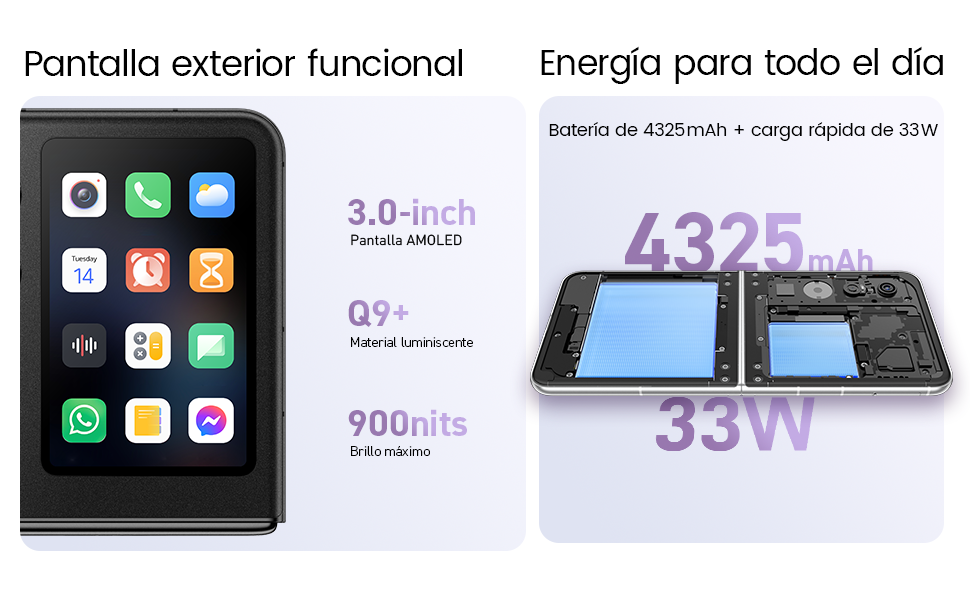
Your Nubia Flip 5G features two displays: a large 6.9-inch internal foldable AMOLED screen and a compact 3-inch external AMOLED screen. Both screens offer a smooth 120 Hz refresh rate for an enhanced visual experience.
- אינערלעכע אויסשטעלונג: Ideal for immersive content consumption, gaming, and detailed tasks.
- פונדרויסנדיק ווייַז: Provides quick access to notifications, widgets, music controls, and even full applications without needing to unfold the phone. Swipe left or right to navigate through different functions.
3.2. קאַמעראַ פאַנגקשאַנאַליטי

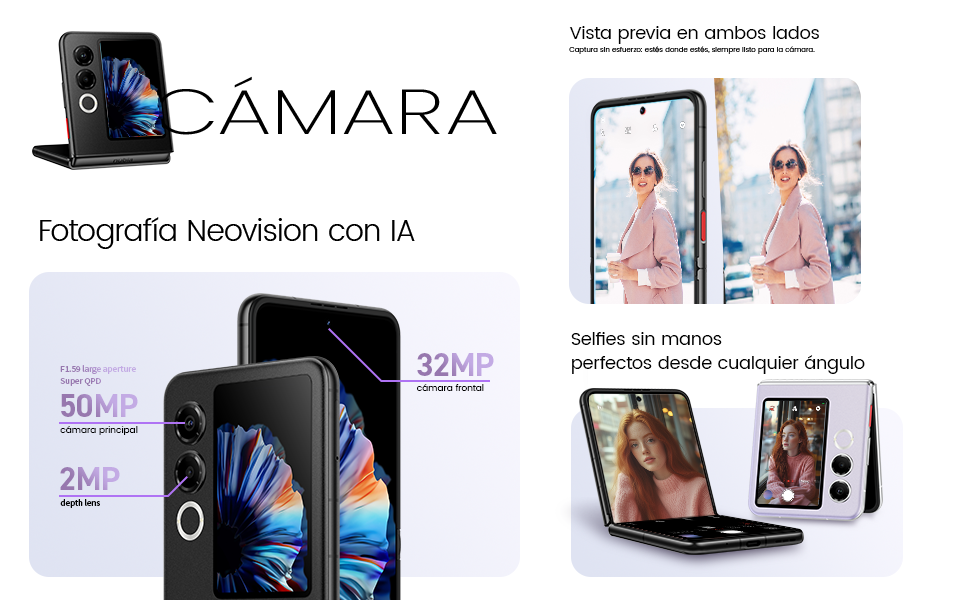
The Nubia Flip 5G is equipped with a powerful 50 MP main camera and a secondary portrait camera, enhanced with AI for superior image quality. The 32 MP front camera ensures clear video calls and selfies.
- High-Resolution Selfies: Use the external screen as a viewfinder to take selfies with the high-quality rear cameras.
- הענט-פרייע פאָטאָגראַפֿיע: Partially fold the phone and place it on a flat surface to capture photos and videos without needing a tripod.
- 4K Stabilized Video: Record smooth, high-definition videos with advanced stabilization.
3.3. קינסטלעכע אינטעליגענץ פֿעיִטשערס
The device integrates several AI functions to enhance user experience:
- AI Magic Photos: Utilize AI for intelligent photo editing and enhancement.
- Live Call Translation: Experience real-time translation during voice calls, breaking down language barriers.
3.4. ווידעא פארבייview
אפיציעלע פּראָדוקט ווידעאָ שאָוasing the Nubia Flip 5G's design, versatile external display, hands-free selfie capabilities, and long-lasting battery.
4. באַטאַרייע און טשאַרדזשינג

The Nubia Flip 5G is equipped with a 4325 mAh battery, designed to provide extended usage. It supports 33W fast charging, allowing you to quickly replenish the battery. A 50% charge can be achieved in less than 20 minutes.
- Use the provided USB cable and a compatible 33W charger for optimal fast charging.
- Avoid using non-certified chargers or cables to prevent damage to the device.
5. וישאַלט
Proper care ensures the longevity and optimal performance of your Nubia Flip 5G.
- סקרין זאָרגן: The foldable screen is delicate. Avoid pressing hard on the screen, especially near the crease. Keep sharp objects away from the display.
- רייניקונג: ניצט אַ ווייכע, לינט-פֿרייע שטאָף צו רייניקן דעם עקראַן און קערפּער. פֿאַרמייַדט שטרענגע כעמיקאַלן אָדער אַברייסיוו מאַטעריאַלן.
- וואַסער קעגנשטעל: While the device may have some level of splash resistance, it is not fully waterproof. Avoid submerging the phone in water or exposing it to excessive moisture.
- טעמפּעראַטור: Operate the device within recommended temperature ranges. Extreme heat or cold can affect battery life and performance.
- ווייכווארג דערהייַנטיקונגען: Regularly update your device's software to ensure you have the latest features, security patches, and performance improvements.
6. טראָובלעשאָאָטינג
If you encounter issues with your Nubia Flip 5G, try the following common troubleshooting steps:
- מיטל נישט קער אויף: זיכער מאַכן אַז די באַטאַרייע איז אויפגעלאָדן. פֿאַרבינדט דעם טשאַרדזשער און וואַרט אַ פּאָר מינוט איידער איר פּרוּווט ווידער אָנצוצינדן.
- עקראַן רעאַגירט נישט: Restart the device by pressing and holding the Power button. If unresponsive, perform a forced restart (refer to device-specific instructions if standard restart fails).
- אַפּפּס קראַשינג: רייניקט אויס דעם קעש פון דער פראבלעמאטישער אפליקאציע אדער אינסטאלירט עס איבער. זיכערט זיך אז אייער אפאראט'ס ווייכווארג איז אפ טו דעיט.
- נעבעך באַטאַרייע לעבן: Adjust screen brightness, disable unnecessary background apps, and turn off features like GPS or Bluetooth when not in use.
- קאָנעקטיוויטי פּראָבלעמען (Wi-Fi/Bluetooth): Toggle Wi-Fi or Bluetooth off and on. Restart your router or the connected device.
- איבערהייצונג: Close demanding applications, reduce screen brightness, and avoid direct sunlight. If overheating persists, contact support.
For more complex issues, refer to the official Nubia support webפּלאַץ אָדער קאָנטאַקט זייער קונה דינסט.
7. ספּעסאַפאַקיישאַנז
Below are the detailed technical specifications for the Nubia Flip 5G (Model: 123447101014):
| שטריך | באַשרייַבונג |
|---|---|
| אָפּערייטינג סיסטעם | אַנדרויד 14 |
| פּונקט וואָג | 193 ג |
| פּעקל דימענשאַנז | 21.1 רענטגענ 9 רענטגענ 3.2 סענטימעטער; 193 גראַמז |
| באַטעריז | 1 C באַטעריז פארלאנגט. (אַרייַנגערעכנט) |
| מאָדעל נומער | 123447101014 |
| קאַנעקטיוויטי טעכנאָלאָגיע | בלועטוט, ען-עף-סי, יו-עס-בי, וויי-פיי |
| גפּס | אמת |
| ספּעציעלע פֿעיִקייטן | Stereo speakers, Mobile Hotspot capability, Dual SIM, Built-in GPS |
| אנדערע ווייַז פֿעיִקייטן | ווירעלעסס |
| מענטש צובינד אַרייַנשרייַב | טאָוטשסקרעען |
| סקאַננער האַכלאָטע | 2790 X 1188 |
| אַנדערע קאַמעראַ פֿעיִטשערז | פראָנט, דערציען |
| אַודיאָ דזשאַק | אומבאַקאַנט |
| פאָרם פאַקטאָר | פאָלדאַבאַל פאַרשטעלן |
| קאָליר | שוואַרץ |
| באַטערי פּאָווער שאַץ | 4325 מאַה |
| טעלעפאָן רעדן צייט | 24 שעה |
| באַראַן גרייס | 8 גיגאבייט |
| קפּו מאָדעל | מעדיעטעק דימענסיטי 9000 |
| קפּו ספּיד | 2 גהז |
| זכּרון קאַפּאַסיטי | 8 גיגאבייט |
| פאַרשטעלן גרייס | 6.9 אינטשעס |
| דערפרישן קורס | 120 הז |
| מאָדעל נאָמען | ZTE Nubia Flip |
8. וואָראַנטי און שטיצן
Your Nubia Flip 5G smartphone comes with a standard manufacturer's warranty. Please refer to the warranty card included in your product packaging for specific terms and conditions, including coverage duration and claim procedures.
For technical support, service, or additional information, please visit the official Nubia website or contact their authorized customer service channels. Keep your purchase receipt and device serial number handy when seeking support.