הקדמה
This manual provides essential instructions for setting up, operating, and maintaining your SVITOO Kids Tablet 10 Inch. Designed for young users, this Android 15 tablet features parental controls, a durable shockproof case, and a vibrant 10-inch HD IPS display. Please read this guide thoroughly to ensure proper use and to maximize your tablet's functionality.
וואָס איז אין די קעסטל
- SVITOO Kids Tablet 10 Inch
- Protective Cover (Pre-installed)
- וסב-C טשאַרדזשינג קאַבלע
- באַניצער מאַנואַל
- טאַלאַנט באָקס
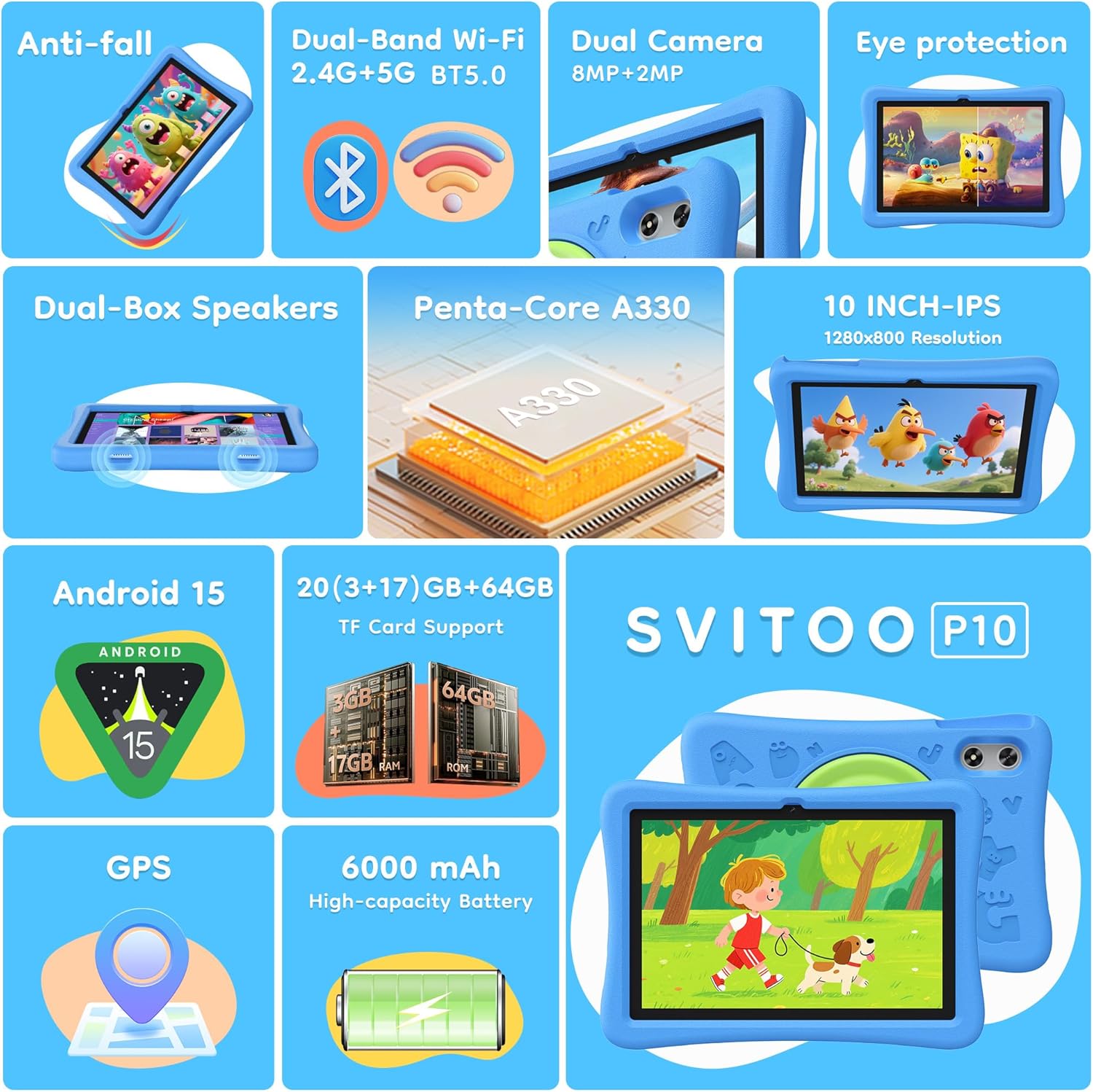
Image: The SVITOO Kids Tablet 10 Inch, shown in its blue protective case, highlighting its robust design suitable for children.
פּראָדוקט איבערview
שליסל פֿעיִקייטן
- אַפּערייטינג סיסטעם: Android 15 with GMS Certification for full Google Play access.
- ווייַז: 10-inch HD IPS (1280 x 800 pixels) touchscreen with eye protection mode.
- פּראַסעסער: Unisoc T7200 8-core CPU for smooth performance.
- זכּרון און סטאָרידזש: 20GB RAM (3GB physical + 17GB virtual) and 64GB internal storage, expandable up to 1TB via microSD card (sold separately).
- קאַמעראַס: 8MP Rear Camera and 2MP Front Camera.
- קאַנעקטיוויטי: Dual-Band Wi-Fi (2.4/5 GHz) and Bluetooth 5.0.
- באַטערי: 6000mAh high-capacity battery for extended usage.
- אַודיאָ: Dual-box speakers and a 3.5mm headphone jack.
- געווער: Kid-friendly EVA shockproof case with a 360° rotating handle and 180° rotating stand.
- פּאַרענטאַל קאָנטראָלס: Advanced settings for screen time limits, content filtering, and app management.
טאַבלעט קאַמפּאָונאַנץ
מאַכט זיך באַקאַנט מיט די פיזישע קאָמפּאָנענטן פון אייער טאַבלעט:

בילד: א דעטאַלירטע view of the tablet's side and rear, indicating the USB Type-C port, headphone jack, power ON/OFF button, volume controls, speakers, rear camera, and front camera.
- וסב טיפּ-C פּאָרט: פֿאַר טשאַרדזשינג און דאַטן אַריבערפירן.
- כעדפאָון דזשאַק (3.5 מם): פֿאַר פֿאַרבינדן דראָטיקע קאָפּהערער.
- מאַכט אויף/אַוועק קנעפּל: To turn the tablet on/off or put it to sleep.
- באַנד קנעפּלעך: צו סטרויערן די אַודיאָ באַנד.
- רעדנער: Dual-box speakers for audio output.
- פראָנט אַפּאַראַט: פֿאַר ווידעאָ קאָלס און סעלפֿיז.
- דערציען אַפּאַראַט: פֿאַר נעמען בילדער און ווידעאָס.
- מיקראָסד קאָרט שפּעלטל: Located under a protective flap, for storage expansion.

Image: The tablet's protective case featuring a versatile 360-degree rotating handle that also functions as a 180-degree rotating stand, allowing for various viewינג אַנגלעס.
סעטאַפּ גייד
- טשאַרדזשינג די טאַבלעט: Before first use, fully charge the tablet using the provided USB-C cable and a compatible power adapter.
- מאַכט אויף: Press and hold the Power ON/OFF button until the screen lights up.
- ערשט סעטאַפּ: פֿאָלגט די אינסטרוקציעס אויף דעם עקראַן צו אויסקלײַבן אײַער שפּראַך, פֿאַרבינדן זיך צו אַ Wi-Fi נעץ, און אויפֿשטעלן אײַער Google חשבון.
- Google Kids Space / Parental Controls: During setup, you will have the option to configure Google Kids Space or other parental control settings. It is highly recommended to set these up immediately to ensure a safe environment for your child.
- ינסטאַלירן אַפּפּס: Once setup is complete, you can download age-appropriate apps and games from the Google Play Store.
אַפּערייטינג ינסטראַקשאַנז
יקערדיק נאַוויגאַציע
- היים פאַרשטעלן: Swipe left or right to access different app pages.
- אַפּ שופלאָד: לאַקכענען אַרויף פֿון די דנאָ פון דעם עקראַן צו view אַלע אינסטאַלירן אַפּלאַקיישאַנז.
- נאָטיפיקאַציעס און שנעלע סעטטינגס: Swipe down from the top of the screen to access notifications and quick settings like Wi-Fi, Bluetooth, and screen brightness.
- צוריק, היים, לעצטע אַפּפּס: Use the navigation buttons at the bottom of the screen to go back, return to the home screen, or view לעצטנס געעפנטע אַפּליקאַציעס.
טשאַרדזשינג די טאַבלעט
Connect the USB-C charging cable to the tablet's USB-C port and the other end to a power adapter. The battery icon on the screen will indicate charging status. A full charge provides approximately 12 hours of mixed use.

Image: The tablet connected to a charger, displaying a battery icon with 99% charge, illustrating the charging process and battery life features like Night Mode and Energy Saving.
אויג פּראַטעקשאַן מאָדע
To reduce eye strain, especially during prolonged use, activate the Eye Protection Mode (often called Night Mode or Reading Mode) from the quick settings panel or display settings. This mode adjusts screen colors to warmer tones.
פּאַרענטאַל קאָנטראָלס
The SVITOO Kids Tablet features robust parental controls to help manage your child's digital experience. These controls are integrated with Android 15 and Google Family Link.

Image: A family using the tablet, with an overlay showing various parental control options such as setting screen time limits, blocking harmful apps/websites, approving app downloads, and tracking child's location.
קאָנפיגורירן עלטערן קאָנטראָלן:
- אַקסעס סעטטינגס: גיין צו סעטטינגס > דיגיטאַל וועלביינג און פּאַרענטאַל קאָנטראָלס or search for "Family Link" in your app drawer.
- Set Screen Time Limits: Define daily limits for tablet usage to encourage balanced screen time.
- אינהאַלט פילטערינג: בלאקירן צוטריט צו נישט-פאסיגע webזייטלעך און אַפּפּס.
- App Approvals: Require parental approval for new app downloads or in-app purchases.
- אָרט טראַקינג: Monitor your child's device location (if enabled and configured).
For detailed instructions on Google Family Link, please refer to Google's official support documentation.
וישאַלט
- רייניקונג: Use a soft, lint-free cloth to clean the screen and tablet body. Avoid abrasive cleaners or solvents.
- באַטערי זאָרגן: כדי צו פארלענגערן די לעבן פון די באַטעריע, זאָלט איר נישט אָפט אויסלאָדן די טאַבלעט גאָר. זאָלט איר עס אָפט לאָדענען און נישט אויסשטעלן צו עקסטרעמע טעמפּעראַטורן.
- ווייכווארג דערהייַנטיקונגען: Keep the tablet's operating system and apps updated to ensure optimal performance and security.
- סטאָרידזש: Store the tablet in a cool, dry place away from direct sunlight when not in use.
- פּראַטעקטיוו פאַל: The included EVA shockproof case provides protection against drops and bumps. Ensure it is properly fitted at all times.
טראָובלעשאָאָטינג
| פּראָבלעם | לייזונג |
|---|---|
| די טאַבלעט טוט זיך נישט אָן. | Ensure the tablet is fully charged. Connect it to a charger for at least 30 minutes, then try powering it on again. |
| די פאַרשטעלן איז ניט ריספּאַנדאַבאַל. | Perform a force restart by holding the Power ON/OFF button for 10-15 seconds. If the issue persists, contact support. |
| Wi-Fi פֿאַרבינדונג פּראָבלעמען. | Check if other devices can connect to the Wi-Fi network. Restart your router and the tablet. Forget the network and reconnect. |
| Apps are crashing or slow. | Close background apps. Clear app cache (Settings > Apps > [App Name] > Storage > Clear Cache). Ensure sufficient storage space is available. Restart the tablet. |
| באַטאַרייע דריינז געשווינד. | רעדוצירט דעם ברייטקייט פונעם עקראַן. שליסט אפליקאציעס וואס מען ניצט נישט. דיאַקטיווירט Wi-Fi/Bluetooth ווען מען ניצט זיי נישט. קאָנטראָלירט די באַטעריע-נוץ אין די סעטטינגס צו אידענטיפיצירן אַפּפּס וואס פארברוכן ענערגיע. |
ספּעסאַפאַקיישאַנז
| שטריך | דעטאַל |
|---|---|
| מאָדעל נאָמען | SVITOO Tab 10 GMS Certified 1027C |
| אָפּערייטינג סיסטעם | אַנדרויד 15 |
| פאַרשטעלן גרייס | 10 אינטשעס |
| פאַרשטעלן האַכלאָטע | 1280 x 800 פּיקסעלס (HD IPS) |
| פּראַסעסער | 1.8 GHz (Unisoc T7200 8-core CPU) |
| באַראַן | 20 גיגאבייט (3 גיגאבייט פיזיש + 17 גיגאבייט ווירטועל) |
| אינערלעכער סטאָרידזש | 64 גיגאבייט |
| יקספּאַנדאַבאַל סטאָרידזש | ביז 1TB דורך MicroSD (פאַרקויפט באַזונדער) |
| גראַפיקס קאָופּראַסעסער | Mali-G57 processor Imagination Tech |
| ווירעלעסס טיפּ | 802.11a/b/g/n/ac (Dual-Band 2.4/5 GHz) |
| בלועטאָאָטה | בלועטאָאָטה 5.0 |
| באַטאַרייע קאַפּאַציטעט | 6000 מאַה |
| דורכשניטלעך באַטאַרייע לעבן | 12 שעה |
| פראָנט אַפּאַראַט | 2 מעגאַפּיקסעל |
| דערציען אַפּאַראַט | 8 מעגאַפּיקסעל |
| פּונקט וואָג | 2.44 פונט |
| פּראָדוקט דימענשאַנז | 9.7 X 6.4 X 0.4 אינטשעס |
וואָראַנטי און שטיצן
Your SVITOO Kids Tablet comes with a 1-Year Manufacturer Protection. This warranty covers manufacturing defects under normal use. It does not cover damage caused by misuse, accidents, natural disasters, or unauthorized modifications.
For technical support, warranty claims, or any questions regarding your product, please contact SVITOO customer service through your Amazon order page. Look for the "Contact Us" option next to your order details.
ביטע באַהאַלטן אייער קויפן-באַווייַז פֿאַר גאַראַנטיע צוועקן.