
1. פּראָדוקט איבערview
The Baseus Mini MagSafe Powerbank 5000 mAh is a compact, Qi2 certified portable charger designed for convenience and efficiency. It features a 5000 mAh capacity, 20W Power Delivery (PD) via USB-C, and 15W wireless charging. The integrated foldable stand allows for hands-free viewing while charging. Its strong magnetic attachment ensures secure connection to compatible devices.
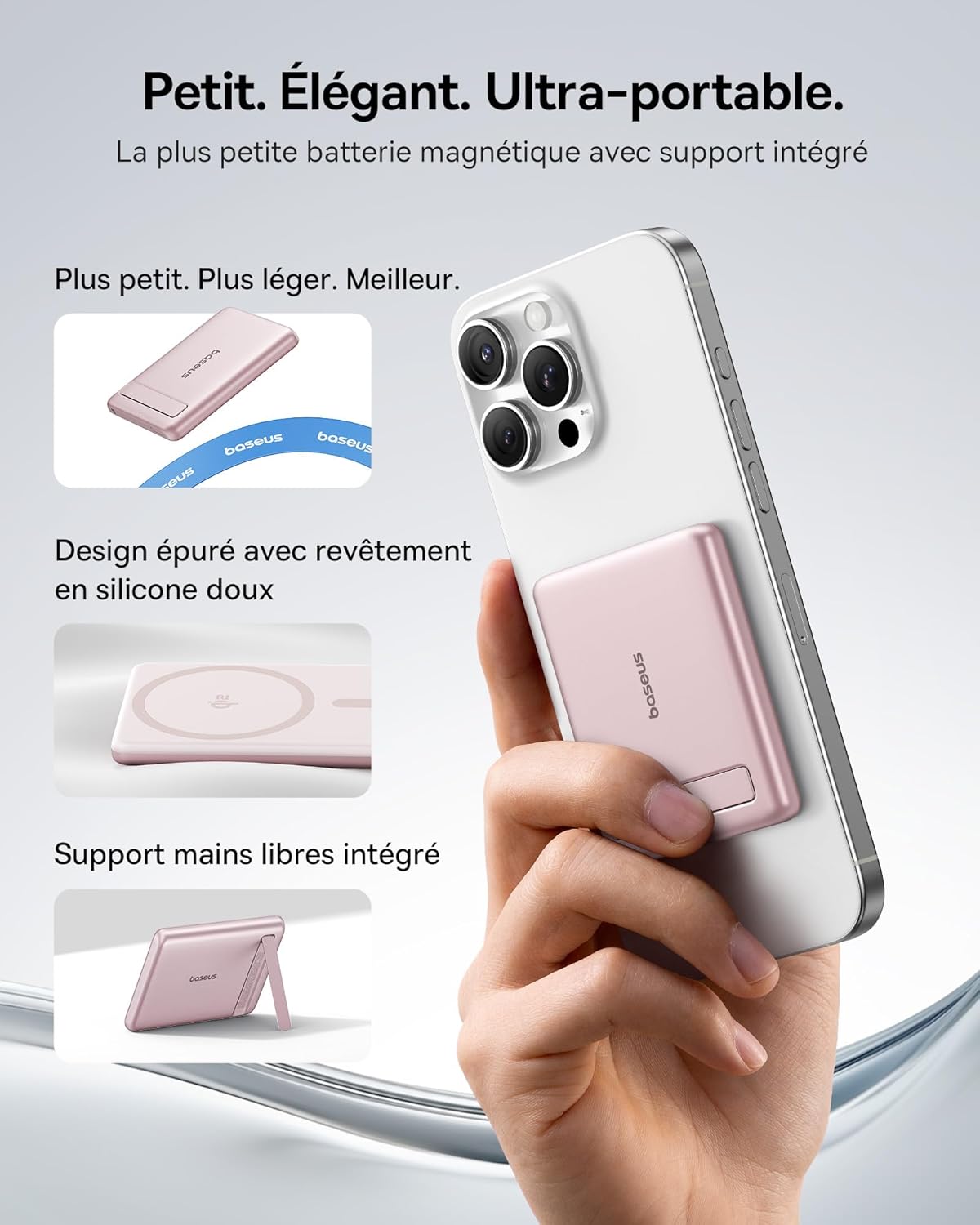
Image: The Baseus Mini MagSafe Powerbank securely attached to an iPhone, demonstrating its compact form factor and the convenience of the integrated kickstand for hands-free use.
2. פּעקל אינהאַלט
- Baseus Mini MagSafe Powerbank (Model: PPKPC-0520S)
- USB-C to USB-C Charging Cable (30 cm)
- באַניצער מאַנואַל

Image: The Baseus Mini MagSafe Powerbank and its accompanying USB-C charging cable, highlighting the included accessories.
3. פּראָדוקט פֿעיִקייטן
- Compact and Premium Design: Smaller than a credit card with a 5000 mAh capacity, featuring a thin aluminum casing and soft-touch silicone finish. Ergonomic curved edges enhance grip, and an LED display indicates battery status.
- Qi2 Fast Charging: Provides up to 15W wireless fast charging for iPhones and other Qi2-compatible devices. Qi2 technology ensures secure magnetic alignment for faster and more reliable power delivery.
- אינטעגרירטע פאָלדאַבאַל שטאַנד: The built-in aluminum kickstand allows for hands-free viewing in both portrait and landscape modes while your phone charges wirelessly.
- שטאַרקע מאַגנעטישע אַטאַטשמענט: Equipped with N52 rubidium magnets offering 3500 GS magnetic power, ensuring a secure lock for instant charging without obstructing the camera lens.
- Wired and Wireless Charging with Advanced Cooling: Charge two devices simultaneously via wireless and USB-C. A three-layer cooling system maintains optimal temperature during extended use.

Image: An iPhone receiving 15W wireless fast charging from the Baseus MagSafe Powerbank, demonstrating the Qi2 certification and efficient power transfer.
4. סעטאַפּ
- ערשט אָפּצאָל: Before first use, fully charge the power bank using the included USB-C cable and a compatible power adapter (not included). The LED indicators will show the charging progress.
- מאַכט אויף: The power bank typically activates automatically when a device is attached or connected. Some models may have a power button to initiate charging.
5. אַפּערייטינג ינסטרוקטיאָנס
5.1 אויפלאָדן די פּאַוער באַנק
- Connect the included USB-C cable to the power bank's USB-C port.
- Connect the other end of the cable to a USB-C power adapter (e.g., 20W PD charger) or a computer's USB-C port.
- די LED אינדיקאַטאָרן וועלן זיך אָנצינדן צו ווײַזן דעם איצטיקן באַטאַרייע לעוועל און טשאַרדזשינג סטאַטוס.
5.2 Wireless Charging (MagSafe/Qi2)
- Ensure your device is compatible with MagSafe or Qi2 wireless charging (e.g., iPhone 12 series and newer).
- Align the back of your compatible device with the magnetic surface of the power bank. The magnets will snap into place, ensuring proper alignment.
- Wireless charging will begin automatically. The LED indicators may show charging activity.
5.3 דראָטיקע טשאַרדזשינג (USB-C)
- Connect your device to the power bank's USB-C port using a compatible USB-C to USB-C cable (or your device's charging cable).
- Wired charging will begin automatically, supporting up to 20W Power Delivery.
5.4 ניצן דעם צוזאַמענפאַלטבאַרן שטאַנד
- Gently pull out the integrated kickstand from the back of the power bank.
- Place your wirelessly charging device onto the power bank.
- סטרויערן די שטיין צו דיין געוואלט viewing angle for portrait or landscape orientation.

Image: The Baseus MagSafe Powerbank simultaneously charging two iPhones, one via USB-C cable and another wirelessly, demonstrating its dual-charging capability.
6. וישאַלט
- רייניקונג: ווישט אָפּ די פּאַוער באַנק מיט אַ ווייכן, טרוקענעם שטאָף. פֿאַרמייַדט ניצן שאַרפע כעמיקאַלן אָדער אַברייסיוו מאַטעריאַלן.
- סטאָרידזש: האַלט די פּאַוער באַנק אין אַ קיל, טרוקן אָרט אַוועק פון דירעקט זונשייַן און עקסטרעמע טעמפּעראַטורן.
- באַטערי זאָרגן: פֿאַר אַן אָפּטימאַלן באַטאַרייע לעבן, זאָל מען גאָר אויפֿלאָדן און אויסלאָדן די פּאַוער באַנק לפּחות איין מאָל יעדע דריי חדשים אויב מען ניצט זי נישט רעגולער.
- ויסמיידן טראפנס: באַשיצן דעם אַפּאַראַט פֿון פֿאַלן און קלאַפּן, וואָס קענען שעדיקן אינעווייניקסטע קאָמפּאָנענטן.
7. טראָובלעשאָאָטינג
- מיטל ניט טשאַרדזשינג:
- זייט זיכער אז די פּאַוער באַנק איז גענוג אויפגעלאָדן.
- Check cable connections for wired charging.
- For wireless charging, ensure proper alignment and that your device is Qi2/MagSafe compatible. Remove any thick phone cases that might interfere.
- פּאַמעלעך טשאַרדזשינג:
- Ensure you are using a compatible cable and power adapter for optimal charging speeds (e.g., PD 20W for wired, Qi2 for wireless).
- טשאַרדזשינג קייפל דעוויסעס סיימאַלטייניאַסלי קען רעדוצירן יחיד טשאַרדזשינג ספּידז.
- מאַגנעטישע אַטאַטשמענט איז שוואַך:
- Ensure your phone or case has MagSafe compatibility.
- Remove any non-MagSafe compatible cases or accessories that might block the magnetic connection.
- Power bank overheating:
- While the power bank has advanced cooling, prolonged high-power usage can generate heat. If it becomes excessively hot, disconnect it and allow it to cool down.
- פֿאַרמײַדן אָפּלאָדן אין דירעקטער זון אָדער פֿאַרמאַכטע פּלעצער.
8. ספּעסאַפאַקיישאַנז
| מאָדעל נומער | פּפּקפּק-0520ס |
| באַטערי טיפּ | ליטהיום פּאָלימער |
| קאַפּאַציטעט | 5000 מאַה |
| דראָטיקע אויסגאַנג (USB-C) | ביז 20 וואט מאַכט צושטעלן (PD) |
| ווירעלעסס רעזולטאַט | ביז 15 וואט (Qi2 סערטיפיצירט) |
| אַרייַנשרייַב וואָלtage | 20 וואלטס (מאקס) |
| דימענסיעס (L X W X H) | 10 X 6.7 X 0.9 סענטימעטער |
| וואָג | 180 גראַמז |
| קאַמפּאַטאַבאַל דעוויסעס | Smartphones (iPhone 12-17 Pro/Pro Max, Android compatible) |
| Wireless Charging Standard | Qi |

Image: The Baseus Mini MagSafe Powerbank positioned next to an iPhone and a soda can, illustrating its ultra-compact and portable size.
9. זיכערקייַט אינפֿאָרמאַציע
Please read and follow these safety guidelines to prevent damage to the product or injury to yourself:
- שטעלט נישט אויס די פּאַוער באַנק צו וואַסער, פייכטקייט, אָדער עקסטרעמע טעמפּעראַטורן.
- Avoid disassembling, puncturing, or modifying the device.
- האַלטן אויס פון דערגרייכן פון קינדער.
- ניצט נישט אויב די פּאַוער באַנק איז קענטיק געשעדיגט אָדער געשוואָלן.
- אָפּזאָגן דעם פּראָדוקט ריספּאַנסאַבלי לויט די היגע רעגיאַליישאַנז.
10. וואָראַנטי און שטיצן
This Baseus Mini MagSafe Powerbank comes with a 2 יאָר וואָראַנטי פֿון דעם קויפֿדאַטום. די וואָראַנטי דעקט פֿאַבריקאַציע חסרונות און אַרבעט אונטער נאָרמאַל נוצן.
For technical support, warranty claims, or any product-related inquiries, please contact Baseus customer service through the retailer where you purchased the product or visit the official Baseus webפּלאַץ פֿאַר קאָנטאַקט אינפֿאָרמאַציע.

Image: A display of various iPhone models and Android devices, all compatible with the Baseus MagSafe Powerbank, highlighting its broad device compatibility.