
1. הקדמה
This manual provides detailed instructions for the safe and effective operation of your TOOLTOP ET120M 120MHz Handheld Digital Oscilloscope. Please read this manual thoroughly before using the device to ensure proper functionality and to prevent damage.
2. זיכערקייַט אינפֿאָרמאַציע
Always observe the following safety precautions when using the ET120M oscilloscope:
- דו זאלסט נישט אַרבעטן די מיטל אין נאַס אָדער דamp באדינגונגען.
- Ensure the device is powered off before connecting or disconnecting probes.
- Use only the provided accessories or approved replacements.
- Do not attempt to open or modify the device; refer all servicing to qualified personnel.
- האַלטן די מיטל אַוועק פון שטאַרק ילעקטראָומאַגנעטיק פעלדער.
3. פּעקל אינהאַלט
באַשטעטיקט אַז אַלע זאכן וואָס זענען אויסגערעכנט אונטן זענען פאַראַן אין אייער פּעקל:
- TOOLTOP ET120M Handheld Digital Oscilloscope
- 100MHz Oscilloscope Probe
- וסב טשאַרדזשינג קאַבלע
- באַניצער מאַנואַל
- שטאָף באַג

פיגורע 3.1: פּעקל אינהאַלט
4. פּראָדוקט איבערview
4.1. מיטל פֿעיִקייטן
The TOOLTOP ET120M is a compact and portable handheld digital oscilloscope designed for various electrical testing and repair applications. Key features include:
- 120MHz analog bandwidth and 500MS/s real-time sampלענג קורס.
- 2.4-inch 320x240 clear color LCD screen.
- Integrated square wave signal output (1kHz, 10KHz, 100KHz, 1MHz).
- 12 types of automatic parameter measurements (Vpp, Vrms, Vavg, Vp, Vmax, Vmin, F, T, T+, T-, Du+, Du-).
- Three scan modes: Auto, Normal, and Single.
- Ability to store 2500 DSO waveforms with thumbnail browsing.
- Built-in rechargeable lithium battery for up to 6 hours of continuous use.
- Durable design with a silicone protective cover.

פיגור 4.1: הויפּט פֿעיִקייטן איבערview
4.2. קאָמפּאָנענט לעגיטימאַציע
Familiarize yourself with the main components and controls of the ET120M oscilloscope:

פיגורע 4.2: פראָנט View of ET120M Oscilloscope
- ווייַז פאַרשטעלן: 2.4-inch LCD for waveform display and menu navigation.
- Input BNC Connector: For connecting the oscilloscope probe.
- קאָנטראָל קנעפּלעך: Including MENU, F1, F2, SAVE, AC/DC, 1X/10X, 50%, TRIG, EDGE, STOP, AUTO, and directional/OK buttons for navigation and settings adjustment.
- וסב פּאָרט: פֿאַר טשאַרדזשינג די מיטל.
5. סעטאַפּ
5.1. ערשטע אויפלאָדונג
Before first use, fully charge the built-in lithium battery using the provided USB charging cable and a standard USB power adapter (not included). The charging indicator will show the charging status.
5.2. פּראָבע פֿאַרבינדונג
Connect the oscilloscope probe to the BNC input connector on the top of the device. Ensure the connection is secure. Set the probe attenuation switch (if applicable) to the desired setting (e.g., 1X or 10X) and match this setting on the oscilloscope via the 1X/10X button.
6. אַפּערייטינג ינסטרוקטיאָנס
6.1. מאַכט אויף / אויסגעלאשן
Press and hold the power button (usually located on the side or top) to turn the device on or off.
6.2. Basic Waveform Acquisition
After powering on, connect the probe to the circuit under test. The oscilloscope will display the waveform. Use the directional buttons to navigate menus and adjust settings.
6.3. Waveform Acquisition Modes
דער ET120M שטיצט דריי סקען מאָדעס:
- אַוטאָ: Automatically adjusts time base and vertical amplitude for a stable waveform display. Press the AUTO button for one-key waveform adaptation.
- נאָרמאַל: Displays a waveform only when a trigger condition is met.
- סינגלע: Captures and displays a single waveform when a trigger condition is met, then stops.

Figure 6.1: Auto Waveform Adaptation
6.4. Parameter Measurement
The device can automatically measure 12 different waveform parameters. Access these measurements through the menu system. Parameters include Peak-to-Peak Voltage (Vpp), Root Mean Square Voltage (Vrms), Average Voltage (Vavg), Peak Voltage (Vp), Maximum Voltage (Vmax), Minimum Voltage (Vmin), Frequency (F), Period (T), Positive Pulse Width (T+), Negative Pulse Width (T-), Positive Duty Cycle (Du+), and Negative Duty Cycle (Du-).
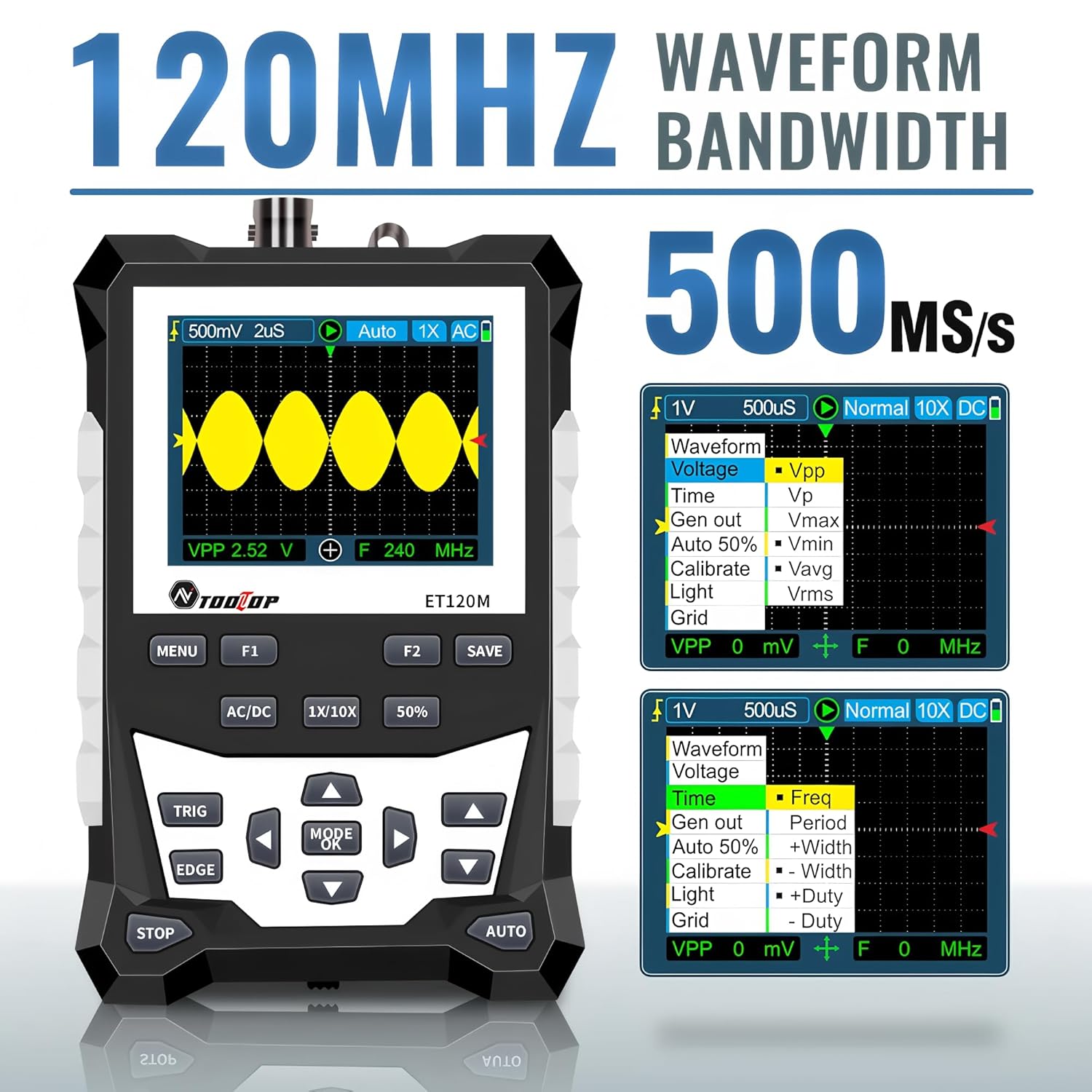
Figure 6.2: Automatic Measurement Functions
6.5. Square Wave Signal Output
The ET120M can generate square wave signals at specific frequencies. Navigate to the signal output function in the menu to select between 1kHz, 10KHz, 100KHz, and 1MHz output frequencies. This feature is useful for testing circuits.

Figure 6.3: Square Wave Signal Output Function
6.6. Waveform Storage and Recall
The device can store up to 2500 DSO waveforms. Use the SAVE button to store the current waveform. Stored waveforms can be browsed via thumbnails for easy recall and analysis.

Figure 6.4: Waveform Storage and Browsing
6.7. Adjusting Waveform Parameters
You can manually adjust various waveform display parameters to fine-tune your measurements:
- צייט באַזע: Adjusts the horizontal scale (time per division).
- Amplitude (Vertical Sensitivity): Adjusts the vertical scale (volts per division).
- Trigger Slope: Sets the trigger to rising or falling edge.
- טריגער מדרגה: שטעלט דעם באַנדtage level at which the waveform is triggered.

Figure 6.5: Adjusting Waveform Display Parameters
7. וישאַלט
7.1. רייניקונג
צו רייניקן דעם אפאראט, ניצט א ווייכן, טרוקענעם טוך. פאר שווערן שמוץ, ניצט א לייכט טרוקענעם טוך.amp מען קען ניצן אַ שטאָף מיט אַ מילדן וואַשפּולווער, און זיכער מאַכן אַז קיין פליסיקייט גייט נישט אַרײַן אין דעם אַפּאַראַט. ניצט נישט קיין שרײַבנדיקע רייניגערס אָדער סאָלווענטן.
7.2. סטאָרידזש
When not in use for extended periods, store the oscilloscope in a cool, dry place, away from direct sunlight and extreme temperatures. It is recommended to store it in the provided cloth bag to protect it from dust and scratches.
7.3. באַטערי קער
To prolong battery life, avoid fully discharging the battery frequently. If storing for a long time, charge the battery to approximately 50% every few months.
8. טראָובלעשאָאָטינג
If you encounter issues with your ET120M oscilloscope, refer to the following common problems and solutions:
- אַפּאַראַט אַרבעט נישט אָן: זיכער מאַכן אַז די באַטאַרייע איז אויפגעלאָדן. פֿאַרבינדט דעם USB טשאַרדזשינג קאַבל און פּרוּווט ווידער.
- קיין כוואַליעפאָרמע געוויזן: Check probe connection. Ensure the probe is properly connected to the circuit under test. Adjust vertical sensitivity and time base settings. Try the AUTO function.
- נישט-סטאַבילע כוואַליעפאָרם: Adjust the trigger level and trigger slope. Ensure the trigger mode is appropriate for the signal.
- ומפּינקטלעך מעזשערמאַנץ: Verify probe attenuation setting (1X/10X) matches the device setting. Perform a probe compensation if necessary (refer to advanced operation in a full manual).
For persistent issues, contact TOOLTOP customer support.
9. ספּעסאַפאַקיישאַנז
9.1. אַלגעמיינע ספּעסאַפאַקיישאַנז
| ווייַז | 320x240 LCD screen |
| ווייַז שטח | 50 מם X 40 מם |
| באַקלייט | White, brightness adjustable |
| ימפּידאַנס | x1: 1MΩ / x10: 10MΩ |
| באַטערי | 18650 lithium battery (built-in) |
| אַוטאָ שאַטדאַון | קיין אָפּעראַציע פֿאַר 15 מינוט |
| כוואַליעפאָרם סטאָרידזש | 2500 די-עס-אָ כוואַליעפאָרמען |
| גרייס | 124 מם X 80 מם X 35 מם |
| אַפּערייטינג טנאָים | 0°C ~ +40°C; <75%RH |
| סטאָרידזש טנאָים | -10°C ~ +60°C; <90%RH |
9.2. אָסילאָסקאָפּ ספּעציפֿיקאַציעס
| אַנאַלאָג באַנדווידט | 120 מהז |
| מאַקסימום רעאַל-צייט סampלינג קורס | 500MSps |
| ווערטיקאַל רעסאָלוטיאָן | 8 ביץ |
| ווערטיקאַל אַקיעראַסי | ± (5% + 0.2 דיוו) |
| אויטאָ נול רעפערענץ | בעשאַס דק מעזשערמאַנט |
| צינגל מדרגה | ±3.8 דיווי (0.1 דיווי פּער שריט) |
| צינגל שטעלע | ±6 דיווי (0.1 דיווי פּער שריט) |
| קורסאָר פונקציע | ΔV, Δt, 1/Δt |
| ניט-לינעאַריטי | ±1 ביטס |
| קאַפּלינג אופֿן | DC/AC |
| Division Vertical | ±3.8 Horizontal: 12 |
| צייט באַסע ראַנגע | 6 נס / דיוו ~ 50 ס / דיוו |
| צייט באַסע אַקיעראַסי | ±(0.01%+0.1דיוו) |
| יבערקוקן מאָדע | אויטאָ/איינציק/נאָרמאַל |
| צינגל סלאָפּע | ארויפגייענדיק / פאלנדיק |
| רעקאָרד לענג | 12דיוו |
| אַוטאָ קאָנפיגוראַטיאָן | Automatically set time base and vertical ampליטוד |
| אויטאָמאַטישע מעסטונג פונקציעס | Vpp, Vrms, Vavg, Vp, Vmax, Vmin, F, T, T+, T-, Du+, Du- |
| ווערטיקאַל סענסיטיוויטי קייט | x1: 50mV/דיוויזיע ~ 10V/דיוויזיע; x10: 500mV/דיוויזיע ~ 100V/דיוויזיע |
10. וואָראַנטי און שטיצן
For warranty information or technical support, please refer to the documentation provided with your purchase or contact TOOLTOP customer service directly. Keep your purchase receipt as proof of purchase.