
1. הקדמה
Thank you for choosing the Black Shark Magnetic Phone Cooler 5 Pro. This device is designed to provide efficient cooling for your smartphone, tablet, or other compatible devices, preventing overheating during intensive use such as gaming, streaming, or video recording. Please read this manual carefully before use to ensure proper operation and to maximize the product's lifespan.
2. פּראָדוקט איבערview
The Black Shark Magnetic Phone Cooler 5 Pro features advanced cooling technology to maintain optimal device temperature. Key features include:
- High-Efficiency Cooling: Up to 35W cooling power, capable of reducing device temperature significantly.
- אַוואַנסירטע אינערלעכע סטרוקטור: Utilizes a 35W high-power TEC cooling chip, industrial-grade cooling fins, a large 4210 fan, and a pure copper cooling plate for rapid heat dissipation.
- קוסטאָמיזאַבלע RGB לייטינג: Equipped with 18 addressable RGB LEDs, offering personalized lighting effects via the Black Shark App.
- ינטעליגענט טעמפּעראַטור קאָנטראָל: Dual NTC sensors monitor internal temperature, with automatic shutdown for safety if temperatures exceed 60°C (140°F) or drop below -20°C (-4°F).
- ווערסאַטאַל קאַמפּאַטאַבילאַטי: Supports both magnetic attachment (for iPhone 12 and above, MagSafe compatible) and clip-on attachment (for Android phones, iPads, and other devices with widths between 66-85mm).
- Detachable Handle Design: Includes removable handles for comfortable handheld use and a 1/4-inch screw nut for mounting on tripods or live streaming brackets.

בילד 2.1: עקספּלאָדירט view showing the internal cooling components, including the TEC chip, fan, and cooling plate.
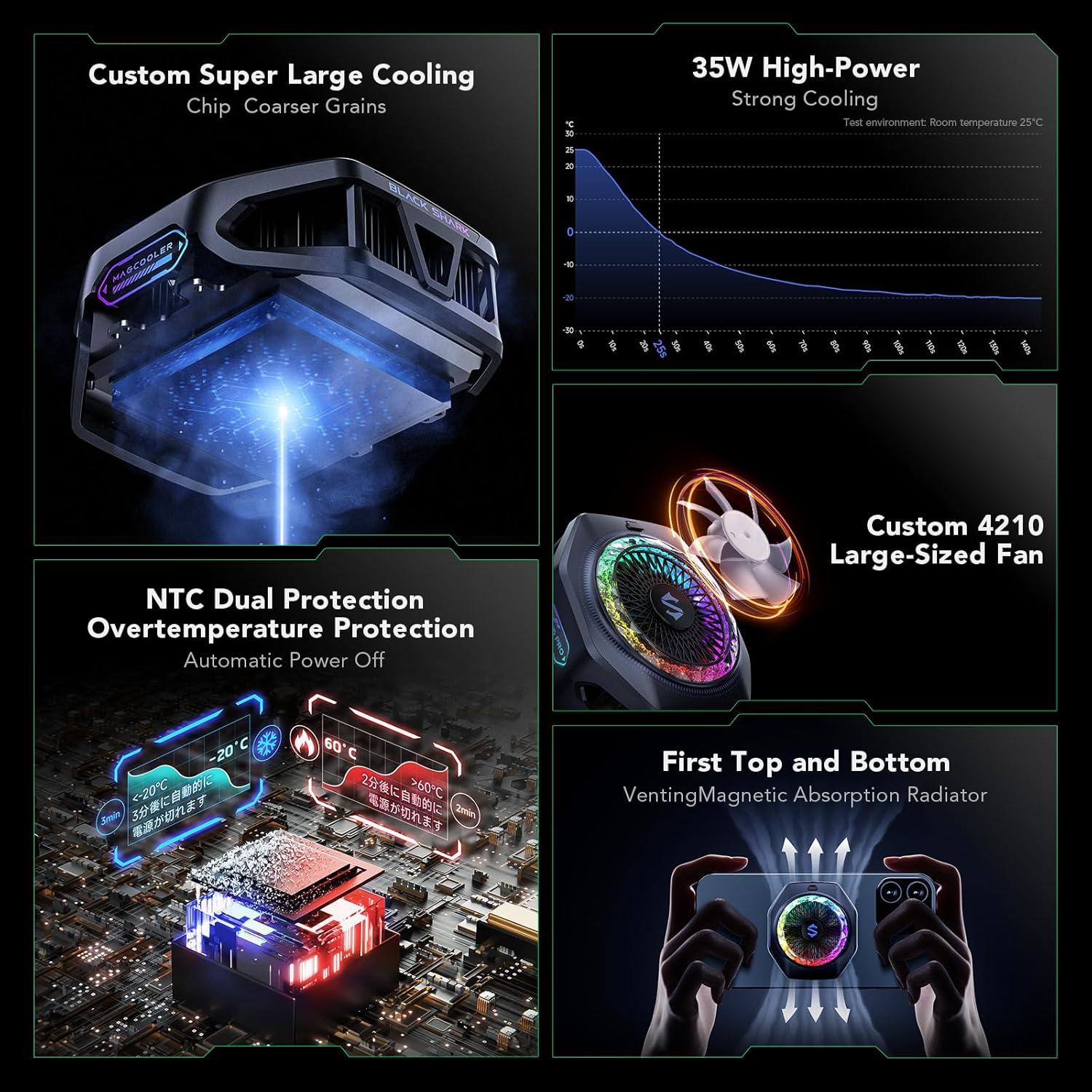
Image 2.2: Diagram illustrating the 35W high-power cooling, custom 4210 large-sized fan, NTC dual protection, and top/bottom venting magnetic absorption radiator.
3. פּעקל אינהאַלט
ביטע טשעק די פּאַקעט פֿאַר די פאלגענדע זאכן:
- Black Shark Magnetic Phone Cooler 5 Pro (x1)
- יו-עס-בי-סי צו יו-עס-בי-סי קאַבל (x1)
- Detachable Handles (x2)
- באַניצער מאַנואַל (x1)
Note: A power adapter (40W or higher) is recommended and sold separately.
4. סעטאַפּ
4.1 Attaching the Cooler
The cooler offers two attachment methods:
- Magnetic Type (for MagSafe compatible devices):
Align the cooler with the magnetic area on the back of your iPhone 12 series or newer, or any MagSafe-compatible device. The cooler will snap into place magnetically.
- Clip Type (for non-MagSafe devices):
Attach the provided clip accessory to the cooler. Extend the clip to fit your device (compatible with widths between 66-85mm). Position the cooler over the area of your device that generates the most heat and secure the clip firmly.

Image 4.1: Illustration of magnetic attachment for iPhone and clip attachment for Android phones.
4.2 Attaching Detachable Handles (Optional)
For enhanced grip during gaming or extended use, attach the detachable handles to the sides of the cooler. Ensure they click securely into place.
4.3 מאַכט קאַנעקשאַן
Connect the supplied USB-C to USB-C cable to the cooler's USB-C port and to a power adapter. For optimal performance, a power adapter of 40W or higher is recommended. The cooler will begin operating once power is supplied.
5. אַפּערייטינג ינסטרוקטיאָנס
Once connected to power, the cooler will automatically activate its cooling function. The fan will start, and the RGB lighting will illuminate.
5.1 באַניץ סינעריאָוז
The Black Shark Magnetic Phone Cooler 5 Pro is suitable for various applications:
- גיימינג: Prevents performance throttling and frame drops during intense gaming sessions.
- Streaming/Video Recording: Maintains stable device temperature for prolonged recording or live broadcasts.
- Binge-Watching: Keeps your device cool during extended video playback.
- Car-Mounted Use: Ideal for navigation or entertainment in vehicles, especially in warm environments.

בילד 5.1: עקס.amples of the cooler in use for gaming, binge-watching, live streaming, and car-mounted applications.
5.2 Mounting on Tripods/Brackets
The cooler features a 1/4-inch screw nut, allowing it to be mounted on standard tripods, camera brackets, or live streaming supports. This is particularly useful for stable positioning during video creation or streaming.
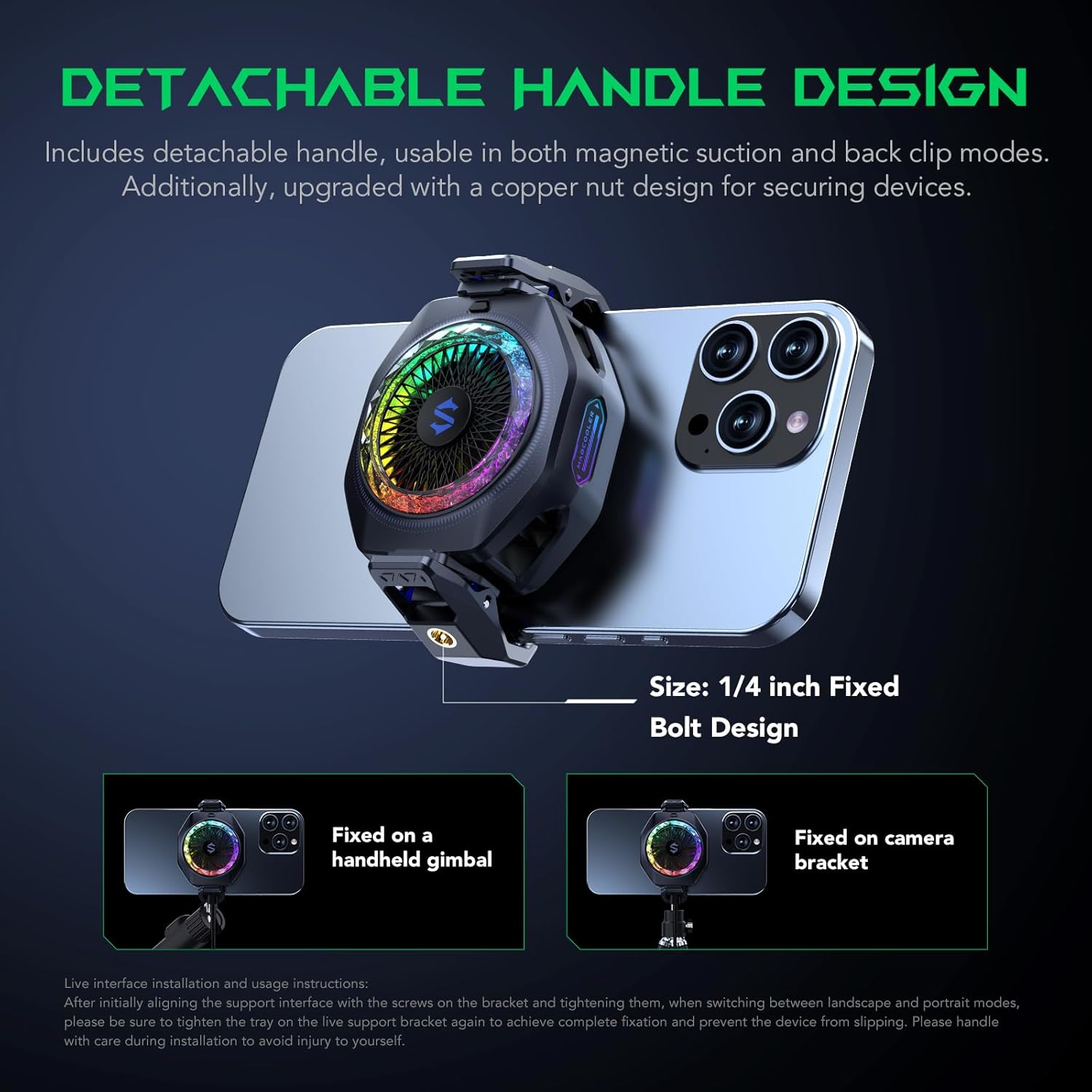
Image 5.2: Demonstrates the detachable handle and the 1/4-inch screw nut for mounting on a gimbal or camera bracket.
6. Application Control (Shark Arsenal App)
For advanced control and customization, download the "Shark Arsenal" application from your device's app store.
- RGB קוסטאָמיזאַטיאָן: Personalize the 18 addressable RGB LEDs with various colors and lighting effects, including the Rubik's Cube lighting mode.
- טעמפּעראַטור מאָניטאָרינג: View real-time temperature readings from the dual NTC sensors.
- Cooling Mode Adjustment: Manually adjust cooling settings or select intelligent modes for optimized performance.
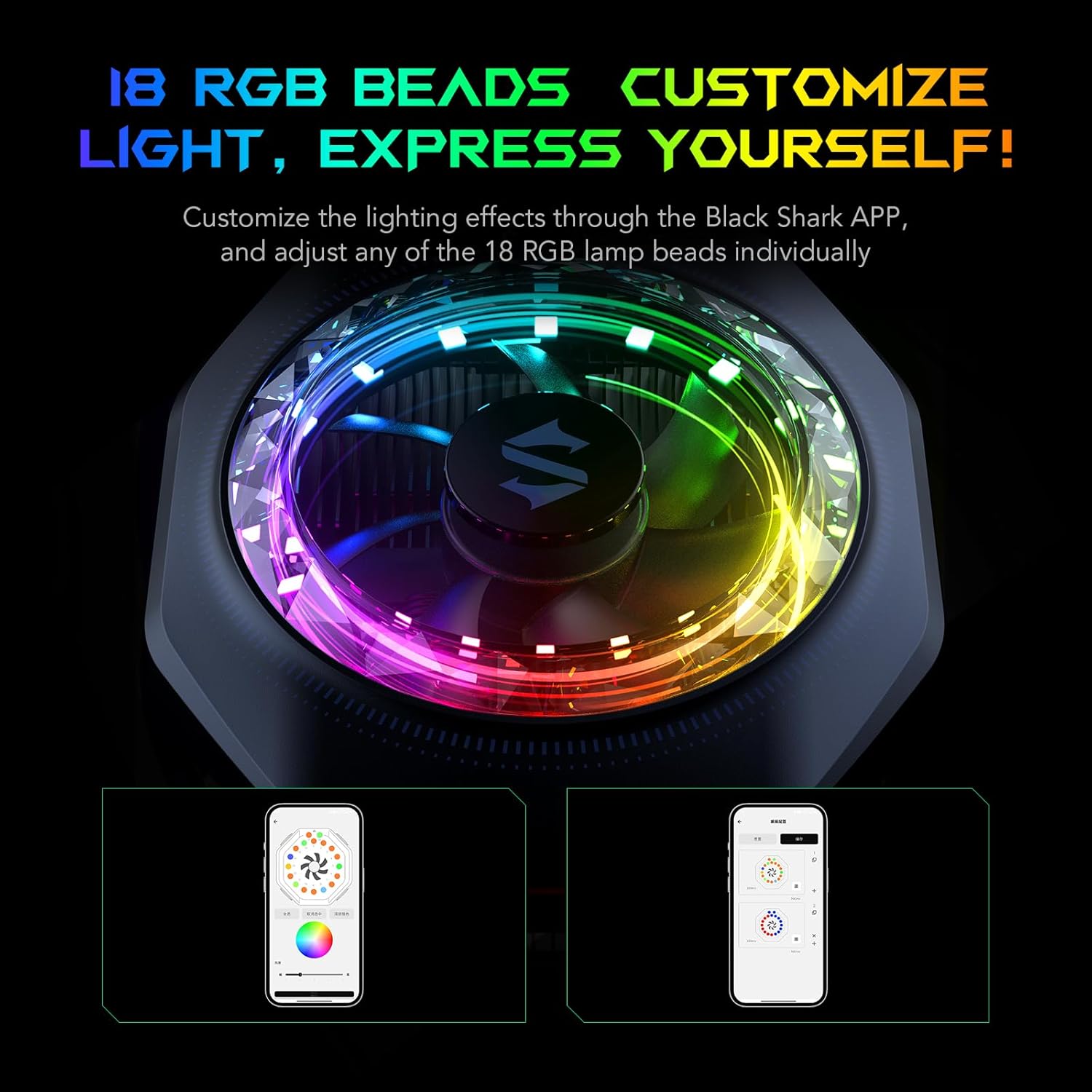
Image 6.1: Screenshots of the Black Shark App showing options for customizing the 18 RGB LEDs.
7. וישאַלט
To ensure the longevity and optimal performance of your cooler:
- רייניקונג: Regularly wipe the exterior of the cooler with a soft, dry cloth. Do not use harsh chemicals or abrasive materials.
- פען געגנט: Ensure the fan intake and exhaust vents are free from dust and debris. Use a soft brush or compressed air to gently clean if necessary.
- סטאָרידזש: ווען נישט אין באַנוץ, האַלט דעם קולער אין אַ קיל, טרוקן אָרט אַוועק פון דירעקט זונשייַן און עקסטרעמע טעמפּעראַטורן.
8. טראָובלעשאָאָטינג
If you encounter issues with your Black Shark Magnetic Phone Cooler 5 Pro, refer to the following common solutions:
- קולער טוט זיך נישט אן:
- Ensure the USB-C cable is securely connected to both the cooler and the power source.
- Verify that the power adapter is functioning and provides sufficient power (40W or higher recommended).
- פּרוּווט אַ אַנדערש וסב-C קאַבלע אָדער מאַכט אַדאַפּטער.
- ניט גענוגיק קאָאָלינג:
- Check that the cooler is properly attached to your device, making good contact with the heat-generating area.
- Ensure the fan vents are not obstructed by dust or other objects.
- Confirm that you are using a 40W or higher power adapter.
- אַפּ קשר ישוז:
- מאַכן זיכער אַז בלועטאָאָטה איז ענייבאַלד אויף דיין מיטל.
- Restart the Shark Arsenal app and the cooler.
- קוק פֿאַר אַפּ דערהייַנטיקונגען.
- אָטאַמאַטיק שאַטדאַון:
The cooler features NTC dual protection. It will automatically shut down if the internal temperature exceeds 60°C (140°F) or drops below -20°C (-4°F) to prevent damage. Allow the device to return to a safe operating temperature before restarting.
9. ספּעסאַפאַקיישאַנז
| שטריך | באַשרייַבונג |
|---|---|
| מאָדעל נומער | BR52 |
| דימענסיעס (L X W X H) | 6 X 4.2 X 7 סענטימעטער |
| וואָג | 120 גראַמז |
| מאַכט | 35 וואטס |
| Voltage | 12 וואלטס |
| ראַש מדרגה | 39 דעציבעלן |
| מאַטעריאַל | פּלאַסטיק |
| מאַקס ראָוטיישאַן ספּיד | 7200 רפּם |
| קאָאָלינג אופֿן | לופט |
| מאַכט קאַנעקטער טיפּ | וסב-C |
| קאַמפּאַטאַבאַל דעוויסעס | Smartphone, Laptop, iPad, Nintendo Switch |
10. זיכערקייַט אינפֿאָרמאַציע
- Do not disassemble or modify the cooler.
- Keep the cooler away from water and other liquids.
- Avoid exposing the cooler to extreme temperatures or direct sunlight for prolonged periods.
- Ensure proper ventilation around the cooler during operation.
- The cooler is equipped with NTC dual protection and will automatically power off if temperatures exceed 60°C (140°F) or drop below -20°C ( -4°F). This is a safety feature; do not attempt to bypass it.
- Use only the provided USB-C cable and a compatible power adapter (40W or higher recommended).
11. וואָראַנטי און שטיצן
Black Shark products are designed for reliability and performance. For warranty information, please refer to the warranty card included with your purchase or visit the official Black Shark webפּלאַץ.
For technical support, troubleshooting assistance, or inquiries about replacement parts, please contact Black Shark customer service through their official channels. Contact details can typically be found on the Black Shark webזייטל אדער אין אייער פּראָדוקט פּאַקאַדזשינג.