
1. הקדמה
א דאנק פארן קויפןasing the JVC XS-N1154B Bluetooth Speaker. This manual provides essential information for the safe and efficient operation of your device. Please read it thoroughly before use and retain it for future reference.
2. זיכערקייַט אינפֿאָרמאַציע
- שטעלט נישט אויס דעם רעדנער צו עקסטרעמע טעמפּעראַטורן, דירעקטע זונשייַן, אדער הויכע פֿײַכטקייט.
- ויסמיידן דראַפּינג אָדער ונטערטעניק די רעדנער צו שטאַרק ימפּאַקץ.
- פרובירט נישט צו צענעמען אדער מאדיפיצירן דעם רעדנער. דאס וועט בטל מאכן די גאראנטיע.
- Keep the speaker away from water and liquids, despite its waterproof rating, to prevent damage to internal components.
- ניצט נאָר דעם ספּעציפֿישן טשאַרדזשינג קאַבל און מאַכט אַדאַפּטער.
- רייניקט דעם רעדנער מיט אַ ווייכן, טרוקענעם שטאָף. ניצט נישט קיין שרײַבנדיקע רייניגערס אדער סאָלווענטן.
3. פּעקל אינהאַלט
זיכער מאַכן אַז אַלע זאכן זענען פאַראַן אין פּעקל:
- JVC XS-N1154B Bluetooth Speaker
- טשאַרדזשינג קאַבלע
- באַניצער מאַנואַל
- ווייַט קאָנטראָל (אויב אַרייַנגערעכנט)
4. פּראָדוקט איבערview
מאַכט זיך באַקאַנט מיט די רעדנער'ס קאָמפּאָנענטן און קאָנטראָלס.
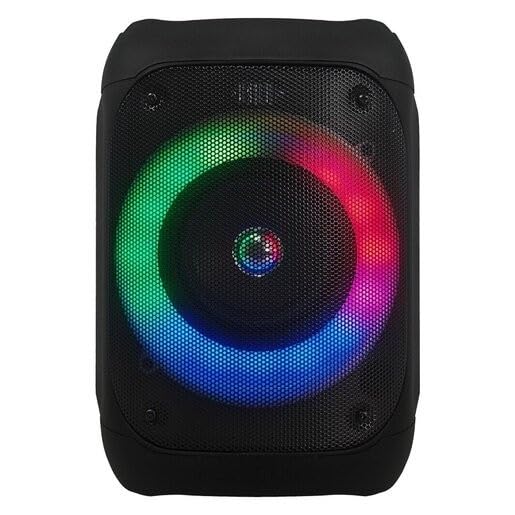
פיגורע 1: פראָנט view of the JVC XS-N1154B Bluetooth Speaker, showcasing the speaker grille and integrated music-activated LED lights.
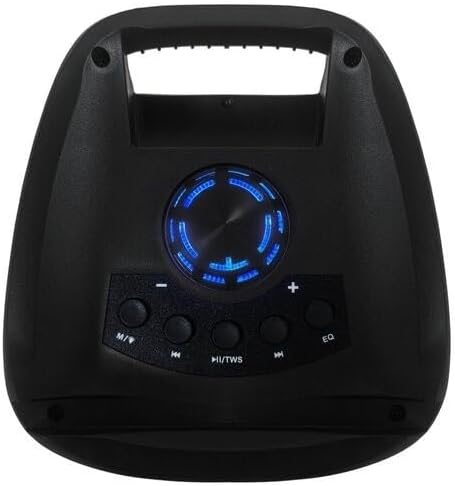
פיגורע 2: Top view of the JVC XS-N1154B Bluetooth Speaker, displaying the control panel with various buttons and the volume knob.
קאָנטראָל פּאַנעל פאַנגקשאַנז:
- מאַכט קנעפּל: טורנס די רעדנער אויף אָדער אַוועק.
- מאָדע (M) קנעפּל: Switches between Bluetooth, USB, SD Card, and FM Radio modes.
- Play/Pause (►||) / TWS Button: Plays or pauses audio. Long press for TWS (True Wireless Stereo) pairing.
- Previous Track (◀◀) Button: Skips to the previous track or tunes down in FM mode.
- Next Track (►►) Button: Skips to the next track or tunes up in FM mode.
- עק קנעפּל: גייט דורך ציקלען דורך יקוואַלייזער פּרעסעטס.
- באַנד קנעפּל: Rotates to adjust the volume level.
5. סעטאַפּ
5.1 אויפלאָדן דעם רעדנער
- Connect the charging cable to the speaker's charging port.
- Plug the other end of the cable into a suitable USB power adapter (not included) or a powered USB port.
- The charging indicator light will illuminate, typically red, during charging.
- Once fully charged, the indicator light may change color (e.g., turn off or turn blue/green). Disconnect the speaker from the power source.
5.2 פּאַוערינג אויף / אַוועק
- צו מאַכט אויף: Press and hold the Power button until the speaker powers on and you hear an audible prompt.
- צו מאַכט אַוועק: Press and hold the Power button again until the speaker powers off.
6. אַפּערייטינג ינסטרוקטיאָנס
6.1 בלועטאָאָטה פּערינג
- Ensure the speaker is powered on and in Bluetooth mode. If not, press the Mode (M) button to switch to Bluetooth mode. The speaker will indicate it is ready for pairing (e.g., a blinking LED or audible prompt).
- אויף אייער מאָבילער מיטל (סמאַרטפאָן, טאַבלעט, לאַפּטאָפּ), אַקטיווירט בלועטוט און זוכט פֿאַר פֿאַראַן דעוויסעס.
- Select "JVC XS-N1154B" from the list of devices.
- Once paired, the speaker will provide an audible confirmation, and the Bluetooth indicator light will become solid.
- איר קענט איצט שפּילן אַודיאָ פֿון אייער דעווייס דורך דעם רעדנער.
6.2 USB/SD קאַרטל ווידערשפּיל
- Insert a USB flash drive or an SD card (with supported audio files) into the corresponding port on the speaker.
- The speaker will automatically switch to USB or SD card mode and begin playing audio. If not, press the Mode (M) button to select the correct input.
- Use the Previous Track (◀◀), Next Track (►►), and Play/Pause (►||) buttons to control playback.
6.3 FM ראַדיאָ אָפּעראַציע
- Press the Mode (M) button to switch to FM Radio mode.
- To auto-scan and save available stations, press and hold the Play/Pause (►||) button. The speaker will scan and store stations automatically.
- Use the Previous Track (◀◀) and Next Track (►►) buttons to navigate between saved FM stations.
6.4 געפירט ליכט מאָדעס
The speaker features music-activated LED lights. These lights typically synchronize with the audio playback. There may be an additional button or a combination of buttons to cycle through different light modes or to turn them off. Refer to the remote control section for specific controls if available.
6.5 באַנד קאָנטראָל
Rotate the Volume Knob on the top panel clockwise to increase volume and counter-clockwise to decrease volume.
6.6 רימאָוט קאָנטראָל באַניץ
If your package includes a remote control, it provides convenient access to various functions:
- מאַכט: אויף / אַוועק
- מאָדע: Switch input sources (Bluetooth, USB, SD, FM)
- באנד +/-: סטרויערן די באַנד
- שפּיל / פּויזע: קאָנטראָל פּלייבאַק
- פֿריִערדיקע / ווייַטער: Skip tracks/stations
- EQ: Change equalizer presets
- LED: Control LED light modes (if applicable)
7. וישאַלט
7.1 רייניקונג
Wipe the speaker's exterior with a soft, dry, lint-free cloth. Do not use liquid cleaners, sprays, or solvents, as these may damage the finish or internal components. Ensure all ports are dry before use, especially given its waterproof nature.
7.2 סטאָרידזש
When not in use for extended periods, store the speaker in a cool, dry place, away from direct sunlight and extreme temperatures. It is recommended to charge the battery periodically to maintain its lifespan.
8. טראָובלעשאָאָטינג
| פּראָבלעם | מעגלעך סיבה | לייזונג |
|---|---|---|
| דער רעדנער גייט נישט אן. | באַטערי איז דיפּליטיד. | לאָדט דעם רעדנער גאָר אויף. |
| קיין געזונט. | Volume is too low or muted. Device not paired correctly. | Increase volume. Re-pair Bluetooth device. Check audio source. |
| בלועטאָאָטה פּערינג פיילז. | דער רעדנער איז נישט אין פּערינג מאָדע. דער דעווייס איז צו ווייט. שטערונג. | Ensure speaker is in Bluetooth pairing mode. Move device closer. Turn off other Bluetooth devices. |
| די USB/SD קארטל שפילט נישט. | אומרעכט file פֿאָרמאַט. קאַרטל/דרייוו נישט ריכטיק אַרײַנגעשטעלט. | פאַרזיכערן אַודיאָ files are in a supported format. Reinsert the USB drive/SD card. Press Mode button to select correct input. |
| די FM ראַדיאָ אָפּנאַם איז שוואַך. | שוואַך סיגנאַל. | אריבערפירן דעם רעדנער צו א געגנט מיט בעסערן אויפנאם. |
9. ספּעסאַפאַקיישאַנז
- מאָדעל: XS-N1154B
- סאָרט: JVC
- קאַנעקטיוויטי: בלועטאָאָטה, וסב, סד קאָרט
- ראַדיאָ: דיגיטאַל עפעם ראַדיאָ
- מאַכט רעזולטאַט: 4 וואטס
- אַודיאָ רעזולטאַט מאָדע: סטערעאָ
- קאָנטראָל אופֿן: ווייַט
- מאַטעריאַל: פּלאַסטיק
- וואָטערפּרוף: יא
- מאַכט מקור: באַטאַרייע פּאַוערד
- דימענסיעס: אומגעפער 18.6D x 18.9W x 25.5H cm
- וואָג: בעערעך 1.2 קג
- קאַמפּאַטאַבאַל דעוויסעס: לאַפּטאַפּ, סמאַרטפאָנע
10. וואָראַנטי און שטיצן
10.1 וואָראַנטי אינפֿאָרמאַציע
This JVC XS-N1154B Bluetooth Speaker comes with a 1 יאָר וואָראַנטי פֿון דעם קויפֿדאַטום. די וואָראַנטי דעקט פֿאַבריקאַציע חסרונות און אַרבעט אונטער נאָרמאַל נוצן. עס דעקט נישט שעדיקן געפֿירט דורך אומרעכט נוצן, אַקסאַדענטן, נישט-אָטעריזירטע מאָדיפֿיקאַציעס, אָדער נאָרמאַל טראָגן און טרער.
10.2 קונה שטיצן
For technical assistance, warranty claims, or further inquiries, please contact JVC customer support through their official website or the retailer where the product was purchased. Please have your product model number (XS-N1154B) and proof of purchase ready when contacting support.