
1. הקדמה
This manual provides essential information for setting up, operating, maintaining, and troubleshooting your GIGABYTE AORUS Elite 16 BWH gaming laptop. The AORUS Elite 16 BWH is designed for high-performance gaming and demanding applications, featuring an Intel Core Ultra 9 processor, NVIDIA GeForce RTX 5070 laptop GPU, a 16-inch WQXGA 165Hz display, and Windows 11 Pro.
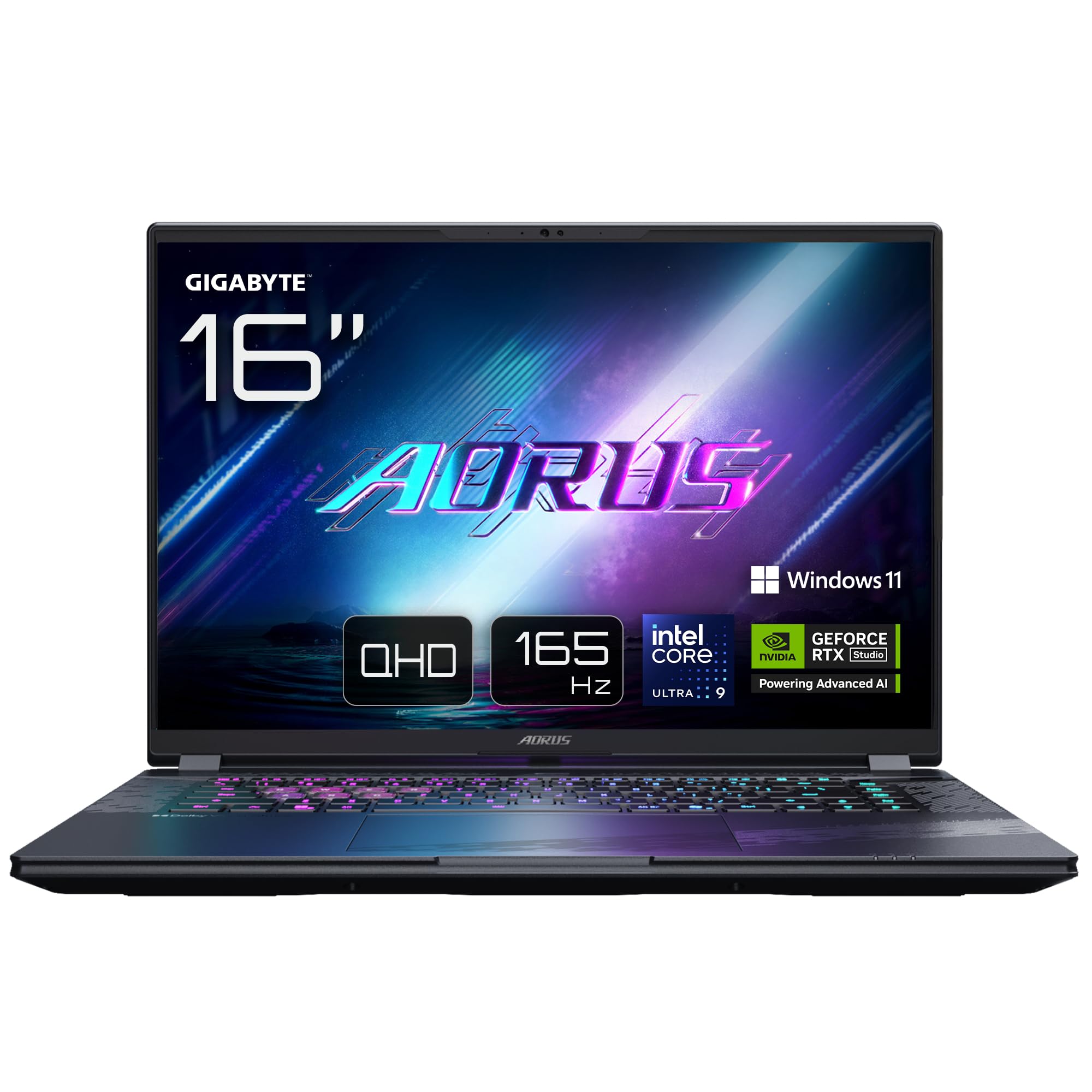
Image: The GIGABYTE AORUS Elite 16 BWH gaming laptop, showcasing its open display and keyboard.
2. סעטאַפּ
2.1 אויספּאַקן די קעסטל און ערשטע דורכקוק
נעמט פֿאָרזיכטיק אַרויס דעם לאַפּטאָפּ און אַלע אַקסעסאָריעס פֿון דער פּאַקאַדזשינג. באַשטעטיקט אַז אַלע קאָמפּאָנענטן וואָס זענען אויסגערעכנט אין דער "וואָס איז אין דער קעסטל" סעקציע זענען פֿאַראַן און נישט געשעדיגט.
- GIGABYTE AORUS ELITE 16 BWHC3FRC65SP Laptop
- מאַכט אַדאַפּטער און קאַבלע
- דאָקומענטאַציע (די מאַנואַל, וואָראַנטי קאַרטל)
2.2 קאַנעקטינג מאַכט
Connect the power adapter to the laptop's power input port and then plug the power cable into an electrical outlet. It is recommended to fully charge the battery before initial use.
2.3 ערשטער מאַכט אויף
Press the power button to turn on the laptop. Follow the on-screen instructions to complete the Windows 11 Pro setup process, including language selection, network connection, and user account creation.
2.4 Connecting Peripherals and Network
The laptop features various ports for connecting external devices and networks.
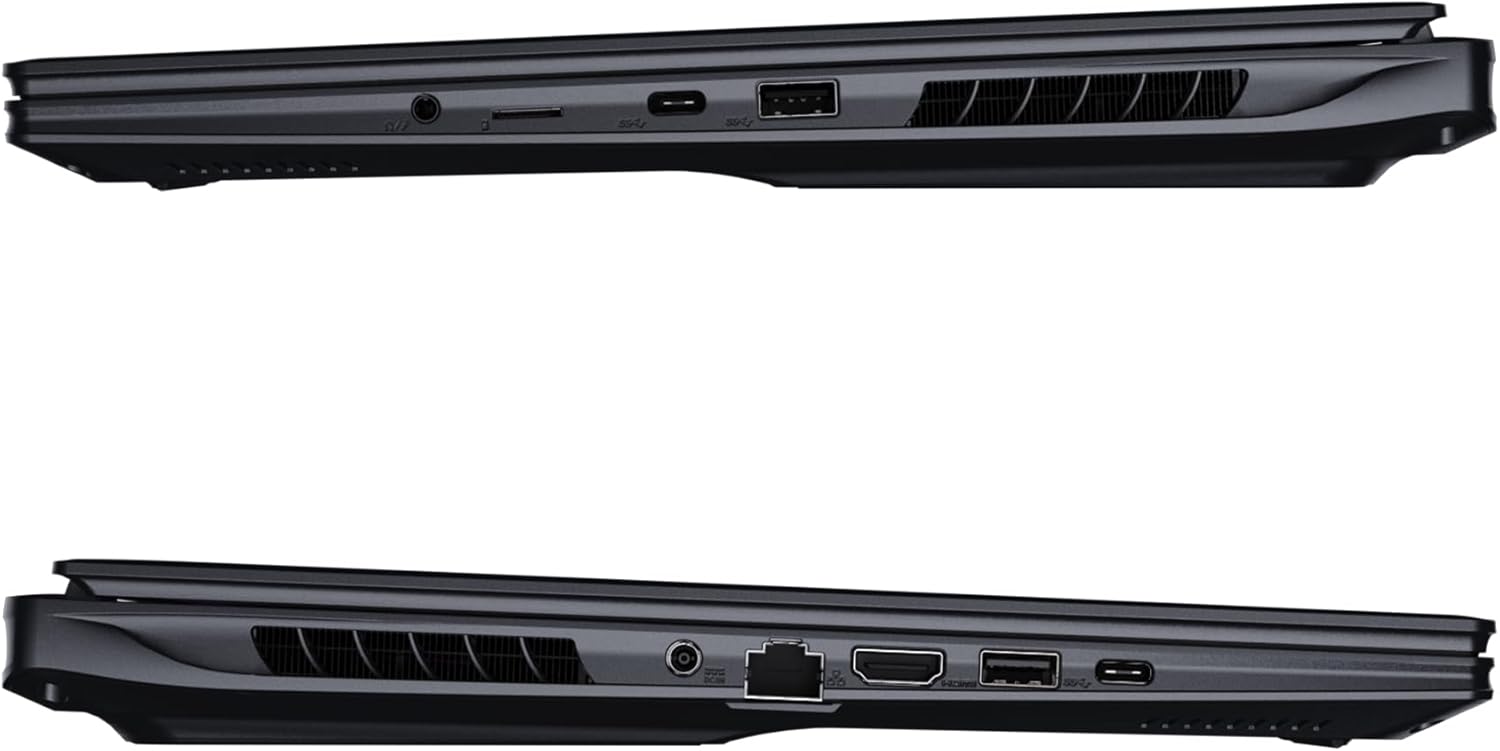
בילד: זייט view of the laptop illustrating the available ports for connectivity.
- וסב פּאָרץ: Connect USB devices such as mice, keyboards, or external storage.
- הדמי פּאָרט: Connect to an external display or TV.
- Thunderbolt 4 פּאָרט: פֿאַר הויך-גיכקייט דאַטן אַריבערפירן און אַרויסווייַזן רעזולטאַט.
- עטהערנעט פּאָרט: פֿאַר אַ דראָטיקער נעץ פֿאַרבינדונג.
- כעדפאָון דזשאַק: פֿאַר אַודיאָ אַרויסגאַנג צו כעדפאָונז אָדער עקסטערנע רעדנערס.
- Wi-Fi 7: Connect to wireless networks via the integrated Wi-Fi 7 module.
- בלועטאָאָטה 5.4: פאַרבינדן מיט בלועטוט-ענייבאַלד דעוויסעס.
3. אפערירן דיין לאַפּטאָפּ
3.1 ווייַז פֿעיִקייטן
Your AORUS Elite 16 BWH features a 16-inch WQXGA (2560x1600) IPS display with a 165Hz refresh rate and 16:10 aspect ratio, offering a wide viewing experience. It supports Dolby Vision for enhanced visual quality and is Pantone validated for color accuracy.

Image: The laptop's 16:10 aspect ratio display, highlighting its IPS panel and Pantone validation.
3.2 קלאַוויאַטור און טאָוטשפּאַד
The laptop is equipped with a backlit keyboard for comfortable typing in various lighting conditions and a responsive touchpad for navigation.
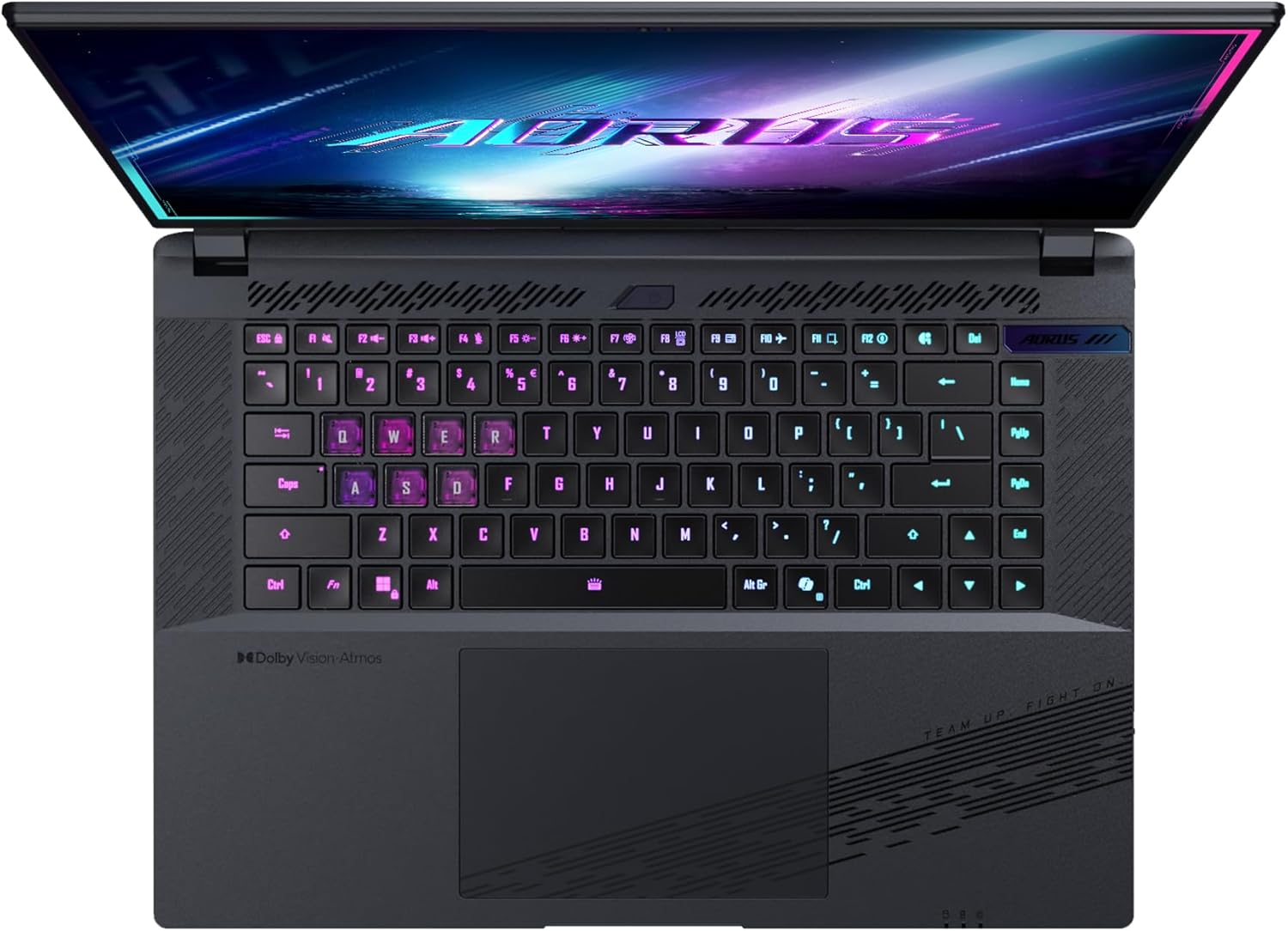
בילד: פון אויבן אַראָפּ view פון די לאַפּטאָפּ'ס קלאַוויאַטור, ווייַזונגasing its backlit keys.
The keyboard also features a dedicated Copilot Key for quick access to AI functionalities in Windows 11.

Image: Close-up of the keyboard, highlighting the Copilot Key for AI features.
3.3 אַודיאָ סיסטעם
Experience immersive audio with Dolby Atmos support and integrated 2W speakers. The laptop also includes a built-in microphone for communication.

Image: Visual representation of Dolby Atmos and Dolby Vision audio and visual enhancements.
3.4 פאָרשטעלונג פֿעיִקייטן
The AORUS Elite 16 BWH is powered by an Intel Core Ultra 9 processor with an integrated NPU for AI acceleration and an NVIDIA GeForce RTX 5070 laptop GPU, ensuring high performance for gaming and demanding tasks. It also features Advanced Optimus with DDS Technology for optimized graphics performance.

בילד: א דעטאַלירטע view of the Intel Core Ultra 9 processor chip.
בילד: א דעטאַלירטע view of the NVIDIA GeForce RTX 50 Series laptop GPU chip.
3.5 GiMATE AI Agent
Utilize GiMATE, your personal AI agent, to optimize performance, manage smart cooling, enhance privacy, control power settings, and improve audio and voice functionalities.

Image: GiMATE AI Agent interface showing various optimization features.
4. וישאַלט
4.1 קאָאָלינג סיסטעם
The laptop features the WINDFORCE Infinity cooling system to maintain optimal temperatures during intensive use. Ensure the vents are clear of obstructions to allow proper airflow.

Image: Representation of the WINDFORCE Infinity cooling system.
4.2 רייניקונג
Use a soft, lint-free cloth to clean the screen and exterior surfaces. For stubborn marks, dampווישט דעם שטאָף לײַכט מיט וואַסער אָדער אַ לייזונג פֿאַר רייניקונג פֿון עקראַן. פֿאַרמײַדט שאַרפֿע כעמיקאַלן.
4.3 באַטערי קער
To prolong battery life, avoid extreme temperatures and do not leave the laptop fully charged or fully discharged for extended periods.
4.4 ווייכווארג דערהייַנטיקונגען
Regularly update your Windows operating system, drivers, and GIGABYTE software to ensure optimal performance and security.
5. טראָובלעשאָאָטינג
5.1 שטראָם פּראָבלעמען
- לאַפּטאָפּ טוט זיך נישט אָנצינדן: Ensure the power adapter is securely connected and the outlet is functional. Check the battery charge level.
- באַטערי נישט טשאַרדזשינג: קאָנטראָלירט אַז דער מאַכט אַדאַפּטער און קאַבל זענען נישט געשעדיגט. פּרוּווט אַן אַנדער אַוטלעט.
5.2 ווייַז ישוז
- קיין ווייַז: Connect an external monitor to check if the issue is with the laptop's screen. Ensure the laptop is powered on.
- פליקערנדיקע אדער פארדרייטע אויסשטעלונג: דערהייַנטיקט גראַפיקס דרייווערס. קאָנטראָלירט די פֿאַרבינדונגען פֿון די דיספּליי קאַבל אויב איר ניצט אַן עקסטערנעם מאָניטאָר.
5.3 קאָנעקטיוויטי פּראָבלעמען
- Wi-Fi פֿאַרבינדט זיך נישט: Check if Wi-Fi is enabled in Windows settings. Restart your router and laptop.
- בלוטוט דעווייס נישט פארבינדן: Ensure the device is in pairing mode and within range. Update Bluetooth drivers.
5.4 אַלגעמיינע פאָרשטעלונג פּראָבלעמען
- לאַנגזאַמע פאָרשטעלונג: Close unnecessary applications. Check for malware. Ensure sufficient free disk space.
- איבערהייצונג: Ensure cooling vents are clear. Use the laptop on a hard, flat surface.
פֿאַר מער קאָמפּליצירטע פּראָבלעמען, זעט די GIGABYTE שטיצע webפּלאַץ אָדער קאָנטאַקט קונה דינסט.
6. ספּעסאַפאַקיישאַנז
| שטריך | דעטאַל |
|---|---|
| סאָרט | GIGABYTE |
| מאָדעל נאָמען | AORUS ELITE 16 BWHC3FRC65SP |
| פאַרשטעלן גרייס | 16 אינטשעס |
| קאָליר | גרוי |
| שווער דיסק גרייס | 2000 GB (2x 1TB SSD Gen4) |
| קפּו מאָדעל | Intel Core Ultra 9 275HX |
| אינסטאַלירטע ראַם גרייס | 32 גיגאבייט דדר5 |
| אָפּערייטינג סיסטעם | Windows 11 פּראָ |
| ספּעציעלע שטריך | Backlit Keyboard, Memory Card Slot |
| גראַפיקס קאַרד באַשרייַבונג | דעדאַקייטאַד |
| גראַפיקס קאָופּראַסעסער | NVIDIA GeForce RTX 5070 |
| Hard Disk Technology | ססד |
| פּונקט וואָג | 2300 גראַמז |
| Webcam Capability | Yes (Frontal) |
| גראַפיקס קאַרטל ראַם גרייס | 8 גיגאבייט GDDR6 |
| מאַקס ראַם געשטיצט | 64 גיגאבייט |
| באַטעריע ענערגיע אינהאַלט | 99 Watt-hours (Lithium-polymer, 4 cells) |
| קאַנעקטיוויטי | Bluetooth 5.4, Ethernet (10/1000 Mbit/s), HDMI (1 port), Thunderbolt 4 (1 port), USB 3.2 Gen 2 (2 ports), Wi-Fi 7 (802.11.be) |
| פּראַסעסער ספּיד | 2.7 GHz (Max 5.4 GHz) |
| נומער פון פּראַסעסערז | 24 |
| פאַרשטעלן האַכלאָטע | 2560 x 1600 פּיקסעלס (WQXGA) |
| ווייַז טיפּ | IPS LCD |
| אַודיאָ פֿעיִקייטן | Dolby Atmos, 2x 2W Integrated Speakers, Integrated Microphone |
7. וואָראַנטי אינפֿאָרמאַציע
Your GIGABYTE AORUS Elite 16 BWH laptop comes with a 2-יאָר לימיטעד וואָראַנטי. This warranty covers manufacturing defects and hardware malfunctions under normal use. Please retain your proof of purchase for warranty claims. For detailed terms and conditions, refer to the warranty card included with your product or visit the official GIGABYTE webפּלאַץ.
8. שטיצן
For technical assistance, driver downloads, and further product information, please visit the official GIGABYTE support webזייטל. איר קענט אויך געפֿינען דאָרט אָפֿט געשטעלטע פֿראַגעס און קהילה פֿאָרומס.
- גיגאבייט אפיציעל Webפּלאַץ: www.gigabyte.com
- קונה סערוויס: Refer to your regional GIGABYTE webפּלאַץ פֿאַר היגע קאָנטאַקט אינפֿאָרמאַציע.