
1. הקדמה און איבערview
The SONICAKE Pocket Master is a portable multi-effects pedal designed for guitar, bass, and acoustic instruments. It integrates a wide range of effects, amp modeling, IR cabinet simulations, and a USB audio interface into a compact, rechargeable unit. This manual provides essential information for setting up, operating, and maintaining your device.

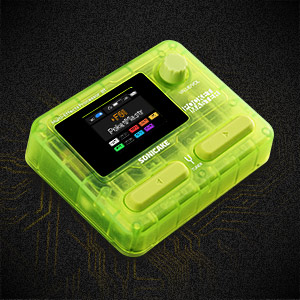
Figure 1: SONICAKE Pocket Master Multi-Effects Pedal (Transparent Green)
2. שליסל פֿעיִקייטן
- White-Box Digital Modeling Technology: Delivers organic, living tone with support for 3rd party IRs (5 user slots) for custom sound creation.
- Extensive Effects Library: Over 100 built-in guitar, bass, and acoustic effects, including 20 legendary amp מאָדעלס.
- High-Quality Signal Processing: 24-bit 44.1kHz signal processing ensures clear audio.
- Rhythm and Looper Functions: Features 99 built-in drum rhythms and a looper function.
- פּרעסעץ: 100 customizable presets with an adjustable signal chain, allowing up to 9 simultaneous effect blocks.
- USB אַודיאָ צובינד: Stereo audio streaming with OTG function for direct connection to iOS/Android mobile devices.
- בלועטאָאָטה קאַנעקטיוויטי: For audio connection and control.
- באַניצער-פרייַנדלעך ווייַז: Clear LCD color screen for easy navigation through effects and settings.
- פּאָרטאַטיוו פּלאַן: Compact, pocket-sized, and features a built-in rechargeable battery for on-the-go use.
- Software Support: Free Mac/Windows/iOS/Android software for sound editing and preset management.
3. Product Layout and Controls
Familiarize yourself with the physical layout and controls of your Pocket Master unit.

פיגור 2: אויבערשטע פּאַנעל קאָנטראָלס
- 1. לקד סקרין: Displays current preset, effects chain, and settings.
- 2. VALUE/VOL Knob: Adjusts volume and navigates menu options.
- 3. פֿוס־שוויטשעס: Used for preset changes, tuner activation, and looper control.
פיגור 3: זייט פּאַנעל פּאָרץ
- 4. IN Jack: 1/4" input for your instrument.
- 5. OUT/PHONES Jack: 1/4" output for ampליפערז אָדער כעדפאָונז.
- 6. USB-C (OTG) Port: For connecting to mobile devices.
- 7. USB-C (Charging/Data) Port: For charging and connecting to computers.
4. סעטאַפּ
4.1 ערשט טשאַרדזשינג
Before first use, fully charge the Pocket Master using the provided USB-C cable and a compatible 5V USB power adapter (not included). The battery indicator on the LCD screen will show charging status.
4.2 יקערדיק קאַנעקשאַן
- Connect your instrument (guitar, bass, or acoustic) to the IN jack (4) using a 1/4" instrument cable.
- פאַרבינדן די OUT/PHONES jack (5) to your amplifier, audio interface, or headphones.
- Press and hold the power button (usually integrated with a footswitch or knob, refer to the quick start guide for exact location) to turn on the device.
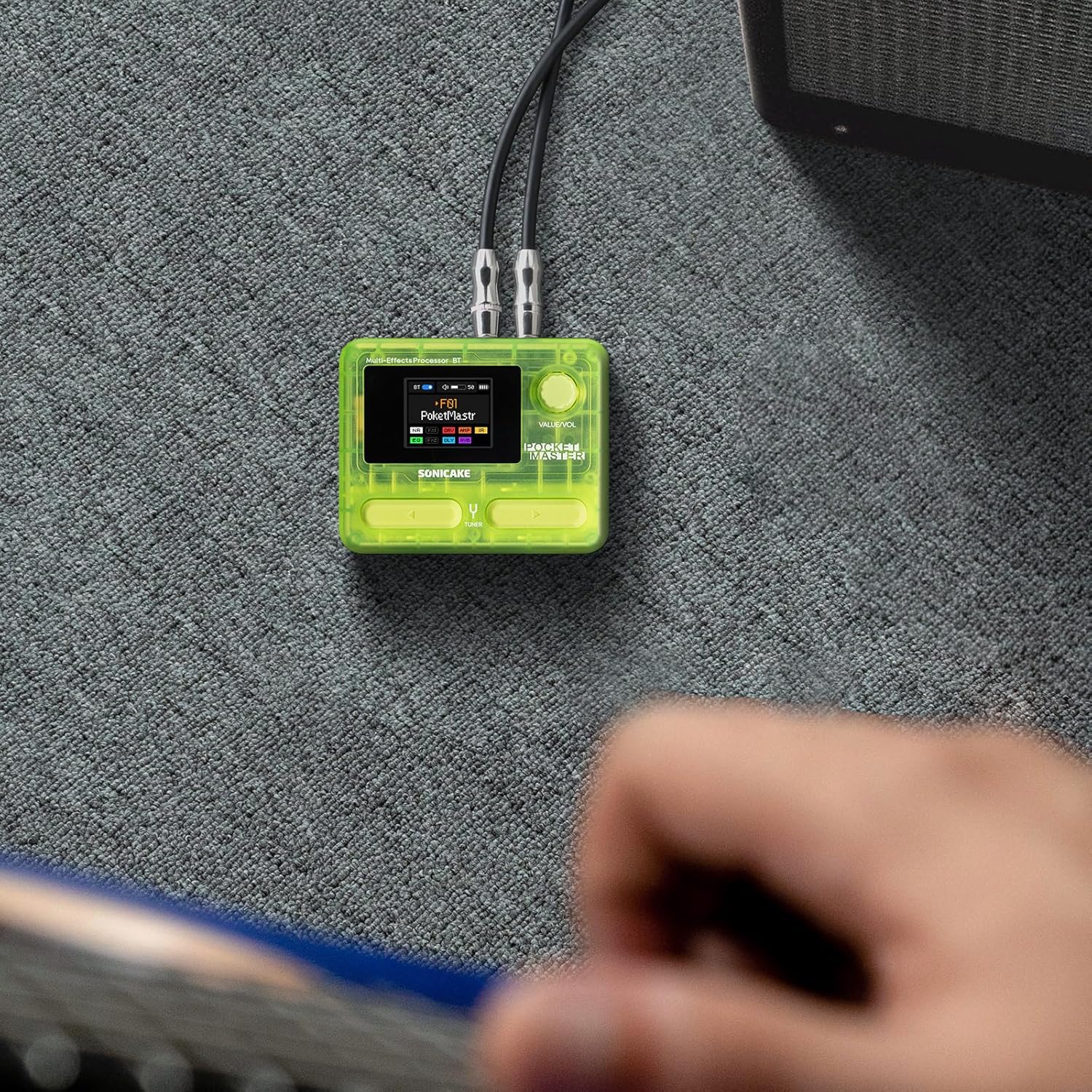
Figure 4: Connecting the Pocket Master to an instrument and ampליפער.
4.3 USB Audio Interface Setup
To use the Pocket Master as a USB audio interface for recording or playback:
- Connect the Pocket Master to your computer or mobile device using a USB-C cable via the dedicated USB-C (Charging/Data) port (7) or USB-C (OTG) port (6) for mobile devices.
- Install the necessary drivers and software from the official SONICAKE website for your operating system (Mac/Windows). For iOS/Android, download the companion app.
- Select the Pocket Master as your audio input/output device in your DAW or system settings.
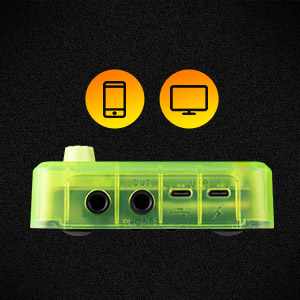
Figure 5: USB connection for audio interface functionality.
5. אַפּערייטינג ינסטרוקטיאָנס
5.1 Navigating Presets
Use the footswitches (3) to cycle through the 100 available presets. The LCD screen (1) will display the current preset number and name.
5.2 Adjusting Volume and Parameters
The VALUE/VOL knob (2) controls the overall output volume. When editing effects, this knob is used to adjust specific parameters. Pressing the knob may confirm selections or enter sub-menus.
5.3 טונער פונקציע
Hold down a specific footswitch (refer to the quick start guide for exact assignment) to activate the built-in tuner. The LCD screen will display tuning information.
5.4 לאָאָפּער און פּויק מאַשין
The Pocket Master includes a looper and drum machine. Specific footswitch combinations or menu navigation are used to activate and control these features. The LCD screen provides visual feedback for recording, playback, and drum rhythm selection.
5.5 Bluetooth Audio and App Control
Pair your mobile device with the Pocket Master via Bluetooth to stream audio or use the dedicated app for deeper editing and preset management.
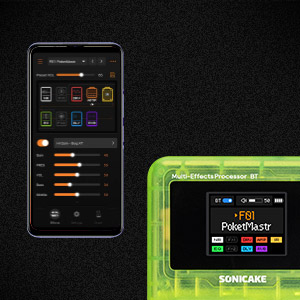
Figure 6: App control interface for the Pocket Master.
6. Effects and Amp מאָדעלס
The Pocket Master features a versatile effects matrix with up to 9 simultaneous effect blocks and over 100 high-quality effects. These include Noise Reduction (NR), two FX modules (FX1, FX2), Drive (DRV), Amp Modeling (AMP), Impulse Response (IR) cabinets, Equalizer (EQ), Delay (DLY), and Reverb (RVB).
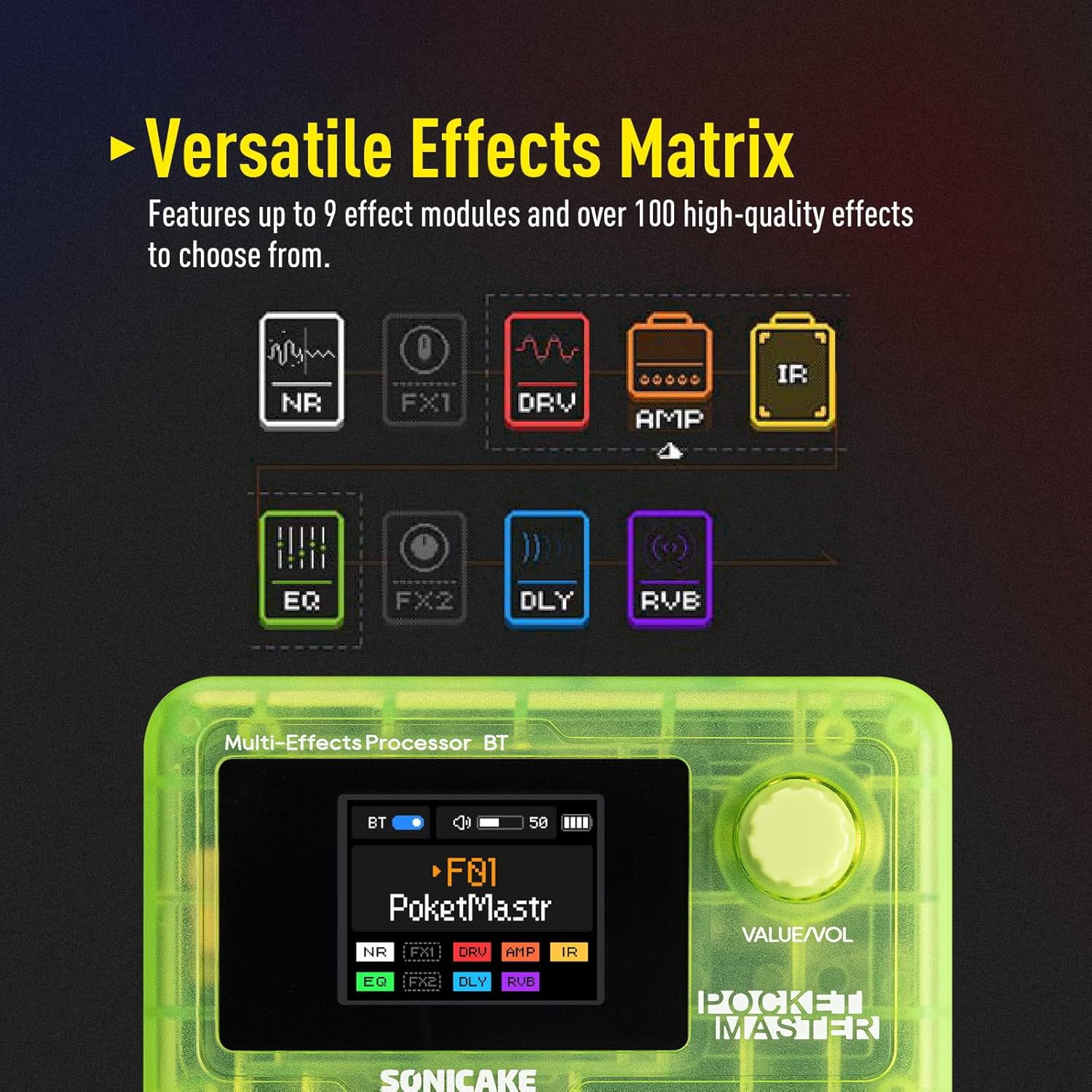
Figure 7: Visual representation of the effects chain.
You can customize the order and parameters of these effects within each preset using the device's controls or the companion software.
7. וישאַלט
- רייניקונג: ניצט אַ ווייכע, טרוקענע שטאָף צו רייניקן דעם אַפּאַראַט. פֿאַרמייַדט אַברייסיוו רייניגער אָדער סאָלווענטן.
- סטאָרידזש: האַלט דעם אַפּאַראַט אין אַ קיל, טרוקן אָרט אַוועק פון דירעקט זונשייַן און עקסטרעמע טעמפּעראַטורן.
- באַטערי זאָרגן: To prolong battery life, avoid fully discharging the unit frequently. Charge regularly, even if not in use for extended periods.
- Firmware דערהייַנטיקונגען: Periodically check the official SONICAKE website for firmware updates to ensure optimal performance and access new features.
8. טראָובלעשאָאָטינג
| פּראָבלעם | מעגלעך סיבה | לייזונג |
|---|---|---|
| קיין געזונט רעזולטאַט | Incorrect cable connections, low volume, dead battery, incorrect preset. | Check all cable connections. Ensure volume is up on both Pocket Master and amplifier/headphones. Charge the unit. Select a different preset. |
| דער אַפּאַראַט טוט נישט מאַכט אויף | Dead battery, faulty power button. | Charge the unit for at least 30 minutes. If still unresponsive, contact support. |
| Effects not working as expected | Incorrect effect parameters, outdated firmware. | Adjust effect parameters via the knob or app. Check for and install any available firmware updates. |
| בלועטאָאָטה קשר ישוז | Device not in pairing mode, interference, outdated app. | Ensure Pocket Master Bluetooth is enabled and in pairing mode. Move closer to the device. Update the companion app. |
9. ספּעסאַפאַקיישאַנז
- נומער וואָג: 7.3 אונסעס (208 גראַם)
- פּראָדוקט דימענשאַנז: 2.44 X 4.13 X 2.44 אינטשעס
- נומער מאָדעל נומער: QME-10TGN
- באַטעריז: 1 Nonstandard Battery (rechargeable)
- קאָליר נאָמען: טראַנספּעראַנט גרין
- קאַנעקטער טיפּ: וסב
- ייַזנוואַרג צובינד: וסב
- סיגנאַל פֿאָרמאַטירונג: דיגיטאַל
- מאַטעריאַל טיפּ: פּלאַסטיק
- מאַכט מקור: Battery Powered, DC Powered
- Voltage: 5 וואלטס
- סטייל: Multi-effects, Acoustic, Bass
10. וואָס איז אין דער קעסטל
- SONICAKE Pocket Master Multi-Effects Pedal
- וסב-C טשאַרדזשינג קאַבלע
- באַניצער מאַנואַל (דעם דאָקומענט)
- Footswitch, 1/4" stereo/headphone outputs (implied by product description, often integrated or part of the unit)
11. וואָראַנטי און שטיצן
For warranty information, technical support, and further assistance, please visit the official SONICAKE webזייטל אדער קאנטאקט זייער קאסטומער סערוויס גלייך. האלט אייער קויף קוויטל אלס באווייז פון קויפן פאר גאראנטיע קליימס.
באַאַמטער Webפּלאַץ: SONICAKE Store on Amazon