
הקדמה
Thank you for choosing the CNAPXAIA C10 Instant Kids Camera. This camera is designed to provide a fun and creative photography experience for children aged 3 to 12. It combines digital photography with ink-free instant printing, allowing children to capture memories and print them instantly. This manual provides detailed instructions for safe and effective use of your camera.
זיכערקייַט אינפֿאָרמאַציע: ניט פּאַסיק פֿאַר קינדער אונטער 3 יאר ווייַל פון קליין טיילן.
וואָס איז אין די קעסטל
ביים אויספּאַקן, ביטע זיכער מאַכן אַז אַלע זאכן זענען פאַראַן:
- CNAPXAIA C10 Instant Kids Camera
- 3 Rolls of Print Paper
- 6 Coloring Pens
- לאַניאַרד
- וסב-C טשאַרדזשינג קאַבלע
- 32 גיגאבייט זכּרון קאַרטל (פאַר-אינסטאַלירט אָדער באַזונדער)

Figure 1: Camera and Included Accessories
פּראָדוקט איבערview
קאַמעראַ קאַמפּאָונאַנץ
The CNAPXAIA C10 camera features a compact design with intuitive controls for children.
- 2.4-אינטש HD פאַרשטעלן: פֿאַר viewבילדער, ווידיאס, און נאַוויגירן מעניוז.
- אַפּאַראַט לענס: פֿאַר כאַפּן בילדער און ווידעאָס.
- דרוק ארויסגאַנג שפּאַלט: וואו געדרוקטע פאָטאָס קומען ארויס.
- קאָנטראָל קנעפּלעך: Power, Shutter, Navigation, Menu, Print.
- וסב- C פּאָרט: פֿאַר טשאַרדזשינג און דאַטן אַריבערפירן.
- מיקראָ סד קאָרט שפּעלטל: For memory expansion (32GB card included).

פיגורע 2: פראָנט View פון די קאַמעראַ
סעטאַפּ
1. טשאַרדזשינג די קאַמעראַ
- פֿאַרבינדט דעם צוגעשטעלטן USB-C קאַבל צום קאַמעראַ'ס USB-C פּאָרט.
- Plug the other end of the cable into a standard USB power adapter (not included) or a computer's USB port.
- The charging indicator light will illuminate. The camera is fully charged when the light turns off or changes color (refer to screen indicator).
- A full charge provides approximately 3-4 hours of continuous use.
2. ינסערטינג די זכּרון קאָרט
The camera comes with a 32GB Micro SD card. Locate the Micro SD card slot on the side of the camera. Insert the card with the gold contacts facing down until it clicks into place. To remove, push the card in gently until it springs out.
3. לאָדן דרוק פּאַפּיר
The camera uses ink-free thermal print paper. Follow these steps to load a new roll:
- שריט 1: Open the paper compartment cover on the side of the camera.
- שריט 2: Insert a new roll of print paper into the compartment, ensuring the paper feeds out from the top and a small portion extends beyond the slot.
- שריט 3: Close the paper compartment cover firmly until it clicks.
- שריט 4: The camera is now ready to print.

Figure 3: Loading Print Paper
אַפּערייטינג ינסטראַקשאַנז
1. מאַכט אויף / אויסגעלאשן
דריק און האלט דעם פּאַוער קנעפּל צו דרייען די קאַמעראַ אָן אָדער אויס.
2. גענומען פאָטאָס
- צינד אן די קאַמעראַ. עס וועט טיפּיש אָנהייבן אין פאָטאָ מאָדע.
- Frame your shot using the 2.4-inch screen.
- דרוק די לאָדן קנעפּל צו נעמען אַ פאָטאָ.
- After taking a photo, you will have the option to print it immediately or save it to the memory card.
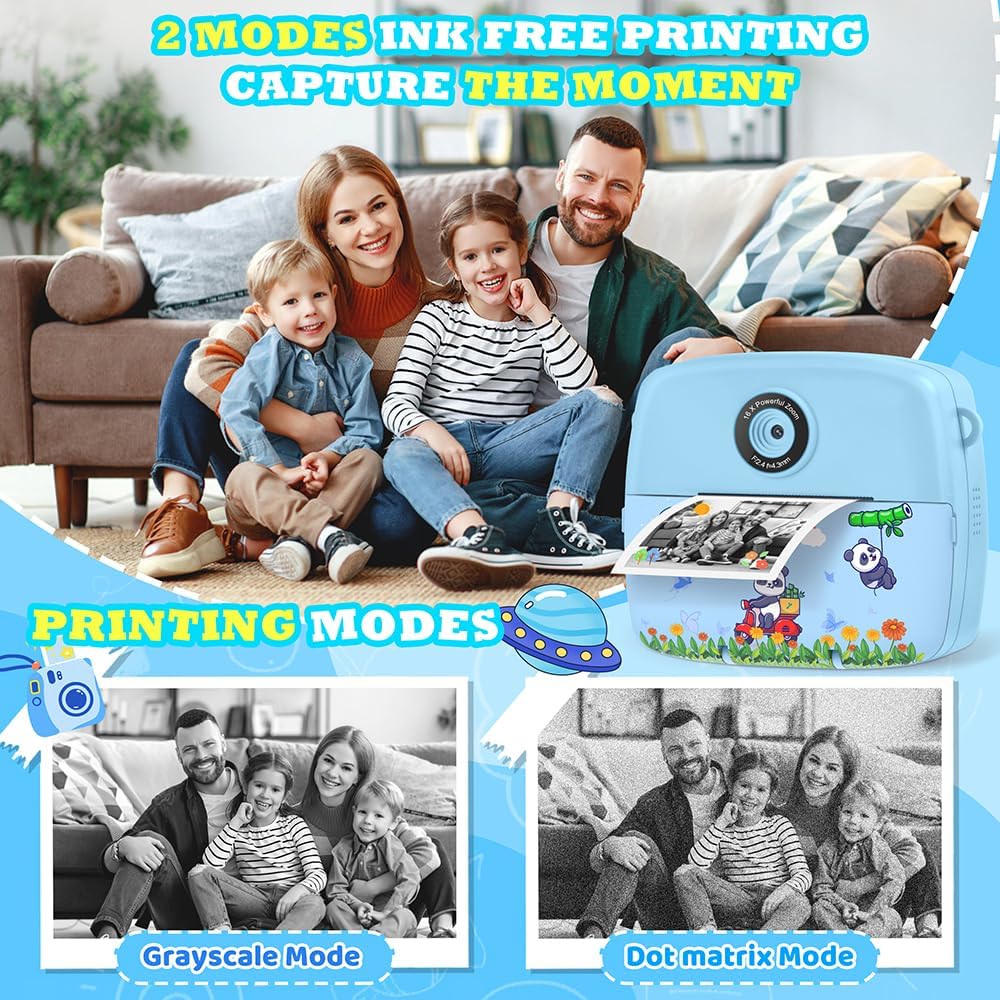
Figure 4: Ink-Free Printing Modes
3. רעקאָרדינג ווידיאס
- From the main menu, navigate to the video recording mode.
- Press the Shutter button to start recording. A red 'REC' indicator will appear on the screen.
- Press the Shutter button again to stop recording. Videos are saved in 1080P resolution to the memory card.

Figure 5: Video Recording and Special Features
4. ניצן פילטערס, ראמען און סטיקערס
The camera offers various creative options:
- פילטערס: Apply different color effects to your photos.
- ראַמען: Add decorative borders to your pictures (12 photo frames available).
- סטיקערז: Overlay fun graphics onto your images (6 stickers available).
- Mirror Effects: Experiment with 8 different mirror effects.
Access these options through the camera's menu while in photo mode. Use the navigation buttons to select and apply your desired effect before taking a picture.

Figure 6: Creative Photo Options
5. Time-Lapse Photography
Capture sequences of photos over time. Select the time-lapse mode from the menu and choose intervals of 2, 5, or 10 seconds between shots.
6. דיגיטאַל פארגרעסער
The camera features up to 16x digital zoom. Use the zoom buttons (usually up/down navigation) to adjust the magnification before taking a photo or recording a video.
7. Burst Shooting
For capturing fast-moving subjects, activate burst shooting mode. The camera can take up to 5 frames per second (FPS).
8. Games and MP3 Player
The camera includes 5 puzzle games for entertainment and an MP3 player function. Access these features through the main menu.

Figure 7: Learning and Entertainment Features
9. Coloring Printed Photos (Graffiti DIY)
Use the included coloring pens to add a personal touch to your black and white instant prints.

Figure 8: DIY Coloring Activity
וישאַלט
1. רייניקונג די קאַמעראַ
Wipe the camera body with a soft, dry cloth. Do not use liquid cleaners or solvents. For the lens, use a specialized lens cleaning cloth.
2. פארטרעטן דרוק פּאַפּיר
When the print quality degrades or no paper is dispensed, it's time to replace the paper roll. Refer to the "Loading Print Paper" section under Setup for detailed instructions.
3. באַטערי קער
To prolong battery life, avoid fully discharging the camera frequently. Charge the camera regularly, even if not in use for extended periods.
טראָובלעשאָאָטינג
| פּראָבלעם | מעגלעך סיבה | לייזונג |
|---|---|---|
| די קאַמעראַ צינדט זיך נישט אָן. | נידעריק באַטאַרייע. | Charge the camera using the USB-C cable. |
| קען נישט נעמען בילדער/ווידעאס. | זכּרון קאַרטל פול אָדער נישט ריכטיק אַרײַנגעשטעלט. | קאָנטראָלירט דעם אַרײַנשטעל פֿון זכּרון קאַרטל. אויסמעקן נישט-נייטיקע זאַכן. fileאדער פארטרעטן די קארטל. |
| פאָטאָס ווערן נישט געדרוקט. | No print paper or paper loaded incorrectly. | Ensure print paper is loaded correctly and there is enough paper. Refer to "Loading Print Paper". |
| דער עקראַן איז איינגעפֿרוירן אָדער רעאַגירט נישט. | ווייכווארג פראבלעם. | Hold the power button for 10 seconds to force a restart. If unresponsive, let the battery drain completely and then recharge. |
| Distorted audio from speaker. | Speaker malfunction. | This may indicate a hardware issue. Contact customer support if the problem persists. |
ספּעסאַפאַקיישאַנז
| שטריך | דעטאַל |
|---|---|
| מאָדעל נומער | C10 |
| דימענשאַנז | 11 X 5 X 9 סענטימעטער |
| וואָג | 200 ג |
| פאַרשטעלן גרייס | 2.4 אינטשעס לקד |
| ווידעא האַכלאָטע | 1080 פּ |
| פאָטאָ האַכלאָטע | 3 MP (Effective 12 MP) |
| פארגרעסער | 16x דיגיטאַל פארגרעסער |
| סטאָרידזש | 32GB Micro SD Card (included), expandable up to 32GB |
| באַטערי טיפּ | 1 ליטהיום פּאָלימער (אַרייַנגערעכנט) |
| טשאַרדזשינג צובינד | וסב-C |
| דרוק טעכנאָלאָגיע | Ink-free thermal printing |
| געשטיצט File פאָרמאַץ | JPEG (images), MP4 (videos) |
| קעסיידערדיק שאָאָטינג ספּיד | 5 FPS |
| עלטער רעקאָמענדאַציע | 3-12 יאר |
וואָראַנטי און שטיצן
For warranty information or technical support, please refer to the contact details provided with your purchase or visit the official CNAPXAIA webזייטל. האַלט דיין קויפן באַווייַז פֿאַר וואָראַנטי קליימז.