
Voktta A38IDCE0130-003
Voktta USB Rechargeable Soldering Iron Instruction Manual
Model: A38IDCE0130-003
1. זיכערקייַט אינפֿאָרמאַציע
Please read all safety instructions carefully before using the Voktta USB Rechargeable Soldering Iron. Failure to follow these instructions may result in electric shock, fire, or serious injury.
- הויך טעמפּעראַטורעס: The soldering iron tip reaches very high temperatures (up to 450°C / 842°F). Avoid direct contact with the tip to prevent burns.
- ווענטילאַטיאָן: Use the soldering iron in a well-ventilated area to avoid inhaling fumes produced during soldering.
- אויג שוץ: Always wear safety glasses to protect your eyes from solder splashes or fumes.
- האַלטן אַוועק פון קינדער: This product is not a toy. Keep it out of reach of children and unauthorized persons.
- Proper Stand Usage: Always place the hot soldering iron in its designated stand when not in use to prevent accidental contact or damage to surfaces.
- מאַכט אַוועק: Disconnect the power and allow the iron to cool completely before cleaning, storing, or changing tips.
- ברענעוודיק מאַטעריאַלס: האַלט ברענענדיקע מאַטעריאַלן אַוועק פון דער סאַדערינג געגנט.
- באַטערי זיכערקייַט: Do not expose the battery to extreme temperatures or disassemble it. Use only the provided charging cable.
2. פּראָדוקט איבערview
The Voktta USB Rechargeable Soldering Iron is a portable and versatile tool designed for various electronic repair and DIY projects. It features an adjustable temperature range, quick heating, and a built-in battery for cordless operation.
שליסל פֿעיִקייטן:
- אַדזשאַסטאַבאַל טעמפּעראַטור: Temperature range of 200-450°C (392-842°F), switchable between Celsius and Fahrenheit.
- גיך באַהיצונג: Heats up in approximately 10 seconds and reaches maximum temperature in about 30 seconds.
- LCD ווייַז: High-resolution screen displays current temperature status.
- קאָרדלעסס אָפּעראַציע: Built-in 800 mAh battery provides approximately 30 minutes of continuous use after a 1.5-hour charge via USB-C.
- ערגאָנאָמיק פּלאַן: Features a non-slip, heat-resistant handle for comfortable and safe use.
- קעראַמיש הייצונג קאָר: Ensures stable and efficient heating.
פּעקל אינהאַלט:
- USB Electric Soldering Iron x 1
- Soldering Tip x 3 (various types)
- Rosin x 1
- Soldering Iron Holder (with sponge) x 1
- וסב טיפּ-C טשאַרדזשינג קאַבלע X 1
- Soldering Wire x 1
- Toolbox x 1
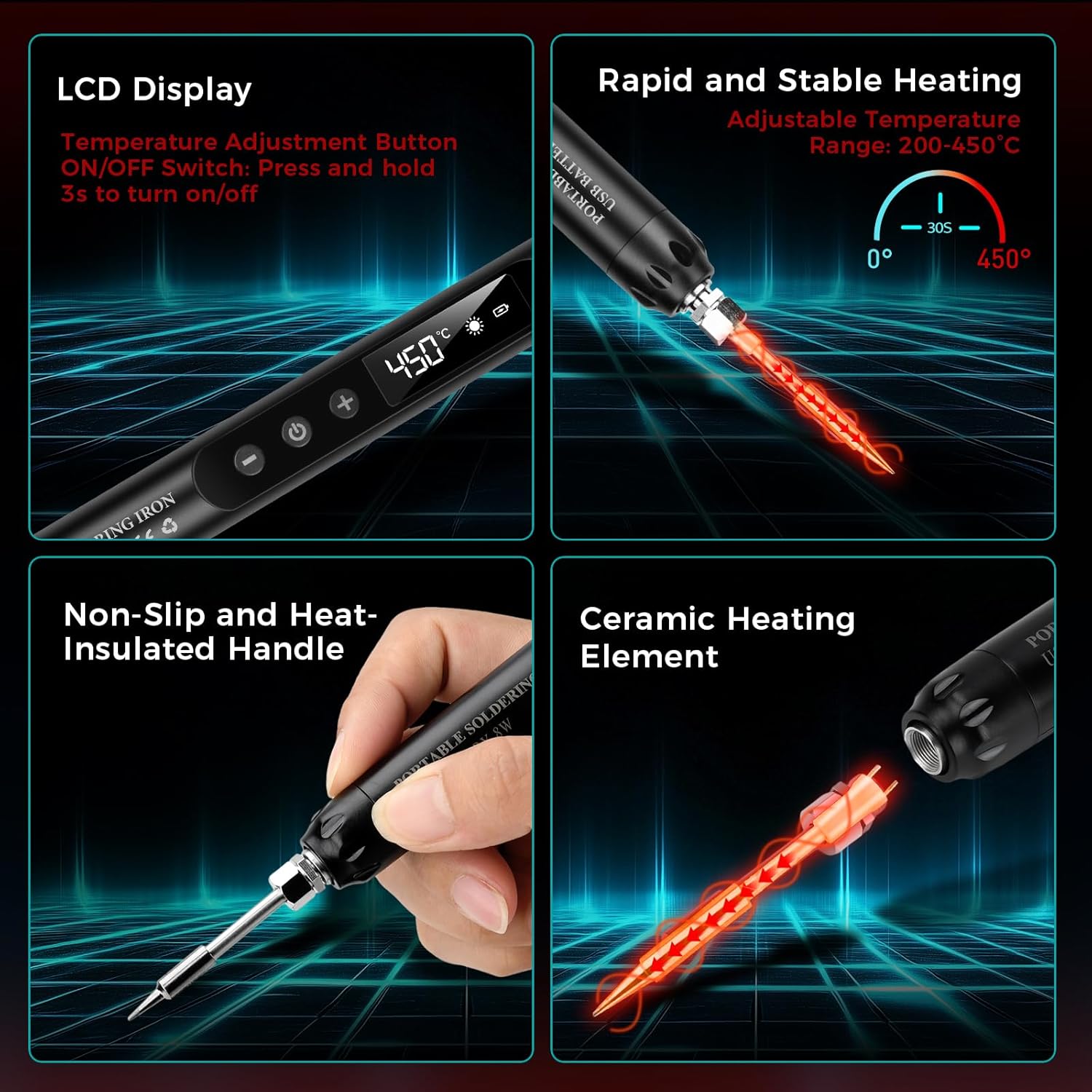
בילד: איבערview of the soldering iron's key features including the LCD display, rapid heating, non-slip handle, and ceramic heating element.

בילד: עקסamples of common applications for the soldering iron, such as repairing circuit boards, jewelry, and other small electronic components.
3. סעטאַפּ
3.1 ערשט טשאַרדזשינג
Before first use, fully charge the soldering iron. Connect the provided USB Type-C charging cable to the soldering iron's charging port and to a compatible USB power source (e.g., wall adapter, computer USB port, power bank).
- A רויט ליכט indicates that the device is charging.
- A גרין ליכט ינדיקייץ אַז די באַטאַרייע איז גאָר באפוילן.
- טשאַרדזשינג נעמט טיפּיש אַרום 1.5 שעה.

Image: The soldering iron connected to a USB power source, illustrating the charging indicator lights (red for charging, green for fully charged).
3.2 Attaching a Soldering Tip
Ensure the soldering iron is cool and powered off before changing tips. Carefully screw the desired soldering tip onto the heating element. Do not overtighten.
3.3 Preparing the Work Area
- Ensure your workspace is clean, well-lit, and well-ventilated.
- Place the soldering iron stand on a stable, heat-resistant surface.
- Moisten the sponge in the soldering iron holder with a small amount of water. This sponge is used for cleaning the tip.
- Have your solder wire, rosin, and components ready.
4. אַפּערייטינג ינסטרוקטיאָנס
4.1 פּאַוערינג אויף / אַוועק
To power on the soldering iron, press and hold the power button for approximately 3 seconds until the LCD screen illuminates. To power off, press and hold the power button again for 3 seconds.
4.2 אַדזשאַסטירן טעמפּעראַטור
Once powered on, use the '+' and '-' buttons to adjust the desired temperature. The temperature range is 200-450°C (392-842°F). The LCD screen will display the current temperature.

Image: The soldering iron's LCD screen displaying the temperature and controls for adjustment and unit conversion.
4.3 וועקסלען טעמפּעראַטור איינהייטן
The soldering iron supports both Celsius (°C) and Fahrenheit (°F). Refer to the product's specific instructions or button labels for switching between these units, typically by a short press of a dedicated button or a combination of temperature adjustment buttons.
4.4 לאָטערן פּראָצעס
פֿאָלגט די סטעפּס פֿאַר עפֿעקטיוו סאָלדערינג:
- Moisten the Sponge: Ensure the cleaning sponge is damp.
- מאַכט אויף: Turn on the soldering iron and set the desired temperature. Allow it to heat up.
- Apply Rosin Flux: If necessary, apply a small amount of rosin flux to the components or PCB pads to improve solder flow.
- הײצט דעם דזשוינט: Touch the hot soldering iron tip to both the component lead and the PCB pad simultaneously. Heat them for a few seconds.
- צולייגן סאָלדער: While heating, touch the solder wire to the heated joint (not directly to the iron tip). The solder should melt and flow smoothly around the joint.
- אַראָפּנעמען סאָלדער און אייַזן: Once enough solder has flowed, remove the solder wire first, then remove the soldering iron. Allow the joint to cool naturally without disturbance.
- ריין די שפּיץ: Wipe the hot soldering iron tip on the moist sponge to remove excess solder and oxidation.
- מאַכט אַוועק: When finished, turn off the soldering iron and place it securely in its stand to cool.

Image: A step-by-step visual guide demonstrating the proper soldering technique.
5. וישאַלט
5.1 רייניקן די לאָטירונג שפּיץ
Regular cleaning of the soldering tip is crucial for optimal performance and longevity. Wipe the hot tip on a moist sponge frequently during use to remove excess solder and oxidation. For stubborn residue, use a brass wire cleaner (not included) or specialized tip cleaner.
5.2 Replacing Soldering Tips
Ensure the iron is cool and unplugged. Unscrew the old tip and screw in a new one. Only use compatible replacement tips.
5.3 באַטעריע זאָרג און סטאָרידזש
- Avoid fully discharging the battery frequently. Recharge when the battery indicator is low.
- Store the soldering iron in a cool, dry place when not in use, preferably in its toolbox.
- If storing for extended periods, charge the battery to about 50% to prolong its lifespan.
6. טראָובלעשאָאָטינג
- אייַזן נישט וואַרעמען:
- Check if the iron is powered on (LCD screen should be lit).
- זיכער מאַכן אַז די באַטאַרייע איז אויפגעלאָדן. פֿאַרבינדט עס צו אַ מאַכט מקור און קאָנטראָלירט דעם טשאַרדזשינג אינדיקאַטאָר.
- Verify the soldering tip is securely attached.
- סאָלדער נישט צעשמעלצן אָדער שלעכטע דזשוינץ:
- פאַרגרעסערן די באַשטימט טעמפּעראַטור.
- Clean the soldering tip thoroughly; a dirty tip cannot transfer heat effectively.
- Ensure you are heating both the component lead and the pad, not just the solder.
- Use fresh solder wire.
- באַטאַרייע ניט טשאַרדזשינג:
- Check the USB Type-C cable for damage and ensure it's properly connected.
- פרובירט אן אנדערע USB שטראָם מקור אדער וואנט אדאפטער.
7. ספּעסאַפאַקיישאַנז
| מאָדעל נומער | A38IDCE0130-003 |
| מאַכט מקור | באַטאַרייע פּאַוערד |
| וואָסtage | 8 וואטס |
| אַדזשאַסטאַבאַל טעמפּעראַטור | 200-450°C (392-842°F) |
| באַטאַרייע קאַפּאַציטעט | 800 מאַה (געבויט-אין) |
| טשאַרדזשינג צייט | בעערעך. 1.5 שעה |
| אַפּערייטינג צייט | Approx. 30 minutes (continuous) |
| באַהיצונג צייט | 10 seconds to heat, 30 seconds to max temperature |
| שעפּן מאַטעריאַל | פּלאַסטיק, גומע |
| פּונקט וואָג | 210 גראַמז |
| פּעקל דימענשאַנז | 24 X 9.4 X 3.7 סענטימעטער |
8. וואָראַנטי און שטיצן
This Voktta product is covered by a standard manufacturer's warranty against defects in materials and workmanship. Please refer to your purchase documentation for specific warranty terms and duration.
פֿאַר טעכנישע שטיצע, וואָראַנטי קליימז, אָדער פאַרבייַט טיילן, ביטע קאָנטאַקט די הענדלער אָדער פאַבריקאַנט גלייך. האַלטן דיין קויפן באַווייַז פֿאַר וואָראַנטי וואַלידאַציע.
Ask a question about this manual
Ask about setup, troubleshooting, compatibility, parts, safety, or missing instructions. Manuals+ will review the question and use this page’s manual context to help answer it.