
1. הקדמה
Thank you for choosing the HAARAY Solar Security Light Model JY2423. This manual provides essential information for the safe and efficient installation, operation, and maintenance of your new solar-powered security light. Please read these instructions thoroughly before use and retain them for future reference.
2. זיכערקייַט אינפֿאָרמאַציע
- Ensure the solar panel is installed in a location that receives direct sunlight for at least 6-8 hours daily to maximize charging efficiency.
- Do not disassemble, modify, or attempt to repair the product yourself. Contact qualified personnel for service.
- Keep the product away from fire or high temperatures.
- Avoid direct eye exposure to the light source, as it is very bright.
- אַוועקוואַרפן באַטעריעס און עלעקטראָנישע קאָמפּאָנענטן לויט די לאָקאַלע רעגולאַציעס.
- This product is IP65 waterproof, suitable for outdoor use, but avoid submerging it in water.
3. פּעקל אינהאַלט
באַשטעטיקן אַז אַלע קאָמפּאָנענטן זענען פאַראַן איידער די אינסטאַלאַציע:
- Solar Security Light (with dual adjustable heads and motion sensor) x 1
- Solar Panel with 16.4ft Cable x 1
- Mounting Hardware (Wall Plugs x 8, Screws x 8, Wall Brackets x 2)
- ינסטרוקטיאָנס מאַנואַל x 1

Figure 3.1: Package Contents and Easy Installation Diagram
4. פּראָדוקט איבערview
4.1 שליסל פֿעיִקייטן
- זונ - פּאַוערד: Energy-efficient charging via a high-efficiency polycrystalline silicon solar panel.
- באַוועגונג סענסאָר: High-sensitivity motion detection with a 120° detection angle and up to 39 feet range.
- אַדזשאַסטאַבאַל צווייענדיקע קעפּ: Two rotatable light heads provide wide and customizable illumination coverage.
- סעפּאַראַבלע פּלאַן: LED panels and solar panel are separable with a 16.4ft cable for flexible installation indoors or outdoors.
- 3 לייטינג מאָדעס: Offers two motion-activated modes and one stay-on mode for varied lighting needs.
- אַדזשאַסטאַבאַל טיימער: Lighting duration can be set from 5 seconds to 1 minute.
- טאָג/נאַכט סענסאָר: Adjustable knob to select operation during night only or day and night.
- דוראַבאַל קאַנסטראַקשאַן: IP65 waterproof rating, frost-resistant, and heat-resistant ABS material for reliable performance in various weather conditions.
4.2 קאַמפּאָונאַנץ
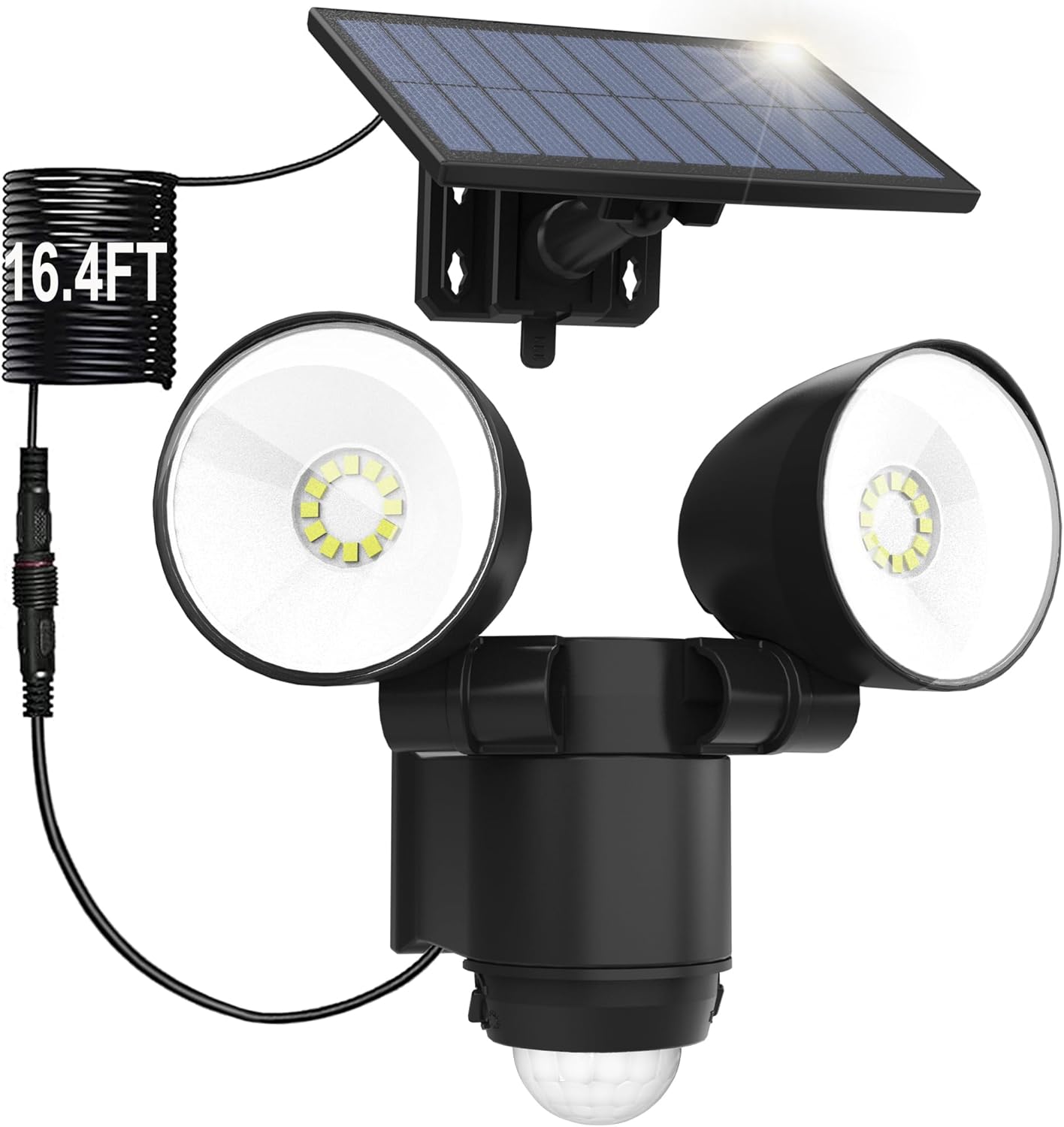
Figure 4.1: Main Product View - Solar Security Light and Solar Panel

Figure 4.2: High-Efficiency Heat Dissipation Design

Figure 4.3: Polycrystalline Silicon Solar Panel Technology
5. ינסטאַלירונג
The HAARAY Solar Security Light is designed for easy installation. Follow these steps:
- קלייַבן אַ אָרט: Select a mounting location for the solar panel that receives maximum direct sunlight throughout the day (6-8 hours recommended). The light unit can be installed separately, up to 16.4 feet away from the solar panel, thanks to the extended cable.
- בארג די זונ פּאַנעל: Use the provided wall brackets, screws, and wall plugs to securely mount the solar panel. Adjust its angle to face the sun directly.
- מאָנטירן די ליכט אַפּאַראַט: Attach the light unit to your desired location (wall, fence, etc.) using the remaining mounting hardware. Ensure the motion sensor is positioned to cover the desired detection area.
- פאַרבינדן די קאַבלע: Connect the 16.4ft cable from the solar panel to the light unit. Ensure the connection is secure.
- אַדזשאַסטירן ליכט קעפּ: Manually adjust the two light heads to direct illumination where needed. Each head can be rotated 90 degrees vertically and 180 degrees horizontally.

Figure 5.1: Separable Design for Flexible Installation

Figure 5.2: Adjustable Dual Heads and Motion Detection Area
6. אַפּערייטינג ינסטרוקטיאָנס
The light unit features a Day/Night knob and a Timer knob for customization.
6.1 Day/Night Knob Adjustment
This knob controls when the motion sensor activates the light:
- זון איקאָן: The sensor will activate the light during both day and night when movement is detected.
- Moon Icon: The sensor will activate the light only at dusk or night when movement is detected.

Figure 6.1: Day/Night Knob Settings
6.2 Timer Knob Adjustment
The Timer knob adjusts how long the light stays on after motion is detected. It can be set from 5 seconds to 60 seconds.
- Rotate towards '-' for shorter duration (minimum 5 seconds).
- Rotate towards '+' for longer duration (maximum 60 seconds).

Figure 6.2: Timer Knob Adjustment
6.3 לייטינג מאָדעס
The HAARAY Solar Security Light offers three distinct lighting modes:
- Mode 1 (Motion Activated - Bright): The light remains OFF until motion is detected. Upon detection, it illuminates at 100% brightness and turns OFF approximately 25 seconds after no further motion is detected.
- Mode 2 (Stay On All Night): The light remains at 30% brightness continuously throughout the night, regardless of motion detection.
- Mode 3 (Dim to Bright Motion Activated): The light stays on at 10% brightness. When motion is detected, it switches to 100% brightness and returns to 10% brightness approximately 25 seconds after no further motion is detected.

Figure 6.3: Mode 1 Operation

Figure 6.4: Mode 2 Operation

Figure 6.5: Mode 3 Operation
7. וישאַלט
- ריין די זונ פּאַנעל: ווישט רעגולער אויס די זונ - פּאַנעל מיט אַ ווייכן, דamp א שטאָף צו באַזייַטיקן שטויב, שמוץ, אדער דעבריס. א ריינע פּאַנעל גאַראַנטירט אָפּטימאַלע טשאַרדזשינג עפעקטיווקייט.
- דורכקוקן קאַנעקשאַנז: Periodically check the cable connection between the solar panel and the light unit to ensure it remains secure and free from damage.
- ויסמעקן אַבסטראַקשאַנז: Ensure no trees, buildings, or other objects obstruct direct sunlight from reaching the solar panel.
- באַטערי זאָרגן: The internal battery is designed for long-term use. If the light's performance significantly degrades over time, it may indicate the battery needs replacement by a qualified technician.

Figure 7.1: Weather Resistance of the Solar Security Light
8. טראָובלעשאָאָטינג
| פּראָבלעם | מעגלעך סיבה | לייזונג |
|---|---|---|
| די ליכט צינדט זיך נישט ביי נאַכט. |
|
|
| Light stays on continuously or flashes. |
|
|
| באַוועגונג סענסאָר ראַנגע איז שוואַך. |
|
|
9. ספּעסאַפאַקיישאַנז
| שטריך | דעטאַל |
|---|---|
| סאָרט | HAARAY |
| מאָדעל נומער | JY2423 |
| מאַטעריאַל | אַקרילאָניטרילע בוטאַדיענע סטירענע (אַבס) |
| ליכט קאָליר | ווייַס (7000K) |
| מאַכט מקור | זונ - פּאַוערד |
| באַוועגונג דעטעקשאַן ווינקל | 120° |
| באַוועגונג דעטעקשאַן ראַנגע | אַרויף צו 39 פֿיס |
| Cable Length (Solar Panel to Light) | 16.4 פֿיס |
| אַדזשאַסטאַבאַל לייטינג צייט | 5 סעקונדעס צו 60 סעקונדעס |
| וואַסער קעגנשטעל שאַץ | IP65 |
| באַטערי | 1 D battery (included) |
| פּראָדוקט דימענשאַנז | 5"ל x 6"ברייט x 7"ה (אומגעפער) |
| פּונקט וואָג | 16 אונסעס (1 פונט) |
10. וואָראַנטי און שטיצן
HAARAY products come with an extended warranty. For specific warranty details, please refer to the warranty card included in your package or contact HAARAY customer support.
If you encounter any issues or have questions regarding your HAARAY Solar Security Light, please contact our customer support team:
- אָנליין שטיצן: Visit the official HAARAY store on Amazon: HAARAY Amazon Store
- E- בריוו שטיצן: Refer to your product packaging or warranty card for direct email contact information.
Please have your model number (JY2423) and purchase date ready when contacting support.