
הקדמה
Thank you for choosing the iKF T1 Max Wireless Bluetooth Over Ear Headphones. These headphones are designed to provide a premium audio experience with features like Active Noise Cancellation, HiFi sound, and extended battery life. This manual will guide you through the setup, operation, and maintenance of your new headphones to ensure optimal performance and enjoyment.
בילד: פראָנט view of the iKF T1 Max Wireless Bluetooth Over Ear Headphones.
וואָס איז אין די קעסטל
ביטע טשעקט די אינהאַלט פון די פּאַקעט צו זיכער מאַכן אַז אַלע זאכן זענען דאָרט:
- iKF T1 Max Wireless Bluetooth Over Ear Headphones
- באַניצער מאַנואַל
- טשאַרדזשינג קאַבלע
- Audio Cable (3.5mm AUX)

Image: The iKF T1 Max headphones and included accessories.
פּראָדוקט פֿעיִקייטן
Premium HiFi Sound with 40mm Drivers
The iKF T1 Max headphones feature 40mm HiFi speakers, engineered to deliver deep bass, rich mids, and crisp highs. This ensures a studio-quality audio performance for music, movies, and podcasts.

Image: Illustration of the 40mm dynamic driver for HiFi sound.
שפּיל צייט אַרויף צו 100 שעה
Enjoy extended listening sessions with a long-lasting battery. The headphones offer up to 100 hours of wireless playtime with Active Noise Cancellation (ANC) off, and 75 hours with ANC on. This makes them suitable for long commutes, travel, or remote work without frequent recharging.

Image: Battery life details for iKF T1 Max headphones.
Active Noise Cancelling with Adjustable Levels
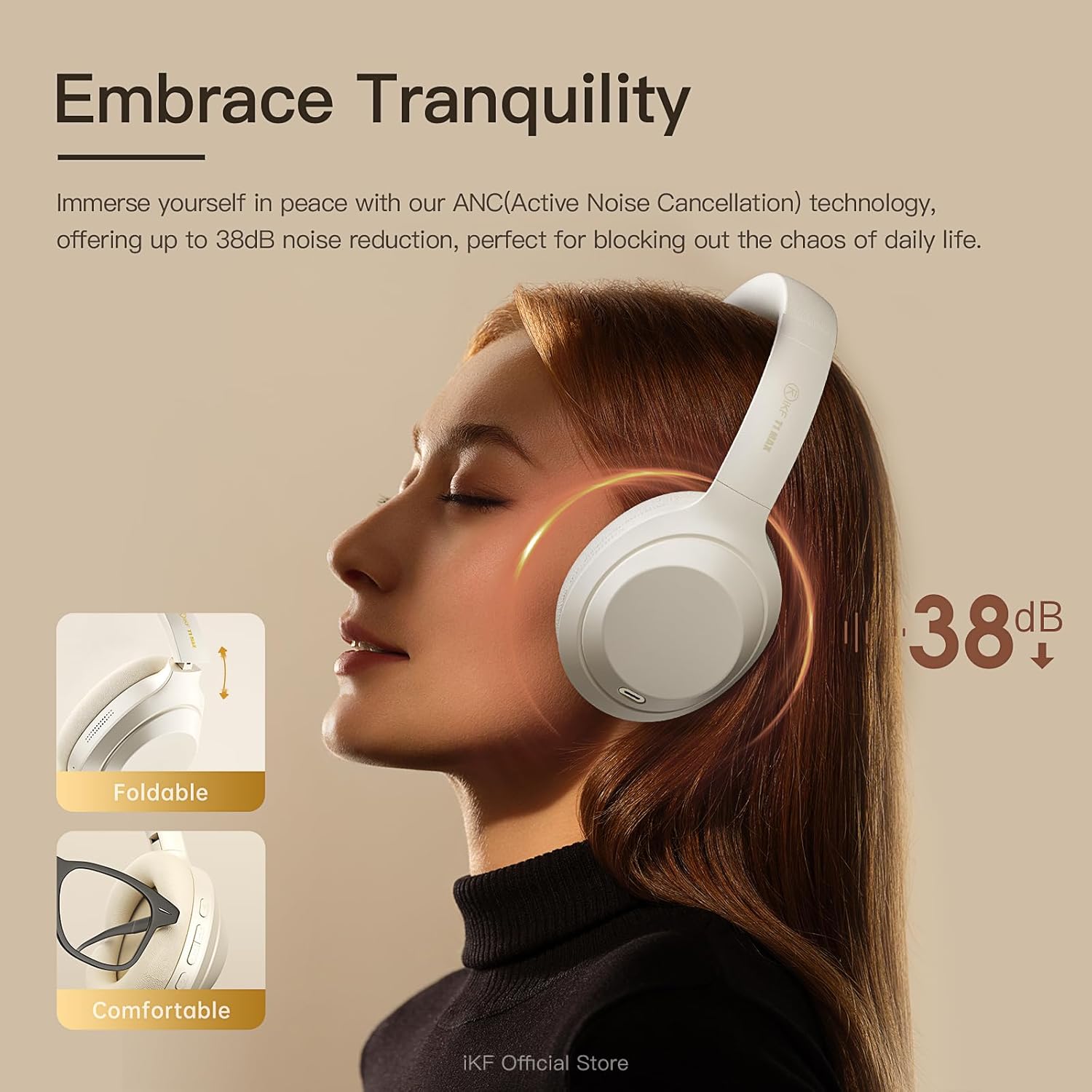
Immerse yourself in your audio with advanced Active Noise Cancellation (ANC) technology, providing up to 38dB noise reduction. Customize ANC levels through the iKF app to effectively block out distractions in various environments such as flights, offices, or public spaces.

Image: Active Noise Cancellation feature of the iKF T1 Max headphones.
Dual Device Bluetooth Connection
Connect your headphones to two Bluetooth devices simultaneously. This allows for seamless switching between your phone and laptop for calls, meetings, or music without the need to disconnect and reconnect. This feature is ideal for multitasking professionals.

Image: Dual device connection capability of the headphones.
Wireless and Wired Modes
The iKF T1 Max offers both wireless Bluetooth 5.4 connectivity and a wired mode via the included 3.5mm AUX audio cable. This ensures continuous listening even if the battery runs low, providing flexibility for various usage scenarios.

Image: Wireless and wired connection options.
Customization via iKF App
Connect to the iKF-APP to personalize your listening experience. Adjust ANC levels, create custom sound profiles, and fine-tune settings to match your unique preferences and lifestyle.

Image: iKF App interface for personalized settings.
סעטאַפּ
1. טשאַרדזשינג די כעדפאָונז
Before first use, fully charge your iKF T1 Max headphones. Connect the provided charging cable to the USB-C port on the headphones and to a USB power source (e.g., computer, wall adapter). The charging time is approximately 2 hours for a full charge.

Image: Charging port location on the headphones.
2. פּאָווערינג אויף / אויסגעלאשן
- צו מאַכט אויף: דריק און האלט דעם פּאַוער קנעפּל פֿאַר אַרום 3 סעקונדעס ביז די אינדיקאַטאָר ליכט צינדט זיך אָן.
- צו מאַכט אַוועק: דריק און האלט דעם פּאַוער קנעפּל פֿאַר אַרום 5 סעקונדעס ביז די אינדיקאַטאָר ליכט גייט אויס.
3. בלועטאָאָטה פּערינג
- מאַכן זיכער אַז די כעדפאָונז זענען פּאַוערד אַוועק.
- Press and hold the Power button for about 5-7 seconds until the indicator light flashes blue and red, indicating pairing mode.
- אויף אייער דעווייס (סמאַרטפאָן, לאַפּטאָפּ, אאז"וו), אַקטיווירט בלועטוט און זוכט פֿאַר פֿאַראַן דעווייסעס.
- Select "iKF T1 Max" from the list of found devices.
- אַמאָל פארבונדן, וועט די אינדיקאַטאָר ליכט ווערן שטענדיק בלוי אָדער בלינקען בלוי לאַנגזאַם.
4. ווייערד קאַנעקשאַן (AUX מאָדע)
To use the headphones in wired mode, connect one end of the 3.5mm audio cable to the AUX port on the headphones and the other end to your audio source. The headphones will automatically switch to wired mode, and Bluetooth will be disabled.
אַפּערייטינג ינסטראַקשאַנז

בילד: איבערview of headphone control buttons.
מוזיק פּלייַבאַקק
- שפּיל / פּויזע: Press the Multi-function button (usually the power button or a dedicated play/pause button) once.
- ווייַטער שפּור: Press and hold the Volume Up button or a dedicated "Next" button. (Refer to specific button layout in the included manual for exact controls).
- פֿריִערדיקע שפּור: Press and hold the Volume Down button or a dedicated "Previous" button. (Refer to specific button layout in the included manual for exact controls).
- באַנד אַרויף: דריק קורץ דעם "Volume Up" קנעפל.
- באַנד אַראָפּ: דריק קורץ דעם באַנד אַראָפּ קנעפּל.
רופן פאַרוואַלטונג
- ענטפֿערן / סוף רופן: דרוק אַ מאָל אויף די מולטי-פונקציאָנירן.
- אָפּוואַרפן רופן: דריקן און האַלטן די מולטי-פונקציע קנעפּל פֿאַר 2 סעקונדעס.
- שטימע אַססיסטאַנט: Double-press the Multi-function button to activate your device's voice assistant (Siri, Google Assistant).
אַקטיוו ראַש קאַנסאַליישאַן (ANC) קאָנטראָל
- Toggle ANC Modes: Press the ANC button once to cycle through ANC On, Ambient Sound Mode, and ANC Off.
- Customize ANC: Use the iKF app to fine-tune ANC levels and ambient sound settings.
צווייענדיק מיטל קאַנעקשאַן
When connected to two devices, the headphones will intelligently switch audio sources. For example, if you are listening to music on your laptop and receive a call on your phone, the headphones will automatically switch to the phone call. After the call, they will return to the laptop audio.
וישאַלט
- רייניקונג: ניצט אַ ווייכע, טרוקענע שטאָף צו רייניקן די כעדפאָונז. ניצט נישט קיין שרײַבנדיקע רייניגערס אדער סאָלווענטן.
- סטאָרידזש: Store the headphones in a cool, dry place, away from direct sunlight and extreme temperatures. When not in use for extended periods, ensure they are fully charged.
- וואַסער ויסשטעלן: די קאָפּהערער זענען נישט וואַסערפּרוף. פֿאַרמייַדן אויסשטעלונג צו וואַסער אָדער איבעריקע פֿײַכטקייט.
- באַטערי זאָרגן: כדי צו פארלענגערן די לעבן פון די באַטעריע, זאָלט איר נישט אָפט אויסלאָדן די קאָפּהערער. לאָדט זיי אָפט אויף, אפילו אויב זיי ווערן נישט קעסיידער גענוצט.
טראָובלעשאָאָטינג
| פּראָבלעם | מעגלעך לייזונג |
|---|---|
| די קאָפּהערער ווערן נישט אנגעצינדן. | Ensure the headphones are charged. Connect them to a power source using the charging cable. |
| קען נישט פארבינדן דורך בלוטוט. |
|
| קיין קלאַנג אָדער נידעריקע וואָלומען. |
|
| ANC איז נישט עפעקטיוו. |
|
| געזונט קוואַליטעט איז נעבעך. |
|
ספּעסאַפאַקיישאַנז
| שטריך | דעטאַל |
|---|---|
| מאָדעל נאָמען | iKF T1 Max |
| קאַנעקטיוויטי טעכנאָלאָגיע | בלועטוט, ווייערד (3.5 מ״מ דזשעק) |
| ווירעלעסס קאָמוניקאַציע | בלועטאָאָטה 5.4 |
| אויער פּלייסמאַנט | איבער אויער |
| ראַש קאָנטראָל | Active Noise Cancellation, Environmental Noise Cancellation |
| דרייווער גרייס | 40 מם |
| באַטעריע לעבן (ANC אויסגעלאָשן) | אַרויף צו 100 שעה |
| באַטעריע לעבן (ANC אן) | אַרויף צו 75 שעה |
| טשאַרדזשינג צייט | בעערעך 2 שעה |
| מאַטעריאַל | פּלאַסטיק, פּאָליורעטאַן (PU) |
| אַרייַנגערעכנט קאַמפּאָונאַנץ | Headphones, Charging Cable, Audio Cable, User Manual |
| קאַמפּאַטאַבאַל דעוויסעס | Android Phone, Laptops, Smart Watch, Tablets, iPhone/iPad/Macbook |
וואָראַנטי אינפֿאָרמאַציע
The iKF T1 Max headphones come with a standard manufacturer's warranty. Please refer to the warranty card included in your product packaging or visit the official iKF webזייטל פֿאַר דעטאַלירטע וואָראַנטי טערמינען און באַדינגונגען. האַלט דיין באַווייַז פון קויפן פֿאַר וואָראַנטי קליימז.
שטיצן
For further assistance, technical support, or customer service inquiries, please visit the official iKF store or contact their customer support team:
- iKF Official Store: Visit iKF Store on Amazon
- אָנליין שטיצן: Refer to the official iKF webוועבזייטל פֿאַר אָפֿט געשטעלטע פֿראַגעס און קאָנטאַקט אינפֿאָרמאַציע.