
ALLPOWERS S300LUS Portable Power Station User Manual
מאָדעל: AP-SS-005
Thank you for choosing ALLPOWERS. Please read this manual carefully before use and retain it for future reference.
1. זיכערקייַט אינסטרוקציעס
To ensure safe operation and prolong the lifespan of your ALLPOWERS S300LUS Portable Power Station, please observe the following safety guidelines:
- Do not disassemble, repair, or modify the unit. Incorrect reassembly may cause fire or injury.
- Do not expose the unit to fire or extreme temperatures (above 60°C / 140°F).
- Do not use or store the unit in a bathroom or in areas exposed to water or high humidity.
- Do not use or store the unit near heat sources such as stoves or heaters.
- Avoid dropping, heavy impacts, or strong vibrations.
- האַלטן אויס פון דערגרייכן פון קינדער און פּעץ.
- ניצט נאָר אָריגינעלע אָדער סערטיפֿיצירטע אַקסעסאָריעס.
- If the unit emits unusual odors, generates heat, or shows any other abnormality, discontinue use immediately and contact customer support.
- אַוועקוואַרפן דעם פּראָדוקט לויט די לאָקאַלע רעגולאַציעס. נישט אַוועקוואַרפן מיטן הויזגעזינדלעכן מיסט.
2. פּראָדוקט איבערview
The ALLPOWERS S300LUS is a compact and portable power station designed to provide reliable power for various devices. It features multiple output ports, wireless charging, and several recharging options.
פּעקל אינהאַלט:
- 1 x ALLPOWERS Portable Power Station (S300LUS)
- 1 x AC Adapter and Charging Cable
- 1 x באַניצער מאַנואַל
שליסל פֿעיִקייטן:
- קאַפּאַציטעט: 288 ווה / 78000 מאַה
- אַק רעזולטאַט: 300W (Pure Sine Wave, Peak 600W)
- קייפל אַוטפּוץ: AC, USB-A, USB-C, 12V Car Charger, Wireless Charging
- טשאַרדזשינג אָפּציעס: AC, Solar, Car Charger, AC + Solar, AC + Car Charger
- סאָליד פּלאַן: 8.1 x 6.5 x 4.3 inches, 8.8 pounds with built-in handle
- Emergency Light: ינטעגראַטעד געפירט ליכט
- סמאַרט קאָנטראָל: Bluetooth app compatibility (iOS 9.0+, Android 4.3+)
- זיכערקייַט: Built-in Battery Management System (BMS) for protection against overcurrent, overload, overheating, and short circuits.
קאָמפּאָנענט אידענטיטעט:

בילד: פראָנט view of the ALLPOWERS S300LUS Portable Power Station, showing the display, AC outlet, USB ports, DC input, and handle.
- AC Output Port (US Standard)
- ווירעלעסס טשאַרדזשינג פּאַד
- לקד ווייַז סקרין
- אַק מאַכט קנעפּל
- DC/USB מאַכט קנעפּל
- USB-A רעזולטאַט פּאָרץ (2x)
- USB-C רעזולטאַט פּאָרט (PD 100W)
- 12V Car Charger Output
- עמערגענסי געפירט ליכט
- שעפּן
3. אויפשטעלן און ערשטע באנוץ
אויספּאַקן:
Carefully remove the power station and all accessories from the packaging. Inspect for any damage. If any components are missing or damaged, contact customer support immediately.
ערשט טשאַרדזשינג:
Before first use, it is recommended to fully charge the ALLPOWERS S300LUS. This ensures optimal battery performance and calibration.
- Connect the provided AC adapter to the DC Input Port (9) on the power station.
- צאַפּן די AC אַדאַפּטער אין אַ נאָרמאַל וואַנט ווענטיל.
- The LCD display (3) will show the charging status. The battery icon will animate, and the percentagE וועט פאַרגרעסערן.
- Charging is complete when the battery icon is full and the display shows 100%.
Initial AC charging typically takes approximately 1.5 hours (Max. 200W).
4. אַפּערייטינג ינסטרוקטיאָנס
מאַכט אויף / אַוועק:
- To turn on the unit, press and hold the AC Power Button (4) or DC/USB Power Button (5) for 3 seconds. The LCD display will illuminate.
- To turn off the unit, press and hold the respective power button (AC or DC/USB) for 3 seconds.
- If no output is detected, the unit will automatically shut down after a period of inactivity to conserve power.
ניצן AC Output:
- Press the AC Power Button (4) to activate the AC output. The AC icon will appear on the LCD display.
- Plug your AC device into the AC Output Port (1).
- Ensure your device's power consumption does not exceed 300W (or 600W peak). Overloading will trigger protection and shut down the AC output.
- When finished, press the AC Power Button (4) again to turn off the AC output.
Using DC/USB Outputs:
- Press the DC/USB Power Button (5) to activate the DC and USB outputs. The DC and USB icons will appear on the LCD display.
- Connect your devices to the USB-A Ports (6), USB-C Port (7), or 12V Car Charger Output (8).
- The USB-C port supports Power Delivery (PD) up to 100W.
- When finished, press the DC/USB Power Button (5) again to turn off these outputs.
ווירעלעסס טשאַרדזשינג:
- Press the DC/USB Power Button (5) to activate the wireless charging function.
- Place your Qi-compatible device on the Wireless Charging Pad (2).
- זיכער מאַכן אַז די דעוויס איז צענטרירט אויף די פּאַד פֿאַר אָפּטימאַל טשאַרדזשינג.
- When finished, press the DC/USB Power Button (5) again to turn off wireless charging.

Image: Visual representation of the six output options available on the power station, including AC, USB-C, USB-A, wireless charging, and car charger, with examples of devices being powered.
נויטפאַל LED ליכט:
- To turn on the LED light, short press the LED Light button (usually integrated with the DC/USB button or a separate button, refer to unit for exact location).
- Press again to cycle through brightness levels or SOS mode (if available).
- Press and hold to turn off the LED light.
אויפלאָדן די מאַכט סטאַנציע:
The S300LUS offers multiple ways to recharge:

Image: Infographic detailing the five different ways to recharge the power station: AC, Solar, Car Charger, AC+Solar, and AC+Car Charger, along with estimated charging times.
- AC Wall Outlet (Max. 200W): Connect the provided AC adapter to the DC Input Port (9) and a wall outlet. Approximately 1.5 hours.
- Solar Panel (Max. 100W MPPT): Connect a compatible solar panel (sold separately) to the DC Input Port (9). Ensure the solar panel is placed in direct sunlight. Approximately 3-4 hours (depending on sunlight intensity).
- Car Charger (Max. 100W): Connect a car charger adapter (not included, typically) to the DC Input Port (9) and your vehicle's 12V cigarette lighter socket. Approximately 3-4 hours.
- AC + Solar (Max. 300W): Combine AC wall charging and solar panel charging for faster recharge. Approximately 1 hour.
- AC + Car Charger (Max. 300W): Combine AC wall charging and car charger for faster recharge. Approximately 1 hour.
Note: Charging times are estimates and may vary based on environmental conditions and power source.
בלועטאָאָטה אַפּ קאָנטראָל:
The ALLPOWERS S300LUS can be controlled remotely via the ALLPOWERS app.
- Download the "ALLPOWERS" app from the App Store (iOS 9.0+) or Google Play Store (Android 4.3+).
- מאַכן זיכער אַז בלועטאָאָטה איז ענייבאַלד אויף דיין סמאַרטפאָנע.
- Open the app and follow the on-screen instructions to pair with your S300LUS power station.
- Once connected, you can monitor battery status, control outputs, and adjust settings within a 10-meter range.
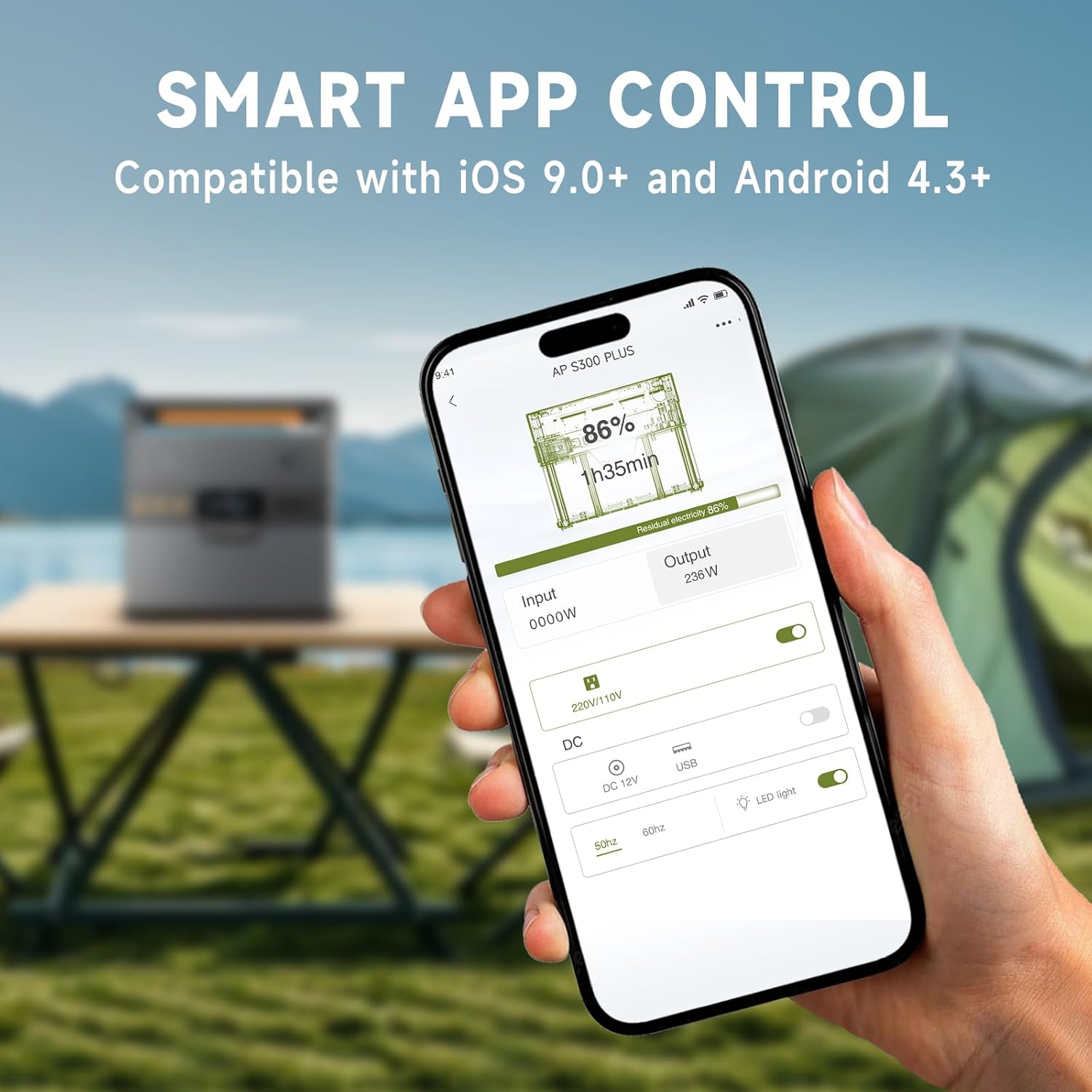
Image: A hand holding a smartphone showing the ALLPOWERS app interface, demonstrating remote control capabilities for the power station.
5. וישאַלט
סטאָרידזש:
- Store the power station in a cool, dry place, away from direct sunlight and corrosive materials.
- פֿאַר לאַנג-טערמין סטאָרידזש, לאָדט די אַפּאַראַט צו 50-80% יעדע 3-6 חדשים צו האַלטן די באַטאַרייע געזונט.
- Avoid storing in extreme temperatures (below -10°C / 14°F or above 45°C / 113°F).
רייניקונג:
- ווישן די יקסטיריער מיט אַ ווייך, טרוקן שטאָף.
- דו זאלסט נישט נוצן אַברייסיוו קלינערז אָדער סאָלוואַנץ.
- זיכער מאַכן אַז אַלע פּאָרטן זענען פריי פון שטויב און דעבריס.
6. טראָובלעשאָאָטינג
| פּראָבלעם | מעגלעך סיבה | לייזונג |
|---|---|---|
| אַפּאַראַט טוט נישט קער אויף. | באַטערי איז דיפּליטיד. | Charge the power station using the AC adapter. |
| AC אויסגאַנג אַרבעט נישט. | AC output not activated; device exceeds 300W. | Press the AC Power Button. Reduce load or use a lower-power device. |
| USB/DC אויסגאנג ארבעט נישט. | DC/USB output not activated. | Press the DC/USB Power Button. |
| וויירלעס טשאַרדזשינג אַרבעט נישט. | Device not Qi-compatible; device not centered; DC/USB output not activated. | Ensure device is Qi-compatible and correctly placed. Activate DC/USB output. |
| Slow charging via solar. | Insufficient sunlight; panel not correctly angled; panel not compatible. | Adjust panel angle for direct sunlight. Ensure panel is compatible and clean. |
| בלועטאָאָטה קשר ישוז. | Bluetooth off on phone; app not updated; unit too far. | Ensure phone Bluetooth is on. Update app. Move phone closer to unit (within 10m). |
If the problem persists, please contact ALLPOWERS customer support.
7. ספּעסאַפאַקיישאַנז
| שטריך | דעטאַל |
|---|---|
| מאָדעל נאָמען | אַפּ-סס -005 |
| באַטאַרייע קאַפּאַציטעט | 288 ווה / 78000 מאַה |
| אַק רעזולטאַט | 300W (Pure Sine Wave, Peak 600W) |
| וסב-א רעזולטאַט | קסנומקס רענטגענ קסנומקסוו |
| וסב-C רעזולטאַט | 1 x 100W (QC3.0) |
| 12V Car Charger Output | 1 רענטגענ 12 וו / 10 אַ |
| ווירעלעסס טשאַרדזשינג | 1 רענטגענ 5 וו / 1 אַ |
| אַק טשאַרדזשינג אַרייַנשרייַב | Max. 200W |
| זונ טשאַרדזשינג אַרייַנשרייַב | Max. 100W (MPPT) |
| פּראָדוקט דימענשאַנז | 8.1"ל x 6.5"ברייט x 4.3"ה (20.5 ס״מ x 16.5 ס״מ x 10.9 ס״מ) |
| פּונקט וואָג | 8.8 לבס (4 קג) |
| באַטערי טיפּ | ליטהיום פּאָלימער |
8. וואָראַנטי און שטיצן
וואָראַנטי אינפֿאָרמאַציע:
The ALLPOWERS S300LUS Portable Power Station comes with a 10-year ALLPOWERS warranty. This warranty covers manufacturing defects and workmanship under normal use. Please retain your proof of purchase for warranty claims.
The warranty does not cover damage caused by misuse, accidents, unauthorized modifications, or natural disasters.
קונה שטיצן:
For technical assistance, warranty claims, or any questions regarding your ALLPOWERS S300LUS, please contact ALLPOWERS customer support through their official webפּלאַץ אָדער די קאָנטאַקט אינפֿאָרמאַציע צוגעשטעלט מיט דיין קויפן.
איר קענט אויך באַזוכן די יו ALLPOWERS Store on Amazon פֿאַר מער פּראָדוקט אינפֿאָרמאַציע און שטיצע רעסורסן.