
1. הקדמה
This manual provides detailed instructions for the installation, operation, and maintenance of your KiriNavi 15.6 Inch Car Radio. This advanced head unit is designed to enhance your driving experience with its 2K IPS touch screen, Android 13 operating system, and integrated features like Apple CarPlay, Android Auto, and GPS navigation. Please read this manual thoroughly before installation and use to ensure proper function and safety.
2. קאַמפּאַטאַבילאַטי
This car radio is specifically designed for:
- Chevrolet Silverado (2014-2019)
- GMC Sierra (2014-2019)
וויכטיק באַמערקונג:
- Only compatible with vehicles equipped with the OEM 8-inch screen version.
- Not compatible with OEM 4.2-inch or 7-inch screen versions.
- Supports original car BOSE and B&O sound systems.
- Retains original car system functions and original car camera usage.
3. אַרייַנגערעכנט קאַמפּאָונאַנץ
Verify that all the following components are present in the package:
- 1x KiriNavi Android Head Unit (15.6 Inch)
- 1x גפּס אַנטענע
- 1x מאַכט קאַבלע
- 1x עקסטערנער מיקראָפאָן
- 1x Backup Camera
- 1x Car Dash Cam
- ינסטאַלירונג אינסטרוקציעס
4. סעטאַפּ און ייַנמאָנטירונג
Installation of this head unit requires technical knowledge and experience with car electronics. Professional installation is highly recommended to ensure correct wiring and functionality, and to prevent damage to your vehicle or the unit.
4.1 פאַר-ינסטאַלירונג טשעק
- Ensure your vehicle's original AUX channel is functioning correctly. If it is not, the head unit will not produce sound. Repair the original AUX channel if necessary.
- Confirm your vehicle's central control matches the compatible OEM 8-inch screen version.
4.2 ינסטאַללאַטיאָן איבערview
The KiriNavi head unit is designed for a standard size fit, eliminating the need for additional accessories. Follow the provided installation instructions carefully. The process generally involves:
- Disconnecting the vehicle's battery.
- Removing the original head unit and trim.
- Connecting the new head unit's wiring harness to the vehicle's existing connectors.
- Installing the GPS antenna, external microphone, backup camera, and dash cam.
- Mounting the new 15.6-inch head unit into the dashboard.
- Reconnecting the battery and testing all functions.

בילד 4.1: Visual comparison of the vehicle's dashboard before and after the KiriNavi 15.6 inch car radio installation. The top image shows the new unit installed, while the bottom images show the original 8-inch screen setup.
5. אַפּערייטינג ינסטרוקטיאָנס
5.1 יקערדיק אָפּעראַציע
The KiriNavi head unit features a 15.6-inch 2K IPS touchscreen. Navigate the Android 13 operating system by tapping, swiping, and pinching gestures similar to a tablet or smartphone. The interface provides access to various applications and settings.
5.2 אַודיאָ פֿעיִקייטן
The unit supports FM/AM radio with RDS (Radio Data System). You can save your favorite stations for quick access. The integrated 16-band Equalizer (EQ) and Digital Sound Processor (DSP) allow for precise audio customization, including subwoofer control, to optimize sound quality within your vehicle.

בילד 5.1: Display of the audio settings interface, highlighting FM/AM/RDS radio functions, 16-band equalizer, subwoofer controls, and DSP for enhanced sound customization.
5.3 Connectivity (Bluetooth, Wi-Fi, 4G)
- בלועטאָאָטה 5.0: Connect your smartphone for hands-free calling and audio streaming.
- ווי-פי: Connect to a Wi-Fi hotspot to access online services, download apps, and stream content.
- 4G נעץ: Insert a 4G SIM card (not included) to enable direct internet access for online navigation, video streaming, and app downloads without relying on a Wi-Fi hotspot.

בילד 5.2: Illustration of 4G and Wi-Fi connectivity features, alongside various GPS navigation application icons.
5.4 נאַוויגאַציע
The unit features a built-in GPS + GLONASS module for high-precision navigation. It supports both online and offline maps, including popular applications like Apple Maps, Google Maps, and Waze. Download offline maps for navigation without an internet connection.
5.5 סמאַרטפאָון אינטעגראַציע (עפּל קאַרפּליי און אַנדרויד אויטאָ)
Connect your smartphone to access Apple CarPlay or Android Auto. This allows you to use your phone's navigation, music, messages, and other compatible apps directly on the car radio's screen. Voice control (Siri/Google Assistant) is supported for hands-free operation.

בילד 5.3: Screenshots demonstrating the Wireless & Wired Apple CarPlay and Android Auto interfaces, showing integration with smartphone applications.
5.6 סטירינג ראָד קאָנטראָל
The unit supports learning and utilizing your vehicle's original steering wheel buttons. This allows you to control various functions of the head unit, such as volume, track changes, and call management, without taking your hands off the steering wheel.
5.7 קאַמעראַ סופּפּאָרט
The system supports your original car camera, providing clear night vision and wide-angle views for safer reversing. An AHD backup camera and a car dash cam are included for enhanced safety and recording capabilities.

בילד 5.4: Display illustrating the integration of the original car camera with features like AHD and night vision, alongside the interface for programming steering wheel controls.
5.8 Dual System Switch
The KiriNavi car radio is designed to retain your original car system. This means all original car functions remain accessible and operational, allowing you to switch between the Android system and your vehicle's native system as needed.
6. ספּעסאַפאַקיישאַנז
Detailed technical specifications of the KiriNavi 15.6 Inch Car Radio:
| סאָרט | KiriNavi |
| מאָדעל נאָמען | KiriNavi 15.6 Touch GPS |
| פאָרמיטל סערוויס טיפּ | Truck (Chevrolet Silverado, GMC Sierra) |
| אָפּערייטינג סיסטעם | אַנדרויד 13 |
| קפּו | 8 Core Qualcomm Processor |
| באַראַן | 8 גיגאבייט |
| ראַם | 128 גיגאבייט |
| פאַרשטעלן גרייס | 15.6 אינטשעס |
| פאַרשטעלן האַכלאָטע | 1920x1440P IPS Touchscreen |
| ספּעציעלע פֿעיִקייטן | Bluetooth 5.0, Touchscreen, GPS Navigation, Apple CarPlay, Android Auto, Steering Wheel Control, Dual System Switch |
| קאַנעקטיוויטי טעכנאָלאָגיע | Bluetooth, Ethernet, USB, Wi-Fi, 4G |
| מאַפּע טיפּ | Worldwide (Online & Offline) |
| אַודיאָ רעזולטאַט מאָדע | Stereo with 16-band EQ and DSP |
| מאַונטינג טיפּ | דאַשבאָרד בארג |

בילד 6.1: Diagram illustrating the internal hardware, including the Qualcomm 8-core processor, 8GB RAM, and 128GB ROM, highlighting performance capabilities.
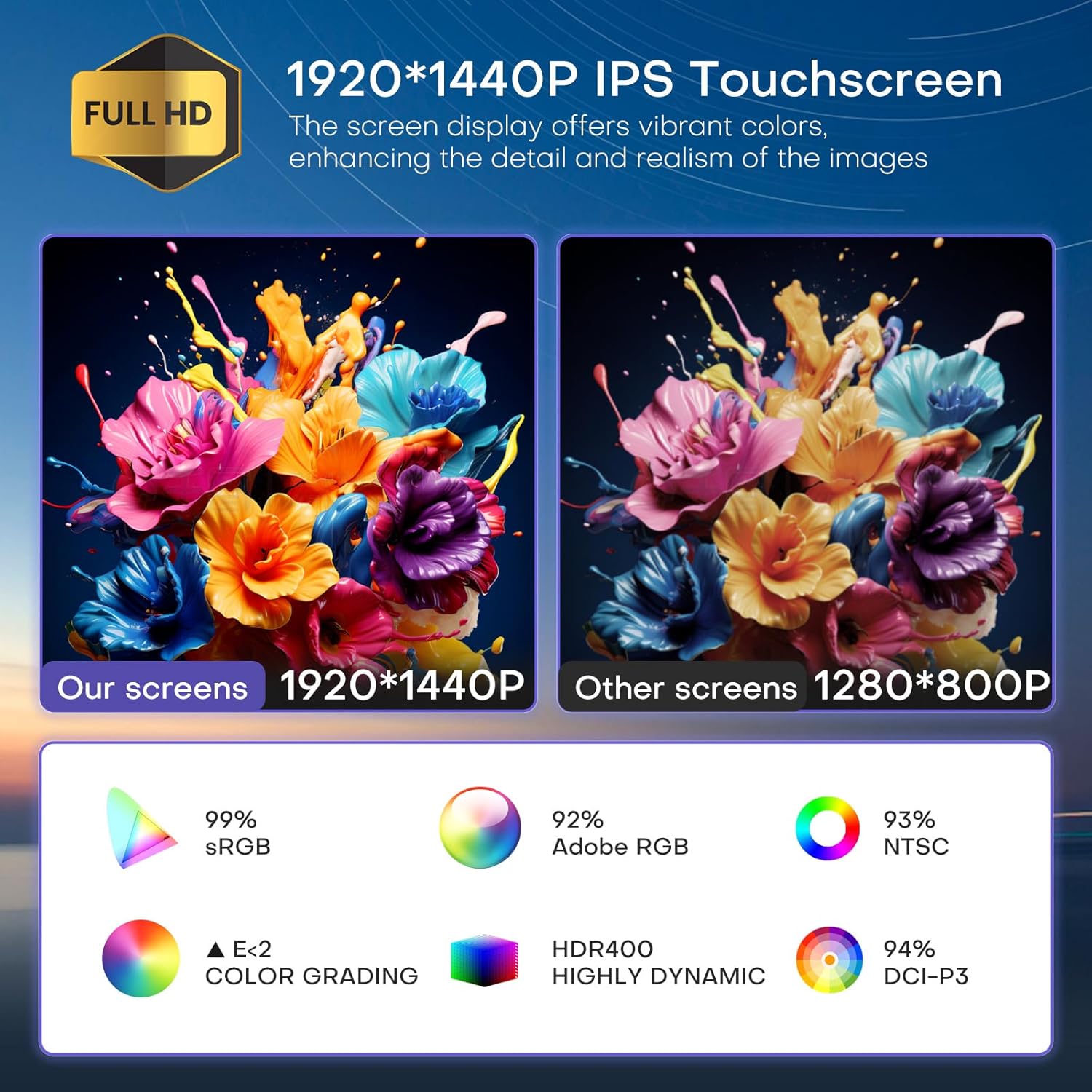
בילד 6.2: Visual comparison demonstrating the superior 1920x1440P IPS touchscreen resolution and color accuracy of the KiriNavi unit compared to standard displays.

בילד 6.3: איבערview of key features including the Qualcomm 8-core processor, Bluetooth 5.0, Android 13 system, large HD screen, 170-degree viewing angle, and integrated CarPlay/Android Auto.
7. טראָובלעשאָאָטינג
7.1 קיין קלאַנג אַרויסגאַנג
- Check AUX Channel: Ensure your vehicle's original AUX channel is working correctly. If it is not, the head unit will not produce sound. Repair the original AUX channel if necessary.
- באַנד סעטטינגס: Verify that the volume on both the head unit and your vehicle's amplifier (if applicable) is not muted or set too low.
- וויירינג קאַנעקשאַנז: Confirm all audio wiring connections are secure and correctly installed.
7.2 איינהייט גייט נישט אן
- מאַכט קאַבלע: Check if the power cable is securely connected to both the head unit and the vehicle's power source.
- פוסעס: Inspect the vehicle's fuse box and the head unit's inline fuse for any blown fuses. Replace if necessary.
- באַטערי קשר: Ensure the vehicle's battery is properly connected and charged.
7.3 פּראָבלעמען מיטן GPS סיגנאַל
- אַנטענע אָרט: זיכער מאַכן אַז די GPS אַנטענע איז אינסטאַלירט אין אַ אָרט מיט אַ קלאָרן view פֿון הימל, פֿרײַ פֿון שטערונגען.
- אַנטענע קשר: Verify the GPS antenna is securely connected to the head unit.
- Map Data: Ensure your navigation app's maps are up-to-date, especially for offline use.
8. וישאַלט
- סקרין רייניקונג: Use a soft, lint-free cloth specifically designed for electronics screens to clean the touchscreen. Do not use abrasive cleaners or solvents.
- ווייכווארג דערהייַנטיקונגען: קאָנטראָלירט און אינסטאַלירט ווייכווארג דערהייַנטיקונגען פּעריִאָדיש צו ענשור אָפּטימאַלע פאָרשטעלונג און צוטריט צו נייַע פֿעיִקייטן.
- ינווייראַנמענאַל טנאָים: פֿאַרמײַדט אויסשטעלן דעם אַפּאַראַט צו עקסטרעמע טעמפּעראַטורן, דירעקטע זונשײַן פֿאַר פֿאַרלענגערטע פּעריאָדן, אָדער איבערגעטריבענע פֿײַכטקייט.
9. שטיצן
For technical assistance, installation inquiries, or any other questions regarding your KiriNavi car radio, please contact KiriNavi customer support. Before contacting support, it is helpful to have your product model name and purchase details ready.
If you are unsure about vehicle compatibility before purchasing, you can send a picture of your car's central control to KiriNavi customer service for confirmation.
קאָנטאַקט אינפֿאָרמאַציע: Refer to the contact details provided with your purchase or visit the official KiriNavi webפּלאַץ פֿאַר שטיצן אָפּציעס.