
1. הקדמה
This manual provides detailed instructions for the safe and effective use of the SEEIRIR KKM198 Digital Multimeter. This device is a versatile tool designed for measuring various electrical parameters, including DC/AC voltage, DC/AC current, resistance, capacitance, and temperature. It features a 4.4-inch touch screen for intuitive operation and includes a VFC (Variable Frequency Control) function for accurate measurements in variable frequency environments.
2. זיכערקייַט אינפֿאָרמאַציע
שטענדיק האַלטן זיך צו די פאלגענדע זיכערהייט מיטלען צו פאַרמייַדן פערזענלעכע שאָדן אָדער שעדיקן צו די מולטימעטער:
- נישט איבערשרייטן די מאַקסימום אַרייַנגאַנג ווערטן ספּעציפֿיצירט פֿאַר יעדן מעסטונג קייט.
- Ensure test leads are in good condition and properly connected before making any measurements.
- Do not use the multimeter if it appears damaged or if the battery cover is not securely closed.
- געניטונג עקסטרעם וואָרענען ווען ארבעטן מיט וואָלtagהעכער 30V AC RMS, 42V שפּיץ, אדער 60V DC. די וואַליומעןtagדאָס איז אַ ריזיקירן פון קלאַפּ.
- שטענדיק אָפּשטעקן די מאַכט פֿון דער קרייז און אָפּלאָדן אַלע הויך-וואָלוומעtage capacitors before measuring resistance, capacitance, or continuity.
- טוישט די באַטעריעס גלייך ווען דער נידעריק-באַטעריע אינדיקאַטאָר דערשיינט צו ענשור גענויע מעסטונגען.
3. פּראָדוקט איבערview
The SEEIRIR KKM198 Digital Multimeter is equipped with a large touch screen display and intuitive controls for ease of use. Below is an image illustrating the device.
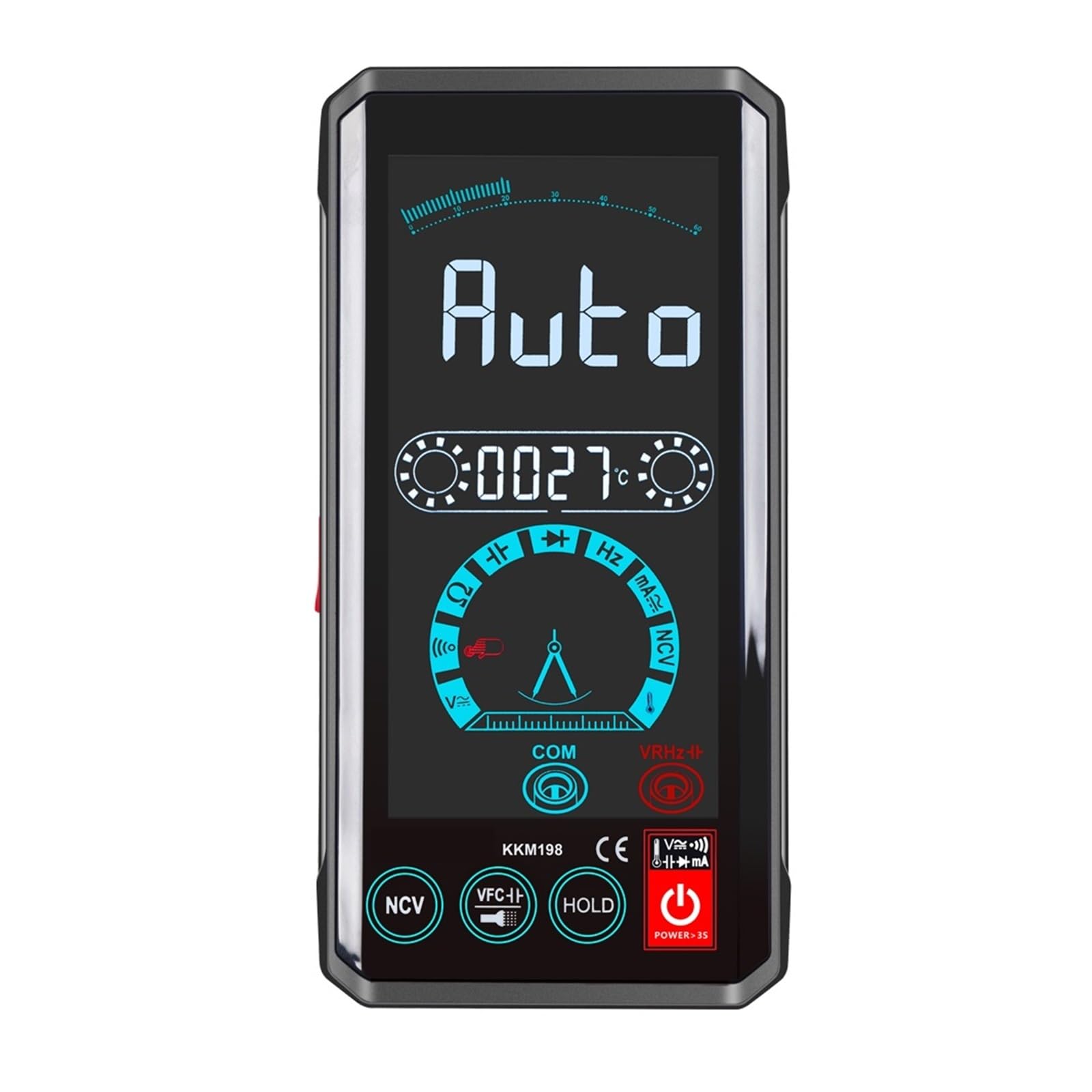
פיגורע 3.1: פראָנט view of the SEEIRIR KKM198 Digital Multimeter, showing its 4.4-inch touch screen interface and connected test leads.
4. סעטאַפּ
4.1. באַטאַרייע ייַנמאָנטירונג
The KKM198 Multimeter requires batteries for operation. To install or replace batteries:
- זייט זיכער אז דער מולטימעטער איז אויסגעלאשן און דיסקאנעקט אלע טעסט דראטן.
- געפינט די באַטאַרייע אָפּטייל אויף דער הינטערשטער זייט פון דעם אַפּאַראַט.
- עפענען די באַטאַרייע אָפּטייל דעקן.
- Insert new batteries, observing correct polarity (+ and -).
- נאָענט די דעקן פון די באַטאַרייע אָפּטייל סיקיורלי.
4.2. פֿאַרבינדן טעסט דראָטן
פֿאַרבינדט די טעסט דראָטן צו די פּאַסיקע אַרייַנגאַנג דזשאַקס אויף דעם מולטימעטער:
- אַרייַנלייגן די שוואַרץ טעסט פירן אין די COM (געוויינטלעך) דזשעק.
- פֿאַר רובֿ באַנדtage, resistance, capacitance, and temperature measurements, insert the רויט טעסט פירן אין די VΩCAPHzTemp דזשאַק.
- For current measurements (mA), insert the רויט טעסט פירן אין די mA דזשאַק.
5. אַפּערייטינג ינסטרוקטיאָנס
The KKM198 features a touch screen interface for mode selection and function control.
5.1. מאַכט אויף / אויסגעלאשן
Press and hold the power button on the device to turn it on or off. The 4.4-inch touch screen will illuminate upon power-on.
5.2. DC/AC VoltagE מעזשערמאַנט
צו מעסטן וואָלtage:
- פאַרבינדן די רויט פּרובירן פירן צו די VΩCAPHzTemp דזשעק און די שווארצע פירן צו די COM דזשאַק.
- Select the DC Voltage (VDC) or AC Voltage (VAC) mode on the touch screen.
- Connect the test probes in parallel to the circuit or component being measured.
- לייענען דעם חלקtagדי ווערט געוויזן אויף דעם עקראַן.
5.3. דק / אַק קראַנט מעזשערמאַנט
צו מעסטן קראַנט:
- וויכטיק: Disconnect power to the circuit before connecting the multimeter.
- פאַרבינדן די רויט פּרובירן פירן צו די mA דזשעק און די שווארצע פירן צו די COM דזשאַק.
- Select the DC Current (ADC) or AC Current (AAC) mode on the touch screen.
- Connect the multimeter in סעריע with the circuit where current is to be measured.
- לייגט צו שטראָם צום קרייַז און לייענט דעם קראַנט ווערט.
5.4. קעגנשטעל מעזשערמאַנט
צו מעסטן קעגנשטעל:
- Ensure the circuit is de-energized and all capacitors are discharged.
- פאַרבינדן די רויט פּרובירן פירן צו די VΩCAPHzTemp דזשעק און די שווארצע פירן צו די COM דזשאַק.
- Select the Resistance (Ω) mode on the touch screen.
- פֿאַרבינדט די טעסט פּראָובז אַריבער דעם קאָמפּאָנענט וואָס מען וויל מעסטן.
- לייענט דעם ווערט פון דעם קעגנשטעל.
5.5. קאַפּאַסיטאַנס מעזשערמאַנט
צו מעסטן קאַפּאַסאַטאַנס:
- זיכער מאַכן אַז דער קאַפּאַסיטאָר איז גאָר אויסגעלאָדן איידער מעסטן.
- פאַרבינדן די רויט פּרובירן פירן צו די VΩCAPHzTemp דזשעק און די שווארצע פירן צו די COM דזשאַק.
- Select the Capacitance (CAP) mode on the touch screen.
- פֿאַרבינדט די טעסט פּראָובז אַריבער די קאַפּאַסיטאָר טערמינאַלס.
- לייענט די קאַפּאַסיטאַנס ווערט.
5.6. טעמפּעראַטור מעזשערמאַנט
צו מעסטן טעמפּעראַטור:
- פאַרבינדן די רויט פּרובירן פירן צו די VΩCAPHzTemp דזשעק און די שווארצע פירן צו די COM דזשאַק.
- Select the Temperature (Temp) mode on the touch screen.
- Place the temperature probe (if included and connected) at the desired measurement point.
- לייענט די טעמפּעראַטור ווערט.
5.7. VFC Function
The VFC (Variable Frequency Control) function is designed for accurate voltage and frequency measurements in circuits with variable frequency drives or other non-sinusoidal waveforms. Activate this mode via the touch screen when measuring such signals.
6. וישאַלט
6.1. רייניקונג
צו רייניקן דעם מולטימעטער, ווישט אויס דעם קעסטל מיט אדamp cloth and a mild detergent. Do not use abrasives or solvents. Ensure the device is powered off and disconnected from all circuits before cleaning.
6.2. סטאָרידזש
ווען נישט אין באַנוץ פֿאַר לענגערע פּעריאָדן, אַרויסנעמען די באַטעריעס צו פאַרמייַדן ליקאַדזש. האַלטן די מולטימעטער אין אַ קיל, טרוקן אָרט, אַוועק פון דירעקט זונשייַן און עקסטרעמע טעמפּעראַטורן.
6.3. באַטערי פאַרבייַט
Replace the batteries as described in Section 4.1 when the low battery indicator appears on the display. Using a multimeter with low batteries can lead to inaccurate readings.
7. טראָובלעשאָאָטינג
If you encounter issues with your KKM198 Digital Multimeter, refer to the following common problems and solutions:
- קיין ווייַז: קאָנטראָלירט די באַטעריע אינסטאַלאַציע און זיכערט זיך אַז די באַטעריעס זענען נישט אויסגעשעפּט.
- ומפּינקטלעך רידינגז: Verify correct mode selection, proper test lead connection, and ensure batteries are not low. Calibrate if necessary (refer to service information).
- No Response from Touch Screen: Power cycle the device. If the issue persists, contact support.
- "OL" אדער איבערלאסטונג אינדיקאציע: דער געמעסטענער ווערט איז גרעסער ווי דער אויסגעקליבענער ראַנג. טוישט צו א העכערן ראַנג אדער וועריפיצירט די קרייז באדינגונגען.
8. ספּעסאַפאַקיישאַנז
| פּאַראַמעטער | ווערט |
|---|---|
| מאָדעל נומער | KKM198 |
| ווייַז טיפּ | דיגיטאַל אַרויסווייַזן |
| פאַרשטעלן גרייס | 4.4 אינטשעס |
| טיפּ קנעפּל | ריר קנעפּל |
| Sampלינג קורס | בעערעך 3 מאל פּער סעקונדע |
| DC VoltagE ראַנגע | 6 וו / 60 וו / 600 וו / 1000 וו |
| AC VoltagE ראַנגע | 2V / 20V / 200V / 750mV |
| דק קראַנט ראַנגע | 600מאַ ±(1.2%+10) |
| אַק קראַנט ראַנגע | 600מאַ ±(1.2%+10) |
| קעגנשטעל ראַנגע | 600Ω / 6קΩ / 60kΩ / 600kΩ / 6MΩ / 60mΩ |
| קאַפּאַסיטאַנס ראַנגע | 10nF / 100nF / 1uF / 10uF / 100uF / 1mF / 10mF / 60mF |
| אַפּערייטינג טעמפּעראַטור | 0 - 40°C |
| דימענשאַנז | 14 X 7 X 2.2 סענטימעטער |
| פּונקט וואָג | בעערעך 10.6 אונסעס (300 גראַמז) |
| ינדאַקטאַנס מעזשערמאַנט | ניט געשטיצט |
9. וואָראַנטי און שטיצן
The SEEIRIR KKM198 Digital Multimeter is designed for reliability and performance. For warranty information, please refer to the product packaging or the retailer's terms of sale. If you require technical assistance or have questions not covered in this manual, please contact your point of purchase or the manufacturer's customer support for further guidance.