
1. הקדמה
The Sony WH-1000XM6 are over-ear wireless Bluetooth headphones designed to provide an immersive audio experience with advanced noise-cancelling capabilities. This manual provides essential information for the proper setup, operation, and maintenance of your headphones.
Key features include the HD Noise Cancelling Processor QN3, Multi Noise Sensor Technology, High-Resolution Audio support, DSEE Extreme, and a foldable design for portability. The headphones also offer up to 30 hours of battery life and support multipoint connection.
2. וואָס איז אין דער קעסטל
באַשטעטיקן אַז אַלע זאכן זענען פאַראַן אין דער פּאַקאַדזשינג:
- סאָני WH-1000XM6 כעדפאָונז
- Compact Protective Carrying Case
- וסב- C קאַבלע
- דאָקומענטאַציע (דיזער מאַנואַל און אַנדערע גיידס)
3. פּראָדוקט איבערview
The WH-1000XM6 headphones feature a lightweight design with soft, cushioned ear pads and an adjustable headband for comfort during extended listening sessions. The headphones are foldable for easy storage and transport in the included carrying case.
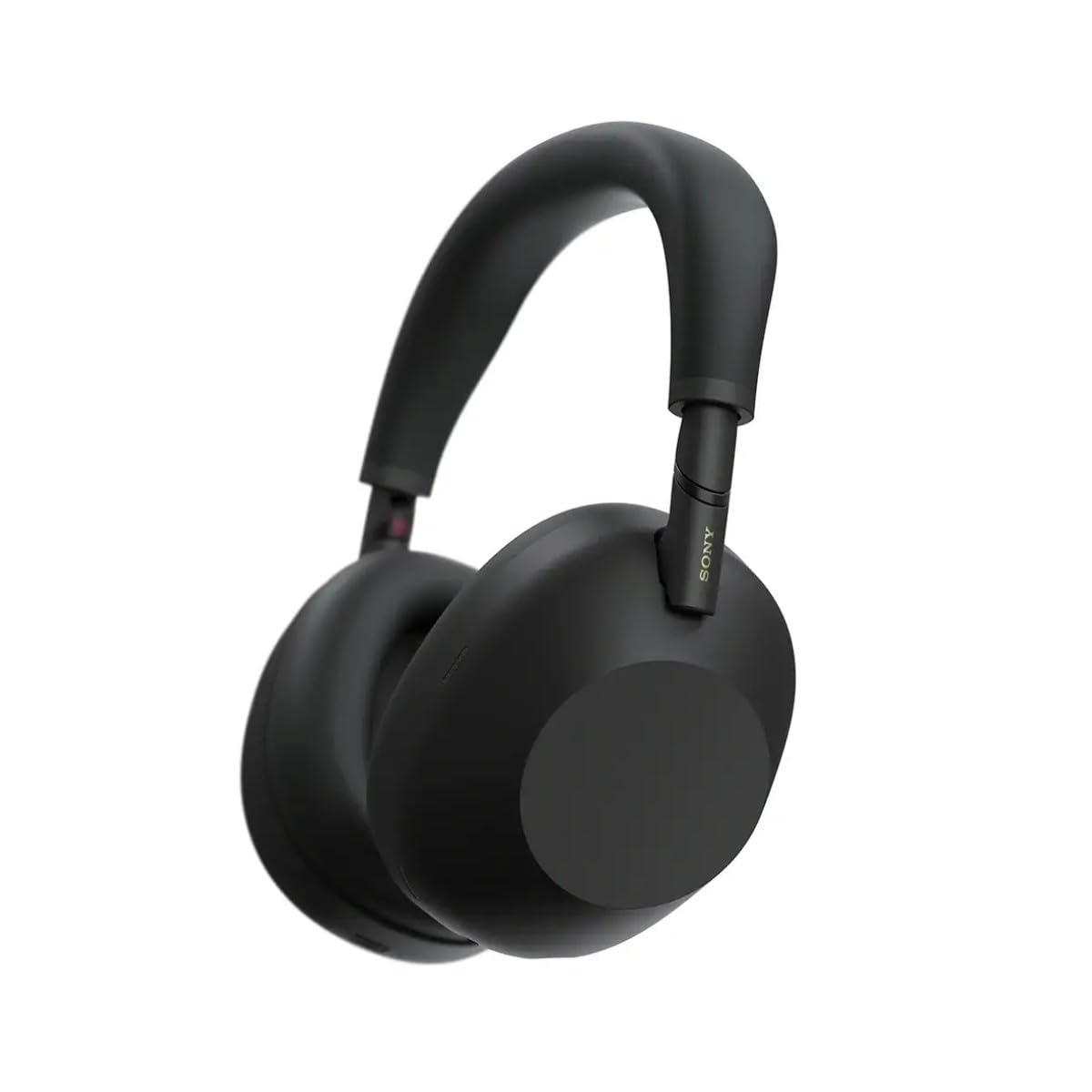
פיגורע 3.1: פראָנט view of the Sony WH-1000XM6 headphones in black.
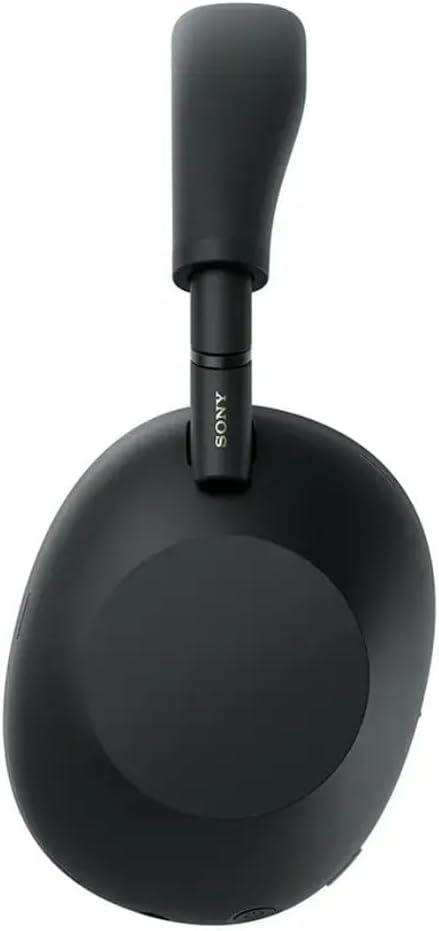
פיגורע 3.2: זייַט view of the Sony WH-1000XM6 headphones.

Figure 3.3: WH-1000XM6 headphones stored in their protective carrying case.
4. סעטאַפּ
4.1. טשאַרדזשינג די כעדפאָונז
Before initial use, fully charge the headphones. Connect the supplied USB-C cable to the charging port on the headphones and to a USB power source. A full charge provides up to 30 hours of playback. A quick 3-minute charge can provide approximately 3 hours of playback. The headphones can be used while charging.
4.2. מאַכט אויף / אויסגעלאשן
- To power on: Press and hold the power button until the indicator light illuminates.
- אויסצולאָשן: דריק און האַלט דעם מאַכט קנעפּל ביז די אינדיקאַטאָר ליכט גייט אויס.
4.3. בלועטאָאָטה פּערינג
צו פֿאַרבינדן אייערע קאָפּהערער צו אַ בלוטוט מיטל:
- מאַכן זיכער אַז די כעדפאָונז זענען פּאַוערד אַוועק.
- Press and hold the power button for approximately 7 seconds until the indicator light flashes blue rapidly and a voice guidance announces "Bluetooth pairing mode."
- אויף אייער דעווייס (סמאַרטפאָן, טאַבלעט, קאָמפּיוטער), אַקטיווירט בלועטוט און זוכט פֿאַר פֿאַראַן דעווייסעס.
- אויסקלייבן "WH-1000XM6" פון דער ליסטע פון דעטעקטירטע דעווייסעס.
- Once connected, the indicator light will flash slowly, and a voice guidance will announce "Bluetooth connected."
4.4. סאָני | כעדפאָונז קאָנעקט אַפּ
Download the Sony | Headphones Connect app from your device's app store. This app allows you to customize sound settings, manage noise cancellation, update firmware, and access additional features for your WH-1000XM6 headphones.
5. אַפּערייטינג ינסטרוקטיאָנס
5.1. Noise Cancelling and Ambient Sound Mode
The WH-1000XM6 features advanced noise cancellation powered by the HD Noise Cancelling Processor QN3 and Multi Noise Sensor Technology. The Auto NC Optimizer adapts to your environment for optimal performance.
- ראַש קאַנסאַלינג: רעדוצירט אַמביאַנט ראַש פֿאַר אַן יממערסיווע הערן דערפאַרונג.
- אַמביאַנט געזונט מאָדע: Allows you to hear surrounding sounds while listening to music, enhancing situational awareness. The Auto Ambient Sound Mode adjusts the level based on your environment.
- שנעלע אויפמערקזאמקייט מאָדע: Cover the right earcup with your hand to instantly lower music volume and allow ambient sound in, useful for quick conversations.
5.2. אַודיאָ פּלייַבאַקק
The headphones feature 30mm driver units, support High-Resolution Audio, and include DSEE Extreme for upscaling compressed digital music files. Audio playback can be controlled via the touch panel on the right earcup:
- שפּיל / פּויזע: טאָפּל צאַפּן אויף די פאַרבינדן טאַפליע.
- ווייַטער שפּור: רוק פאָרויס.
- פֿריִערדיקע שפּור: רוק צוריק.
- באַנד אַרויף: רוק אַרויף.
- באַנד אַראָפּ: לאַקכענען אַראָפּ.
Customize your sound profile using the 10-band equalizer in the Sony | Headphones Connect app.
5.3. רוף פונקציעס
The WH-1000XM6 features 6 AI-powered beam-forming microphones and AI Noise Reduction for clear call quality, even in noisy environments.
- ענטפֿערן / סוף רופן: טאָפּל צאַפּן אויף די פאַרבינדן טאַפליע.
- אָפּוואַרפן רופן: דריק און האַלט די ריר פּאַנעל.
- שטום מיקראָפאָן: Double-press the ANC button during a call.
5.4. מולטיפּאָינט קאַנעקשאַן
The Multipoint Connection feature allows you to connect the headphones to two Bluetooth devices simultaneously. This enables seamless switching between devices, such as a smartphone and a laptop, without needing to manually reconnect.
5.5. Adaptive Sound Control
Adaptive Sound Control automatically detects your activity (e.g., sitting, walking, traveling) and adjusts the noise cancellation or ambient sound settings accordingly. This feature can be configured via the Sony | Headphones Connect app.
5.6. Specialized Audio Features
- 360 Upmix for Cinema: Transforms stereo content into an immersive surround sound experience.
- Game EQ: Enhances clarity and detail in gaming audio.
- פערזענליכען ספּיישאַל קלאַנג: Available through the app for an optimized listening experience.
6. וישאַלט
6.1. רייניקונג
- ווישט די קאָפּהערער מיט אַ ווייכן, טרוקענעם שטאָף.
- ניצט נישט אַלקאָהאָל, בענזין, דינערס, אדער אַנדערע כעמישע רייניקונגסמיטלען, ווײַל זיי קענען שעדיקן די ענדיקונג.
- Clean the ear pads and headband gently to remove any buildup.
6.2. סטאָרידזש
When not in use, store the headphones in their compact protective carrying case to prevent damage from dust, scratches, and impacts. Avoid storing in direct sunlight or in excessively hot or humid environments.
7. טראָובלעשאָאָטינג
If you encounter issues with your WH-1000XM6 headphones, try the following steps:
- קיין מאַכט: זיכער מאַכן אַז די קאָפּהערער זענען אָנגעלאָדן. פֿאַרבינדט זיי צו אַ שטראָם מקור מיטן USB-C קאַבל.
- קיין קול: Check the volume level on both the headphones and the connected device. Ensure the headphones are properly paired via Bluetooth.
- נעבעך געזונט קוואַליטעט: Verify that the audio source is of good quality. Try moving closer to the connected device to avoid interference. Check equalizer settings in the Sony | Headphones Connect app.
- בלועטאָאָטה פּערינג ישוז: Ensure the headphones are in pairing mode. Turn off and on Bluetooth on your device. Delete the headphones from your device's Bluetooth list and attempt to pair again.
- ראַש קאַנסאַלינג נישט עפעקטיוו: Ensure the headphones are properly seated on your ears. Use the Auto NC Optimizer feature via the app.
- Headphones Unresponsive: Perform a factory reset if available (refer to the Sony | Headphones Connect app or Sony support webוועבזייטל פֿאַר ספּעציפֿישע אינסטרוקציעס).
For further assistance, refer to the Sony | Headphones Connect app or the official Sony support webפּלאַץ.
8. ספּעסאַפאַקיישאַנז
| סאָרט | סאָני |
| מאָדעל נאָמען | WH-1000XM6 |
| קאָליר | שוואַרץ |
| אויער פּלייסמאַנט | איבער אויער |
| קאַנעקטיוויטי טעכנאָלאָגיע | ווירעלעס (בלוטוט 5.1) |
| ראַש קאָנטראָל | אַקטיוו ראַש קאַנסאַליישאַן |
| אַודיאָ דרייווער טיפּ | דינאַמיש דרייווער |
| אָפטקייַט ענטפער | 20 הערץ - 40,000 הערץ |
| ימפּידאַנס | 48 אָהמס |
| באַטערי דורכשניטלעך לעבן | 30 שעה |
| באַטאַרייע אָפּצאָל צייט | 3 מינוט פֿאַר 3 שעה ווידערשפּיל |
| פּונקט וואָג | 250 גראַמז |
| מאַטעריאַל | Aluminum (Enclosure) |
| קאָנטראָל טיפּ | שטימע קאנטראל, אפליקאציע |
| וואַסער קעגנשטעל מדרגה | ניט וואַסער קעגנשטעליק |
9. וואָראַנטי און שטיצן
פֿאַר דעטאַלירטע וואָראַנטי אינפֿאָרמאַציע, ביטע זען די וואָראַנטי קאַרטל וואָס איז אַרייַנגערעכנט מיט דיין פּראָדוקט אָדער באַזוכט די באַאַמטער סאָני שטיצע website. For technical support, product registration, or service inquiries, please contact Sony customer service or visit their online support resources.