
1. הקדמה
This manual provides detailed instructions for the setup, operation, and maintenance of your EGate Atom 4X Projector. Please read this manual thoroughly before using the product to ensure proper functionality and to maximize your viewינג דערפאַרונג.
The EGate Atom 4X is a compact and powerful mini projector designed for home cinema use. It supports 4K Ultra HD content at a native 1080p resolution, offering stunning visuals on screens up to 300 inches. Featuring Android 13, wireless display capabilities, and dual-band WiFi, it provides seamless streaming and a versatile entertainment experience.
2. פּעקל אינהאַלט
באַשטעטיקט אַז אַלע זאכן וואָס זענען אויסגערעכנט אונטן זענען אַרייַנגערעכנט אין אייער פּעקל:
- 1x EGate Atom 4X Projector
- 1x מאַכט קאַבלע
- 1x רימאָוט קאָנטראָל
- 1x User Manual with Warranty Card

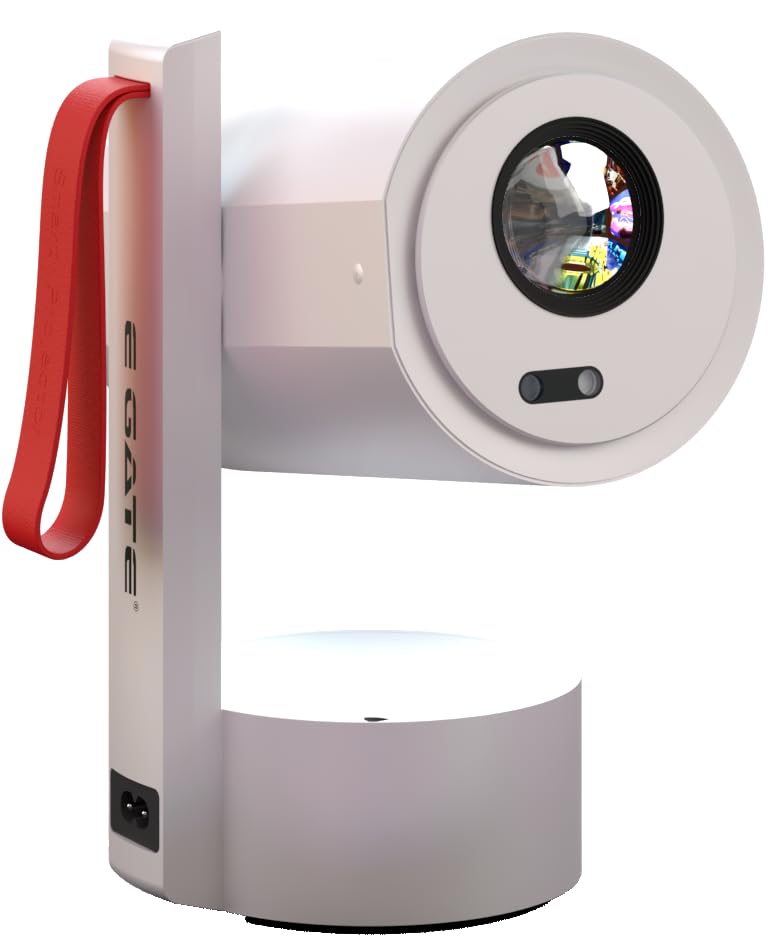
בילד: פראָנט view of the EGate Atom 4X Projector, showing the lens and sensors.
3. פּראָדוקט איבערview
3.1 שליסל פֿעיִקייטן
- Native 1080p Resolution with 4K Support: Delivers clear and sharp images, supporting 4K content for enhanced detail.
- אַנדרויד טעלעוויזיע 13.0: Integrated smart TV operating system with access to numerous apps like Netflix, Prime Video, and YouTube.
- Automatic Focus & Keystone Correction: AI-powered dual camera setup ensures instant, razor-sharp focus and perfect image alignment (4P and 6D correction).
- 270 ° ראָטאַטאַבלע פּלאַן: Allows projection onto walls, ceilings, or floors, offering flexible placement options.
- Dual Band Wi-Fi 6 & Bluetooth 5.0: Provides fast, stable wireless connectivity for streaming and connecting external audio devices.
- קייפל קאַנעקטיוויטי פּאָרץ: Includes HDMI 2.1 (ARC/eARC/CEC), USB, and 3.5mm Audio Out for versatile device connections.
- High Contrast & Brightness: 6000:1 contrast ratio and 400 ISO lumens with HDR10+/HLG support for vibrant and lifelike colors.
- לאנג לamp לעבן: געפירט לamp designed for up to 60,000 hours of operation.
- געבויט-אין רעדנער: 7 Watt integrated speaker for audio output.
3.2 פּראָיעקטאָר קאָמפּאָנענטן

בילד: זייט view of the EGate Atom 4X Projector, highlighting its compact design and red strap.

בילד: הינטערשטע view of the EGate Atom 4X Projector, showing the power input and ventilation.
The projector features a cylindrical main body housing the lens and internal components, mounted on a stable base. A red strap is integrated for portability. The rear panel includes essential ports for connectivity.
4. סעטאַפּ
4.1 ערשטע פּלאַצירונג
- אַנפּאַק: נעמט פֿאָרזיכטיק אַרויס דעם פּראָיעקטאָר און אַלע אַקסעסאָריעס פֿון דער פּאַקאַדזשינג.
- מאַכט קשר: פֿאַרבינדט דעם מאַכט קאַבל צום פּראָיעקטאָר'ס מאַכט אַרייַנגאַנג און דערנאָך צו אַ מאַכט ווענטיל.
- פּאַזישאַנינג: Place the projector on a stable, flat surface. Utilize the 270° rotatable design to adjust the projection angle as needed.

Image: Diagram illustrating the 270-degree rotation capability of the EGate Atom 4X Projector, allowing projection onto various surfaces.
The projector's flexible stand allows for projection onto walls, ceilings, or even the floor. Ensure the projection path is clear of obstructions.
4.2 אויטאָמאַטישער פאָקוס און קיסטאָון קערעקשאַן
The EGate Atom 4X features fully automatic focus and keystone correction for a clear, rectangular image without manual adjustments.
- מאַכט אויף: קער אויף די פּראַדזשעקטער מיט די מאַכט קנעפּל אָדער ווייַט קאָנטראָל.
- אָטאַמאַטיק אַדזשאַסטמאַנט: The projector will automatically detect the projection surface and adjust focus and keystone within approximately 5 seconds.
- Manual Adjustment (Optional): If minor adjustments are still needed, use the remote control to fine-tune focus or keystone settings in the projector's menu.

Image: The EGate Atom 4X Projector projecting an image, with overlays indicating automatic focus and 4P+4D keystone correction for perfect alignment.
5. אַפּערייטינג ינסטרוקטיאָנס
5.1 פּאַוערינג אויף / אַוועק
- צו מאַכט אויף: דרוק די מאַכט קנעפּל אויף די פּראַדזשעקטער אָדער די ווייַט קאָנטראָל.
- צו מאַכט אַוועק: Press the power button on the remote control once to enter standby mode, or press and hold to fully shut down.
5.2 נאַוויגירן אַנדרויד טיווי 13.0
Your EGate Atom 4X Projector runs on Android TV 13.0, providing a smart interface for apps and media.
- ווייַט קאָנטראָל: Use the provided remote control to navigate the interface. The directional pad, OK button, Back button, and Home button are essential for navigation.
- Wi-Fi קאַנעקשאַן: Go to Settings > Network & Internet to connect to your home Wi-Fi network.
- גוגל אקאונט: Sign in with your Google account to access the Google Play Store and personalize your experience.
- אַפּ אַקסעס: Pre-loaded apps like Netflix, Prime Video, and YouTube are available. Download more apps from the Google Play Store.

Image: The EGate Atom 4X Projector displaying the Android 13 interface with various streaming app icons like YouTube, Netflix, and Prime Video.
5.3 אַדזשאַסטירן בילד און קלאַנג סעטטינגס
Access the projector's settings menu to customize picture and sound preferences.
- בילד מאָדעס: Select from various picture modes (e.g., Standard, Vivid, Cinema) or adjust brightness, contrast, and color manually.
- געזונט מאָדעס: Choose sound presets or adjust bass and treble for the built-in 7W speaker or connected audio devices.

Image: A split screen comparison showing the superior picture quality of the EGate Atom 4X (1080p) versus a 720p projector, highlighting vibrant colors and sharp details.
6. קאַנעקטיוויטי
6.1 ווייערד קאַנעקשאַנז
The projector offers several wired ports for connecting external devices:
- HDMI 2.1 (ARC/eARC/CEC): Connect gaming consoles, Blu-ray players, laptops, or streaming devices. ARC/eARC allows audio return to compatible sound systems, and CEC enables control of connected devices with a single remote.
- וסב: Connect USB flash drives for media playback or external hard drives.
- 3.5 מם אַודיאָ אָוט: פֿאַרבינדט עקסטערנע כעדפאָונז אָדער רעדנערס.

Image: The EGate Atom 4X Projector surrounded by various devices (laptop, tablet, game controller, speaker, headphones) illustrating its HDMI, USB, Audio, Wi-Fi 6, and Bluetooth connectivity.
בילד: נאָענט-אַרויף view of the EGate Atom 4X Projector's rear panel, detailing the HDMI, USB, and Audio ports for universal device compatibility.
6.2 ווירעלעסס קאַנעקשאַנז
- Dual Band Wi-Fi 6: Connect to 2.4GHz or 5GHz Wi-Fi networks for high-speed internet access and seamless streaming.
- בלועטאָאָטה 5.0: Pair with Bluetooth speakers, headphones, or other compatible audio devices for wireless sound.
- סקרין שפּיגל: Wirelessly cast content from Windows, iOS, and Android devices using Miracast or similar protocols.

Image: A smartphone screen being mirrored wirelessly to the EGate Atom 4X Projector via Dual-Band Wi-Fi 6, showing compatibility with Miracast, Android, iOS, and Windows.

Image: The EGate Atom 4X Projector positioned with Bluetooth headphones and a portable speaker, illustrating seamless Bluetooth 5.0 connectivity for audio.
7. וישאַלט
7.1 רייניקן דעם פּראָיעקטאָר
- עקסטעריע: ניצט אַ ווייכע, טרוקענע שטאָף צו ווישן די אויסערלעכע זייט פון דעם פּראָיעקטאָר. ניצט נישט קיין שרײַבנדיקע רייניגערס אדער סאָלווענטן.
- לענס: Gently clean the projector lens with a lens cleaning cloth or a soft, lint-free cloth specifically designed for optical surfaces. Avoid touching the lens directly with your fingers.
- ווענטילאַטיאָן: Ensure the ventilation openings are clear of dust and debris to prevent overheating. Use a soft brush or compressed air to clean them periodically.
7.2 סטאָרידזש
ווען נישט אין באַנוץ פֿאַר לענגערע פּעריאָדן, זאָל מען האַלטן דעם פּראָיעקטאָר אין אַ קיל, טרוקן אָרט, אַוועק פֿון דירעקטער זון און עקסטרעמע טעמפּעראַטורן. עס איז רעקאָמענדירט צו נוצן די אָריגינעלע פּאַקאַדזשינג אָדער אַ פּראַטעקטיוו קעסטל צו פאַרמייַדן שטויב אָנזאַמלונג און שעדיקן.
8. טראָובלעשאָאָטינג
If you encounter issues with your EGate Atom 4X Projector, refer to the following common problems and solutions:
8.1 קיין בילד אדער "קיין סיגנאַל" מעסעדזש
- טשעק מאַכט: זיכער מאַכן אַז דער פּראָיעקטאָר איז ריכטיק פֿאַרבונדן צו אַ מאַכט מקור און אנגעצינדן.
- אַרייַנשרייַב מקור: באַשטעטיקט אַז די ריכטיקע אַרייַנגאַנג מקור (HDMI, USB, אאז"וו) איז אויסגעקליבן אין דעם פּראָיעקטאָר'ס מעניו.
- קאַבלע קשר: Ensure all HDMI or USB cables are securely connected to both the projector and the source device.
- מקור מיטל: Confirm that the source device (laptop, console) is powered on and outputting a signal.
8.2 פארשוואָמענע בילד
- אַוטאָ פאָקוס: Allow the projector a few seconds to perform automatic focus. If the image remains blurry, try moving the projector slightly or restarting it.
- לענס רייניקונג: Clean the projector lens with a soft, lint-free cloth.
- פּרויעקציע דיסטאַנסע: Ensure the projector is within the recommended projection distance for the desired screen size.
8.3 Distorted or Tilted Image (Keystone)
- Auto Keystone: The projector should automatically correct keystone. If the image is still distorted, try repositioning the projector.
- מאַנואַל Keystone: Access the projector's settings menu to manually adjust keystone correction (4P and 6D options).
8.4 קיין געזונט
- באַנד מדרגה: Check the volume level on both the projector and the source device.
- שטום פֿונקציע: Ensure the projector is not muted.
- אַודיאָ רעזולטאַט: If using external speakers or headphones, ensure they are properly connected and selected as the audio output in the projector's settings.
- בלועטאָאָטה קאַנעקשאַן: If using Bluetooth audio, ensure the device is correctly paired and connected.
9. ספּעסאַפאַקיישאַנז
| שטריך | דעטאַל |
|---|---|
| סאָרט | E GATE |
| מאָדעל נאָמען | Atom 4X |
| מאָדעל נומער | 9027 |
| געבוירן האַכלאָטע | 1920 רענטגענ 1080 (פול הד) |
| שטיצט רעסאָלוטיאָן | Up to 4K (3840 x 2160) |
| ברייטנאַס | 400 יסאָ לומענס |
| קאַנטראַסט פאַרהעלטעניש | 6000:1 |
| ווייַז טיפּ | לקד |
| אַספּעקט פאַרהעלטעניש | 16:9 |
| מאַקסימום פאַרשטעלן גרייס | 300 אינטשעס (762 סענטימעטער) |
| אָפּערייטינג סיסטעם | אַנדרויד טעלעוויזיע 13.0 |
| פּראַסעסער | Amologic T950S Quad Core |
| באַראַן / ראַם | 1 גיגאבייט באַראַן / 8 גיגאבייט ראַם |
| ווי-פי | Dual Band Wi-Fi 6 (2.4 + 5 GHz) |
| בלועטאָאָטה | בלועטאָאָטה 5.0 |
| קאַנעקטיוויטי | HDMI 2.1 (ARC/eARC/CEC), USB, 3.5mm Audio Out |
| ספּעציעלע פֿעיִקייטן | Auto Focus, Auto Keystone (4P & 6D), HDR10+/HLG Support, 270° Rotatable Design, Screen Mirroring |
| Lamp לעבן | 60,000 שעה |
| געבויט-אין רעדנער | 7 וואט |
| פּראָדוקט דימענשאַנז | 12.5 X 11 X 22.5 סענטימעטער |
| פּונקט וואָג | 990 ג |
10. וואָראַנטי און שטיצן
The EGate Atom 4X Projector comes with a 1 יאָר וואָראַנטי provided by EGate from the date of purchase. To avail warranty benefits, it is mandatory to register your product.
EGate offers free home pickup and drop service during the warranty period. For more details and product registration, please visit the official EGate webפּלאַץ אָדער קאָנטאַקט קונה שטיצן.
פאַבריקאַנט: Egate Infotel Pvt Ltd, 503, SG Alpha Tower II, Sec 9, Vasundhara, Ghaziabad, UP, Optroniq India (Importer)