
הקדמה
This manual provides essential information for the setup, operation, and maintenance of your VINABTY replacement remote control. This remote is designed to function as a direct replacement for your original Philips Smart LED TV remote, requiring no programming.
קאַמפּאַטאַבילאַטי
This remote control is compatible with the following Philips Smart LED TV models:
- 398GM10BEPHND000CR
- 398GM10BEPHNE000CR
- 43PUS8389/12
- 48אָלעד759/12
- 43PUS8909/12
- 50PUS8909/12
It features a lightweight and ergonomic design, providing a comfortable grip and stable performance with a transmission distance of up to 10 meters.
סעטאַפּ
ייַנמאָנטירונג פון באַטאַרייע
די ווײַטקאָנטראָל דאַרף צוויי AAA באַטעריעס (נישט אַרייַנגערעכנט) פֿאַר אָפּעראַציע. פֿאָלגט די סטעפּס צו אינסטאַלירן די באַטעריעס:
- געפֿינען די דעקן פון די באַטאַרייע אָפּטייל אויף די צוריק פון די ווייַט קאָנטראָל.
- שלעפּט דעם דעקל אַראָפּ אָדער דריק דעם לאַטש (אויב פֿאַראַן) צו עפֿענען דעם אָפּטייל.
- אַרײַנשטעלן צוויי AAA באַטעריעס, און זיכער מאַכן אַז די פּאָזיטיוו (+) און נעגאַטיוו (-) טערמינאַלן זענען ריכטיק אויסגעשטעלט מיט די מאַרקירונגען אינעווייניק אין דעם אָפּטייל.
- לייגט צוריק דעם דעקל פונעם באַטעריע־אָפּטייל דורך עס צוריקצורוקן אין פּלאַץ ביז עס קליקט זיכער.

Image: Back of the remote control with the battery compartment open, illustrating where to insert two AAA batteries.
Once batteries are installed, the remote is ready for use with your compatible Philips Smart LED TV. No additional programming or pairing is required.
אַפּערייטינג ינסטראַקשאַנז
This section details the functions of the buttons on your VINABTY replacement remote control.
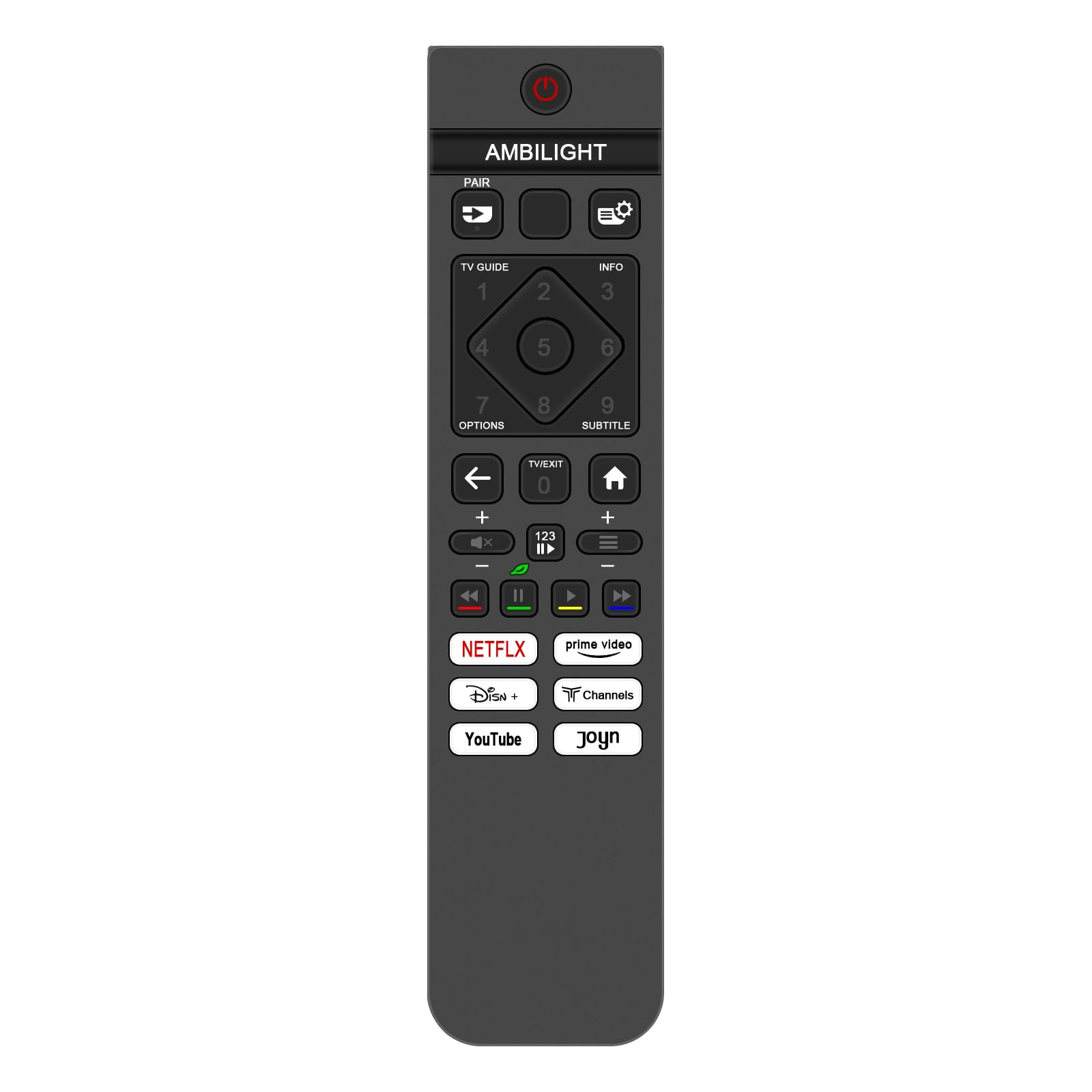
בילד: פראָנט view of the remote control, highlighting the layout and functions of various buttons.
- מאַכט קנעפּל (●): צינדט אָן אָדער אויס דעם טעלעוויזאָר.
- אַמבילייט קנעפּל: Controls the Ambilight feature of your Philips TV.
- פּאָר קנעפּל: Used for pairing the remote if required by specific TV models (though generally not needed for this replacement remote).
- TV GUIDE Button: Accesses the electronic program guide.
- INFO קנעפּל: Displays information about the current program or input.
- Settings/Gear Icon Button: Opens the TV's settings menu.
- נומער פּאַד (0-9): Used for direct channel selection or inputting numbers.
- אָפּטיאָנס קנעפּל: Accesses contextual options or menus.
- סובטיטלע קנעפּל: Toggles subtitles on or off.
- נאַוויגאַציע פּאַד (אַרויף, אַראָפּ, לינקס, רעכטס, גוט): Navigates through menus and selects items.
- צוריק עראָו קנעפּל: גייט צוריק צום פריערדיקן עקראַן אָדער מעניו.
- TV/EXIT Button: Switches to TV mode or exits the current menu/app.
- היים קנעפּל: Returns to the TV's home screen or smart hub.
- באַנד אַרויף / אַראָפּ (+/-): אַדזשאַסטירט די טעלעוויזיע באַנד.
- Mute Button (X icon): שטומט אדער אנשטומט דעם טעלעוויזיע אודיאָ.
- Channel Up/Down (P+/-): טוישט טעלעוויזיע קאַנאַלן.
- Media Control Buttons (Rewind, Play/Pause, Fast Forward, Stop): קאָנטראָלירט מעדיע ווידערשפּיל.
- Netflix Buttonדירעקטער צוטריט צו דער נעטפליקס אַפּליקאַציע.
- Prime Video Button: Direct access to the Prime Video application.
- Disney+ Button: Direct access to the Disney+ application.
- Channels Button: Direct access to the Channels application.
- יאָוטובע קנעפּל: Direct access to the YouTube application.
- Joyn Button: Direct access to the Joyn application.
Point the remote control directly at the TV's infrared receiver for optimal performance. Ensure there are no obstructions between the remote and the TV.
וישאַלט
געהעריגע זאָרג און וישאַלט וועט פֿאַרלענגערן דאָס לעבן פֿון אייער ווײַטקאָנטראָל.
- רייניקונג: Use a soft, dry cloth to clean the remote control. For stubborn dirt, slightly dampווייקט דעם שטאָף מיט וואַסער אָדער אַ מילדער רייניקונג לייזונג, און ווישט טרוקן גלייך. ניצט נישט קיין שרײַבנדיקע רייניגער אָדער סאָלווענטן.
- באַטערי פאַרבייַט: Replace batteries when the remote's response becomes sluggish or stops working. Always replace both batteries at the same time with new ones of the same type (AAA).
- סטאָרידזש: Store the remote control in a cool, dry place away from direct sunlight and extreme temperatures. If the remote will not be used for an extended period, remove the batteries to prevent leakage.
- ויסמיידן דראָפּס און ימפּאַקץבאַשיצן די ווייַטקאָנטראָל פון גשמיות שעדיקן דורך ויסמיידן פאַלן און ימפּאַקטן.
טראָובלעשאָאָטינג
If you encounter issues with your remote control, refer to the following common solutions:
| פּראָבלעם | לייזונג |
|---|---|
| די ווײַטקאָנטראָל רעאַגירט נישט. |
|
| Buttons are not working or are sticky. |
|
| ווייַט קייט איז רידוסט. |
|
אויב די פראבלעם בלייבט נאך פרובירן די לייזונגען, ביטע קאנטאקטירט קאסטומער סופארט.
ספּעסאַפאַקיישאַנז
| שטריך | דעטאַל |
|---|---|
| סאָרט | VINABTY |
| מאָדעל נומער | 398GM10BEPHND000CR |
| קאַמפּאַטאַבאַל דעוויסעס | Philips Smart LED TVs (Specific models listed in Introduction) |
| קאַנעקטיוויטי טעכנאָלאָגיע | ינפרערעד (IR) |
| קאָנטראָללער טיפּ | שטופּן קנעפּל קאָנטראָל |
| מאַקסימום קייט | 10 מעטער |
| מאַכט מקור | 2 X AAA באַטעריז (ניט אַרייַנגערעכנט) |
| דימענשאַנז | 12 x 6 x 1 ס״מ (אומגעפער 4.72 x 2.36 x 0.39 אינטשעס) |
| וואָג | 80 ג (אומגעפער 2.82 אונסעס) |
| קאָליר | שוואַרץ |
| ספּעציעלע שטריך | ערגאָנאָמיק פּלאַן |

Image: Remote control dimensions, showing a length of 19.2 cm (7.56 in) and a width of 4.5 cm (1.77 in).
שטיצן
For further assistance or inquiries, please refer to the seller's contact information provided at the point of purchase. If there is an issue with the product or service, contact the seller for a satisfactory response within 24 hours.