
1. הקדמה
This manual provides detailed instructions for the installation, operation, and maintenance of your GIGABYTE B550M DS3H AC R2 motherboard. This micro-ATX motherboard is designed to support AMD Ryzen 5000, 4000, and 3000 series CPUs on the AM4 socket, offering a robust platform for various computing needs. Please read this manual thoroughly before beginning installation to ensure proper setup and functionality.
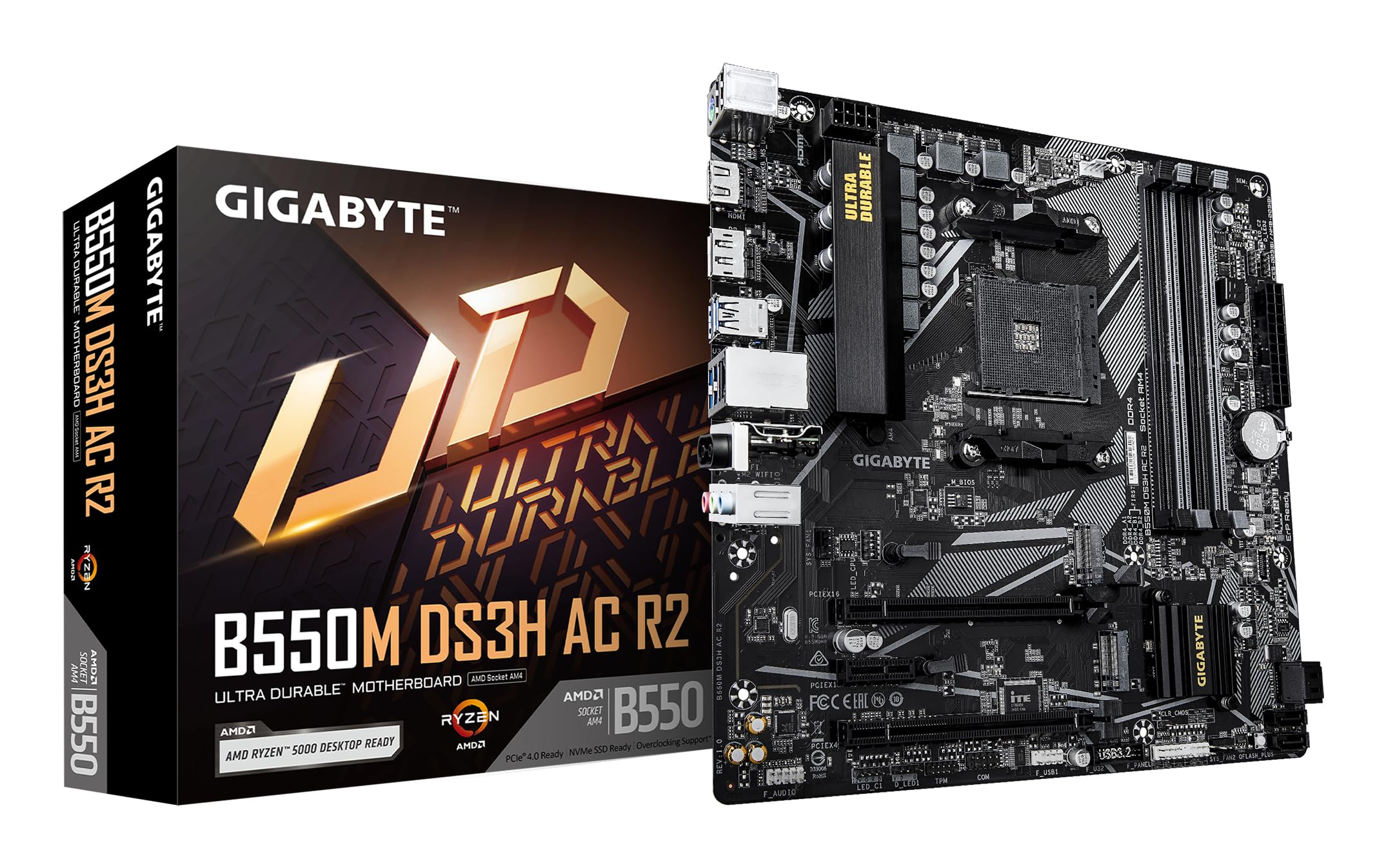
פיגור 1.1: פון אויבן אַראָפּ view of the GIGABYTE B550M DS3H AC R2 Motherboard, showcasing its layout including the CPU socket, DIMM slots, and various connectors.
2. שליסל פֿעיִקייטן
- AMD B550 טשיפּסעט: Supports AMD Ryzen 5000, 4000, and 3000 series CPUs with AM4 socket.
- High-Speed DDR4 Memory: Dual-channel support for up to 4733MHz (O.C.) across 4 DIMM slots.
- Advanced Storage Options: Includes one PCIe 4.0 M.2 slot and one PCIe 3.0 M.2 slot, alongside PCIe slots for graphics and expansion.
- אינטעגרירטע קאָנעקטיוויטי: Features Wi-Fi 5, Bluetooth 5.0, and 1GbE LAN for reliable network connections.
- Flexible Display Outputs: Equipped with HDMI and DisplayPort for multi-monitor configurations.
- קלוגע קיל סיסטעם: Smart Fan 6 with multiple temperature sensors ensures efficient thermal management.
- Q-Flash Plus: Allows BIOS updates without the need for CPU, memory, or graphics card installation.
3. סעטאַפּ און ייַנמאָנטירונג
3.1 קפּו ינסטאַלירונג
- זיכער מאַכן אַז די CPU סאָקעט לעווער איז אין דער אָפֿן פּאָזיציע.
- Carefully align the triangular mark on the AMD Ryzen CPU with the mark on the AM4 socket.
- לייגט פֿאָרזיכטיק אַרײַן די סי־פּי־יו אין דער סאָקעט אָן עס צווינגען.
- נידעריקער די הייבער צו באַוואָרענען די קפּו אין פּלאַץ.
- אינסטאלירט דעם סי-פי-יו קולער לויט די אינסטרוקציעס פונעם פאבריקאנט.
3.2 זכּרון (RAM) אינסטאַלאַציע
- עפֿנט די קליפּס ביי ביידע ענדס פֿון די DIMM סלאָץ.
- גלייכט אויס דעם קערב אויפן DDR4 זכּרון מאָדול מיטן שליסל אין דעם DIMM סלאָט.
- Insert the memory module firmly until the clips snap into place. For dual-channel operation, refer to the motherboard manual for recommended slot configurations.
3.3 סטאָרידזש מיטל ינסטאַלירונג
This motherboard supports both M.2 NVMe SSDs and SATA drives.
- M.2 SSD: Locate the M.2 slots (one PCIe 4.0, one PCIe 3.0). Insert the M.2 SSD at an angle and secure it with the provided screw.
- SATA דרייווס: פֿאַרבינדט SATA דאַטן קייבלס פֿון אייערע SSDs/HDDs צו די SATA פּאָרטן אויף דער מוטערבאָרד. פֿאַרבינדט מאַכט קייבלס פֿון אייער מאַכט צושטעלן צו די דרייווז.
3.4 אינסטאַלאַציע פון עקספּאַנסיע קאַרטל
Install your graphics card or other PCIe expansion cards into the appropriate PCIe slots. Ensure they are seated firmly and secured with the case screw.
3.5 מאַכט קאַנעקשאַנז
- פֿאַרבינדט דעם 24-פּין ATX הויפּט מאַכט קאַנעקטאָר פֿון אייער מאַכט צושטעל צום מוטערבאָרד.
- פֿאַרבינדט דעם 8-פּין ATX 12V CPU מאַכט קאַנעקטאָר צום מוטערבאָרד.
3.6 Rear I/O Panel Overview

Figure 3.1: The rear I/O panel of the GIGABYTE B550M DS3H AC R2 motherboard, showing various ports including USB, HDMI, DisplayPort, LAN, and audio jacks.
The rear I/O panel provides connectivity for external devices. It includes USB 2.0, USB 3.2 Gen 1, HDMI, DisplayPort, 1GbE LAN, Wi-Fi antenna connectors, and audio jacks. Refer to the detailed diagram in the physical manual for specific port identification.
4. אַפּערייטינג ינסטרוקטיאָנס
4.1 בייאָוס סעטאַפּ
The BIOS (Basic Input/Output System) is firmware that initializes hardware during the booting process. To enter BIOS Setup, press the DEL key during the Power-On Self-Test (POST). Here you can configure system settings, boot order, and monitor hardware status.
4.2 קיו-פלאַש פּלוס
Q-Flash Plus allows you to update the BIOS without installing the CPU, memory, or graphics card. Simply download the latest BIOS file פֿון גיגאַבייט webזייטל, טוישן דעם נאמען צו GIGABYTE.bin, ראטעווען עס אויף א USB פלעש דרייוו, און אריינשטעלן עס אין דעם באשטימטן Q-Flash Plus USB פארט. דריקן דעם Q-Flash Plus קנעפל צו אנפאנגען דעם אפדעיט.
4.3 דרייווער ינסטאַלירונג
After installing your operating system, install the necessary drivers for the motherboard chipset, audio, LAN, Wi-Fi, and other integrated components. These drivers are typically provided on a support DVD or can be downloaded from the official GIGABYTE webפּלאַץ.
5. וישאַלט
5.1 רייניקונג
Regularly clean your computer's interior to prevent dust buildup, which can lead to overheating and reduced performance. Use compressed air to remove dust from components, especially heatsinks and fans. Ensure the system is powered off and unplugged before cleaning.
5.2 בייאָוס דערהייַנטיקונגען
טשעקט פּעריִאָדיש די גיגאַבייט website for BIOS updates. Updates can improve system stability, add support for new hardware, or fix known issues. Follow the instructions provided by GIGABYTE carefully when performing a BIOS update.
5.3 Smart Fan 6
Utilize the Smart Fan 6 utility in the BIOS or GIGABYTE's software to monitor system temperatures and adjust fan speeds. Proper fan configuration helps maintain optimal operating temperatures and extends component lifespan.
6. טראָובלעשאָאָטינג
- סיסטעם קען נישט בוטן: Check all power connections (24-pin ATX, 8-pin CPU), ensure RAM modules are properly seated, and verify the CPU is correctly installed. Try clearing the CMOS.
- קיין אַרויסווייַז רעזולטאַט: Confirm the graphics card is fully seated in its PCIe slot and connected to power (if required). Ensure your monitor cable is connected to the graphics card, not the motherboard's integrated graphics ports (unless using an APU).
- פּעריפערישע פּראָבלעמען: If USB devices or other peripherals are not working, ensure drivers are installed and check BIOS settings for port enablement.
- סיסטעם אינסטאביליטעט/קראכן: This can be caused by outdated drivers, overheating, or faulty hardware. Update drivers, monitor temperatures, and test components individually if possible.
- בייאָס אַפּדייט דורכפאַל: If a BIOS update fails, use the Q-Flash Plus feature to recover the BIOS.
7. ספּעסאַפאַקיישאַנז
| שטריך | באַשרייַבונג |
|---|---|
| סאָרט | GIGABYTE |
| מאָדעל נאָמען | B550M DS3H AC R2 |
| קפּו סאָקקעט | כאָלעל AM4 |
| קאָמפּאַטיבלע פּראַסעסאָרן | AMD Ryzen 3000 סעריע, AMD Ryzen 4000 סעריע, AMD Ryzen 5000 סעריע |
| טשיפּסעט טיפּ | אַמד ב550 |
| ראַם זכּרון טעכנאָלאָגיע | דדר4 |
| זכּרון זייגער ספּיד | Up to 4733 MHz (O.C.) |
| זכּרון סלאָץ בנימצא | 4 |
| ראַם זכּרון מאַקסימום גרייס | 128 גיגאבייט |
| graphics קאָרט צובינד | PCI Express 4.0 |
| Total PCIe Ports | 1 (PCIe 4.0 x16 for GPU) + other PCIe slots |
| מ.2 סלאָץ | 1x PCIe 4.0 M.2, 1x PCIe 3.0 M.2 |
| גאַנץ SATA פּאָרץ | 4 |
| ווירעלעסס קאַנעקטיוויטי | Wi-Fi 5, בלועטוט 5.0 |
| לאַן | 1GbE לאַן |
| גאַנץ וסב פּאָרץ | 6 (Rear I/O) + Internal Headers |
| ווייַז אַוטפּוץ | 1x HDMI, 1x DisplayPort |
| פאָרם פאַקטאָר | מיקראָ אַטקס |
| נומער דימענשאַנז ל x וו x ה | 24.4 ל רענטגענ 24.4 וו רענטגענ 3.5 ה סענטימעטער |
| פּונקט וואָג | 980 גראַמז |
8. וואָראַנטי אינפֿאָרמאַציע
The GIGABYTE B550M DS3H AC R2 motherboard comes with a 3-YEAR Manufacturer Warrantyביטע באַהאַלטן אייער קויפן-באַווייַז פֿאַר וואָראַנטי-קליימז. פֿאַר דעטאַלירטע תּנאים און באַדינגונגען, זעט די אָפֿיציעלע GIGABYTE וואָראַנטי-פּאָליטיק וואָס איז פֿאַראַן אויף זייער... webפּלאַץ.
9. שטיצע און קאָנטאַקט
פֿאַר טעכנישע שטיצע, דרייווער דאַונלאָודז, בייאָס דערהייַנטיקונגען, און ווייטערדיקע פּראָדוקט אינפֿאָרמאַציע, ביטע באַזוכט די אָפֿיציעלע גיגאַבייט. website. You can also contact GIGABYTE customer service for assistance.
פאַבריקאַנט קאָנטאַקט אינפֿאָרמאַציע:
GIGABYTE Technology (India) Pvt. Ltd.
Unit No. 807 & 808, 8th Floor, Naman Midtown B-Wing,
Elphinstone Road, Mumbai – 400013, India
For the most up-to-date contact details and support resources, please refer to the GIGABYTE official webפּלאַץ: www.gigabyte.com


