
1. הקדמה
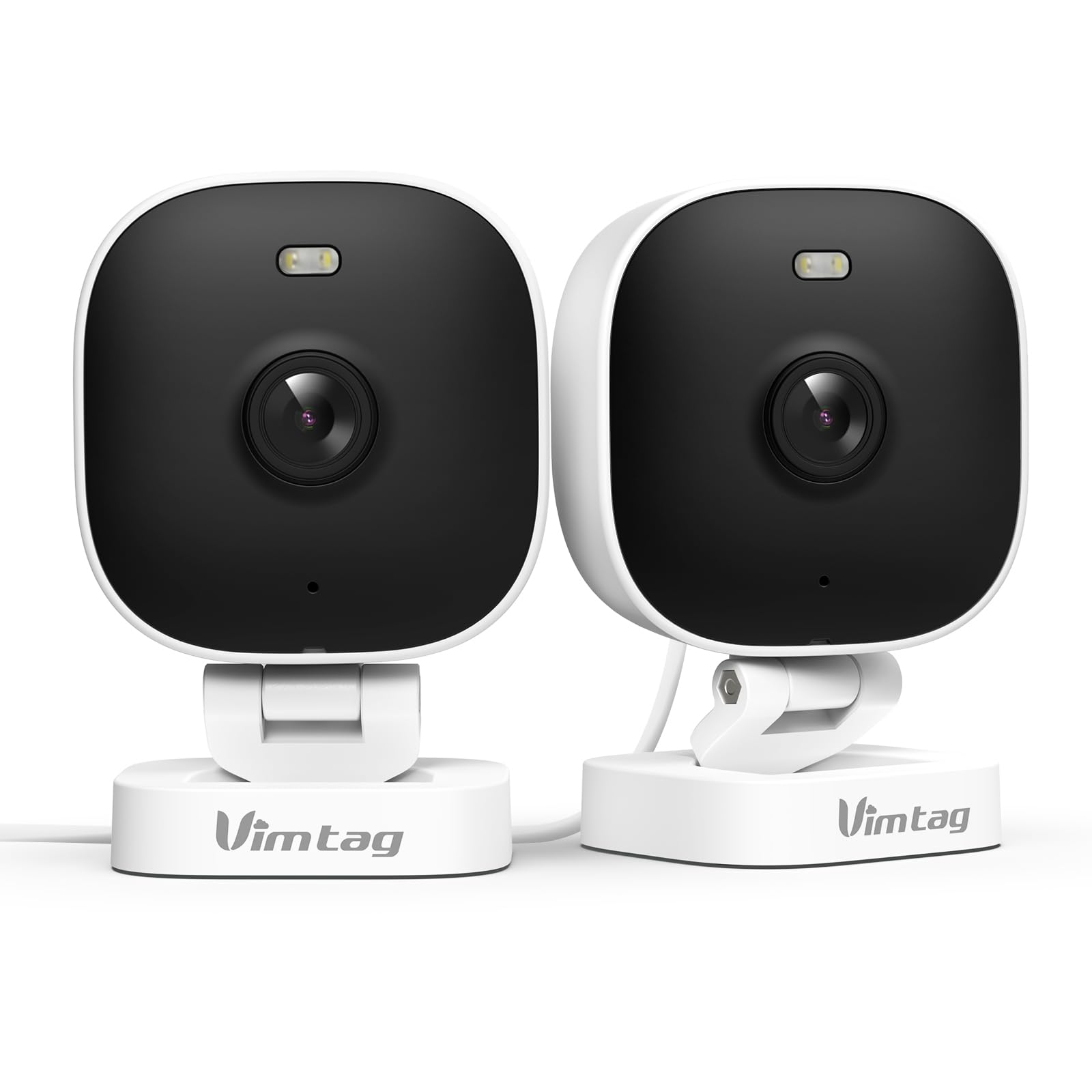
The VIMTAG 8310 2.5K Security Camera is designed to provide comprehensive surveillance for your home, pets, and loved ones. This manual provides detailed instructions for setting up, operating, and maintaining your camera to ensure optimal performance and security.
שליסל פֿעיִקייטן:
- קעסיידערדיק אָפּעראַציע: The camera operates 24/7 via a plug-in power cable, eliminating the need for battery charging. It supports 2.4GHz and 5GHz dual-band WiFi, including WiFi 6 technology, for stable connections.
- הויך-האַכלאָטע ווידעא: Provides 2.5K resolution for clear day and night visibility. Features full-color night vision, enhanced by a built-in LED light, for detailed monitoring in various indoor and outdoor environments.
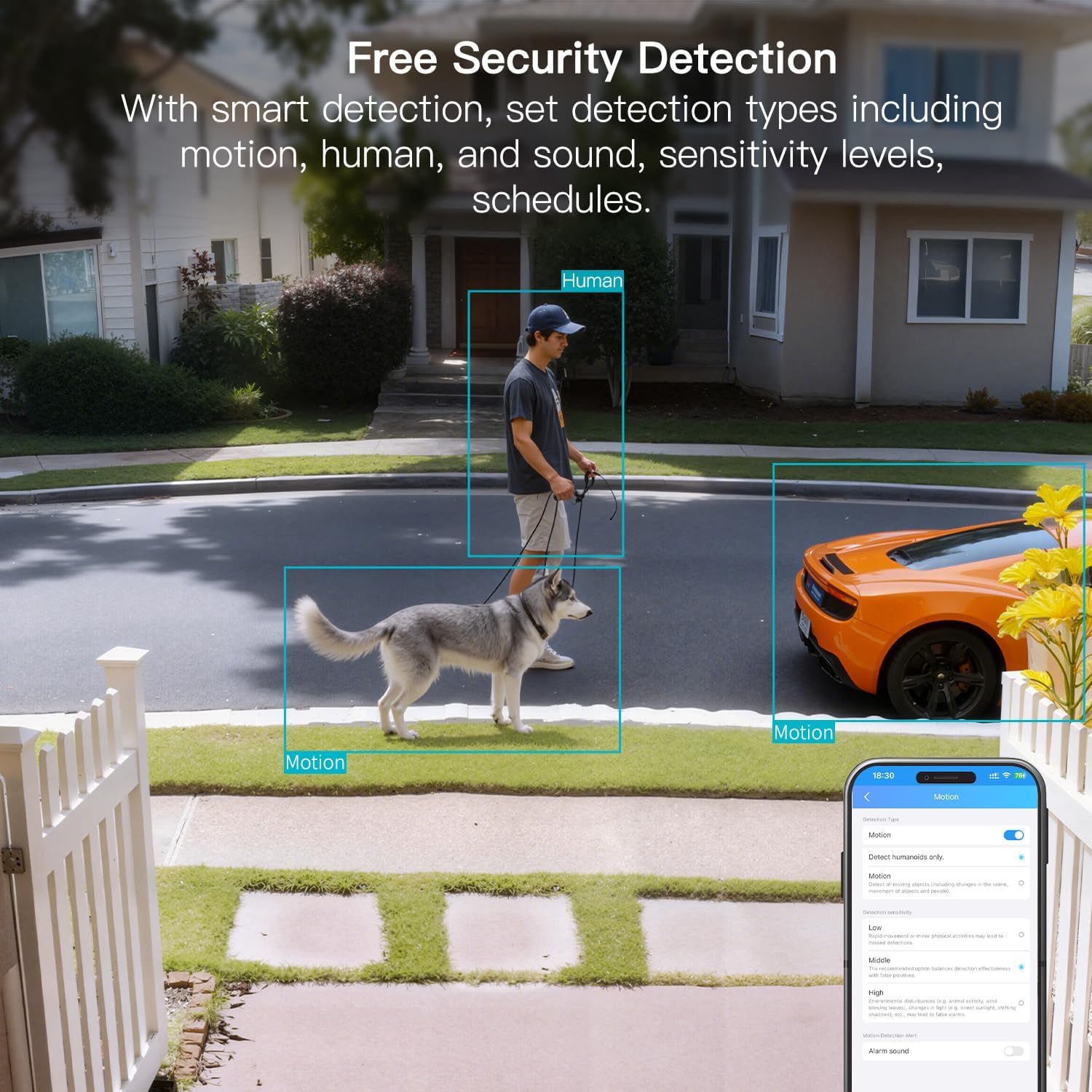
- קלוג דעטעקשאַן: Offers advanced detection capabilities for motion, people, and sound up to 33 feet. Users receive instant alerts for detected activity.
- וועטער קעגנשטעל: Rated IP65, the camera is designed for outdoor use and can withstand rain, snow, heat, and cold, ensuring continuous operation in various weather conditions.
- Remote Access and Two-Way Audio: The mobile app allows remote access to live video footage and recorded content. Built-in two-way audio enables real-time communication through the camera.
- סענטראַלייזד פאַרוואַלטונג: Up to 32 Vimtag WiFi cameras can be managed within a single application. Features include smart cloud storage (subscription required), motion detection, and event filtering.
2. וואָס איז אין דער קעסטל
ביטע טשעקט די אינהאַלט פון די פּאַקעט צו זיכער מאַכן אַז אַלע זאכן זענען דאָרט:
- Camera with cable
- מאַונטינג שרויף
- מאַכט אַדאַפּטער
- ינסטרוקטיאָן מאַנואַל (דעם דאָקומענט)
3. סעטאַפּ
3.1 ערשטע סעטאַפּ און אַפּ קאַנעקשאַן
- אראפקאפיע די אַפּ: זוכן פֿאַר "Canny Cam" in your smartphone's app store (iOS or Android) and download the application.
- רעגיסטרירן אַקאַונט: Open the Canny Cam app and follow the on-screen instructions to register a new user account.
- מאַכט אויף: Connect the camera to the power adapter using the provided cable and plug it into an electrical outlet. The camera will power on automatically.
- לייג דיווייס: In the Canny Cam app, select the option to add a new device. Enable Bluetooth and Wi-Fi on your smartphone as prompted by the app.
- פֿאָלגן די אינסטרוקציעס אין דער אַפּ: The app will guide you through the process of connecting the camera to your home Wi-Fi network. Ensure your Wi-Fi network is 2.4GHz or 5GHz compatible.
- פֿאַרבינדונג באַשטעטיקונג: Once successfully connected, the app will confirm the device has been added.

Image: Visual guide showing the steps to download the Canny Cam app, enable Bluetooth and Wi-Fi, and connect the camera.
3.2 מאַונטינג אָפּציעס
The VIMTAG 8310 camera offers flexible mounting options to suit various indoor and outdoor locations. Use the provided mounting screws for secure installation.
- וואנט בארג: Securely attach the camera to a wall using the mounting bracket and screws.
- Ceiling Mount: Install the camera on a ceiling for an overhead view.
- Tabletop Mount/Freestanding: Place the camera on a flat surface such as a table, shelf, or desk.
- Door Mount/Window Mount: Position the camera near doors or windows for specific entry point monitoring.

Image: A hand using a screwdriver to mount the VIMTAG camera to a surface.
בילד: עקסamples of various mounting positions for the camera, including freestanding, wall-mounted, and ceiling-mounted.
4. אַפּערייטינג די קאַמעראַ
4.1 לעבן View און רעקאָרדינג
Access the live video feed and recorded footage through the Canny Cam app on your smartphone or tablet.

Image: A comparison demonstrating the enhanced detail of 2.5K QHD resolution compared to 1080p.
4.2 קאָליר נאַכט זעאונג
The camera features full-color night vision, providing clear and detailed images even in low-light conditions, unlike traditional black-and-white night vision.
Image: A visual comparison illustrating the difference between color night vision and traditional night vision.
4.3 Dual-Band Wi-Fi Connectivity
The camera supports both 2.4GHz and 5GHz Wi-Fi bands, offering flexibility for network connection. 2.4GHz provides a stable connection over longer distances, while 5GHz offers faster speeds for shorter ranges.

Image: Explanation of 2.4GHz and 5GHz Wi-Fi benefits for the camera's connectivity.
4.4 קלוגע דעטעקציע און וואָרענונגען
Configure motion, human, and sound detection settings within the Canny Cam app. The camera can trigger a smart sound and light alarm and send instant notifications to your smartphone upon detecting activity.

Image: Depiction of the smart sound and light alarm feature in action.

Image: App interface showing options for setting detection types and sensitivity levels.
4.5 צוויי-וועג אַודיאָ
Utilize the built-in microphone and speaker for two-way communication. This allows you to speak to visitors, deter intruders, or comfort pets remotely.
בילד: עקסample of using two-way audio to communicate through the camera.
4.6 סטאָרידזש אָפּציעס
The camera supports local storage via a MicroSD card (up to 512GB, sold separately) for continuous or event-triggered recording. Cloud storage is also available through a subscription service, offering event recording and multi-device playback.

Image: The camera's recording capabilities to a TF card or cloud storage.

בילד: איבערview of Canny Cam app features, including those available with and without a cloud subscription.
4.7 אַלעקסאַ אינטעגראַציע
The VIMTAG 8310 camera is compatible with Alexa, allowing for hands-free control and live streaming to compatible Alexa-enabled devices.

בילד: עקסample of using Alexa to view די אַפּאַראַט פיטער.
5. וישאַלט
To ensure the longevity and optimal performance of your VIMTAG 8310 camera, follow these maintenance guidelines:
- רייניקונג: ווישט רעגולער אויס די קאַמעראַ לענס און קערפּער מיט אַ ווייכן, טרוקענעם שטאָף צו באַזייַטיקן שטויב און שמוץ. פֿאַרמייַדט ניצן שטרענגע כעמיקאַלן אָדער אַברייסיוו מאַטעריאַלן.
- Firmware דערהייַנטיקונגען: Check the Canny Cam app periodically for available firmware updates. Keeping your camera's firmware up-to-date ensures you have the latest features and security enhancements.
- מאַכט צושטעלן: Ensure the camera is connected to a stable power source. Avoid using damaged cables or adapters.
- ענוויראָנמענטאַל שוץ: While the camera is IP65-rated for weather resistance, avoid direct exposure to extreme conditions or prolonged submersion in water.
6. טראָובלעשאָאָטינג
If you encounter any issues with your VIMTAG 8310 camera, please refer to the following common troubleshooting tips or contact support:
- קיין מאַכט: Ensure the power adapter is securely connected to both the camera and a working electrical outlet.
- Wi-Fi קאַנעקשאַן ישוז: Verify your Wi-Fi network is active and the camera is within range. Try restarting your router and the camera. Ensure you are connecting to the correct 2.4GHz or 5GHz network as supported by your router and camera settings.
- אַפּ קאַנעקטיוויטי פּראָבלעמס: Check if your smartphone has a stable internet connection. Ensure the Canny Cam app is updated to the latest version. Try restarting the app or your phone.
- נעבעך ווידעא קוואַליטעט: Check your internet speed. A slow connection can affect streaming quality. Ensure the camera lens is clean.
- באַוועגונג דעטעקשאַן ניט ארבעטן: Review the motion detection settings in the Canny Cam app to ensure they are configured correctly and sensitivity levels are appropriate.
Note: No relevant product videos with 'creator_type: Seller' were found in the provided data to include in this section.
7. ספּעסאַפאַקיישאַנז
| שטריך | דעטאַל |
|---|---|
| דרינענדיק / דרויסנדיק באַניץ | דרינענדיק, דרויסנדיק |
| קאַמפּאַטאַבאַל דעוויסעס | Smartphone, iPhone, iPad, Android Phone, Android Pad |
| מאַכט מקור | קאָרדעד עלעקטריק |
| קאַנעקטיוויטי פּראָטאָקאָל | ווי-פי |
| קאָנטראָללער טיפּ | APP |
| מאַונטינג טיפּ | Wall mount, Ceiling mount, Tabletop Mount, Freestanding, Door mount, Window mount |
| ווידעא קאַפּטורע רעסאָלוטיאָן | 1440 פּ (2.5 ק) |
| קאָליר | ווייַס |
| נומער פון זאכן | 2 |
| נומער פון טשאַנאַלז | 2 |
| ווירעלעסס קאָמוניקאַציע טעכנאָלאָגיע | ווי-פי |
| פאָרם פאַקטאָר | קובע |
| עפעקטיוו ווידעא האַכלאָטע | 4 מפּ |
| Viewינג אַנגלע | 130 דיגריז |
| נאַכט וויזשאַן ראַנגע | 33 פֿיס |
| ראַם קורס | 25 ראָמען פּער סעקונדע |
| מאַטעריאַל | פּלאַסטיק |
| Voltage | 5 וואלטס |
| וואָסtage | 5 וואטס |
| נומער דימענשאַנז L X W X H | 2.28 X 1.85 X 2.8 אינטשעס |
| וואַסער קעגנשטעל מדרגה | וואָטערפּרוף (IP65) |
| באַטעריז פארלאנגט? | ניין |
| פלאַש זכּרון טיפּ | מיקראָ סד |
| פּונקט וואָג | 0.19 קילאָגראַמס (6.7 אונסעס) |
| ווידעא קאָדירונג | H.264 & H.265 |
| פאָרעם | רעקטאַנגגיאַלער |
| פאָקוס טיפּ | אַוטאָ פאָקוס |
| נידעריק ליכט טעכנאָלאָגיע | נאַכט קאָליר |
| פארגרעסער טיפּ | דיגיטאַל פארגרעסער |
| פארגרעסער פאַרהעלטעניש | 8 |
| פלינק טיפּ | אַודיאָ און באַוועגונג |
| ליכט מקור טיפּ | LED, IR |
| ווידעא קאַפּטורע פֿאָרמאַט | עמפּעג-4 |
| פאָטאָ סענסאָר טעכנאָלאָגיע | קמאָס |
| עפעקטיוו נאָך האַכלאָטע | 4 מפּ |
| אינטערנאַציאָנאַלע פּראַטעקשאַן שאַץ | IP66 |
| מאַקסימום Webקאַם בילד רעסאָלוטיאָן | 4 מפּ |
| קאָנטראָל מעטאָד | אַפּ, ווייַט |
| נומער פון יר לעדס | 2 |
| פלאַש מעמאָרי שטיצט מאַקסימום גרייס | 512 גיגאבייט |
| פּראָדוקט גראַד | רעזידענטשאַל שטח |
| סמאַרט היים קאַמפּאַטאַבילאַטי | Smart Home Compatible |
| סעליאַלער טעכנאָלאָגיע | 2.4G 5G |
| Audio Visual Recording Capabilities | Audio, Still Image, Video |
| אָפטקייַט באַנד קלאַס | צווייענדיק-באַנד |

Image: Product dimensions of the VIMTAG 8310 camera.
8. וואָראַנטי און שטיצן
For expert support with setting up and optimizing your VIMTAG cameras, please contact our support team:
- טעלעפאָן שטיצן: +1 (978) 437-5767
- אַוויילאַביליטי: Monday to Friday, 9:00 AM - 6:00 PM (ET)
VIMTAG is committed to providing lifetime technical support for its products. For any inquiries or assistance, please reach out to our dedicated support channels.

Image: VIMTAG Free Expert Support contact information.