
1. הקדמה
Thank you for choosing the KEJOG Mini Projector. This manual provides essential information for the safe and efficient operation of your device. Please read it thoroughly before use and retain it for future reference.
The KEJOG Mini Projector features native 1080P resolution with 4K compatibility, electric focus, a 180-degree adjustable stand, and Bluetooth connectivity, offering a versatile entertainment experience.
2. זיכערקייַט אינפֿאָרמאַציע
- עלעקטריקאַל זיכערקייַט: Ensure the power supply matches the projector's requirements. Do not expose the projector to rain or moisture. Avoid using damaged power cords or plugs.
- ווענטילאַטיאָן: בלאָקירט נישט די ווענטילאַציע עפענונגען. זאָרגט פֿאַר גענוג פּלאַץ אַרום דעם פּראָיעקטאָר פֿאַר געהעריקן לופֿטפֿלוס כּדי צו פֿאַרמייַדן איבערהיצונג.
- האַנדלינג: Handle the projector with care. Avoid dropping or subjecting it to strong impacts. Do not look directly into the lens when the projector is operating, as the bright light can cause eye strain.
- רייניקונג: טרענט אפ די עלעקטריציטעט איידער איר רייניגט. ניצט א ווייכע, טרוקענע שטאָף צו רייניקן די אויסערליכע זייט. פאר די לענס, ניצט א ספעציאליזירטע לענס רייניקונג שטאָף.
- אַפּערייטינג סוויווע: Operate the projector in a clean, dust-free environment. Avoid extreme temperatures.
3. פּעקל אינהאַלט
באַשטעטיקט אַז אַלע זאכן וואָס זענען אויסגערעכנט אונטן זענען אַרייַנגערעכנט אין אייער פּעקל:
- KEJOG Mini Projector
- ווייַט קאָנטראָל
- מאַכט שנור
- HDMI קאַבלע
- באַניצער מאַנואַל
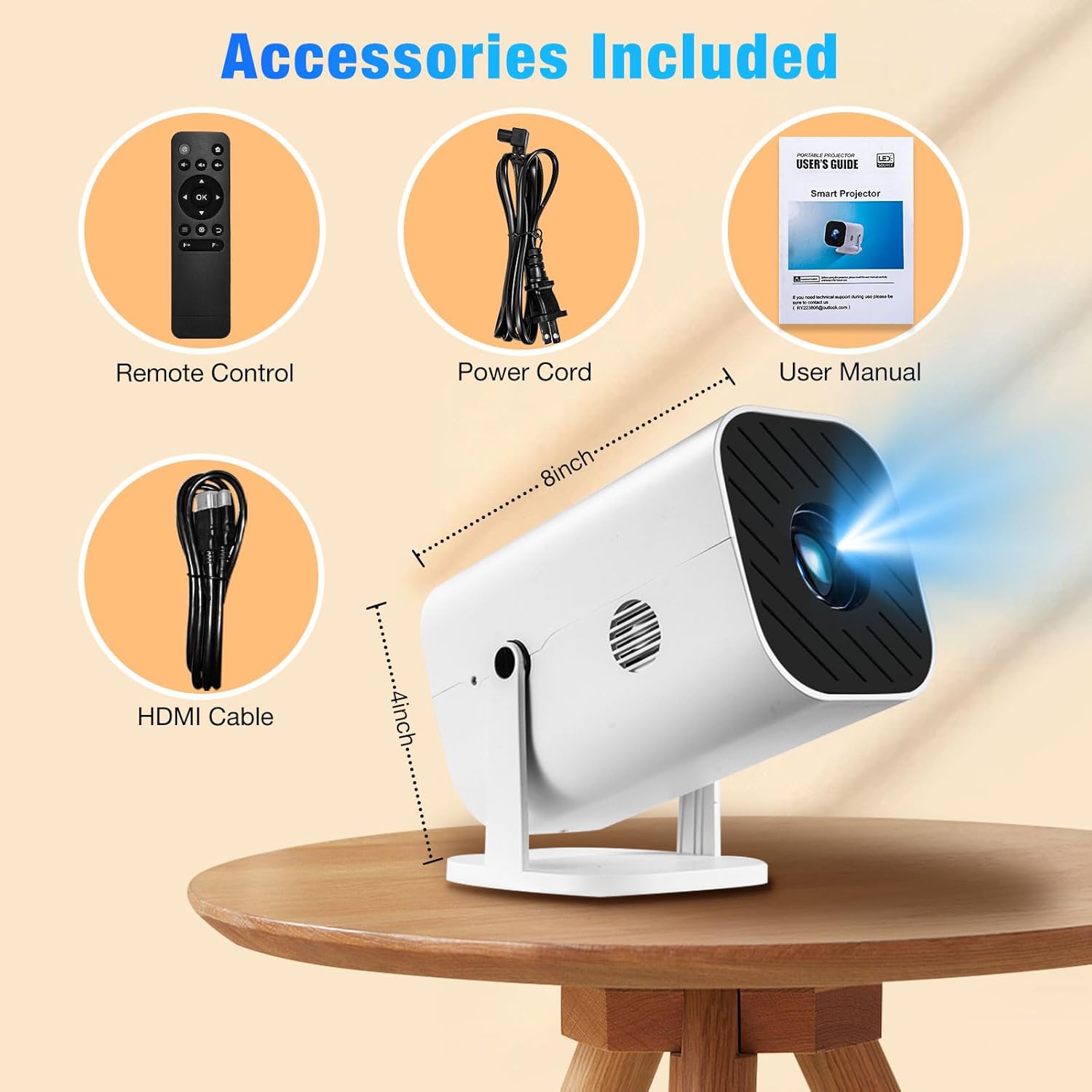
This image displays all items included in the KEJOG Mini Projector package: the projector unit, a remote control, a power cord, an HDMI cable, and the user manual. The dimensions of the projector (approximately 8 inches long and 4 inches high) are also indicated.
4. פּראָדוקט איבערview
The KEJOG Mini Projector is designed for portability and ease of use, featuring a compact form factor and versatile projection capabilities.

This image displays the KEJOG Mini Projector from a front-side angle, showcasing its compact design and the lens. In the background, a projected image of a dolphin illustrates the projector's capabilities, with feature callouts for 4K support, Bluetooth 5.3, Electric Focus, and 8500 Lumens.
שליסל פֿעיִקייטן:
- עלעקטריק פאָקוס: Adjust image clarity with the remote control.
- 180° אַדזשאַסטאַבאַל שטאַנד: Project onto walls, ceilings, or floors from various angles.
- געבויט-אין רעדנער: Provides integrated audio output.
- בלועטאָאָטה 5.2: Connect external audio devices wirelessly.
- Native 1080P, 4K Compatible: Delivers high-resolution visuals.
- ברייט קאַנעקטיוויטי: HDMI, USB, and 3.5mm audio jack for various devices.
5. סעטאַפּ
5.1 פּלייסמאַנט
Position the projector on a stable, flat surface. Utilize the 180° adjustable stand to direct the projection onto your desired surface (wall, ceiling, or floor). The optimal projection distance ranges from 4.9ft to 18.4ft, allowing for screen sizes between 47 inches and 200 inches.

This image showcases the KEJOG Mini Projector's integrated 180-degree adjustable bracket. It illustrates how the projector can be tilted to various angles (0°, 45°, 90°, 135°, 180°) for multi-angle projection on walls, ceilings, or floors, emphasizing its compact and portable design.
5.2 מאַכט קאַנעקשאַן
- פֿאַרבינדט דעם צוגעשטעלטן מאַכט שנור צום פּראָיעקטאָר'ס מאַכט אַרייַנגאַנג פּאָרט.
- שטעקט אריין דעם אנדערן עק פונעם עלעקטרישן שנור אין א געווענליכן עלעקטרישן ווענטיל.
5.3 קאַנעקטינג דעוויסעס
דער פּראָיעקטאָר שטיצט פֿאַרשידענע אַרייַנשרייַב קוואלן:
- הדמי: Connect devices such as laptops, gaming consoles (PS5, Switch), TV sticks, DVD players, and set-top boxes using the included HDMI cable.
- וסב: אַרײַנשטעלן אַ USB דרייוו צו שפּילן מעדיע files גלייַך.
- אַודיאָ אַרויס (3.5 מם דזשעק): פאַרבינדן פונדרויסנדיק ספּיקערז אָדער כעדפאָונז פֿאַר ימפּרוווד אַודיאָ.
- Smartphone Wired Connection: For Android phones and iPhones, an HDMI adapter cable (not included) is required to mirror your device's screen.

This image details the wide range of connectivity options for the KEJOG Mini Projector. It highlights Audio output (for speakers/headsets), HDMI input (for iPhones/Android, Tablets/Laptops, PS5, TV Sticks), and USB input (for USB disks). Popular streaming service logos are also displayed, indicating compatibility.

This image illustrates how to connect a smartphone to the KEJOG Mini Projector using an HDMI adapter cable (not included). A gaming scene is projected onto a wall, while the phone's screen mirrors the content, demonstrating wired connectivity for mobile devices.
6. אַפּערייטינג ינסטרוקטיאָנס
6.1 מאַכט אויף / אַוועק
דריק דעם מאַכט קנעפּל אויף דעם פּראָיעקטאָר אָדער די ווײַטקאָנטראָל צו דרייען דעם מיטל אָן אָדער אויס.
6.2 Electric Focus Adjustment
To achieve a clear image, use the 'F+' and 'F-' buttons on the remote control to adjust the electric focus. This allows for precise image sharpening without manual lens manipulation.

This image demonstrates the electric focus function of the KEJOG Mini Projector. A hand holds the remote control, pointing to the F+/F- buttons used for focus adjustment. A clear image of a butterfly is projected, indicating successful focusing, contrasting with manual adjustment methods.
6.3 Bluetooth Pairing (Audio Devices Only)
The projector's Bluetooth 5.2 allows connection to external audio devices like speakers or headphones. Navigate to the Bluetooth settings in the projector's menu, enable Bluetooth, and select your desired audio device to pair. Note: Bluetooth is for audio output only and does not support video mirroring from smartphones.
6.4 אויסוואל פון איינגאבע מקור
Use the 'Source' button on the remote control or projector to cycle through available input options (HDMI, USB, etc.) and select the one corresponding to your connected device.
7. ספּעסאַפאַקיישאַנז

This image compares the visual output of the KEJOG Mini Projector ('Ours') with another projector ('Other'), demonstrating superior color vibrancy and clarity. The projector itself is shown with its lens assembly, emphasizing its optical components. Key features like 4K support, 50000 Lumens, and 10000:1 contrast ratio are highlighted.
| שטריך | באַשרייַבונג |
|---|---|
| סאָרט | KEJOG |
| רעקאָממענדעד ניצט | געשעפט, בילדונג, גיימינג, היים קינאָ |
| ספּעציעלע פֿעיִקייטן | Built-In Speaker, Lightweight, Portable, Electric Focus, 180° Adjustable Stand |
| קאַנעקטיוויטי טעכנאָלאָגיע | 3.5mm Jack, Bluetooth, HDMI, USB |
| ווייַז האַכלאָטע | 1920 x 1080 (Native 1080P, Compatible 4K) |
| פּרויעקציע גרייס | 47" - 200" |
| פּרויעקציע דיסטאַנסע | 4.9 פֿוס - 18.4 פֿוס |
| בלועטאָאָטה ווערסיע | 5.2 |
8. טראָובלעשאָאָטינג
If you encounter issues with your KEJOG Mini Projector, refer to the following common problems and solutions:
- קיין מאַכט:
- Ensure the power cord is securely connected to both the projector and the power outlet.
- קוק אויב די מאַכט ווענטיל איז פאַנגקשאַנאַל.
- קיין בילד:
- Verify that the correct input source is selected (HDMI, USB).
- Check the connection cable (HDMI, USB) for damage or loose connections.
- Ensure the connected device is powered on and outputting a signal.
- בלערי בילד:
- Use the 'F+' and 'F-' buttons on the remote control to adjust the electric focus.
- זיכער מאַכן אַז די פּראָיעקציע־איבערפֿלאַך איז גלאַט און דער פּראָיעקטאָר איז סטאַביל.
- קיין קול:
- קאָנטראָלירן די באַנד סעטטינגס אויף ביידע די פּראַדזשעקטער און די קאָננעקטעד מיטל.
- If using Bluetooth, ensure the external audio device is properly paired and its volume is up.
- אויב איר ניצט HDMI, זאָרגט אַז די אַודיאָ אַרויסגאַנג איז ריכטיק קאָנפיגורירט אויף דער מקור מיטל.
- בלועטאָאָטה קאַנעקשאַן ישוז:
- Ensure the Bluetooth audio device is in pairing mode and within range.
- Restart both the projector and the Bluetooth device.
- Remember, Bluetooth is for audio devices only, not for video mirroring from smartphones.
9. וישאַלט
9.1 רייניקן די לינז
Use a soft, lint-free lens cleaning cloth to gently wipe the projector lens. Avoid using abrasive materials or chemical cleaners that could damage the lens coating.
9.2 Cleaning the Vents
Periodically clean the projector's ventilation openings with a soft brush or compressed air to prevent dust buildup, which can impede airflow and lead to overheating.
9.3 סטאָרידזש
When not in use, store the projector in a cool, dry, and dust-free environment. If storing for an extended period, consider placing it in its original packaging or a protective case.
10. וואָראַנטי און שטיצן
Your KEJOG Mini Projector comes with a 3-year warranty service. For technical assistance or warranty claims, please contact our 24/7 technical support team. Refer to the contact information provided in your purchase documentation or on the official KEJOG webפּלאַץ.