
1. הקדמה
This manual provides essential information for setting up, operating, and maintaining your MOREFINE Mini PC M9. Please read these instructions carefully before using the device to ensure optimal performance and safety.
The MOREFINE Mini PC M9 is a compact desktop computer designed for various applications, including office work, business tasks, and home entertainment. It features a 13th Generation Twin Lake N150 processor, 8GB DDR4 RAM, and a 256GB PCIe M.2 SSD, offering efficient performance in a small form factor.
2. זיכערקייַט אינפֿאָרמאַציע
- זיכער מאַכן אַז דער מאַכט אַדאַפּטער איז קאָמפּאַטיבל מיט אייער לאָקאַלער מאַכט צושטעל.
- שטעלט נישט אויס דעם אפאראט צו וואסער, פייכטקייט, אדער עקסטרעמע טעמפעראטורן.
- ויסמיידן פּלייסינג די מיטל אין דירעקט זונשייַן אָדער לעבן היץ קוואלן.
- נישט עפענען דעם סיasing or attempt to repair the device yourself. Refer to qualified service personnel.
- האַלטן ווענטאַליישאַן אָופּאַנינגז קלאָר צו פאַרמייַדן אָוווערכיטינג.
- ניצן בלויז באוויליקט אַקסעסעריז און פּעריפעראַלס.
3. פּעקל אינהאַלט
באַשטעטיקן אַז אַלע זאכן זענען פאַראַן אין פּעקל:
- MOREFINE Mini PC M9 Unit
- מאַכט אַדאַפּטער
- HDMI קאַבלע
- באַניצער מאַנואַל
- וועסאַ מאָונט (אפציאָנעל, קען זיין אַנדערש לויט פּעקל)
4. פּראָדוקט איבערview
The MOREFINE Mini PC M9 is designed for efficiency and connectivity. Below are the key features and port layouts.
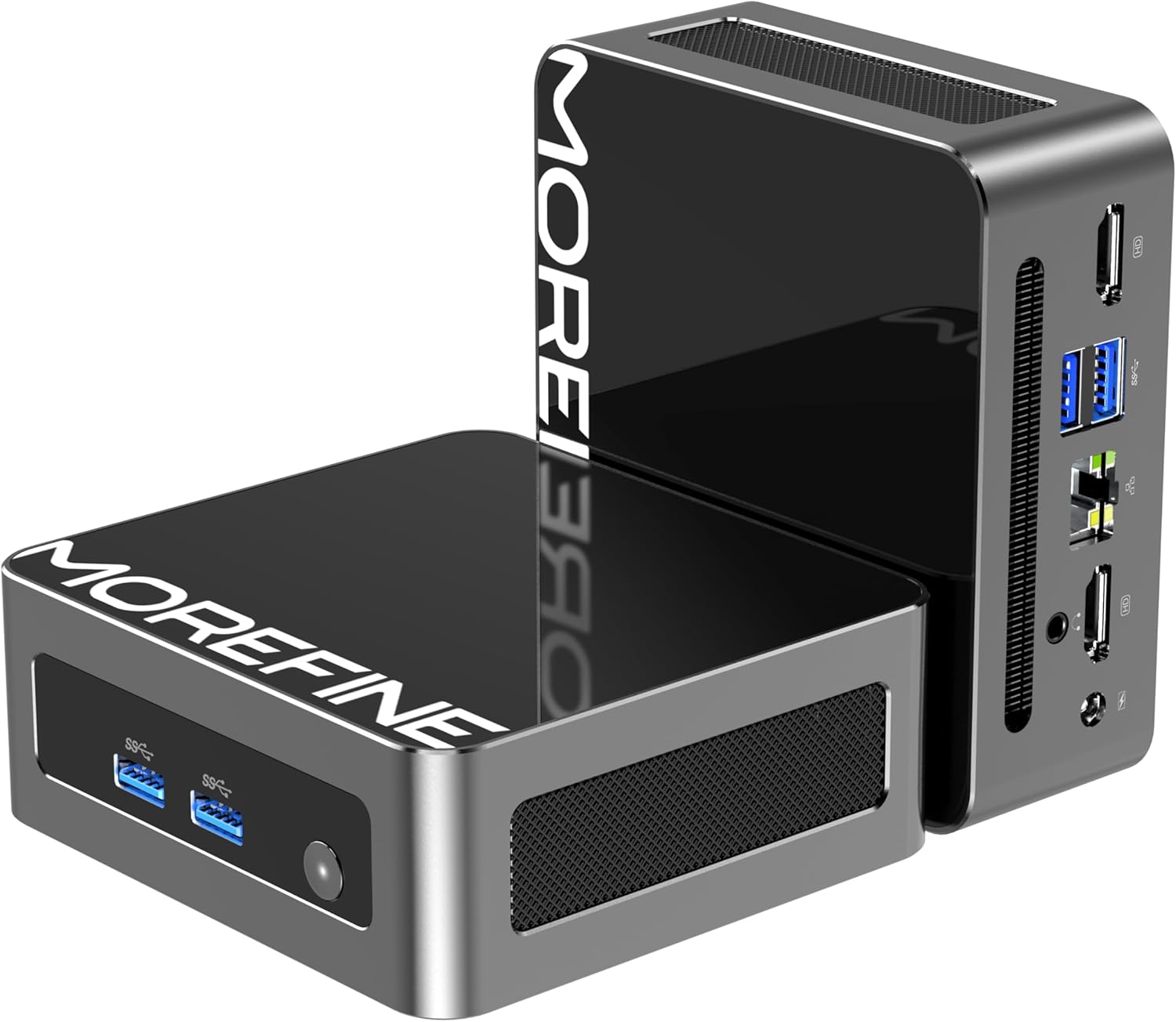
בילד: פראָנט און זייט view of the MOREFINE Mini PC M9, showcasing its compact design and accessible ports.

בילד: איבערview of the Mini PC's features including Twin Lake N150 processor, dual 4K output, space-saving design, quiet fan, DDR4 RAM, WiFi+Bluetooth, and 2.5G LAN.
פּאָרט אויסלייג
- פראָנט פּאָרץ: Power Button, USB 3.2 x 2
- דערציען פּאָרץ: USB 3.2 x 2, 2.5GbE RJ45 x 1, HDMI 2.0 x 2, 3.5mm Audio Jack x 1, DC Power Input x 1

Image: Close-up of the side ports on the MOREFINE Mini PC M9, showing USB 3.2 ports and the power button.

בילד: הינטערשטע view of the MOREFINE Mini PC M9, detailing the HDMI, USB, RJ45, and power input ports.
5. סעטאַפּ
Follow these steps to set up your MOREFINE Mini PC M9:
- פאַרבינדן פּעריפעראַלס: Connect your monitor(s) to the HDMI ports using HDMI cables. Connect your keyboard and mouse to the USB ports.
- נעץ קאַנעקשאַן: For a wired connection, connect an Ethernet cable to the 2.5GbE RJ45 port. For wireless, the device supports WiFi 6 and Bluetooth 5.2, which can be configured after initial boot.
- מאַכט קשר: Connect the power adapter to the DC power input port on the Mini PC, then plug the adapter into a power outlet.
- מאַכט אויף: Press the power button located on the front of the device. The system will boot up.
- ערשט סעטאַפּ: Follow the on-screen instructions to complete the operating system setup (e.g., Windows 11). This typically involves selecting language, region, and creating a user account.

Image: Demonstrates the compact size and multiple placement options for the Mini PC, including laying flat or mounting on the back of a monitor.
6. אָפּערייטינג
צווייענדיק ווייַז סעטאַפּ
The Mini PC supports dual 4K display output via its two HDMI 2.0 ports. To set up dual monitors:
- Connect both monitors to the HDMI ports on the Mini PC.
- Power on the Mini PC and both monitors.
- Once the operating system loads, right-click on the desktop and select 'Display settings' (Windows) or similar.
- Configure the display mode (e.g., Extend, Duplicate) and resolution for each monitor as desired.

Image: Illustration of the Mini PC connected to two monitors, demonstrating its dual 4K display capability for enhanced multitasking.
נעץ און בלועטוט קאָנעקטיוויטי
- WiFi 6: Access network settings in your operating system to connect to available wireless networks.
- בלועטאָאָטה 5.2: Enable Bluetooth in your operating system settings to pair with compatible devices like keyboards, mice, or headphones.
Auto Power On and Wake On LAN
The Mini PC supports Auto Power On and Wake On LAN features. These settings can typically be configured within the BIOS/UEFI setup. To access BIOS/UEFI, press the 'Del' key repeatedly during startup. You may need to adjust the boot delay in Windows advanced startup options if the default 1-second delay is too short.
7. וישאַלט
רייניקונג
- ניצן אַ ווייך, טרוקן שטאָף צו ריין די יקסטיריער פון די מיטל.
- פֿאַר שווערן שמוץ, אַ ביסל דampשווענק דעם שטאָף מיט וואַסער. פֿאַרמייַדט שאַרפע כעמיקאַליעס.
- Periodically clean the ventilation openings with a soft brush or compressed air to prevent dust buildup.
Storage and RAM Expansion
The MOREFINE Mini PC M9 supports storage and RAM upgrades:
- באַראַן: The device has one DDR4 SODIMM slot, supporting up to 32GB DDR4 3200MHz RAM.
- סטאָרידזש: It features one M.2 2280 NVMe PCIe 3.0 slot and one M.2 2242 SATA3 slot, supporting up to 4TB of storage expansion.
To perform upgrades, it is recommended to consult a qualified technician or refer to detailed online guides specific to the M9 model to avoid damaging internal components.

בילד: אינערלעך view of the Mini PC, highlighting the DDR4 SODIMM slot, M.2 2280 NVMe PCIe, and M.2 2242 SATA slots for memory and storage expansion.
8. טראָובלעשאָאָטינג
אויב איר טרעפט פּראָבלעמען מיט אייער מיני פּיסי, זעט די פאלגענדע געוויינטלעכע פּראָבלעמען און לייזונגען:
- קיין מאַכט:
- זיכער מאַכן אַז דער מאַכט אַדאַפּטער איז זיכער פארבונדן צו ביידע די מיני פּיסי און אַ אַרבעטנדיק מאַכט ווענטיל.
- פּרובירן די מאַכט ווענטיל מיט אן אנדער מיטל.
- If the power button LED does not illuminate, there might be an issue with the power button or internal power delivery. Contact support if basic checks fail.
- קיין ווייַז:
- Verify that the HDMI cable(s) are securely connected to both the Mini PC and the monitor(s).
- זיכער מאַכן אַז דער מאָניטאָר איז אנגעצונדן און איינגעשטעלט צו דער ריכטיקער אינפוט מקור (HDMI 1, HDMI 2, אאז"וו).
- Try connecting to a different monitor or using a different HDMI cable.
- No Network Connection (WiFi/Ethernet):
- פֿאַר עטערנעט, קאָנטראָלירט די קאַבל פֿאַרבינדונג און ראַוטער סטאַטוס.
- For WiFi, ensure WiFi is enabled in the operating system and you are connecting to the correct network with the correct password.
- Restart your router/modem and the Mini PC.
- Operating System Issues (e.g., updates failing):
- Ensure you have a stable internet connection for updates.
- Check for available disk space.
- Run the operating system's built-in troubleshooters.
- Consider performing a clean installation of the operating system if issues persist and are not resolved by standard troubleshooting.
9. ספּעסאַפאַקיישאַנז
Detailed technical specifications for the MOREFINE Mini PC M9:
| שטריך | באַשרייַבונג |
|---|---|
| מאָדעל | M9 |
| פּראַסעסער | Intel 13th Gen Twin Lake N150 (4 Cores, 4 Threads, up to 3.6 GHz) |
| גראַפיקס | אינטעל UHD גראַפיקס (אינטעגרירט) |
| באַראַן | 8 גיגאבייט DDR4 3200MHz (אויסברייטבאר ביז 32 גיגאבייט) |
| סטאָרידזש | 256GB PCIe M.2 SSD (Expandable up to 4TB via M.2 2280 NVMe PCIe 3.0 and M.2 2242 SATA3 slots) |
| אָפּערייטינג סיסטעם | OS (Pre-installed, typically Windows) |
| ווידעא רעזולטאַט | 2 x HDMI 2.0 (Supports Dual 4K@60Hz) |
| וסב פּאָרץ | 4 רענטגענ וסב 3.2 |
| נעץ | 1 x 2.5GbE RJ45, WiFi 6 (802.11ax Dual-band), Bluetooth 5.2 |
| אַודיאָ | 1 רענטגענ 3.5 מם אַודיאָ דזשאַק |
| מאַכט אַרייַנשרייַב | DC 12V/3A |
| דימענשאַנז | בעערעך 4.49 X 4.17 X 1.73 אינטשעס |
| וואָג | בעערעך 1.43 פונט |
10. וואָראַנטי און שטיצן
וואָראַנטי אינפֿאָרמאַציע
Your MOREFINE Mini PC M9 comes with a standard manufacturer's warranty. Please refer to the warranty card included in your package or the product listing for specific terms and duration. Keep your proof of purchase for warranty claims.
טעכניש שטיצן
For technical assistance, troubleshooting beyond this manual, or warranty inquiries, please contact MOREFINE customer support through the retailer where you purchased the product or visit the official MOREFINE webפּלאַץ פֿאַר קאָנטאַקט אינפֿאָרמאַציע.