
הקדמה
Thank you for choosing the Csasan T70 Smart Watch. This manual provides essential information for setting up, operating, and maintaining your device. The T70 Smart Watch features a 1.91-inch HD display, Bluetooth calling capabilities, over 110 sports modes, 24/7 health monitoring, and IP68 water resistance. Please read this manual thoroughly to ensure optimal performance and longevity of your smartwatch.

Image: Csasan T70 Smart Watch highlighting key features.
וואָס איז אין די קעסטל
באַשטעטיקן אַז אַלע זאכן זענען פאַראַן אין דיין פּעקל:
- סמאַרט וואַך x1
- מאַגנעטיק טשאַרדזשער x1
- באַניצער מאַנואַל x1

Image: Illustration of the Csasan T70 Smart Watch package contents.
סעטאַפּ
1. אויפלאָדן דעם סמאַרט וואַך
Before first use, fully charge your Csasan T70 Smart Watch. Connect the magnetic charger to the charging points on the back of the watch and plug the USB end into a power adapter (not included) or a computer's USB port. A full charge typically takes approximately 2 hours.

Image: Smartwatch charging process and battery life details.
2. אַפּ ינסטאַללאַטיאָן
To unlock all features and synchronize data, download and install the גלאָריפיט אַפּ אויף דיין סמאַרטפאָנע. זוכן פֿאַר "Gloryfit" in the Apple App Store (for iOS devices) or Google Play Store (for Android devices).
3. פארבינדן מיט אייער סמאַרטפאָון
- מאַכן זיכער אַז בלועטאָאָטה איז ענייבאַלד אויף דיין סמאַרטפאָנע.
- עפֿנט די Gloryfit אַפּ און פֿאָלגט די אינסטרוקציעס אויף דעם עקראַן צו שאַפֿן אַ חשבון אָדער זיך אַרײַנלאָגירן.
- In the app, navigate to the device section and select "Add Device" or similar option.
- The app will search for available devices. Select "T70" or the corresponding device name when it appears.
- באַשטעטיקן די פּאָרינג בעטן אויף ביידע דיין זייגער און סמאַרטפאָון.
אַפּערייטינג ינסטראַקשאַנז
יקערדיק נאַוויגאַציע
- ריר סקרין: סווייפּ לינקס, רעכטס, אַרויף, אָדער אַראָפּ צו נאַוויגירן דורך מעניוז און פֿעיִקייטן. צאַפּן צו סעלעקטירן.
- וועק סקרין: הייבט אויף אייער האַנטגעלענק אָדער דריק דעם זייט קנעפּל צו וועקן דעם עקראַן.
- מנהג וואַך פנימער: Customize your watch face through the Gloryfit app using personal photos or pre-set designs.

Image: Customizable watch faces on the 1.91-inch HD screen.
דראָטלאָזע רופן און מעסעדזש פּוש
Once paired with your smartphone, the T70 Smart Watch allows you to manage calls and notifications directly from your wrist.
- ענטפֿערן / מאַכן קאַללס: Use the watch to answer incoming calls or dial numbers. The watch syncs with your mobile contacts.
- אָנזאָג נאָטיפיקאַטיאָנס: Receive notifications from various apps including Instagram, YouTube, Messenger, Gmail, Snapchat, Facebook, Twitter, and WhatsApp. Note: The watch does not support replying to messages.

Image: Smartwatch displaying Bluetooth call functionality.

Image: Smartwatch showing notifications and other features like drink water reminder, sedentary reminder, weather, and alarm clock.
ספּאָרט מאָדעס און טעטיקייט טראַקינג
The watch offers over 110 sports modes to track your physical activities. It records steps, distance, calories burned, and more.
- Access Sports Modes: Swipe on the watch face to find the sports mode menu and select your desired activity.
- אַקטיוויטעט דאַטן: View real-time data during your workout and detailed summaries in the Gloryfit app.

Image: Smartwatch displaying various sports modes and activity metrics.
געזונט מאָניטאָרינג
The T70 Smart Watch includes sensors for continuous health monitoring.
- האַרץ קורס מאָניטאָר: מאָניטאָרירט אייער האַרץ ראַטע 24/7. דאַטן זענען בלויז פֿאַר רעפֿערענץ און נישט פֿאַר מעדיצינישע דיאַגנאָז.
- שלאָף טראַקער: אויטאָמאַטיש טראַקס דיין שלאָף פּאַטערנז, אַרייַנגערעכנט וואַך, ליכט און טיף שלאָף.tages. Review sleep data in the Gloryfit app to adjust habits.
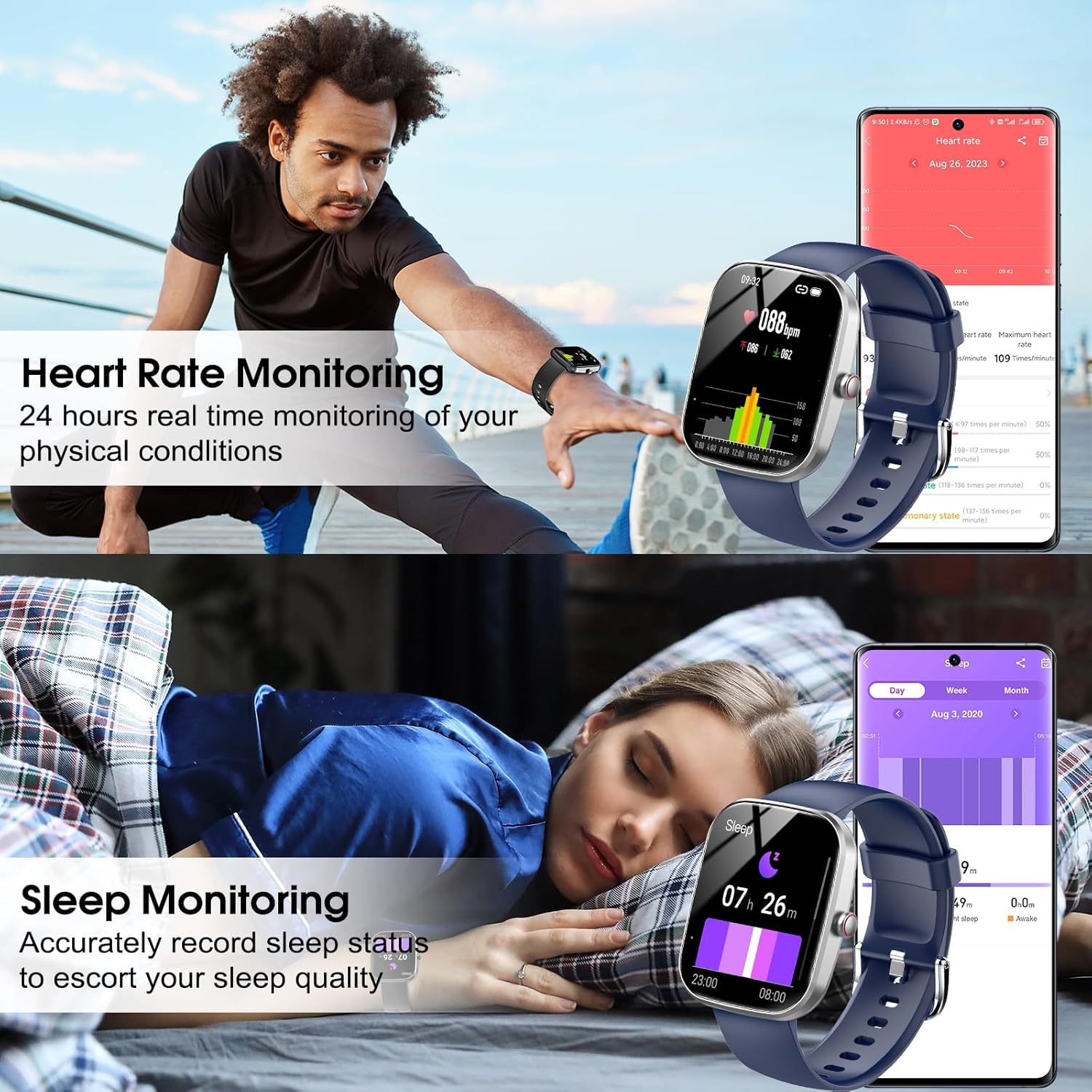
Image: Smartwatch displaying heart rate and sleep monitoring functions.
מוזיק קאָנטראָל
קאָנטראָלירט מוזיק ווידערשפּיל אויף אייער סמאַרטפאָון גלייך פֿון אייער זייגער.
- פּלייבאַק קאָנטראָל: Play, pause, skip tracks, and adjust volume without needing to access your phone.

Image: Smartwatch demonstrating music control functionality.
אַפּאַראַט רימאָוט קאָנטראָל
Use your smartwatch as a remote shutter for your smartphone's camera.
- ווייַט לאָדן: Open the camera function in the Gloryfit app and use your watch to trigger photos.
אנדערע פאַנגקשאַנז
The Csasan T70 Smart Watch includes several other useful features:
- וועטער פאָרעקאַסט
- זיציק דערמאָנונג
- סטאַפּוואַטש
- שרעק זייגער
- טיימער
- ווייַבלעך ציקל טראַקינג
- געפֿינען פאָון
וישאַלט
וואַסער קעגנשטעל (IP68)
The Csasan T70 Smart Watch is IP68 waterproof, meaning it is resistant to dust and can withstand immersion in water up to 1.5 meters for 30 minutes. It is suitable for daily activities like washing hands or exercising in the rain.
וויכטיק באַמערקונג:
- ניצט נישט די זייגער אין הייס וואַסער, סאָנאַס, אדער דאַמף צימערן.
- Avoid prolonged soaking in water, as this can affect the waterproof seal over time.
- וואַסער קעגנשטעל איז נישט אַ שטענדיקע צושטאַנד און קען פאַרמינערן זיך מיט דער צייט מיט נאָרמאַלער טראָגן און טרער.

Image: Smartwatch demonstrating IP68 water resistance.
רייניקונג און קער
- ווישט די זייגער רעגולער ווי מיט א ווייכן, טרוקענעם שטאָף.
- ויסמיידן ניצן האַרב קעמיקאַלז אָדער אַברייסיוו מאַטעריאַלס.
- האַלט די טשאַרדזשינג קאָנטאַקטן ריין און טרוקן צו ענשור געהעריק טשאַרדזשינג.
באַטערי לעבן
The Csasan T70 Smart Watch offers:
- Up to 30 days of standby time.
- 5-7 days of average usage, depending on feature usage.
טראָובלעשאָאָטינג
If you encounter issues with your Csasan T70 Smart Watch, refer to the following common solutions:
| פּראָבלעם | מעגלעך לייזונג |
|---|---|
| וואַך נישט אויסגעדרייט אויף | Ensure the watch is fully charged. Connect to the magnetic charger for at least 30 minutes. |
| קען נישט צוזאמענשטעלן מיטן טעלעפאן | Make sure Bluetooth is on, the Gloryfit app is open, and the watch is within range. Restart both the watch and phone. |
| נאָוטאַפאַקיישאַנז ניט באקומען | Check app permissions for Gloryfit on your phone. Ensure notifications are enabled within the Gloryfit app settings for specific applications. Verify the watch is connected via Bluetooth. |
| ומפּינקטלעך שריט ציילן | Ensure the watch is worn snugly on your wrist. Arm movements without actual steps (e.g., pushing a stroller) may not be accurately counted. |
| Heart rate/sleep data incorrect | Ensure the watch is worn correctly and snugly. Clean the sensor on the back of the watch. Note that data is for reference only. |
| קורץ באַטאַרייע לעבן | רעדוצירן דעם ברייטקייט פון דעם עקראַן, דיאַקטיווירן קאָנטינויִערלעכע האַרץ-ריטם מאָניטאָרינג אויב נישט נויטיק, און באַגרענעצן אָפטע נאָוטאַפאַקיישאַנז. |
ספּעסאַפאַקיישאַנז
| שטריך | דעטאַל |
|---|---|
| מאָדעל נאָמען | T70 |
| סאָרט | Csasan |
| פאַרשטעלן גרייס | 1.91 אינטשעס |
| פאָרעם | רעקטאַנגגיאַלער |
| גפּס | קיין גפּס |
| באַטאַרייע צעל זאַץ | ליטהיום פּאָלימער |
| ווירעלעסס קאָמוניקאַציע סטאַנדאַרד | בלועטאָאָטה |
| קאַנעקטיוויטי טעכנאָלאָגיע | בלועטאָאָטה |
| ספּעציעלע שטריך | אַקטיוויטעט טראַקער |
| אָפּערייטינג סיסטעם | אַנדרויד (קאָמפּאַטיבל מיט אַנדרויד 5.0+ און iOS 9.0+) |
| פּונקט וואָג | 0.09 קילאָגראַמס (3.2 אונסעס) |
| פאַבריקאַנט | Csasan |
| וואָטערפּרוף רייטינג | IP68 |
וואָראַנטי און שטיצן
וואָראַנטי אינפֿאָרמאַציע
The Csasan T70 Smart Watch comes with a 2-year free replacement policy פֿון דעם קויפֿדאַטום, וואָס באַדעקט פֿאַבריקאַציע־דעפֿעקטן.
קונה שטיצן
Csasan provides לעבן שטיצן for its products. For any inquiries, technical assistance, or warranty claims, please contact our customer service team. We offer 24-hour quick service via email.
Please refer to the contact information provided in your product packaging or on the official Csasan webפּלאַץ פֿאַר שטיצן דעטאַילס.