
1. פּראָדוקט איבערview
The Zunate X99H Motherboard is designed for high-performance desktop computing, supporting LGA 2011-3 CPUs including E5 V3, E5 V4, i7 58xx, and i7 68xx series processors. It features four DDR4 DIMM slots, allowing for a maximum memory capacity of 128GB, with support for DDR4 2666, 2400, and 2133MHz memory types. This mATX form factor motherboard includes M.2 NVMe and SATA3 interfaces for storage, USB 3.0 connectivity, and integrated HD multimedia and VGA interfaces for display output. The design incorporates solid capacitors for enhanced stability and extended lifespan.

Figure 1: Zunate X99H Motherboard - Top View. This image displays the overall layout of the motherboard, including the LGA 2011-3 CPU socket, four DDR4 DIMM slots, PCIe slots, and various headers and ports.
2. סעטאַפּ און ייַנמאָנטירונג
Follow these steps for proper installation of your Zunate X99H Motherboard and its components.
2.1 קפּו ינסטאַלירונג
- Prepare the CPU Socket: Gently lift the CPU retention lever on the LGA 2011-3 socket.
- אויסגלייַכן די סי-פּי-יו: Carefully align your LGA 2011-3 CPU (E5 V3/V4, i7 58xx/68xx series) with the socket, ensuring the triangular markers on the CPU and socket match. Do not force the CPU into place.
- זיכער מאַכן די סי-פּי-יו: Lower the CPU into the socket. Close the retention lever until it clicks into place.
- אינסטאַלירן סי-פּי-יו קולער: Apply thermal paste (if not pre-applied) and install your compatible CPU cooler according to its manufacturer's instructions.

Figure 2: CPU Socket Compatibility. This image emphasizes the LGA 2011-3 CPU socket, compatible with E5 V3/V4 and i7 58xx/68xx series processors, and shows the 8-pin and 24-pin power sockets.
2.2 זכּרון (RAM) אינסטאַלאַציע
- Open DIMM Latches: Open the retention clips at both ends of the DDR4 DIMM slots.
- אויסגלייַכן ראַם מאָדולן: Align the notch on your DDR4 memory module with the key in the DIMM slot.
- אַרײַנשטעלן ראַם: דריק פעסט אַראָפּ אויף ביידע עקן פון די זכּרון מאָדול ביז די ריטענשאַן קליפס קנאַקן אין פּלאַץ.
- Install Multiple Modules: For optimal performance, refer to your CPU and memory manufacturer's guidelines for dual or quad-channel memory configuration.

Figure 3: Memory Support. This image highlights the four DDR4 DIMM slots, capable of supporting up to 128GB of DDR4 2666/2400/2133MHz memory.
2.3 סטאָרידזש מיטל ינסטאַלירונג
- M.2 NVMe/SATA SSD:
- געפֿינען די M.2 שפּעלטל אויף די מאָטהערבאָאַרד.
- שטעל אַרײַן דעם M.2 SSD אין דעם סלאָט אין אַ ווינקל.
- דריק אראפ דעם SSD מיט א גוטן בליק און באפעסטיקט עס מיטן צוגעשטעלטן שרויף.
- Ensure the jumper switch for the M.2 interface is set correctly for either Serial ATA or PCIE protocol, depending on your M.2 device.
- Serial ATA (SATA) Devices:
- Connect one end of a SATA data cable to a SATA port on the motherboard (2 x SATA2.0, 1 x SATA3.0).
- פֿאַרבינדט דעם אַנדערן עק פֿונעם SATA דאַטן קאַבל צו אייער SATA האַרט דרייוו אָדער SSD.
- Connect a SATA power cable from your power supply unit (PSU) to the SATA device.
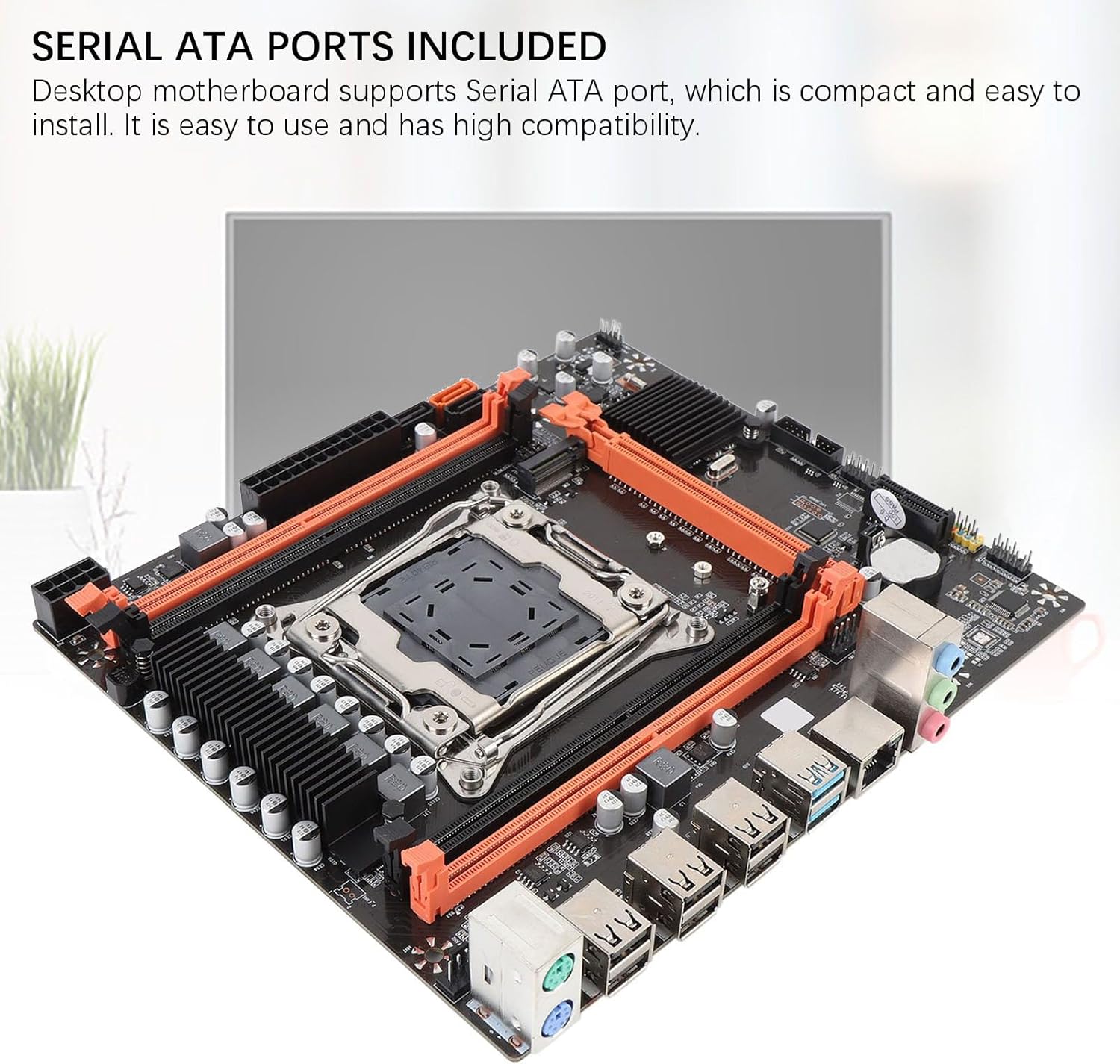
Figure 4: Storage Connectivity. This image shows the Serial ATA ports and the M.2 slot, supporting NGFF and NVME protocols for various storage solutions.
2.4 מאַכט קאַנעקשאַנז
- 24-פּין ATX מאַכט: Connect the main 24-pin power cable from your PSU to the 24-pin power socket on the motherboard.
- 8-פּין קפּו מאַכט: Connect the 8-pin (or 4+4 pin) CPU power cable from your PSU to the 8-pin power socket near the CPU.
2.5 פּעריפערישע פֿאַרבינדונגען
- גראַפיקס קאָרט: Insert your PCI Express 16X graphics card into the designated slot and secure it.
- פראָנט פּאַנעל קאַנעקטערז: Connect the power switch, reset switch, HDD LED, power LED, and front panel USB/audio headers to their respective pins on the motherboard. Refer to the motherboard's silkscreen labels for correct orientation.
- USB דעוויסעס: Connect USB 2.0 and USB 3.0 devices to the rear I/O panel ports.
- נעץ: Connect an Ethernet cable to the RJ45 network interface.
- ווייַז: Connect your monitor to the graphics card or the integrated HD multimedia/VGA interfaces if using integrated graphics (CPU dependent).

Figure 5: Rear I/O Panel. This image provides a clear view of the motherboard's rear input/output ports, including USB 2.0, USB 3.0, RJ45 network, and audio jacks.
3. אַפּערייטינג ינסטרוקטיאָנס
אַמאָל אַלע קאָמפּאָנענטן זענען אינסטאַלירט און פארבונדן, איר קענט אנצינדן דעם סיסטעם.
- ערשט מאַכט אויף: Ensure all power cables are securely connected. Press the power button on your PC case.
- בייאָוס/UEFI צוטריט: During startup, repeatedly press the designated key (commonly DEL, F2, אָדער פ10) to enter the BIOS/UEFI setup utility. Here you can configure boot order, system time, and other advanced settings.
- אַפּערייטינג סיסטעם ינסטאַלירונג: אַרײַנשטעלן אײַער אָפּערירן סיסטעם אינסטאַלאַציע מעדיע (USB דרייוו אָדער DVD) און נאָכפֿאָלגן די אינסטרוקציעס אויף דעם עקראַן צו אינסטאַלירן אײַער בילכער אָפּערירן סיסטעם.
- דרייווער ינסטאַלירונג: After OS installation, install the necessary drivers for your motherboard (chipset, network, audio, USB, etc.) from the manufacturer's webזייטל אדער צוגעשטעלטע מעדיע.
4. וישאַלט
רעגולערע אויפהאלטונג העלפט זיכער מאכן די לאנגעוויטי און סטאבילן פאָרשטעלונג פון אייער מוטערבאָרד און פּיסי סיסטעם.
- באַזייַטיקונג פון שטויב: Periodically clean dust from inside your PC case, especially from fans, heatsinks, and motherboard components, using compressed air. Ensure the system is powered off and unplugged before cleaning.
- קאַבלע פאַרוואַלטונג: Ensure internal cables are neatly routed to improve airflow and prevent obstruction.
- בייאָוס/UEFI דערהייַנטיקונגען: קוק די פאַבריקאַנט ס website for BIOS/UEFI updates. Updates can improve compatibility, stability, and performance. Follow update instructions carefully.
- קאָמפּאָנענט טשעקס: Occasionally check that all components (RAM, graphics card, storage drives) are securely seated in their slots.

Figure 6: Stable Performance Components. This image highlights the solid capacitors used on the motherboard, contributing to its stability and extended lifespan.
5. טראָובלעשאָאָטינג
אויב איר טרעפט פּראָבלעמען, באַטראַכט די פאלגענדע געוויינטלעכע טראָובלעשווטינג טריט:
- קיין מאַכט:
- זיכער מאַכן אַז די PSU איז אנגעצינדן און פארבונדן צו אַ אַרבעטנדיקן עלעקטרישן ווענטיל.
- Verify that the 24-pin and 8-pin power cables are securely connected to the motherboard.
- קאָנטראָלירט די פֿאַרבינדונג פֿון דער פֿראָנט־פּאַנעל צום מאַכט־סוויטש צום מאַדערבאָרד.
- קיין ווייַז:
- Confirm that your monitor is connected to the correct display output (graphics card or integrated graphics port).
- לייג צוריק די גראַפיקס קאַרטל און ראַם מאָדולן.
- Test with a single RAM module in different slots.
- Ensure the CPU cooler is properly installed and connected.
- סיסטעם אינסטאביליטעט/קראכן:
- Check for overheating. Ensure CPU cooler and case fans are functioning.
- Verify RAM compatibility and stability (e.g., run memory diagnostic tools).
- זיכער מאַכן אַז אַלע דרייווערס זענען אַרויף צו דאַטע.
- קוק נאָך פרייַ מאַכט אָדער דאַטן קייבאַלז.
- סטאָרידזש נישט דעטעקטעד:
- For SATA drives, check data and power cable connections.
- For M.2 drives, ensure it is fully seated and secured, and the M.2 jumper is set correctly for its protocol (NVMe or SATA).
- Check BIOS/UEFI settings to ensure SATA ports are enabled and M.2 detection is configured.

Figure 7: Expansion Capabilities. This image highlights the M.2 slot, supporting NGFF and NVME protocols, and other expansion slots like PCIe x16 and PCIe x1, along with HD multimedia and VGA interfaces.
6. ספּעסאַפאַקיישאַנז
| שטריך | באַשרייַבונג |
|---|---|
| Motherboard Structure | מ-אַטקס |
| טשיפּסעט | X99H |
| קפּו סאָקקעט | LGA 2011-3 |
| Supported CPU Types | Intel E5 V3/V4 series, i7 58xx/68xx series |
| זכּרון סלאָץ | 4 x DDR4 DIMM |
| מאַקסימום זכּרון קאַפּאַציטעט | 128 גיגאבייט |
| זיקאָרן טייפּס | DDR4 2666MHz, 2400MHz, 2133MHz |
| Onboard Network Card | Yes (RJ45 interface) |
| גראַפיקס קאַרטל סלאָט | 1 x PCI Express 16X |
| יקספּאַנשאַן סלאָץ | 1 x PCIE x1, 1 x NVME M.2 Interface (Serial ATA, PCIE with Jumper Switch) |
| USB Interfaces (Rear) | 6 רענטגענ וסב 2.0, 2 רענטגענ וסב 3.0 |
| USB Pins (Internal) | 1 set USB3.0, 1 set USB2.0 |
| Serial ATA Ports | 2 x Serial ATA2.0, 1 x Serial ATA3.0 |
| מאַכט סאָקקעץ | 1 x 8-פּין, 1 x 24-פּין |
| געבויט-אין באַטערי | CR2032x1 240mah |
| איך / אָ ינטערפייסיז | PS/2 Keyboard/Mouse Universal Interface, 1 x RJ45 Network Interface, HD multimedia, VGA |
7. וואָראַנטי און שטיצן
For warranty information and technical support, please refer to the official Zunate webפּלאַץ אָדער קאָנטאַקט דיין זיצער.
- פאַבריקאַנט: זונאַטע
- מאָדעל נומער: Zunatear2wnouip9
- אָנליין שטיצן: באַזוכן די Zunate Store on Amazon for product information and potential support links. For direct manufacturer support, search for "Zunate official website" online.
- צוריקקער פּאָליטיק: This product may be subject to a 30-day return/replacement policy. Please check with your retailer for specific details.