
1. הקדמה
Thank you for choosing the Daakro AK30 Mini Bluetooth Amplifier. This compact and powerful 2.0 channel audio amplifier is designed to deliver high-fidelity sound to your passive speakers. Featuring multiple input options including Bluetooth, AUX, USB, and Optical, it offers versatile connectivity for various audio devices. This manual provides detailed instructions for setup, operation, and maintenance to ensure you get the best performance from your ampליפער.
2. וואָס איז אין דער קעסטל
- 1 x AK30 Ampליפער
- 1 x DC12V/5A מאַכט אַדאַפּטער
- 1 x וסב טיפּ-C קאַבלע
- 1 רענטגענ 3.5 מם AUX קאַבלע
- 1 x RCA to 3.5mm AUX Cable
- 1 X טיפּ-C צו וסב אַדאַפּטער
- 1 x ינסטרוקטיאָן מאַנואַל
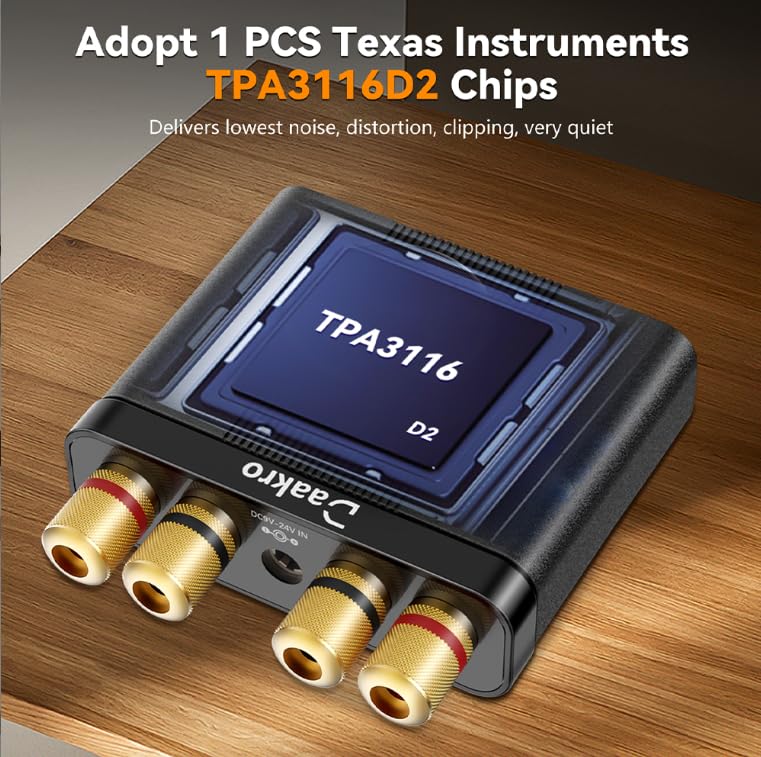
Image: All items included in the Daakro AK30 Mini Bluetooth Ampליפיער פּעקל.
3. פּראָדוקט פֿעיִקייטן
- הויך-פאָרשטעלונג אַודיאָ: Utilizes Texas Instruments TPA3116 chips for reliable performance, delivering 50W+50W maximum output power when paired with 4-ohm passive speakers. Achieves an SNR exceeding 92dB and THD below 0.04%, with a frequency range of 20Hz to 20kHz.
- סאָליד און דוראַבאַל פּלאַן: Features a sturdy black alloy case with a minimalist design.
- Intuitive Single-Knob Control: All functions are integrated into one knob for easy operation:
- Press and release: Play/Pause music.
- Press and hold: Switch between input modes.
- Rotate: Adjust volume.
- Multiple Input Methods: Supports Bluetooth, 3.5mm AUX, USB, and Optical (OPT) inputs for broad compatibility with devices like mobile phones, tablets, laptops, and MP3 players.
- ברייט קאַמפּאַטאַבילאַטי: Compatible with various devices, though it does not support Amazon Echo, Alexa, or Bose speakers.

בילד: אינערלעך view highlighting the TPA3116D2 chip.

בילד: אינערלעך view highlighting the QCC3040 Bluetooth 5.0 chip.
4. סעטאַפּ
4.1 קאַנעקטינג ספּיקערז
The AK30 amplifier supports passive speakers. Connect your speakers to the binding posts on the rear of the amplifier. You can use either banana plugs or bare speaker wire. Ensure correct polarity (positive to positive, negative to negative) for optimal sound quality.

Image: Speaker connection options for the AK30 ampליפער.
4.2 מאַכט קאַנעקשאַן
Connect the provided DC12V/5A power adapter to the 'DC9V-24V IN' port on the rear of the amplifier, then plug the adapter into a power outlet. The amplifier is designed for reliable performance with the included power supply.
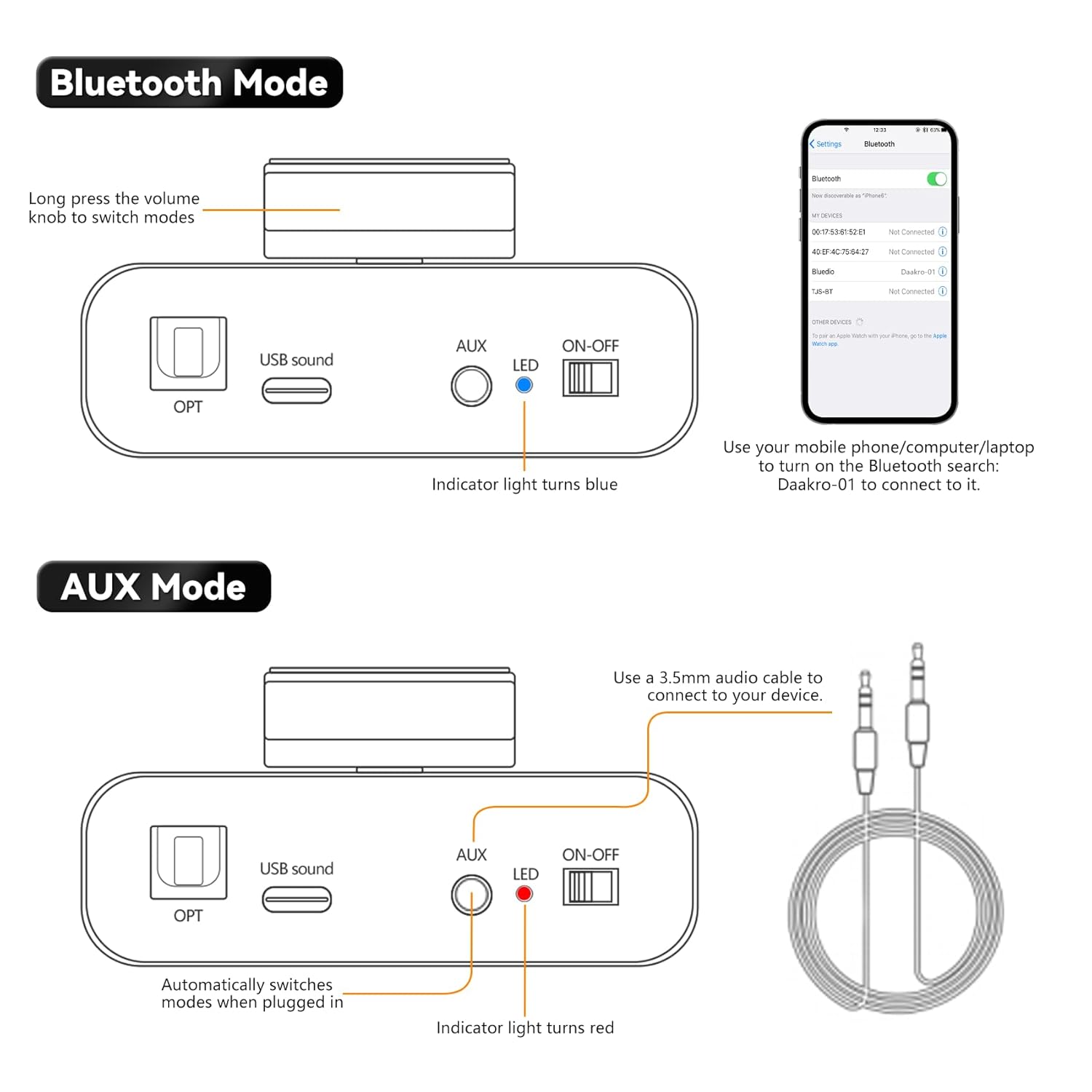
Image: Rear panel connections including power input.
4.3 איינגאַבע מקור פֿאַרבינדונג
The AK30 offers multiple input options:
- בלועטאָאָטה: For wireless connection from your smartphone, tablet, or laptop.
- AUX: Use the 3.5mm AUX cable to connect devices like MP3 players or older audio sources.
- וסב: Connect a USB drive or a computer via the USB-C port for digital audio playback.
- OPT: Use an optical fiber cable for high-quality digital audio from TVs or other optical output devices.

Image: Front panel inputs and controls.
Video: Official Daakro AK30 Mini Audio Ampליפער איבערview and setup guide. This video demonstrates the unboxing, connections, and basic operation of the amplifier with various input sources.
5. אַפּערייטינג ינסטרוקטיאָנס
5.1 מולטיפונקטיאָנאַל קנופּ
The single knob on the front panel controls all primary functions:
- דרייען לינקס/רעכטס: Increases/Decreases volume. A beep sound indicates minimum/maximum volume.
- Click (Press and Release): Play/Pause music (available in Bluetooth & USB modes).
- Long Press (Press and Hold): Switch between input modes (Blue: Bluetooth, Red: AUX, Green: USB, Purple: OPT).

Image: Multifunctional knob controls.
5.2 בלועטאָאָטה מאָדע
Long press the volume knob to switch to Bluetooth mode (indicator light turns blue). On your device (phone, computer, laptop), search for "Daakro-01" in Bluetooth settings and connect.
5.3 AUX מאָדע
Plug a 3.5mm audio cable into the AUX input. The amplifier automatically switches to AUX mode (indicator light turns red) when a cable is detected.
5.4 וסב מאָדע
Connect a USB stick directly or use the Type-C to USB adapter to connect a USB device to the USB Sound port. The amplifier automatically switches to USB mode (indicator light turns green).
5.5 OPT Mode
Press and hold the volume knob to switch to OPT mode (indicator light turns purple). Connect an optical fiber cable to the OPT input.

Image: USB and OPT mode connections.
6. ספּעסאַפאַקיישאַנז
| שטריך | באַשרייַבונג |
|---|---|
| סאָרט | Daakro |
| מאָדעל נומער | AK30 |
| נומער פון טשאַנאַלז | 2 |
| רעזולטאַט מאַכט | 100 Watts (50W+50W @ 4Ω) |
| Voltage | 12 וואלטס (דק) |
| מאַקסימום צושטעלן וואָלtage | 12 וואלטס (דק) |
| מינימום צושטעלן וואָלtage | 12 וואלטס (דק) |
| מאַטעריאַל | אַללוי |
| מאַונטינג טיפּ | Freestanding |
| פּונקט וואָג | 1.15 פונט |
| פּעקל דימענשאַנז | 6.57 X 6.3 X 2.52 אינטשעס |

Image: Power output table.
7. טראָובלעשאָאָטינג
- קיין קול:
- זיכער מאַכן אַז דער מאַכט אַדאַפּטער איז זיכער פארבונדן און אַז דער ampליפיער איז אויסגעדרייט אויף.
- Check all audio cables for secure connections and correct polarity.
- Verify the correct input mode is selected on the amplifier (indicated by LED color).
- פֿאַרגרעסערן דעם באַנד אויף ביידע ampליפיער און אייער אַודיאָ מקור מיטל.
- Ensure speakers are properly connected and functional.
- בלועטאָאָטה קאַנעקשאַן ישוז:
- פאַרזיכערן די amplifier is in Bluetooth mode (blue LED).
- Keep your device within 32ft/10m of the amplifier (6.5ft/2m for PC devices) without obstructions.
- Forget "Daakro-01" from your device's Bluetooth list and try pairing again.
- ריסטאַרט ביידע די ampליפיער און אייער בלוטוט דעווייס.
- פאַרקרימט סאָונד:
- רעדוצירן דעם קול אויף ביידע ampלײַפיער און די אַודיאָ מקור.
- Check speaker connections for loose wires or incorrect polarity.
- זיכער מאַכן אַז די אַודיאָ מקור שיקט נישט אַן אָוווערדרייווד סיגנאַל.
- ינטערמיטאַנט אַודיאָ:
- קוק פֿאַר פרייַ קאַבלע קאַנעקשאַנז.
- For Bluetooth, ensure no interference from other wireless devices and maintain close proximity.
8. וישאַלט
- רייניקונג: ניצן אַ ווייך, טרוקן שטאָף צו ריין די ampדי אויסערליכע זייט פונעם ליפיער. פארמיידט צו ניצן פליסיקע רייניגער אדער סאָלווענטן.
- ווענטילאַטיאָן: פאַרזיכערן די ampדער לופטמאַשין האט גענוג ווענטילאַציע צו פאַרמייַדן איבערהיצונג. פאַרשטאָפּט נישט קיין ווענטילאַציעס.
- סטאָרידזש: ווען נישט אין באַנוץ פֿאַר לענגערע צייטן, זאָל מען עס אַוועקלייגן ampהאַלטן די ליפיער אין אַ קיל, טרוקן אָרט אַוועק פון דירעקט זונשייַן און עקסטרעמע טעמפּעראַטורן.
- האַנדלינג: באַהאַנדלט דעם אַפּאַראַט מיט פֿאָרזיכט צו פֿאַרמייַדן פֿיזישע שאָדן.
9. וואָראַנטי און שטיצן
The Daakro AK30 Mini Bluetooth Ampליפיער קומט מיט א 30-טאָגיקע צוריקצאָל/פאַרבייַט פּאָליטיק. For any product inquiries, technical assistance, or warranty claims, please contact Daakro customer support. Our team is dedicated to providing online customer service and ensuring 100% customer satisfaction.
פֿאַר ווייטערדיקע הילף, ביטע באַזוכט די Daakro Store.