
Chef Robot AM7203
שעף ראָבאָט אויטאָמאַטיש עספּרעסאָ מאַשין AM7203 באַניצער מאַנואַל
מאָדעל: AM7203
וויכטיק סאַפעטי אינסטרוקציעס
ביטע ליינט אלע אינסטרוקציעס קערפול איידער איר ניצט דעם אפאראט. האלט דעם מאנואל פאר שפעטערדיגע רעפערענץ.
- Ensure the appliance is placed on a stable, level surface away from heat sources.
- טונקט נישט איין דעם אפּאַראַט, עלעקטרישע שנור, אדער שטעקער אין וואַסער אדער אַנדערע פליסיקייטן.
- אָפּשטויסן די אַפּפּליאַנסע פון די מאַכט ווענטיל ווען ניט אין נוצן און איידער רייניקונג.
- דו זאלסט נישט אַרבעטן די אַפּפּליאַנסע מיט אַ דאַמידזשד שנור אָדער צאַפּן, אָדער נאָך די אַפּפּליאַנסע מאַלפאַנגקשאַנז אָדער איז דאַמידזשד אין קיין וועג.
- נאָענט השגחה איז נייטיק ווען קיין אַפּפּליאַנסע איז געניצט דורך אָדער לעבן קינדער.
- ניצן בלויז אַקסעסעריז רעקאַמענדיד דורך דער פאַבריקאַנט.
- Scalding may occur if the water tank lid is removed during the brewing cycle.
- Always ensure the water tank and coffee grounds container are correctly installed before operation.
פּראָדוקט איבערview
The Chef Robot Automatic Espresso Machine AM7203 is designed to provide a versatile coffee experience, allowing you to enjoy various cafe-quality beverages at home or in the office. It features an integrated grinder, milk frother, and an intuitive touch screen interface for ease of use.
הויפּט קאַמפּאָונאַנץ

Figure 1 Description: This image displays the Chef Robot Automatic Espresso Machine in gray, actively dispensing coffee into a glass. The touch screen control panel is visible at the top, showing various beverage options. To the right, the integrated milk tank is attached, filled with milk. The machine features a sleek, modern design with stainless steel accents.

Figure 2 Description: די דיאַגראַמע גיט אַ דעטאַלירטע view of the espresso machine's components, including the coffee bean container, control panel, water tank assembly, used coffee grounds container, detachable power cord, removable milk tank, drip tray, and cup mat. Each part is clearly labeled to assist with identification and understanding of the machine's structure.
סעטאַפּ
1. ונפּאַקקינג
Carefully remove all packaging materials and ensure all components are present. Clean all removable parts with warm, soapy water before first use.
2. וואַסער טאַנק ינסטאַלירונג

Figure 3 Description: This image highlights the large capacity of the water tank (1.5L) and the milk tank (300ml), along with the overall dimensions of the espresso machine. The water tank is located on the left side of the machine. To install, slide the water tank assembly into its designated slot on the left side of the machine. Fill the 1.5L water tank with fresh, cold water. Ensure it is securely in place to avoid alerts.
3. Coffee Bean Hopper
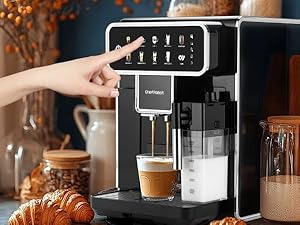
Figure 4 Description: This image shows a close-up of the coffee bean hopper with a built-in burr grinder. The grind adjustment knob is visible within the hopper. Open the lid of the coffee bean container located on top of the machine. Pour fresh coffee beans into the hopper. Close the lid securely.
4. Milk Tank Assembly
Attach the removable milk tank to the designated slot on the front-right side of the machine. Ensure it clicks into place. Fill the milk tank with your desired milk (up to 300ml).
אַפּערייטינג ינסטראַקשאַנז
1. פּאָווערינג אויף / אויסגעלאשן
Press the power button on the touch screen to turn the machine on or off. The machine will perform an automatic rinse cycle upon startup.
2. אויסקלייבן אַ געטראַנק

Figure 5 Description: This image displays the machine's touch screen interface, showing a variety of coffee options including Espresso 1 & 2, Cappuccino 1 & 2, Latte 1 & 2, Milk Foam 1 & 2, Americano, and a Clean function. Select your desired beverage directly from the intuitive touch screen interface.

Figure 6 Description: A hand is shown interacting with the touch screen of the espresso machine, selecting a beverage. This illustrates the ease of use of the intuitive interface for choosing coffee styles and milk foam levels.
3. Adjusting Grind Level
The machine features a 4-level grind control. Turn the grind adjustment knob inside the coffee bean hopper to select your preferred grind level, tailored for espresso, cappuccino, Americano, or latte. Adjusting the grind level should ideally be done while the grinder is running to prevent damage.
4. Adjusting Coffee Strength/Volume
After selecting a beverage, the touch screen may allow you to customize the coffee strength (amount of coffee grounds) and volume (amount of water/milk). Follow the on-screen prompts to adjust these settings to your preference.
5. ברוינג קאַווע
Place your cup under the dispenser. Press the 'Play' or 'Start' button on the touch screen. The machine will automatically grind the beans, brew the coffee, and dispense it into your cup. For milk-based drinks, it will also froth and dispense milk.
6. מילך שאום
For milk-based beverages, ensure the milk tank is filled and properly attached. The machine will automatically froth and dispense milk according to the selected beverage. You can adjust the milk foam level via the touch screen options.
וישאַלט
1. זיך-רייניקונג פֿונקציע
The machine has an automatic self-cleaning function. Select the 'Clean' option on the touch screen to initiate a cleaning cycle. This helps maintain performance and ensures residue-free brewing.
2. Emptying Coffee Grounds Container

Figure 7 Description: This image illustrates the five intelligent reminder functions of the espresso machine, including alerts for water scarcity, full coffee grounds container, milk tank installation, used grounds container installation, and water tank installation. The reminder for a full coffee grounds container is shown as a blinking indicator. The machine will alert you when the coffee grounds container is full. Slide out the drip tray and the integrated grounds container from the front of the machine. Empty the used coffee grounds and clean the container. Reinsert securely.
3. רייניקונג פון די מילך סיסטעם
The removable milk tank and its components should be cleaned regularly. Disassemble the milk tank and wash all parts with warm, soapy water. Rinse thoroughly and reassemble. The machine also has an automatic cleaning function for the milk system, which can be activated via the touch screen.
4. דעסקאַלינג
The machine will prompt you when descaling is required. Follow the instructions in the full manual or on the screen to perform the descaling process using a suitable descaling solution.
Intelligent Reminder Functions
The Chef Robot Espresso Machine is equipped with 5 intelligent reminder functions to ensure optimal operation:
- Water Scarcity: An indicator blinks when the liquid level sensor detects low water.
- Full Coffee Grounds Container: The indicator for the full coffee grounds container will start blinking after brewing approximately 8 cups of coffee. Only the power switch and cleaning function will be active at this time.
- Milk Tank Installation: If the milk tank is not properly installed or is missing, milk-related functions will not work, and a blinking reminder for the milk tank will appear.
- Used Grounds Container Installation: A prompt will appear if the container is not installed or not properly installed.
- וואַסער טאַנק ינסטאַלירונג: A reminder will appear if the water tank is not installed or not installed correctly.
טראָובלעשאָאָטינג
אויב איר טרעפט זיך מיט פראבלעמען, ביטע באציעט זיך צו די פאלגנדע אלגעמיינע לייזונגען:
- קיין קאַווע נישט אויסגעטיילט: Check if the water tank is full and correctly installed. Ensure the coffee bean hopper has enough beans. Verify the brewing unit is properly inserted.
- מילך שאמט נישט: Ensure the milk tank is clean and properly assembled. Check that the milk spout is not clogged. Use fresh, cold milk.
- די מאַשין איז נישט קערינג אויף: קאָנטראָלירט צי דער עלעקטרישער שנור איז זיכער אריינגעשטעקט אין א ארבעטנדיקן ווענטיל.
- Error Message on Screen: Refer to the Intelligent Reminder Functions section or the full product manual for specific error code meanings and solutions.
- קאַווע נישט הייס גענוג: Ensure the machine has preheated fully. Pre-warm your cups before brewing.
ספּעסאַפאַקיישאַנז
| שטריך | באַשרייַבונג |
|---|---|
| סאָרט | שעף ראָבאָט |
| מאָדעל נאָמען | Coffee Maker (AM7203) |
| קאָליר | גרוי |
| פּראָדוקט דימענשאַנז | 20"ד רענטגענ 12"וו רענטגענ 15"ה |
| פּונקט וואָג | 28 פונט |
| וואַסער טאַנק קאַפּאַציטעט | 1.5 ליטער |
| מילך טאַנק קאַפּאַציטעט | 300 מל |
| מאָל קאָנטראָל | 4 לעוועלס |
| ספּעציעלע שטריך | Milk Frother, Touch Screen, Self-Cleaning |
וואָראַנטי און שטיצן
This Chef Robot product is covered by a standard manufacturer's warranty against defects in materials and workmanship. For specific warranty details, please refer to the warranty card included with your product or contact Chef Robot customer support. For technical assistance or service inquiries, please visit the official Chef Robot webפּלאַץ אָדער קאָנטאַקט זייער קונה סערוויס אָפּטיילונג.
אפיציעלע פּראָדוקט ווידיאס
Watch these official product videos for visual guides and demonstrations of your Chef Robot Automatic Espresso Machine.
High-End, Easy Set-Up, Easy-Use, Cappuccino, Espresso, Americano, FULLY AUTOMATIC
דעם ווידעא גיט אַ פולשטענדיק איבערview of the Chef Robot Automatic Espresso Machine, demonstrating its easy setup and use for preparing various beverages like cappuccino, espresso, and Americano. It highlights the fully automatic features of the machine.
A Great Entrant to Automatic Coffee Brewers
This video showcases the Chef Robot Automatic Espresso Machine as a great option for those new to automatic coffee brewing. It covers general operation and user experience, emphasizing its accessibility for beginners.
Very nice SuperAutomatic coffee machine
This video offers another perspective on the Chef Robot Automatic Espresso Machine, highlighting its super-automatic capabilities and overall user satisfaction. It provides a general demonstration of the machine's features.
Ask a question about this manual
Ask about setup, troubleshooting, compatibility, parts, safety, or missing instructions. Manuals+ will review the question and use this page’s manual context to help answer it.