
1. הקדמה
This manual provides detailed instructions for the proper use and maintenance of your Oakcastle HIFI500 Remote Control. This remote is designed as a replacement or spare for the Oakcastle HIFI500 audio system, ensuring seamless control over its functions. Please read this manual thoroughly before use to ensure optimal performance and longevity of your remote control.
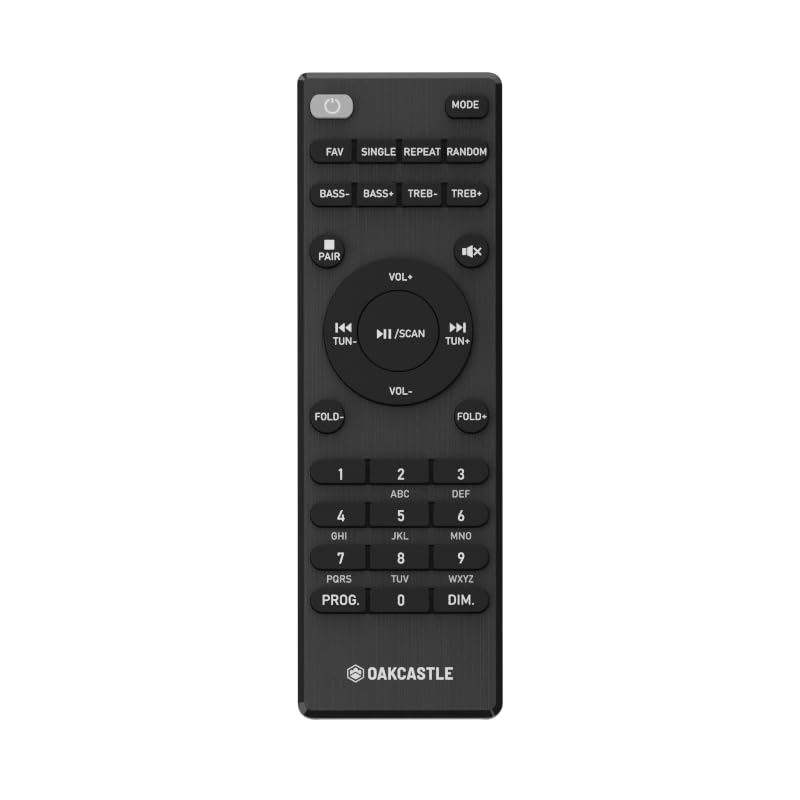
פיגורע 1.1: פראָנט view of the Oakcastle HIFI500 Remote Control. This image displays the compact design and button layout, including power, volume, source selection, and playback controls, typical for operating the HIFI500 audio system.
2. סעטאַפּ
2.1. באַטאַרייע ייַנמאָנטירונג
The Oakcastle HIFI500 Remote Control requires two AAA batteries (not included) for operation. Follow these steps to install the batteries:
- געפֿינען די באַטאַרייע אָפּטייל אויף די צוריק פון די ווייַט קאָנטראָל.
- דריק אַראָפּ אויף דער טאַב און שלעפּ די באַטעריע דעקל אַראָפּ צו עפֿענען עס.
- אַרײַנשטעלן צוויי AAA באַטעריעס, און זיכער מאַכן אַז די פּאָזיטיוו (+) און נעגאַטיוו (-) טערמינאַלן זענען ריכטיק אויסגעשטעלט מיט די מאַרקירונגען אינעווייניק אין דעם אָפּטייל.
- רוק די באַטאַרייע דעקן צוריק אין פּלאַץ ביז עס קליקס סיקיורלי.
באַמערקונג: Always use new batteries and dispose of old batteries responsibly. Do not mix old and new batteries, or different types of batteries.
2.2. ערשט נוצן
Once batteries are installed, the remote control is ready for use with your Oakcastle HIFI500 audio system. Point the remote directly at the infrared (IR) receiver on your HIFI500 system. No additional pairing is typically required for this replacement remote.
3. אַפּערייטינג די רימאָוט קאָנטראָל
The Oakcastle HIFI500 Remote Control provides full functionality for your HIFI500 audio system. Below is a general guide to common button functions:
- מאַכט קנעפּל (⏻): Turns the HIFI500 system on or off.
- באַנד אַרויף / אַראָפּ (Vol+ / Vol-): אַדזשאַסץ די אַודיאָ רעזולטאַט מדרגה.
- שטום (🔇): מאַכט צייטווייליק שטיל די אַודיאָ אַרויסגאַנג.
- Source/Input (מקור): Cycles through available audio inputs (e.g., CD, FM, Bluetooth, AUX).
- Playback Controls (▶ / ⏸ / ⏹ / ⏪ / ⏩): Controls media playback (Play, Pause, Stop, Rewind, Fast Forward) for compatible sources like CD or USB.
- נאַוויגאַציע קנעפּלעך (▲ / ▼ / ◀ / ▶): Used to navigate menus and selections on the HIFI500 system display.
- OK/Enter קנעפּל: קאַנפערמז סאַלעקשאַנז.
- נומעריק קיפּאַד (0-9): For direct input of radio frequencies, track numbers, or other numerical data.
Refer to your Oakcastle HIFI500 audio system's main user manual for specific functions and advanced operations.
4. וישאַלט
4.1. רייניקונג
To clean your remote control, gently wipe the surface with a soft, dry cloth. For stubborn dirt, slightly dampen the cloth with water or a mild, non-abrasive cleaner. Avoid using harsh chemicals, solvents, or abrasive materials, as these can damage the remote's finish or internal components.
4.2. באַטערי פאַרבייַט
Replace batteries when the remote's response becomes sluggish or stops working. Follow the battery installation steps outlined in Section 2.1. Always replace both batteries simultaneously with new ones.
4.3. סטאָרידזש
When not in use for extended periods, it is recommended to remove the batteries from the remote control to prevent leakage, which can cause damage. Store the remote in a cool, dry place away from direct sunlight and extreme temperatures.
5. טראָובלעשאָאָטינג
If you encounter issues with your Oakcastle HIFI500 Remote Control, please refer to the following common problems and solutions:
- ווייַט ניט ריספּאַנדינג:
- קאָנטראָלירט צי די באַטעריעס זענען ריכטיק אינסטאַלירט מיט דער ריכטיקער פּאָלאַריטעט.
- פאַרבייַטן די באַטעריז מיט נייַע.
- Ensure there are no obstructions between the remote control and the HIFI500 system's IR receiver.
- Make sure you are within the effective range and pointing the remote directly at the HIFI500 system.
- אינטערמיטענט פונקציע:
- דאָס ווײַזט אָפֿט אויף אַ נידעריקע באַטעריע־קראַפֿט. טוישט די באַטעריעס.
- Ensure the remote's IR emitter is clean and free from dirt or smudges.
If the problem persists after trying these solutions, please contact Oakcastle customer support.
6. ספּעסאַפאַקיישאַנז
| שטריך | באַשרייַבונג |
|---|---|
| מאָדעל | HIFI500 Remote Control |
| סאָרט | Oakcastle |
| קאַנעקטיוויטי טעכנאָלאָגיע | ינפרערעד (IR) |
| מאַכט מקור | 2 X AAA באַטעריז (ניט אַרייַנגערעכנט) |
| מאַקס נומער פון שטיצט דעוויסעס | 1 (Oakcastle HIFI500 Audio System) |
| ספּעציעלע שטריך | לייטווייט |
| פּונקט וואָג | 2.82 אונס (בעערעך 80 גראַמז) |
| פּעקל דימענשאַנז | 8 x 3.2 x 2.5 אינטשעס (אומגעפער 20.3 x 8.1 x 6.3 ס״מ) |
| פאַבריקאַנט | מערהייט |
7. וואָראַנטי און שטיצן
7.1. וואָראַנטי אינפֿאָרמאַציע
This Oakcastle HIFI500 Remote Control is covered by a manufacturer's warranty. Please refer to the warranty card included with your original Oakcastle HIFI500 audio system or visit the official Oakcastle webזייטל פֿאַר דעטאַלירטע וואָראַנטי טערמינען און באַדינגונגען. האַלט דיין באַווייַז פון קויפן פֿאַר וואָראַנטי קליימז.
7.2. קונה שטיצן
For technical assistance, troubleshooting beyond this manual, or warranty inquiries, please contact Oakcastle customer support. You can typically find contact information, including phone numbers, email addresses, and support portals, on the official Oakcastle webפּלאַץ.
Please have your product model (HIFI500 Remote Control) and purchase details ready when contacting support.