
MRSCOZ TCR
MRSCOZ Toddlers Sleep Training Clock
Model: TCR
באַניצער ינסטרוקטיאָן מאַנואַל
1. הקדמה
The MRSCOZ Toddlers Sleep Training Clock is a multifunctional device designed to assist children with sleep training, provide alarm clock functionality, act as a Bluetooth music player, and offer various night light and sound machine features. Its intuitive design and multiple settings aim to create a comfortable and consistent sleep environment for toddlers and kids.

Image: The MRSCOZ Sleep Training Clock displaying different light colors, highlighting its versatile illumination options.
2. זיכערקייַט אינפֿאָרמאַציע
- This product is not a toy. Adult supervision is recommended for young children.
- Keep the device away from water and excessive moisture to prevent electrical hazards.
- Use only the provided USB-C cable for charging. Do not use damaged cables or chargers.
- דו זאלסט נישט פּרווון צו דיסאַסעמבאַל אָדער פאַרריכטן די מיטל זיך. קאָנטאַקט קונה שטיצן פֿאַר הילף.
- Ensure the clock is placed on a stable, flat surface to prevent it from falling.
3. פּעקל אינהאַלט
ביטע קאָנטראָלירט דעם אינהאַלט פֿון דער פּאַקעט בײַם עפֿענען:
- MRSCOZ Toddlers Sleep Training Clock (White)
- וסב-C טשאַרדזשינג קאַבלע
- באַניצער מאַנואַל (דעם דאָקומענט)
4. פּראָדוקט איבערview
Familiarize yourself with the clock's components and controls.

Image: The multifunctional MRSCOZ Sleep Training Clock highlighting its use as an alarm clock, night light, Bluetooth music player, and sound machine.
קאָנטראָלס און ינדיקאַטאָרס:
| קנעפּל/גראדן | פֿונקציע |
|---|---|
| Time Setting Button (Clock icon) | Press to enter time setting mode. |
| Alarm Setting Button (Bell icon) | Press to set or adjust alarms. |
| Night Light Button (Sun icon) | Short press to change light color. Long press to adjust brightness. |
| Music/Sound Button (Music note icon) | Press to cycle through sleep sounds. |
| Bluetooth Button (M icon) | לאנג דריקן צו אַרייַן בלועטאָאָטה פּערינג מאָדע. |
| Volume Up/Down Buttons (+/-) | Adjust volume for sounds and music. |
| ווייַז סקרין | Shows time, AM/PM, sleep/wake icons, and other indicators. |
| USB-C Port (Rear) | פֿאַר טשאַרדזשינג די מיטל. |
5. סעטאַפּ
5.1 טשאַרדזשינג די מיטל
Before first use, fully charge the sleep training clock. Connect the provided USB-C cable to the charging port on the back of the clock and plug the other end into a compatible USB power adapter (not included).

Image: The sleep training clock connected to a USB-C charging cable, indicating its portable night light feature.
5.2 ערשט מאַכט אויף
The clock will automatically power on when connected to power or if it has sufficient battery charge. The display will light up.
5.3 Time Synchronization via Bluetooth
When connected to a smartphone via Bluetooth, the clock will automatically synchronize with your phone's time, simplifying initial setup.
6. אַפּערייטינג ינסטרוקטיאָנס
6.1 באַשטעטיקן די צייט
צו מאַניואַלי שטעלן די צייט:
- דרוק די צייט באַשטעטיקן קנעפּל (Clock icon) to enter time setting mode.
- ניצן די +/- קנעפּלעך צו סטרויערן די שעה.
- דרוק די צייט באַשטעטיקן קנעפּל again to move to minute adjustment.
- ניצן די +/- קנעפּלעך צו סטרויערן די מינוט.
- דרוק די צייט באַשטעטיקן קנעפּל one more time to confirm and exit setting mode.
For a visual guide on setting up the time, please refer to the video below:
Video: A short demonstration on how to set up the time on the MRSCOZ Sleep Training Clock.
6.2 Sleep Training Function
The clock uses visual cues to help children understand when it's time to sleep and wake up:
- Time to Sleep: The clock displays a closed-eye icon and emits a blue light, indicating it's bedtime.
- Time to Wake Up: The clock displays an open-eye icon and emits a yellow light, signaling it's okay to wake up.
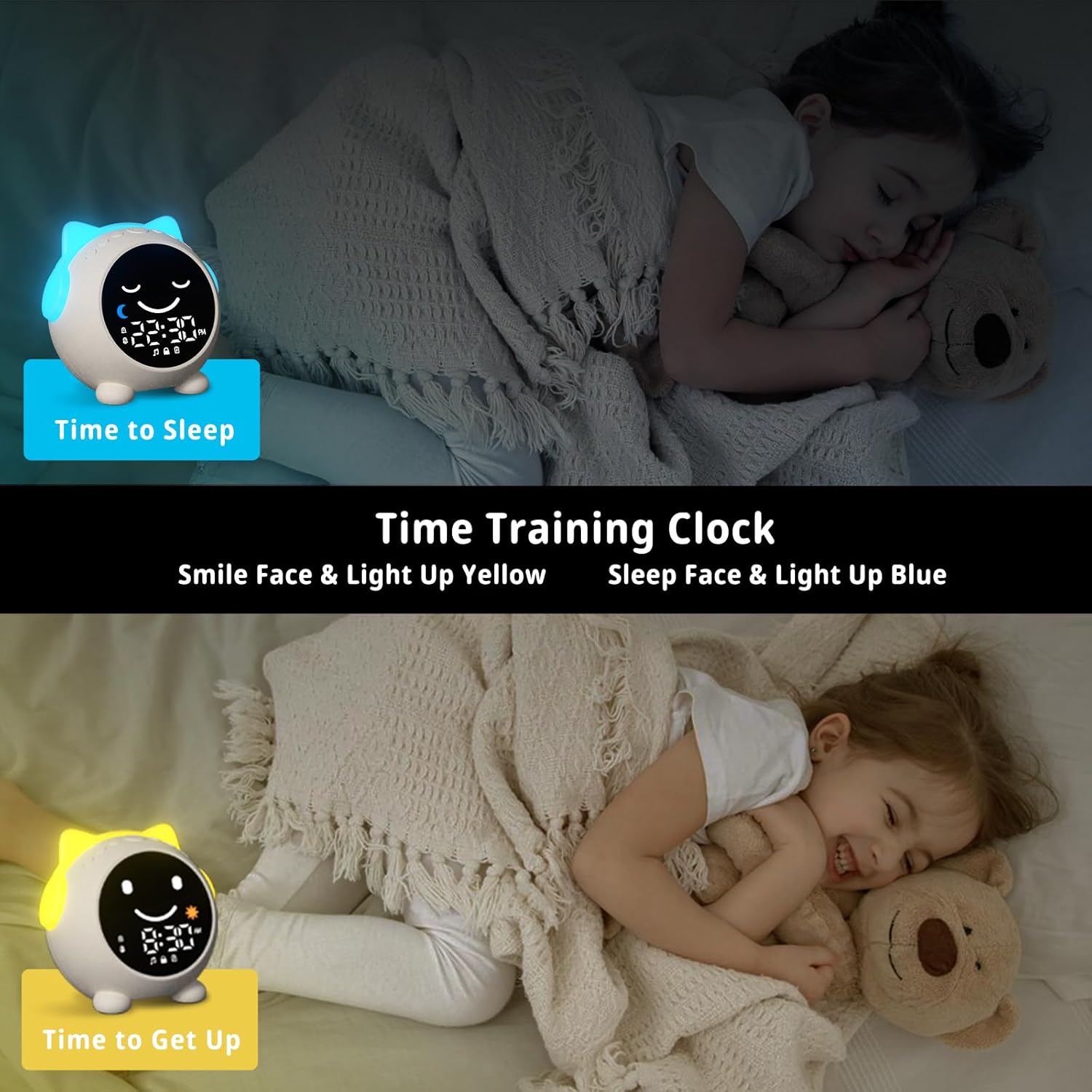
Image: The sleep training clock illustrating the "Time to Sleep" (blue light, closed eyes) and "Time to Get Up" (yellow light, open eyes) features.
6.3 סעטטינגס פֿאַר שרעק זייגער
The clock features dual alarms and a snooze function:
- דרוק די שרעק באַשטעטיקן קנעפּל (Bell icon) to select Alarm 1 or Alarm 2.
- ניצן די +/- קנעפּלעך צו שטעלן די געבעטן שרעק צייט.
- דרוק די שרעק באַשטעטיקן קנעפּל ווידער צו באַשטעטיקן.
- To activate the snooze function, simply touch the clock when the alarm sounds. It will ring again after 10 minutes, up to 3 times.
- To stop the alarm, press any button on the clock.
ווידעא: אן איבערview of the Toddlers Sleep Training Clock and its alarm features, including snooze functionality.
6.4 Night Light Operation
The clock offers 9 light colors and 2 brightness levels:
- טשאַנגינג פארבן: קורץ דריקן די נאַכט ליכט קנעפּל (Sun icon) to cycle through the 9 available colors.
- אַדזשאַסטינג ברייטנאַס: לאנג דריקן די נאַכט ליכט קנעפּל to switch between the 2 brightness levels.

Image: The sleep training clock demonstrating its 9 distinct night light colors and two brightness settings.
6.5 Sleep Sound Machine
Choose from 7 soothing sleep sounds to help your child relax:
- דרוק די Music/Sound Button (Music note icon) to cycle through the available sounds: Ocean Wave, Rain, Campfire, Summer Night, Bird Songs, Wind Bell, and Fan.
- ניצן די +/- קנעפּלעך to adjust the volume of the selected sound.

Image: The sleep training clock illustrating its 7 white noise options, including natural sounds like ocean waves and rain.
6.6 Bluetooth Music Player
Connect your smartphone or other Bluetooth-enabled device to play music through the clock's speaker:
- לאנג דריקן די בלועטאָאָטה קנעפּל (M icon) to enter Bluetooth pairing mode. The display will show a Bluetooth icon.
- On your device, enable Bluetooth and search for "C1" (or similar device name).
- Select "C1" to pair. Once connected, the clock will synchronize its time with your phone.
- You can now play music from your device through the clock. Use the +/- קנעפּלעך צו סטרויערן באַנד.
7. וישאַלט
- רייניקט די זייגער מיט אַ ווייכן, טרוקענעם שטאָף. ניצט נישט קיין שרײַבנדיקע רייניגערס אדער סאָלווענטן.
- ויסמיידן יקספּאָוזינג די מיטל צו עקסטרעם טעמפּעראַטורעס אָדער דירעקט זונשייַן פֿאַר פּראַלאָנגד פּיריאַדז.
- Store the clock in a cool, dry place when not in use for extended periods.
8. טראָובלעשאָאָטינג
| פּראָבלעם | מעגלעך לייזונג |
|---|---|
| Clock display is blank or unresponsive. | Ensure the clock is charged. Connect it to a power source using the USB-C cable. If the issue persists, try resetting the device (if a reset button is available, otherwise let it fully discharge and recharge). |
| דער אַלאַרם קלינגט נישט. | Check if the alarm is enabled and the volume is not set to zero. Verify the alarm time is correctly set. |
| קען נישט פאַרבינדן דורך בלוטוט. | Ensure the clock is in Bluetooth pairing mode (long press M button). Make sure Bluetooth is enabled on your device and it's within range. Try forgetting the device on your phone and re-pairing. |
| Time format stuck in 24-hour mode. | Refer to the time setting instructions. Some models may automatically switch based on phone sync, or require specific button combinations (e.g., long press time button) not explicitly detailed in general instructions. |
| Night light not changing colors/brightness. | Ensure you are using short presses for color change and long presses for brightness adjustment on the Night Light button. |
9. ספּעסאַפאַקיישאַנז
| שטריך | דעטאַל |
|---|---|
| סאָרט | MRSCOZ |
| מאָדעל נומער | TCR |
| קאָליר | ווייַס |
| ווייַז טיפּ | דיגיטאַל |
| פּראָדוקט דימענשאַנז | 3.8"ברייט x 3.9"היך |
| מאַכט מקור | עלעקטריש מיט שנור (אויפֿלאָדן-באַרי) |
| מאַטעריאַל | אַקרילאָניטרילע בוטאַדיענע סטירענע (אַבס) |
| ספּעציעלע פֿעיִקייטן | Bluetooth, Timer, Adjustable Brightness, LED Display, Adjustable Volume, Sleep Training, Night Light, Sound Machine |
| נומער פון באַטעריז | 1 12V battery required (internal) |
| פּונקט וואָג | 9.6 אונסעס |
10. וואָראַנטי און שטיצן
This MRSCOZ product comes with a limited warranty. For detailed warranty information, product support, or to report any issues, please contact MRSCOZ customer service through the retailer's platform or the official brand webזייטל. ביטע באַהאַלטן אייער קויפן באַווייַז פֿאַר וואָראַנטי קליימז.
Ask a question about this manual
Ask about setup, troubleshooting, compatibility, parts, safety, or missing instructions. Manuals+ will review the question and use this page’s manual context to help answer it.