
הקדמה
די דעסview A5 is a versatile 5.5-inch touch screen camera field monitor designed to enhance your filmmaking and photography experience. It features a vibrant Full HD 1920x1080 IPS panel with 600nits brightness, ensuring clear and color-accurate visuals in various lighting conditions. Supporting 4K/60Hz HDMI 2.0 input and output, this monitor provides real-time monitoring and advanced tools like HDR, waveform, histogram, and custom 3D LUT support for precise exposure and color control. Its lightweight design and flexible power options make it suitable for both studio and on-location use.
וואָס איז אין די קעסטל
Upon unboxing your Desview A5 monitor, please ensure all the following items are present:
- 1x Desview A5 מאָניטאָר
- 1x מאָניטאָר בארג
- 1x Sunshide
- 1x HDMI קאַבלע
- 1x Micro HDMI Cable
- 1x U disk (for LUTs)
- 1x אינסטאַלאַציע געצייַג
- 1x Dust Cloth
- 1x באַניצער מאַנואַל
- 1x קערי קאַסע

סעטאַפּ
מאָונטינג די מאָניטאָר
Attach the included monitor mount to the 1/4" screw hole located on the bottom or side of the Desview A5 monitor. Secure the mount firmly using the installation tool. Then, attach the monitor to your camera's cold shoe mount or any compatible rig.

Connecting HDMI Cables
Connect your camera's HDMI output to the HDMI-IN port on the Desview A5 monitor using the provided HDMI or Micro HDMI cable. If you need to output the video signal to another monitor, use the HDMI-OUT port.
מאַכט די מאָניטאָר
די דעסview A5 offers multiple power options:
- NP-F Series Batteries: Insert a compatible NP-F series battery (NP-F550/F750/F970) into the battery compartment on the back of the monitor. (Battery not included).
- טיפּ C אַרייַנשרייַב: Connect a Type-C cable to the Type-C port for power.
- DC 12V אַרייַנשרייַב: Use a DC 12V power adapter (not included) with the DC-IN port.

אַפּערייטינג די מאָניטאָר
Touch Screen & Control Knob
די דעסview A5 features a responsive touch screen for intuitive menu navigation. You can also use the side scroll knob to adjust settings. User-customizable shortcut keys (F1, F2, F3) are available for quick access to frequently used functions. A touch-lock key prevents accidental changes during filming.

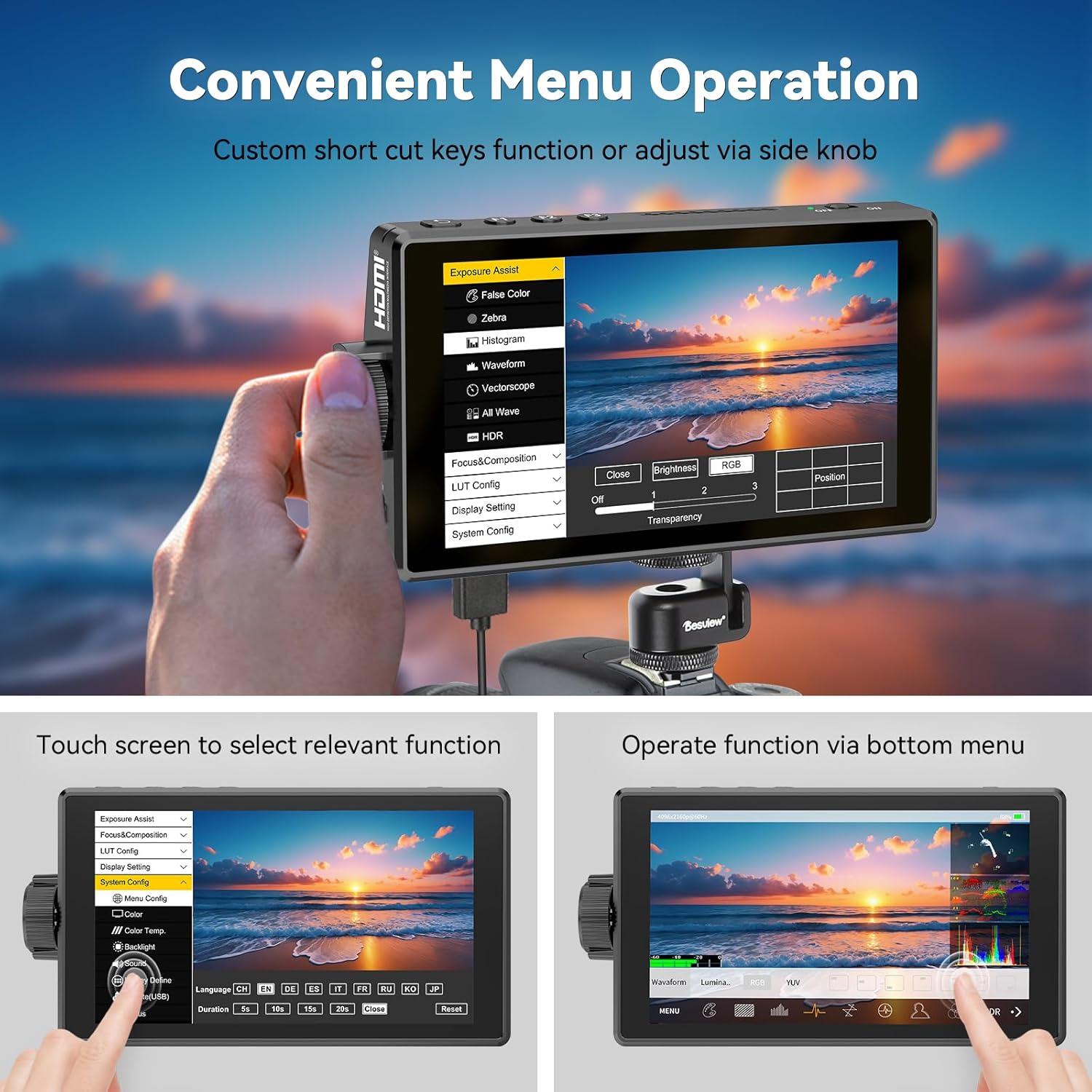
Advanced Monitoring Tools
The monitor includes a suite of professional tools to assist with accurate exposure and focus:
- HDR: High Dynamic Range support for improved contrast and color.
- וואַוועפאָרם: Visual representation of video signal luminance.
- היסטאָגראַם: Displays the tonal distribution of your image.
- פאָקוס פּיקינג: Highlights in-focus areas for precise manual focusing.
- פאַלש קאָליר: Helps in setting correct exposure levels.
- זעברע: Indicates overexposed areas.
- וועקטאָרסקאָפּע: Analyzes color saturation and hue.
- גריד שורות: Assists with composition.
- אַודיאָ מעטער: Monitors audio input levels.
- Safe Area & Mark Ratio: Ensures content is within broadcast-safe zones.

Custom 3D LUT Support
די דעסview A5 allows you to upload custom 3D LUTs (Look Up Tables) via the included U disk. This feature is invaluable for on-set color grading, enabling you to preview דיין פאָtage with desired color profiles for a cinematic look.

ווייַז סעטטינגס
Adjust various display settings to suit your needs, including aspect ratio, display flip, zoom, pixel-to-pixel mapping, HV delay, freeze frame, and anamorphic de-squeeze.
וישאַלט
To ensure the longevity and optimal performance of your Desview A5 monitor, follow these maintenance guidelines:
- רייניקונג: Use the provided dust cloth to gently wipe the screen and body of the monitor. Avoid using harsh chemicals or abrasive materials.
- סטאָרידזש: When not in use, store the monitor in its carry case to protect it from dust, scratches, and impacts.
- זונשייַן: Utilize the detachable sunshade to protect the screen from direct sunlight and reduce glare, especially during outdoor shoots.

טראָובלעשאָאָטינג
If you encounter any issues with your Desview A5 monitor, please refer to the following common troubleshooting steps:
- קיין סיגנאַל: Ensure all HDMI cables are securely connected to both the camera and the monitor. Verify that your camera's HDMI output is enabled and configured correctly.
- קיין מאַכט: Check the battery level or power connection. Ensure the power source is providing adequate voltage (e.g., fully charged NP-F battery, correct DC adapter).
- עקראַן פליקערינג/דיסטאָרשאַן: Try a different HDMI cable or adjust the resolution settings on your camera. Ensure the monitor's firmware is up to date.
- ריר סקרין ניט ריספּאַנדאַבאַל: Check if the touch-lock function is enabled. Disable it if necessary. Restart the monitor.
For persistent issues, please consult the detailed user manual or contact Desview קונה שטיצן.
ספּעסאַפאַקיישאַנז
| שטריך | באַשרייַבונג |
|---|---|
| סאָרט | דעסview |
| מאָדעל נומער | A5 |
| פאַרשטעלן גרייס | 5.5 אינטשעס |
| האַכלאָטע | FHD 1080p (1920x1080 Pixels) |
| ברייטנאַס | 600 candela_per_square_meter |
| קאַנטראַסט פאַרהעלטעניש | 1400:1 |
| Viewינג אַנגלע | 178 דיגריז |
| ווייַז טיפּ | IPS |
| HDMI אַרייַנשרייַב / רעזולטאַט | 4K/60Hz HDMI 2.0 |
| מאַכט אָפּציעס | Type-C, NP-F Series Batteries, DC 12V Input |
| נומער דימענשאַנז (ד רענטגענ וו רענטגענ ה) | 1"ד רענטגענ 5.7"וו רענטגענ 3.2"ה |
| וואָג | 340 גראַם (אומגעפער) |
| נאָך פֿעיִקייטן | Touchscreen, Side Knob Navigation, User-customizable shortcut keys, HDR, 3D LUT Support, Waveform, Histogram, Focus Peaking |
וואָראַנטי און שטיצן
די דעסview A5 Touch Screen Camera Field Monitor comes with a 1 יאָר וואָראַנטי. For technical support, warranty claims, or any product-related inquiries, please contact Desview customer service through their official webזייטל אדער דעם פארקויפער וואו דער פראדוקט איז געקויפט געווארן. ביטע באהאלטן אייער באווייז פון קויפן פאר גאראנטיע באשטעטיקונג.